fxDreema

    • Register
    • Login
    • Search
    • Back to the main page
    • Categories
    • Recent
    • Tags
    • Popular
    • Search
    1. Home
    2. CPBonzo
    3. Posts
    C
    • Profile
    • Following 0
    • Followers 0
    • Topics 0
    • Posts 77
    • Best 10
    • Controversial 0
    • Groups 0

    Posts made by CPBonzo

    • RE: Custom parameter to draw a line

      @trading-prana Once you have the variable created, it needs to be placed as a value in the Draw Line block. In this instance, you will need to set the block to draw a horizontal line and then the value below that relates to the price i.e. the height on the chart at which you want the line to be drawn. Change the setting in the first of the pull-down menus to "Value", the second to "Numeric" (it should default to that) and then where you see a current value of "1" right-click that box and a list of your constants and variables will be displayed. Pick the variable created to give (high+low)/3 and the line will be drawn at that level on the chart.

      Of course, the value (high+low)/3 is in most occasions going to be significantly below the current price so you may need to zoom way out on the chart to see it.
      posted in Questions & Answers
      C
      CPBonzo
    • RE: Once per trade doesnt work pls help

      @setsuna The "once per trade/order" block you have used should only be used when dealing with a loop of trades. Unless I misunderstand, what you need is a "once per bar" block between the condition and the sell pending block.

      posted in Questions & Answers
      C
      CPBonzo
    • RE: How can I use an indicator in my EA but prevent it from displaying?

      Your question is a little unclear. Do you mean when the indicator is being used by an EA? In which case it will not display unless you have put it on the chart. If you don't want to see an indicator the EA is using simply don't include it on the chart, although it must, of course, be listed in the Navigator tab.

      If you referring to an indicator you have put on the chart and which you want to be invisible, for whatever reason, simply open the properties for the indicator and in the colours tab, change everything to "none".

      posted in Questions & Answers
      C
      CPBonzo
    • RE: Possible sell or buy zones visualization by lines.

      @fxmich78 Two things occur to me. Firstly, if the line is to be placed at the same location as the arrow, you could simply use the settings used for the Price(1) placement of the arrow for the Price(1) placement of the line rather than referring to the arrow location directly. Secondly, are you sure the line isn't there? Under "Adjust" you have +20, I don't know what pair you are trading, but this could be a long way from the arrow. If you want twenty pips, you will need to write +20 pips.
      As to where to connect the Draw Line block, I would place it after the Draw Arrow because that is the order in which you expect it to run.

      posted in Questions & Answers
      C
      CPBonzo
    • RE: Possible sell or buy zones visualization by lines.

      @fxmich78 Arrow down is not the name of the object, it is the type of arrow. You will need to give it a name in the draw arrow block and to do this you will need to tchange the two conditions at the top of the block to No and Yes, that is no to the block creating a new object each bar (A) and yes to the object being redrawn (B).

      posted in Questions & Answers
      C
      CPBonzo
    • RE: keeping indicators inside the EA

      @josh01 No it isn't. Any indicators used by the EA need to be on theMT4 or MT5 platform.

      posted in Questions & Answers
      C
      CPBonzo
    • RE: Help!! MT4 personal Indicator Conversion to MT5

      @fbmengue As others have said this can't be done with fxDreema, but I would add that if you only have the .ex4 I don't think it can be done at all as I think you would have to have the .mq4 file and not the compiled file in order to convert it.

      posted in Questions & Answers
      C
      CPBonzo
    • RE: Help with MT4 Scalping limitations by brokers.

      Brokers have these rules for good reason and if you want to use hard stops that are closer than you can currently get you will probably need to find another broker. Alternatively, you could create the EA in such a way that it closes trades at 5 pips profit or 3 pips loss while placing the hard stops at a distance your broker will accept. The hard stops are written into the trade and are visible to the broker, but you can have the EA close a trade at any point for which you can write a condition. This latter approach means your hard stops are only ever hit if, for any reason, your EA ceases to work properly e.g. your MT4 platform crashes.

      posted in Questions & Answers
      C
      CPBonzo
    • RE: Alert Message with symbol name

      @civileng20102000 I assume you are using MT4? If so, click on the Experts tab on the bottom of the Terminal window and all alerts will be there, not just those created by the EA. If you right-click an alert in the Experts window and then click open and then double click on the file for the date you want, all the alerts for that date will open the alert list in notepad or your default editor for notes.

      posted in Questions & Answers
      C
      CPBonzo
    • RE: Custom parameter to draw a line

      @trading-prana Why not create a variable with the value of (high+low)/3 and then use that variable as the value for the line?

      posted in Questions & Answers
      C
      CPBonzo
    • RE: NO TRADE

      @josh01 There are a couple of things that occur to me. Firstly, in the example you shared the drawn lines have no name, so theconditions, which related to named lines don't relate to the lines drawn. Secondly, you have the condition placed after once per bar, which means the condition will only be checked at the beginning of the bar (usually) if the candle doesn't cross at that moment then the condition isn't met.
      I would suggest trying with the conditions conected after a "No Trade" block, that time the conditions block is running all the time there is no trade, or use the "Pass" block if you want it to run even if there are live trades. Then place the "Once per Bar" block between the condition and the Buy and Sell blocks, this will ensure than when the condition is met a trade is only plced once in that bar even if the candle crosses the line more than once in this time.

      posted in Questions & Answers
      C
      CPBonzo
    • RE: NO TRADE

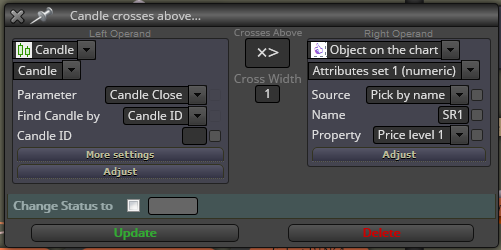
      @josh01 You will have your reason for wanting to use the Bid value on the left, but I use Candle such that the condition passes when the candle crosses a line. This example from a current project:

      0_1559770526991_16d1b31e-8700-4447-bf8f-5a7833a3f0f8-image.png

      posted in Questions & Answers
      C
      CPBonzo
    • RE: NO TRADE

      The first thing I notice is that in the condition block the left operand is the bid price, which seems ok, but the right operand is the name of the object. The bid value is always going to be a price and therefore will not cross a text attribute. I would start by changing the Attribute of the object to set 1 (numeric) and the Property to price level 1, which is the price at which the line is placed on the chart.

      posted in Questions & Answers
      C
      CPBonzo
    • RE: Total lots open on screen?

      @hadees Yes, you're right and that is much more straightforward than the approach I suggested. Thank you

      posted in Questions & Answers
      C
      CPBonzo
    • RE: EA wont buy, help!

      @luka21 if, as you say, buffer0 always shows a value the indicator appear block will not function as you want it to. This block is comparing one event with another, in the example you show it would only pass if at candle ID 4 buffer0 had no value and then at candle ID3 has a value. If it always has a value there is no point at which it appears as it is always present.

      As you say buffer1 has no value when you want the buy to occur (the green line is visible) why not try the ea using the indicator disappear block with buffer1 in place of the indicator appear block with buffer0?

      posted in Questions & Answers
      C
      CPBonzo
    • RE: Buttons for buy and sell(i searched every topic)

      @hasnifx. As @miro1360 has said, all the properties are in the draw button block. Simply open the block and colour, placement etc. are all values under the specific properties section.

      posted in Questions & Answers
      C
      CPBonzo
    • RE: Total lots open on screen?

      @brad-0 Yes, that is what it will do. In the loop the "Modify Variables" block will read the size of each order in turn and place that value in the variable, over-writing the previous entry from the previously checked order. Therefore, if each of your orders is 0.01 Lots, that is the value of the Lots variable at any time there is a live trade.

      The problem you present is not as easy to solve as it seems, but I suggest it could be done by using the "For each trade" block followed by a "Once per Trade/Order" block and then the formula block which would need to take the volume of each trade in turn - set up the left operand as pulling the value of the "Lots" variable, which will be zero initially and add to it the right operand to get the lot size of each trade (as @l-andorrĂ  set up the modify variables above). As the loop runs through each trade the volume of each will be added to the variable and the comment will display this.

      However, there are problems with this approach, as you will need to consider how, after each trade is closed, its volume is removed from the variable. Not impossible, but not straightforward.

      The difficulty is not an issue with fxDreema, but with MQL4 itself and even if one were to write a script in MQL4 directly you would need to create a loop to add the volumes of each trade individually as each is a seperate entity and, unlike say the Equity figure, MT4 does record the sum of the volume of all trades as a single value.

      I would be delighted to be proved wrong on the above, but I think it is a more challenging problem than it first appears.

      posted in Questions & Answers
      C
      CPBonzo
    • RE: Close all open trade with the first TP

      @eliecerjesus why not simply give all the orders the same TP, if they are all in the same direction as the first trade?

      If for some reason you do not want to do that then I suggest using blocks under the Loop for Trades and Orders heading. For example you could use the "For each closed trade" block set to only look at the most recently closed trade and then the "check how it was closed" block set to by TP and use that to trigger a block to close all open trades. However, I can't see why you don't simply set all the orders to have the same TP.

      posted in Questions & Answers
      C
      CPBonzo
    • RE: Buttons for buy and sell(i searched every topic)

      All of these properties are controlled under the Specific Properties tab of the Draw Button block.

      posted in Questions & Answers
      C
      CPBonzo
    • RE: The "No trade" function

      I'm not really sure I understand the question at MT4/MT5 only allow one EA to run at any one time on a single chart.

      If you mean will the EA affect the EAs running on other charts, then, no, as long at they aren't for the same currency pair etc. then a trade on one will not prevent another one from taking a trade.

      posted in Questions & Answers
      C
      CPBonzo
    • 1
    • 2
    • 3
    • 4
    • 3 / 4