fxDreema

    • Register
    • Login
    • Search
    • Back to the main page
    • Categories
    • Recent
    • Tags
    • Popular
    • Search
    1. Home
    2. CPBonzo
    3. Posts
    C
    • Profile
    • Following 0
    • Followers 0
    • Topics 0
    • Posts 77
    • Best 10
    • Controversial 0
    • Groups 0

    Posts made by CPBonzo

    • RE: staying inthe trade until new condition

      Have you looked at the examples in the Tutorials section of this Forum? One of @miro1360 excellent examples of how to use fxDreema explains how to do an EMA crossover and I suggest that as a good place to start.

      If you have done so and it still doesn't work, share your EA with us on here so those on the Forum can see what you have doen so far and then I have no doubt one of us will be able to provide some feedback.

      posted in Questions & Answers
      C
      CPBonzo
    • RE: Momentum of the Momentum

      What you are trying to do is create an indicator and fxDreema is not designed to do that - scripts and ea, yes, but not indicators. You will need to code, or have coded, a custom indicator and then upload it to fxDreema.

      posted in Questions & Answers
      C
      CPBonzo
    • RE: How to Make EA trade Engulfing candle

      The Pass block does nothing except trigger the next block to execute and if you connected the chain of blocks to the No Trade block, for example, you would not need the Pass block at all.
      To answer your question, you would need to place any additional condition block after the Pass block. As to where, it depends in what order you need things to happen and how often conditions should be checked or action taken. As I suggested, it is good idea to write on a piece of paper the logic of the EA you are designing so you can see the order and then structure the fxDreema blocks to do this. If, for example, you want the conditon in your block 2 to occur before an engulfing bar then place it before the other conditions. Where you place it in relation to the Once Per Bar block depends on how you want the EA to function. Without that block the condition will be checked every tick and passed once the conditions are met therefore activating the next block. The Once Per Bar block in this set up means that the following conditions will only be checked once per bar (as it says) and this is usually at the start of the bar regardless of how many ticks there are. If the conditions are met later in the bar the conditions will not pass until the next bar, assuming the conditions remain the same.
      If you remove the once per bar block and, for example, connect your block 2 above the condition blocks 5 and 6 the EA will check for your condition every tick and once passed will check for an engulfing candle as long as your condition is met and every tick all the conditions ar emet it will send an alert and draw an arrow. If you place the Once per bar block betwen the last condition and the alert and arrow blocks these events will only occur once per bar however many times the conditions pass per bar.

      posted in Questions & Answers
      C
      CPBonzo
    • RE: How do you use a MA of an indicator

      You can't do that with fxDreema directly as far as I am aware. You will need to create, or find, an indicator that is the OBV with a MA and upload that into "my indicators" then you will have the two output buffers you will need for fxDreema to use this set up.

      posted in Questions & Answers
      C
      CPBonzo
    • RE: Trades dont close

      I would start by ensuring you have a blue "if positions" block above the conditions to close the trades, so the conditions block knows when to run. It would have more or less the same effect if you were to connect them to the yellow output on the existing "no position" block, but with a simple EA like this I would use an additional "if position" block and join them to the positive output of that.

      posted in Questions & Answers
      C
      CPBonzo
    • RE: Trades dont close

      Without seeing the EA you have created, it is impossible to identify the cause of the issue. If you create a shared copy of the project and put it up here it will be visible to the Forum and I am sure somebody will be able to assist.

      posted in Questions & Answers
      C
      CPBonzo
    • RE: Easy candle size

      It is difficult to comment without knowing what you tried and how it failed. If you create a shared project and post it here then the Forum can take a look and I'm sure somebody will be able to provide some feedback.

      posted in Questions & Answers
      C
      CPBonzo
    • RE: This Block does not work.....???

      The issue is not with the block in fxDreema. The indicator appear block serves no purpose with the Market Facilitation Index as the only output buffer in MT4 is the index number itself (MFI = (previous high -previous low)/volume). If you open the data window in MT4 you will see there is only one value output for this indicator and it is always present so the indicator does not appear or disappear.

      The bars on the MFI are painted different colours by comparing the MFI values with the previous value and volume with the previous bars volume. For example, a green bar is painted when the MFI value is increasing and volume is increasing. In fxDreema this could be established using two "condition" blocks, one where MFI value for candle 1 is higher than MFI value for candle two and the next doing the same for volume. Similarly the logic for the other three colours could be set out with two condition blocks.

      posted in Bug Reports
      C
      CPBonzo
    • RE: How to Make EA trade Engulfing candle

      @surachefx is correct, you need to specify more of the parameters of the engulfing pattern. In your post the conditions will pass if the body of candle 1 is greater in size than the body of candle 2, but this is only one of the characteristics of an engulfing pattern for Bearish Engulfing and there could be circumstances where these conditions are true but there is no engulfing pattern.
      When creating an EA that trades candle patterns (or any EA for that matter) I find it useful to write down all of the characteristics of the pattern, in a similar way as @surachefx has done above and then identify how fxDreena logic can be used to describe these characteristics. This software is powerful and extensive so there will almost always be more than one way to write an EA to perform a particular task. Running the EA in strategy tester or a demo account and watching it will almost certainly reveal things missed e.g. it picks up too many signals because we haven't specified the minimum size of the candles for the engulfing pattern to be valid.
      There is a lot of infomation on this Forum and a quick search on candle patterns will reveal a wealth of information others have already shared.

      posted in Questions & Answers
      C
      CPBonzo
    • RE: How do I import an indicator like Aroon to the indicator list?

      If you search the Forum for references to "Custom Indicators" you get lots of information to help you with this.

      To start, you can up load your custom indicator via the "My Indicators" tab on the top left of the main builder screen.

      posted in Questions & Answers
      C
      CPBonzo
    • RE: function not defined

      I assume this is with MT4?

      If so, the most likely cause is you are not running the latest build of MT4. The latest build is, I think, 1170 (20 Dec 2018). If you have an earlier build I advise updating/downloading the latest version.

      If for any reason you wish to keep the MT4 build you have replacing 'TesterHideIndicators' with 'HideTestIndicators' should work, but you will need to do this in the code after every time you compile an fxDreema file. Updating MT4 is by far the better approach.

      I hope that helps.

      posted in General Discussions
      C
      CPBonzo
    • RE: Help with Indicator that has Green Arrows

      It appears both sides of your condition block have the same settings and refer to the same buffer. As the outputs of both sides must therefore be the same there can be no cross-over, so the block will never give a positive output.

      posted in General Discussions
      C
      CPBonzo
    • RE: how can we solve that fault

      The first blocks you have used before the conditions blocks are "no trade". As it says, this block will only pass if there is no trades, so if there are trades nothing below this block will run, including the "close trades" block.

      posted in Questions & Answers
      C
      CPBonzo
    • RE: Tester hide indicator

      Hi

      The most likely cause is you are running an older build of MT4. The latest build is 1170 (20 Dec 2018) - click Help and then About to check the build number.

      If you close and reopen your MT4 platform it should update automatically. If it does not, it is possible your broker does not offer the latest build (they really should do so) in which case you can seek an update from MetaQuotes by going to the Accounts tab and setting up a demo account with MetaQuotes. Once you open this your platform should update automatically, although a restart of the platform will be necessary.

      I hope that helps.

      A temporary solution that may get you round you specific issue (although you will have to do this every time you upload an EA) is to modify it within the MT4 editor by finding any reference to TesterHideIndicator and change this to HideTestIndicator which is what previous builds used.
      posted in Bug Reports
      C
      CPBonzo
    • RE: how to work with the buttons

      When you create the button ensure that under the "adjust" settings the it is set to not pressed. Then under "on tick" or "on chart" depending on the function you want to control, put the select button and check button state blocks. From the orange connector run whatever function you want to happen when the button is pushed. This will continue to run as the button remains pressed - unless - after the functions you add a "Custom MQL4 code" and insert the following:

      ObjectSet(LoadedObjectName(),OBJPROP_STATE,0);

      This will reset the button to off (i.e. 0, when on is 1). You could also use the block to change the button colour when pressed by changing the properties etc.

      I hope that helps.

      Regards

      Colin

      posted in Questions & Answers
      C
      CPBonzo
    • RE: Counting Candle Back over a number of candles

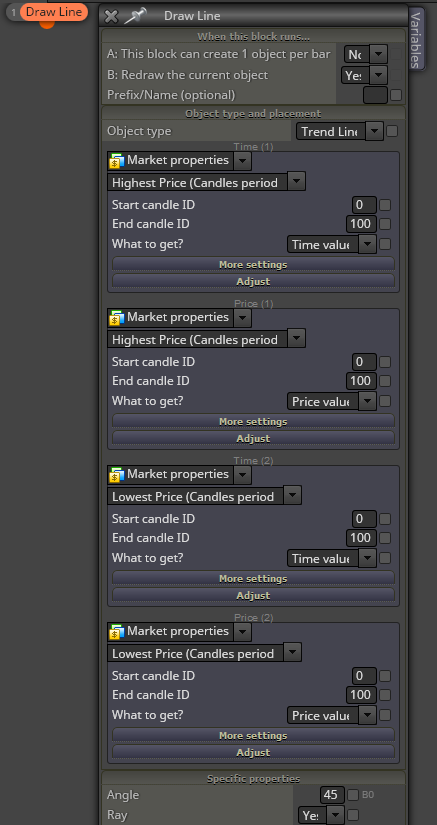
      All of this is contained within the Draw Line block. All you need to do is set it to draw a trend line and then for the first time and price period use market properties of highest price for a candle period and for the second time and price periods use market properties of lowest price for a candle period. Something like this:

      0_1513684903547_c29d9bc6-89a2-4ccd-bb1d-bf4ba492def5-image.png

      posted in Questions & Answers
      C
      CPBonzo
    • RE: UPDATE time, write here if you have problems!

      @fxDreema I have the same problem. The EA compiles (or at least says it is doing so), but no "save as" dialogue appears so I can't save it as either an .mq4 or an .exe file.

      posted in Questions & Answers
      C
      CPBonzo
    • 1
    • 2
    • 3
    • 4
    • 4 / 4