https://fxdreema.com/shared/ux0Lp1N7d it's simple and no changes are made to Risk, SL or TP.
D
Posts made by doeveR
-
RE: Question on Money Management Buy/Sellposted in Questions & Answers
-
Question on Money Management Buy/Sellposted in Questions & Answers
Hello, I have seen something I can not explain. In my EA I defined parameter Risk, SL and TP. Risk was entered 0.0567, SL was 0.2 and TP 100.0. In a Buy or Sell block I use Risk % of balance - so 0.0567 (No upperlimit set), Stop-Loss mode is % of price - so 0.2 and Take-profit mode is % from Stop-loss.
During my backtests with a 100K account the profit/loss money amounts are all around 500/600 (+/-) which was what I expected. But someone else got Trade losses of 5000-6000(+/-). I am confused. 100000*0.0567 is indeed 5/6K but in my backtest I got position values that were much smaller. So what is the position value on a 100K account with the values in my example: Risk 0.0567, SL 0.2 en TP 100. How can it be different ? -
RE: Library Studioposted in Questions & Answers
@jstap said in Library Studio:
how is your global variable set? If it's not it can't return true.
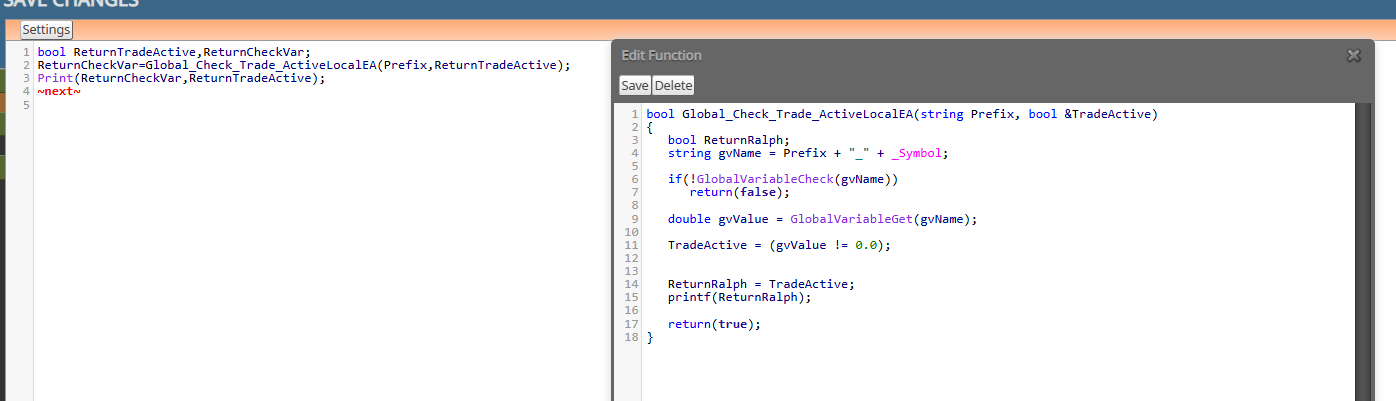
My global variable is set by another EA - that one is set , so TradeActive is set to true. My Print(ReturnCheckVar,ReturnTradeActive) shows true,true in my Experts tab. Also my printf(ReturnRalph) shows true. Therefore I don't understand why ReturnRalph in my EA does not have the value true.
-
RE: Library Studioposted in Questions & Answers
It's set to the value of TradeActive (see the code in the Function Global_Check_Trade_ActviveLocalEA)
-
RE: Library Studioposted in Questions & Answers
I think I am missing the point of your question (due to lack of knowledge). In the EA I have the variable ReturnRalph as boolean defined. I defined ReturnRalph as boolean in the Custom Fucntion GlobalCheck_Trade_ActiveLocalEA as shown on the screenshot. What is missing that allows a proper return ?
-
RE: Library Studioposted in Questions & Answers
Unfortunately the variable set in my function is not passed on to my EA:
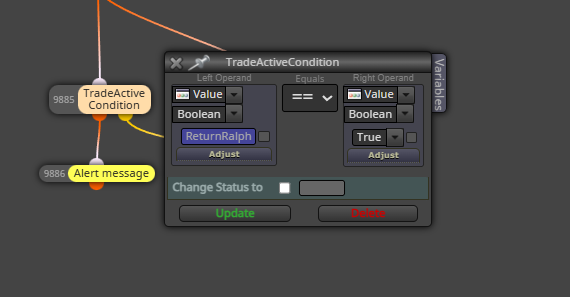
My printf in the function below says TRUE. The check in my EA gives false for variable ReturnRalph
-
RE: Library Studioposted in Questions & Answers
Ah you use a Custom Function named CalculatedLotSize where you pass the value of slPoints to a variable named calculatedLot - which is then available in your EA. Correct ?
-
RE: Library Studioposted in Questions & Answers
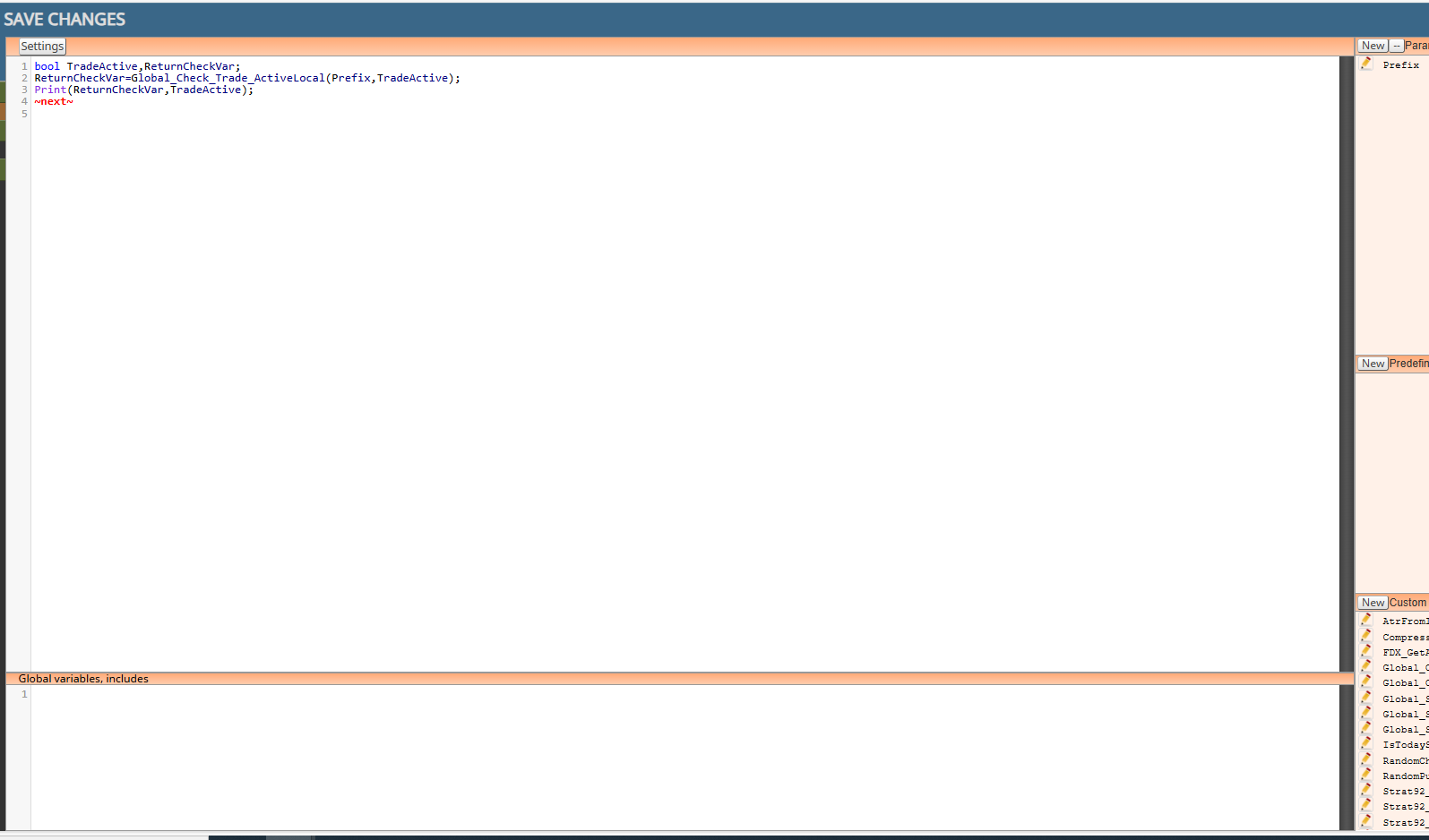
This is how I used in in Sudio and then called it (see previous screenshot)
-
RE: Library Studioposted in Questions & Answers
Ok, so apparently that should work although it does not seem to work for me. In your example, you show calculatedLot as a double in your FDX EA, right ? I don't see this exact value in your previous screenshot but I gather thery are named EXACTLY the same ?
-
RE: Library Studioposted in Questions & Answers
OK, I understand that you send variable values from your Custom function to the Custom Block (code in Area A). I meant sending variable values to the EA in FXDreema where you used a Custom Block.
-
RE: Library Studioposted in Questions & Answers
I have the following variables defined in my EA
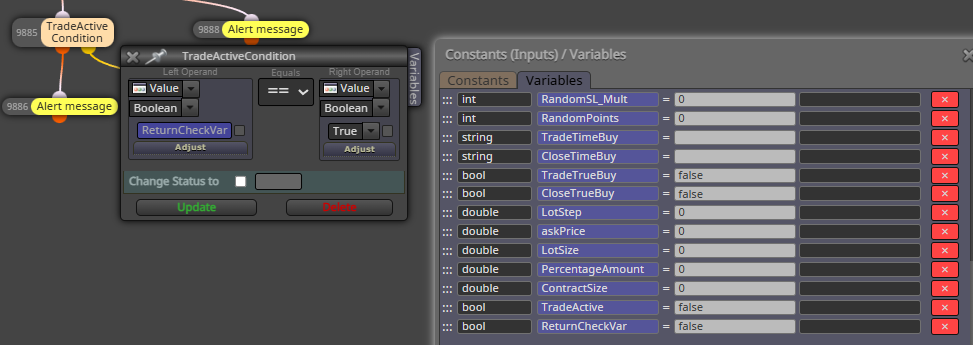
I Check ReturnCheckVar in my EA but I always get back false (I think it remains unchanged)
In studio I have this code: - ReturnCheckVar is defined as you describe. In the expert tab I see the print: true true
So it does not seem to work.
bool TradeActive,ReturnCheckVar;
ReturnCheckVar=Global_Check_Trade_ActiveLocal(Prefix,TradeActive);
Print(ReturnCheckVar,TradeActive);
~next~ -
RE: Tutorial - Create Custom Blocks with "FXDreema Studio"posted in Tutorials by Users
This is my code in Settings (Area A):
bool TradeActive,ReturnCheckVar;
ReturnCheckVar=Global_Check_Trade_ActiveLocal(Prefix,TradeActive);
Print(ReturnCheckVar,TradeActive);
~next~
ReturnCheckVar is defined in my EA as a bool variable. In my Experts Tab I see from the Print, True True. However in my EA the check on TRUE for boolean ReturnCheckVar is not true. -
RE: Tutorial - Create Custom Blocks with "FXDreema Studio"posted in Tutorials by Users
So in Visual studio I define a varable A (in the area Global Variables, includes or in the area where my logic is as a local variable ?) and in my EA I also create a variable and the value that is assigned in the logic in studio, in my custom block is the readeable in my EA in variable A ?
-
RE: Tutorial - Create Custom Blocks with "FXDreema Studio"posted in Tutorials by Users
I don't understand how you can return a value from within the custom block - back to the calling FXD EA.....So if I define for example 2 input parameters into the Custom Block. I do a calculation for which I would need to write Custom code/function and based on that I want to return two values I can use in my EA ; I can't figure out how to do this. That is the purpose of a block in general, right; do something, compare etc. and then return a value that you can use in your logic.
-
RE: Library Studioposted in Questions & Answers
I don't understand how you can return a value from within the custom block - back to the calling FXD EA.....
-
RE: Library Studioposted in Questions & Answers
Ok, I get that - from within the custom block you can access variables than you defined in 'regular' FxDreema. So that should be able. I am thinking about the normal block for example Modify Variable where one of the parameters in the variable that you want to receive (from within the block) the value of for example MA period 14. So writing FROM a custom block to a variable in your FXD EA.
-
RE: Library Studioposted in Questions & Answers
How do I "Return" values (into which variables) to FXdreema where you are using the custom blocks ? Do you use parameters defined in Parameters used in Block to return results ?
-
RE: How to get line/MA slopeposted in Tutorials by Users
@jstap What would be valid values for the LINE_ANGLE parameter ? I tried it and the SLOPE_RESULT seems to be a very small value.
Should I just use a multiplier in order to let LINE_ANGLE parameter a value between 0-90 (to represent a genuine angle value)? -
RE: How to get line/MA slopeposted in Tutorials by Users
Did this work? I tried the name SkyLightBlue as used in the Draw line but this does not trigger the Sell (as far as I can see). What values did you use for ANGLE_RANGE and LINE_ANGLE ?
-
RE: Want to create a custom indocator based on fxdreema EA logicposted in Questions & Answers
I am familiar with that but I mean creating something that can be imported in fxdreema under MyIndicators - I load a .MQ5 there and functionality appears as a custom indicator rather than a custom block.