I have some 'generic' EA code that I want to be available for use as a Custom indicator. Can this be done using FXdreema ? Perhaps using fxdreema Studio ? Any documentation or examples available ?
D
Posts made by doeveR
-
Want to create a custom indocator based on fxdreema EA logicposted in Questions & Answers
-
RE: Risk % (Percent) on equity doesn't work properly - Opens lots higher than it should beposted in Questions & Answers
Can you show if the journal sheds any light on what is going on ?
-
RE: how to say if we have more than two sl don't tradeposted in Questions & Answers
That seems possible. Loop through your Closed positions and check for each loss-trade how long ago it was closed (use block check age). With this you should be able to achieve what you describe.
-
RE: how to say if we have more than two sl don't tradeposted in Questions & Answers
There is a block called For Each Closed Position, combined with Check Loss Block might be a starting point. You will have to define what you mean buh "have more than 2 SL"; 2 SL in a row ? 2 SL of the last 10 trades etc.
-
RE: Orhpaned constants when running EAposted in Questions & Answers
Yes....that is exactly what I mean. I am asking because I have seen EA where the magic number came first. I wonder how "they" did it.....
-
RE: Orhpaned constants when running EAposted in Questions & Answers
Hi @jstap, I meant the order of appearance in the list of parameters. It is now the last after all my defined constants (input parameters). Can I make it to appear as first parameter ?
-
RE: Orhpaned constants when running EAposted in Questions & Answers
One more question - not directly related to the original question. Is there a way to move the magic number as parameter up as the first input variable rather than the last ?
-
RE: Orhpaned constants when running EAposted in Questions & Answers
Ah @jstap you said it - agreed: I just did not know what it meant when I read it. Well, I know you are very "on it" - I can tell from all the posts that I read so now and then so Thanks again !
-
RE: Orhpaned constants when running EAposted in Questions & Answers
Yes, compilation was fine for me to. @l-andorrà pointed me in the right direction. On the Timefilter box there was an option that I examined without using it but apparently I ticked a box next to an option which resulted in a global variable being created. After using the numbers in the variable names I corrected the 'issue' (box being ticked) and the variables were gone !!
Thanks everybody who took the time to trigger my brains.... -
RE: Orhpaned constants when running EAposted in Questions & Answers
@l-andorrà So there must be boxes where there are "ticks" that I don't realize. I never used that option since I never asked myself what it did. WIll have to search all my "boxes" them ?
-
RE: Orhpaned constants when running EAposted in Questions & Answers
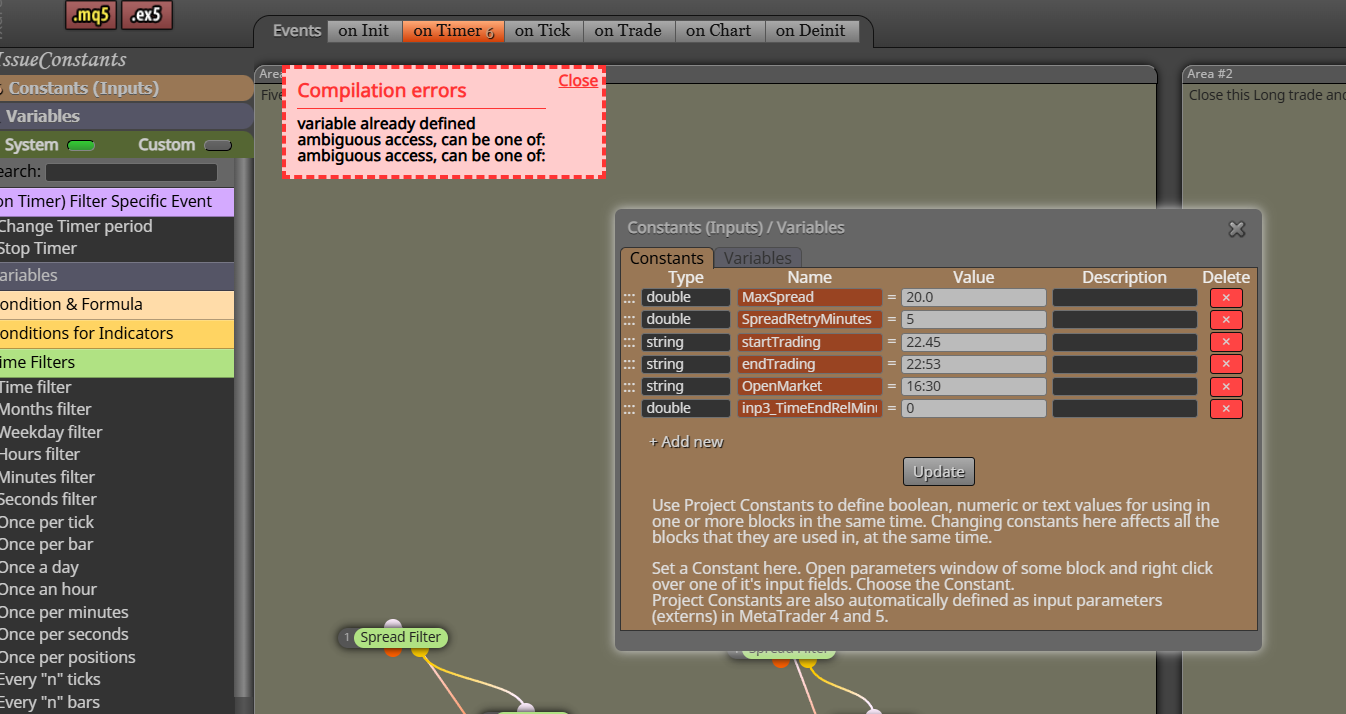
Tried something "smart": so here it shows I can not use the name anymore even though the constant / variable is not defined through the FXD builder..... -
RE: Orhpaned constants when running EAposted in Questions & Answers
https://fxdreema.com/shared/ccFu9xFC
I stripped down my project (since it is very large) and in here you see inp3_TimeEndRelMinutes - It is nowhere defined so I can't get rid of it. I did a normalize IDs a couple of times to get rid of obsolete constants but it left me with a perfect example. @jstap
-
RE: Orhpaned constants when running EAposted in Questions & Answers
The ones with names starting with "inp" are definitely not defined-as-such or used by me. I know that I used a couple of constants/parameters and variables that I removed from my variable /constant list and one can only remove them if they are nog actively used anywhere. But apparently these are some garbage entries that I can not get rid of. Any idea how I can get rid of this ?
Using the Meta Editor I can find these and they are Global Variables. I have no idea how they got defined as such. In Fxdreema builder, I can no where access them.
//--
// Externs (Global Variables)
input string inp21_TimeEndMode = "text";
input double inp711_TimeEndRelMinutes = 0.0;
input double inp1574_TimeEndRelMinutes = 0.0;
input double inp3299_TimeEndRelMinutes = 0.0;
class _externs
{
public:
static string inp21_TimeEndMode;
static double inp711_TimeEndRelMinutes;
static double inp1574_TimeEndRelMinutes;
static double inp3299_TimeEndRelMinutes;
};
string _externs::inp21_TimeEndMode;
double _externs::inp711_TimeEndRelMinutes;
double _externs::inp1574_TimeEndRelMinutes;
double _externs::inp3299_TimeEndRelMinutes; -
RE: on timer of on tick chartposted in Questions & Answers
I am using (my blocks are )on the timer tab and still the lack of tickdata as described results in the timer not passing on the true/Orange side on the time specified.
-
RE: on timer of on tick chartposted in Questions & Answers
Thanks @jstap
My observation is that if there is no tickdata for a certain date, for example on Thanksgiving, my EA running a backtest is not passing the Block Timefilter at the Orange/true output that is for example set to pass between 21:00 and 22:00 at all on that particular date (in that timeframe). I wondered if that is a backtest related issue/behaviour and that I might expect it to run correctly on a live feed. -
Orhpaned constants when running EAposted in Questions & Answers
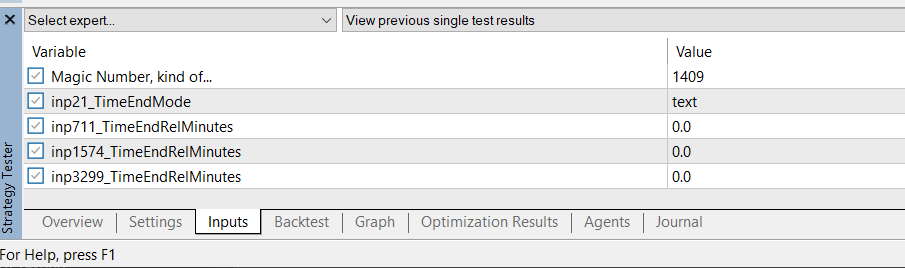
I see some input variables that are definitely not part of my EA project. I do remember removing constants that I no longer used and I am not sure why they appear here and don't know how to remove them. Anyone ?
-
RE: on timer of on tick chartposted in Questions & Answers
Who/how can I contact the admin directly ? @fxDreema ?
-
RE: on timer of on tick chartposted in Questions & Answers
I wonder if this is a typical Backtest issue; in other words will this also happen if I run the EA live ?
-
RE: on timer of on tick chartposted in Questions & Answers
Is this claim still true (see FxDreema reply (above) from 18 May 2019 15:37): " because the Timer event there is a little bit fake."
I recently ran against the issue that my EA (during backtest) did not react on a On Timer event (On Time block), let's say at 22:00. When I investigated this I saw that on that particular day, time there was no Tick data (where on other days there was every day data from 16:30 till 22:59 but on this day only till 19:58). When I changed my timer block to run at 19:58 (last occurance of tick data) the timer responded as expected.
My EA blocks were all located on the On Timer Tab.
Can someone explain this ?