@jstap Thanks and since it works according to your instructions..
I have another question.
I'd like to put the profit in percentage, which I did. However, I'm wondering how to minimize the number of decimal?

@jstap Thanks and since it works according to your instructions..
I have another question.
I'd like to put the profit in percentage, which I did. However, I'm wondering how to minimize the number of decimal?
@fxdreema
I agree with most of all here. The platform really good especially for people like me with minimal programming skills.. I joined not so long ago and it did help me. I found the forum is also really great with some people who always helpful in the forum with all the questions I had..
I also agree that it'd be great to have function to create indicator...:)
Thanks a lot to you and also to people who are being helpful in the forum..( @jstap and @l-andorrà )
@jstap Thanks a lot!!
I tried it on my demo account and I still found errors..
@fxdreema Ok Thanks for the hints!
I changed some blocks which MT5 has their own variant names (eg. no position). However other blocks,which have same variant names, I didn't change it, for instance the condition blocks.
I backtested it, it works however it indeed true that MT5 (netting) took different trades than in MT4. (I backtested it with the exact same settings for MT4)
@fxdreema Thanks for the reply.
Actually I'd like to update it whenever it changes (for instance, the number of trades/lot) . So I think INIT would not be ideal?
Hello,
I am trying to build EA where it also displays the number of lots, number of trades, current profit and current drawdown.
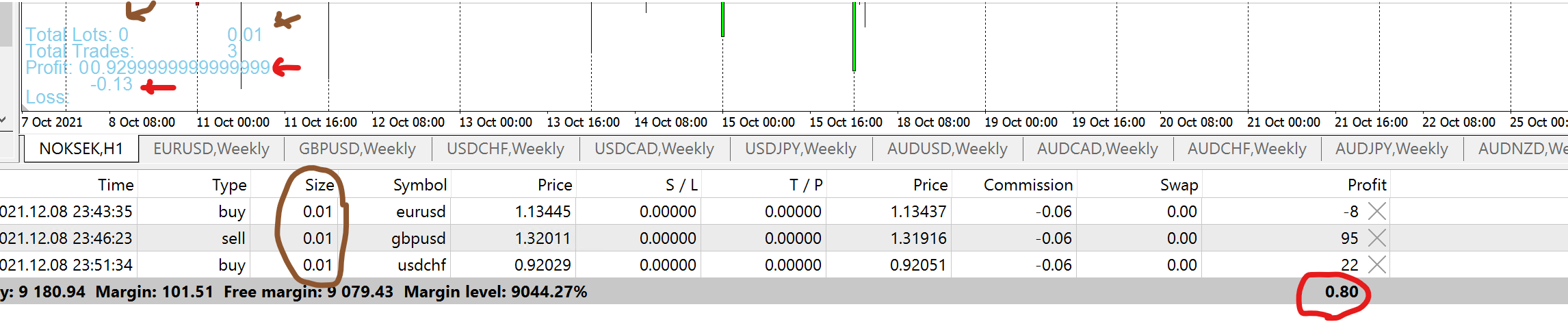
However, it didnt quite work yet, as it displays wrong data as screenshot below where I tried to use it on my demo account.
for instance, the number of lots is not correct and the profit is also wrong.
Could anyone help?

Here is the project: https://fxdreema.com/shared/0z3fYx9Cd
Thank you!
Hello all,
I am trying to build where I want to display current total number of trades, drawdown from account etc.
Is it better to do it on INIT or where.
I saw this and it suggest to do it on INIT and onTrade? Re: on Init and on Trade too
What did you mean by using "run blocks" here? @fxDreema
@l-andorrà Thanks!
just curious, is there any list available which blocks from MT4 and MT5 have different names?
I saw that some blocks under "Check trades and count" in MT4 are different in MT5 on "check position and count"
I think that mostly the differences, right?
Hi guys,
I'd like to build an easy indicator to sync the symbol and time, as below:
case 1. if I have multiple charts and if I set this indicator for sync symbol, then all the charts will be synced with one symbol where I set the indicator on.
case 2. if I have multiple charts, and if I set this indicator for sync time, then all the charts will be synced with one time where I set the indicator on.
Anyone know how to build it? or direct me which function/block to use..
Thanks in advance!
Hello good people,
I am trying to convert MT4 to MT5. As far as I read, the blocks has different names, so I need to change and adjust it.
Is there anything else that I need to consider to do it when it comes to convert MT4 to MT5?
for example: is the variables or constants need to be changed as well?
Thanks in advance for the hints and helps!
@jstap That's what I thought..
I put the comment. however when it runs, the comment only show the "Comment Message" even though I put the "Total Lot" variable as a text..
@jstap Ok. Thanks!
I did the backtest and actual test on my demo, however somehow it did not take any trades...Any idea why?
@jstap
I found out, you can also use directly the condition block with bucket of trades.. (without using modify variables)
is this possible or using modify variables would be the best option?

@jstap Ok. Thank you!
I will try it and see how the color plays in the EA..:)
@jstap Thanks a lot!!
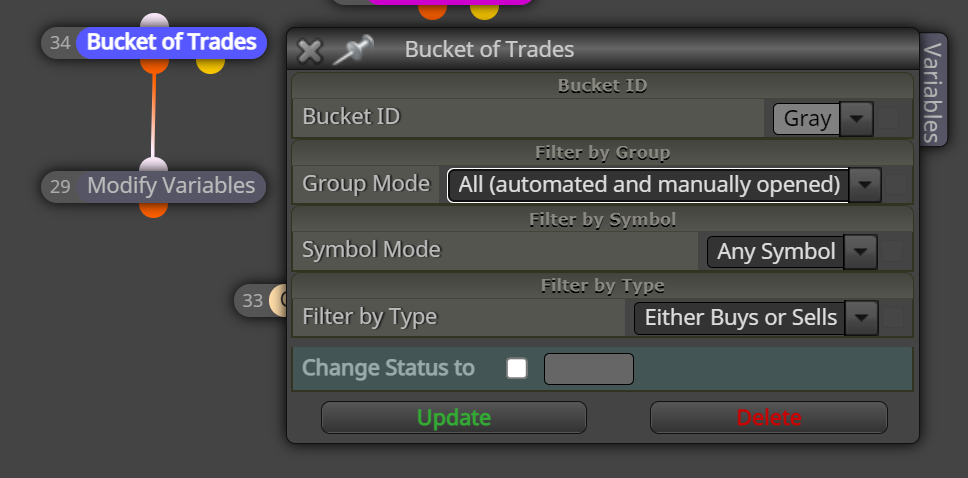
And for the Bucket of trades should be like this?
How the color (gray, magenta, etc.) play the role in this case?
Hello all,
Is there any function where I can create check lot size to open trade. It should be similar like "check trades count" block.
So, for example. max. lot size is set to 1.0 Lot. This means, no trades should be opened if the total lot size for all opened trades already 1.0 Lot.
Thank you in advance for any hints!
@jstap Thanks a lot! good hint. so I will just put it into constant and change it in EA if it comes to JPY.
Do you know how to minimize the decimal?
@l-andorrà Thanks a lot!
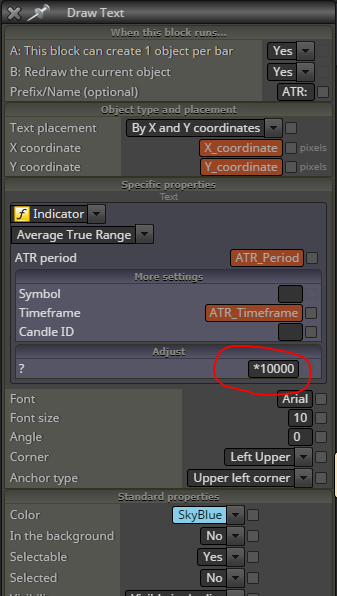
Do you know how to minimize decimal of ATR?

I'm using the *10000 to adjust the ATR value, however, do you know how to do the adjustment when it comes to the currencies using JPY (5 points )