fxDreema

    • Register
    • Login
    • Search
    • Back to the main page
    • Categories
    • Recent
    • Tags
    • Popular
    • Search
    1. Home
    2. drankman
    3. Posts
    D
    • Profile
    • Following 3
    • Followers 0
    • Topics 43
    • Posts 155
    • Best 2
    • Controversial 1
    • Groups 0

    Posts made by drankman

    • RE: Breakeven function

      @jstap Thanks for responding.
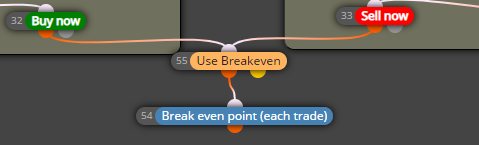
      So if I dont use pass, I can connect the use breakeven directly to buy and sell now like picture below?
      Because I used this before, but somehow it didn't work.
      0_1635333694692_cc66702c-08c0-402c-876a-a0aa745461c1-image.png

      posted in Questions & Answers
      D
      drankman
    • RE: Breakeven function

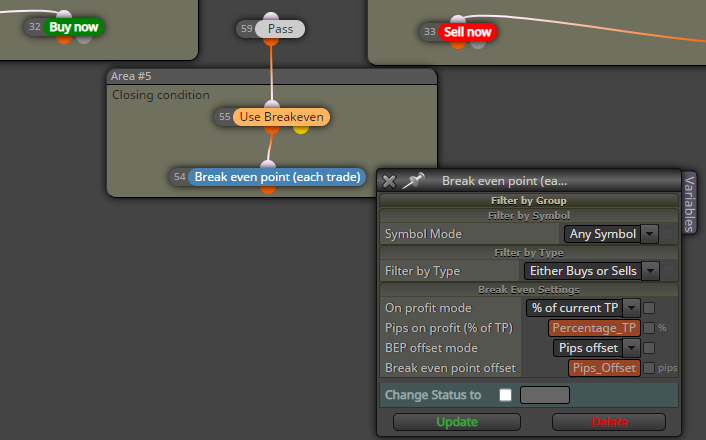
      so after reading some Q&As, would this also possible?
      0_1635327925693_a98d65e3-596a-4694-9701-b9903d755e45-image.png

      posted in Questions & Answers
      D
      drankman
    • Breakeven function

      Good morning,

      I set my breakeven function and it didnt work. I found a Q&A regarding this.
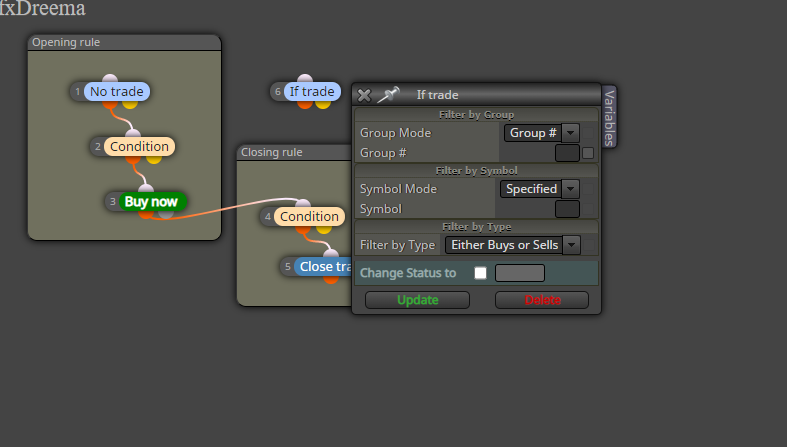
      As in the picture below, block 6 and block 4 need to be connected.

      1. but I am still wondering, how do I define the group#?
      2. and for sell condition, does it also need a separate "if trade" or not?

      https://fxdreema.com/demo/mt4-wrong-closing-rule
      0_1635326506157_d6c783ba-d3ee-44bc-a643-584354b5afbf-image.png

      Thank you!

      posted in Questions & Answers
      D
      drankman
    • RE: Price range from MA as a signal

      @jstap Ok. Thank you!
      I'll try your suggestion. πŸ™‚

      posted in Questions & Answers
      D
      drankman
    • Price range from MA as a signal

      Hello good people πŸ™‚

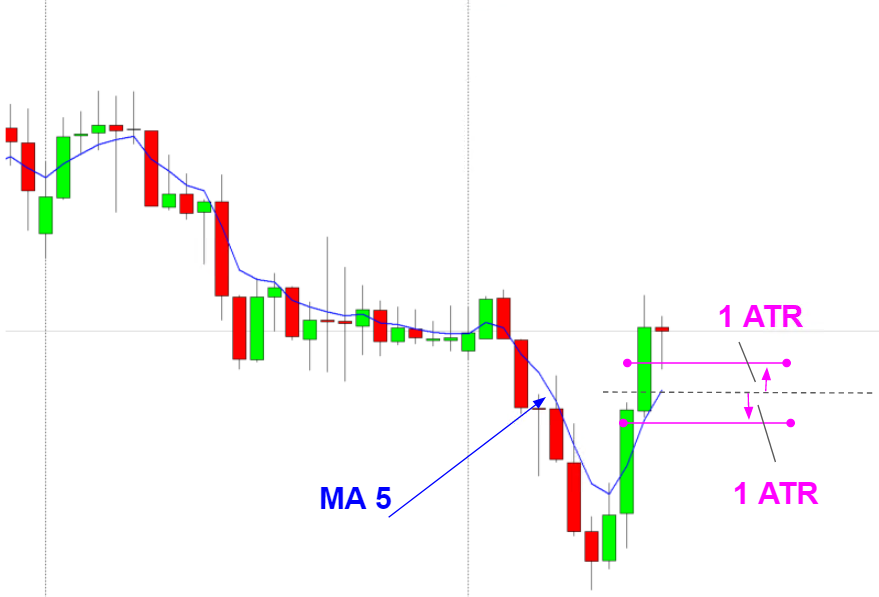
      I was trying to build EA, where EA runs where the price has been to this price range or in this price range as screenshot below.
      with two conditions:

      1. if the price has gone to the defined price range, then EA can start or
      2. if the price is located within the defined price range, then EA also can start

      And for example the price range is defined by the ATR. In the example below, is 1 ATR above and 1 ATR below from the Moving Average
      0_1635237982208_761e9eaf-c1de-4cc5-b051-d8ac3e370a35-image.png

      Thank you for the helps!

      posted in Questions & Answers
      D
      drankman
    • RE: RSI signal

      @jstap Ok. Thank you for the help as usual! πŸ™‚

      posted in Questions & Answers
      D
      drankman
    • RE: RSI signal

      @jstap Thanks!!

      is this what I did wrong? I put the "==true", where your setting did not put "==true" in the RSI condition.
      This is mine:
      0_1634941446770_586b0a59-8e27-4281-91d1-48a141d40b7a-image.png

      and this is yours:
      0_1634941638627_1e6e429f-5455-4ca3-ac06-7ac71f19f9d3-image.png

      to your question:
      Number 3 is where the trade is opened on my demo account. If you see above, the trade is opened where MACD and signal crossed BUT no RSI trigger.

      Number 1&2 are where I am expecting to do, RSI trigger first and the MACD and signal crosses

      posted in Questions & Answers
      D
      drankman
    • RE: RSI signal

      @l-andorrΓ  @jstap

      I was using your suggestion regarding the RSI trigger as mentioned above.
      However, somehow it didn't work.
      If you see picture below. number 1 is where RSI "touched" above level 70 first and then the trade supposed to open where MACD and signal crossed (number 2)
      However the trade was opened without considering the RSI. (number 3)

      Is it possible for you to see my project and let me know if there's something wrong with my setting?https://fxdreema.com/shared/E5Ymf1v1e

      Thanks!

      0_1634938075330_9f3ea6cc-a5a6-4dec-8049-5189ecaeced2-image.png

      posted in Questions & Answers
      D
      drankman
    • RE: adjust the Comment on the chart

      @tipsywisdom Thank you! it works.. πŸ˜‰

      posted in Questions & Answers
      D
      drankman
    • RE: Create comment based on the defined constant

      @jstap it did work. I tried it on my demo

      posted in Questions & Answers
      D
      drankman
    • RE: Create comment based on the defined constant

      @jstap ok. If I put the Timeframe_1 constant in the comment, so whenever I change the Timeframe_1, the comment would also change..

      would this be possible?

      0_1634732792646_7db2d447-38a0-4a11-945f-381bada00bc5-image.png

      posted in Questions & Answers
      D
      drankman
    • adjust the Comment on the chart

      Hello,

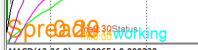
      Could anyone help how to organize this spread comment on the chart. (eg. font size or colours).
      Which condition or block that I need to readjust? I only use the comment setting in buy now block, but I could not adjust it somehow.
      0_1634731631530_4355eea5-d044-4ba1-bc9c-4d1050b0ac37-image.png
      Thanks in advance for any helps!

      posted in Questions & Answers
      D
      drankman
    • RE: Create comment based on the defined constant

      @jstap oh okay. Thanks for the explanation, but I think I wasn't clear explaining my question..Sorry

      What I would like to do, is it possible to add comment constant where it will automatically take the value from the other constant (for instance, time constant) without giving any input to the comment constant.

      Lets say, I have time constant as below:

      0_1634651546702_bca2873a-b3df-420d-a492-64bf4b98f63c-image.png

      How do I set my comment constant, where it will take the value of time constant automatically, whenever I change the Timeframe_1?

      Because what you mentioned above, in order to get the comment I need to select the period everytime I set the EA, right?

      0_1634651602996_efb67ac8-050b-46ef-b1fd-3b164b18c372-image.png

      posted in Questions & Answers
      D
      drankman
    • RE: Create comment based on the defined constant

      @jstap ok. so whenever I changed the timeframe from the other constant, the comment will be changed accordingly?

      posted in Questions & Answers
      D
      drankman
    • RE: Create comment based on the defined constant

      @jstap
      Did you mean like this?

      0_1634649708381_27e7cf6e-1f92-47d9-9592-10a4826885d9-image.png

      posted in Questions & Answers
      D
      drankman
    • RE: Buy now block and double

      @jstap Ok. Ill try to recreate from the start.
      Thank you! πŸ™‚

      posted in Questions & Answers
      D
      drankman
    • Create comment based on the defined constant

      Hello good people πŸ™‚

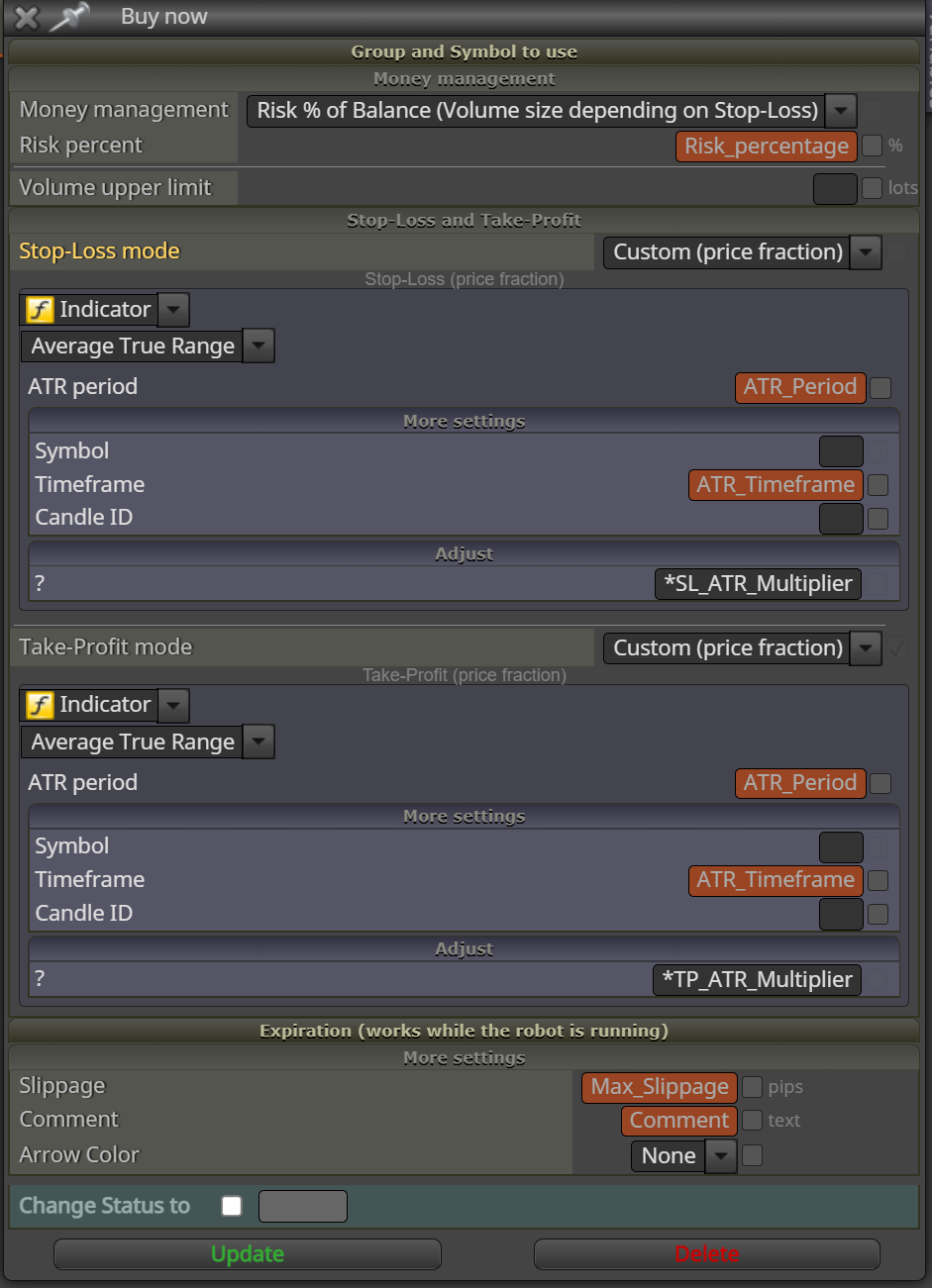
      I have set the constant for the comment and put it on the buy now block and it works as it supposed to.


      0_1634645756370_e4d671c3-a025-4abd-8e75-d3f24cb66bbc-image.png

      0_1634645825002_27b422f6-d519-4fe2-bef8-1eceb919044d-image.png

      But I would like to have the comment based on the time constant (or any other constants)

      0_1634645877962_14b95568-ace6-4361-8930-30994002e003-image.png
      so every time I changed the time constant or the other constants, it will show in the comment section.

      Is that possible?

      posted in Questions & Answers
      D
      drankman
    • RE: Buy now block and double

      @jstap Thanks for the reply.

      1. In the buy now block I put the constant as below where I did not tick the boxes of takeprofit.
        What should I change in order the "inp26_takeProfitMode" disapper?

      0_1634643004357_70d0fd85-8036-4ece-b34c-9ebe06108857-image.png

      1. Can I set the constant int for example for once per bar, as this value does not necessarily need comma?
        For example as below.

      0_1634643998303_679de33e-f8be-430c-9601-87dfbad0fb35-image.png

      posted in Questions & Answers
      D
      drankman
    • Buy now block and double

      Hello,
      I have several questions:

      1. on the buy now block.
        I set the buy now block also its constant. and when I backtested, there is constant defined as below:

      0_1634563689123_06a86553-33c4-4b48-83ee-30e0c1a7f718-image.png

      Does anyone know what does it mean? and eventuall also know how to get rid of this?

      on the sell now it seems it didnt appear anything similar, even though I set the same/similar settings

      1. When I set double in constant, it appears number with comma. What constant can I put that only show number without a comma. I want to put this on for example for max.trades or candle ID. is that possible in general?

      Thank you!

      posted in Questions & Answers
      D
      drankman
    • RE: MACD on/off and MACD signal crosses 0 and crosses signal line

      @jstap Ok thanks!
      Ill try to do it as your suggestions. and see how it works. πŸ™‚

      posted in Questions & Answers
      D
      drankman
    • 1
    • 2
    • 3
    • 4
    • 5
    • 6
    • 7
    • 8
    • 7 / 8