fxDreema

    • Register
    • Login
    • Search
    • Back to the main page
    • Categories
    • Recent
    • Tags
    • Popular
    • Search
    1. Home
    2. FenixTrading
    3. Best
    F
    • Profile
    • Following 0
    • Followers 3
    • Topics 21
    • Posts 49
    • Best 5
    • Controversial 0
    • Groups 0

    Best posts made by FenixTrading

    • ATR value to Pips - Tutorial

      Recently I was looking for a good solution to get always the ATR value in Pips without currency problem.

      So here is a useful tutorial for you:

      1. The first step is to create a new double Variable where we are going to store the result of our calculation.
        In my case, I used "ATRvalue"

        0_1604049773179_dc73fc57-b96c-4a7d-a6a7-0901e2c421c4-image.png

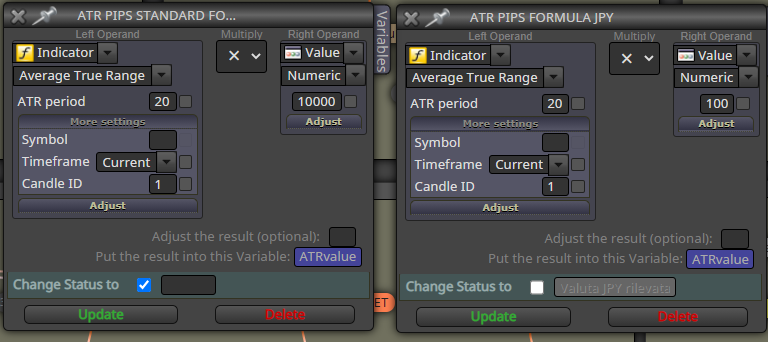
      2. Let's create the formula using 2 different formula blocks
        The formula to convert ATR value in Pips is really simple:
        ATRpips = ATR * 10000 ----> For any currency
        ATRpips = ATR * 100 ----> For JPY
        Just copy the image and use the double Variable to store our results.
      0_1604049096627_f39465ac-0aba-4ea2-b6c6-5884ba903a2a-image.png

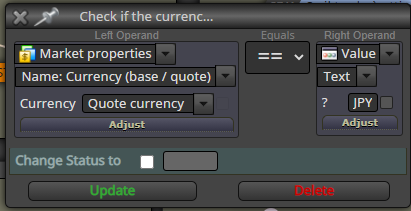
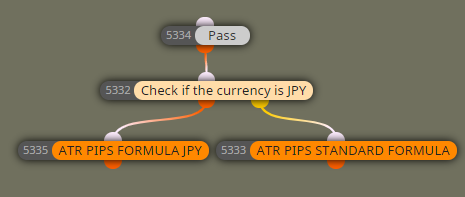
      1. Now we need a block that helps the EA to chose which one formula to use, so the only thing I need to know is if we are trading a JPY pair.
        Since JPY is always the quote currency we need just one block:
        0_1604049486930_97b01740-3534-47ae-8df0-3604e2cad7d2-image.png

      The final results will be like this:
      On Tick
      0_1604049600134_0d5a03fa-f3eb-4063-b598-e899776695b8-image.png

      Upvote if you found helpful this tutorial and have a nice day.

      posted in Tutorials by Users
      F
      FenixTrading
    • ATR to PIPS new Formula

      Hi everyone, thanks for supporting my first ATR to Pips Tutorial

      I red your feedback and i realized that the first formula is focused just on forex market and a bit complex.

      Here is an update with a newer and simpler way to achieve the same result. This formula can be applied to all markets automatically.

      1. Create a new double variable like "pip_value"
        0_1625906218096_4f591158-5a17-416c-b5da-cbca4858ed58-image.png

      2. Insert new Formula Block, copy these settings:
        0_1625906285003_2fc26d77-745f-4901-affc-f9d9a3e8f65a-image.png
        This time i used "Customized", so i picked up the EA builder Values, Sometimes this can work other could be better to use the "Original" setting. But in the next step we are going to verify if the formula works properly.

      3. You can verify if the settings are good with this simple Comment Block:
        0_1625906411452_b32751bc-c36e-44c7-a28f-aa3dea0db666-image.png
        In this way we can see how the ATR value will be converted in pips.
        If it is ok we can manipulate this variable in different ways, without complex calculations and multiple blocks.

      Results:
      Forex pair without JPY:
      0_1625906722032_08ae168a-f72a-4e63-9030-bbb6ebcac158-image.png

      JPY forex pair:
      0_1625906650013_1dec3023-bed4-4144-8a33-66cf5ae1e959-image.png

      Gold:
      0_1625906787829_57a50ef9-a75f-49c2-b56e-1bd7c1560d7d-image.png

      I hope this will be helpful for the community.
      Enjoy.

      posted in Tutorials by Users
      F
      FenixTrading
    • RE: Button that works on Strategy Tester

      @l-andorrĂ  @StantonHitz i made a tutorial about it just now, check it out.

      https://fxdreema.com/forum/topic/9883/working-buttons-in-strategytester

      posted in Questions & Answers
      F
      FenixTrading
    • Working Buttons in StrategyTester

      Hello everyone, someone asked to me in a old post how i solved the Working Buttons problem in StrategyTester, so i decided to make a tutorial about it.

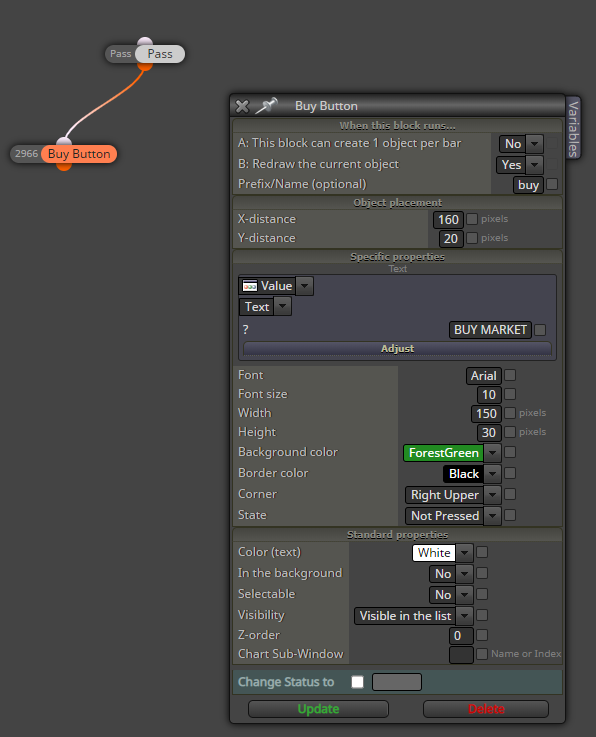
      1. Create buttons in onInit Section like this, name it as you want, I used "buy" as name.
        0_1592560694294_284e041b-b226-4ee4-a8af-a272362a7a5a-image.png

      2. Now we need a block that detect the Test Mode, so we insert "If Testing".

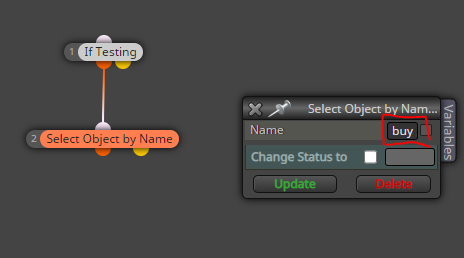
      3. After that we are going to select our object with the block "Select Object by Name", in the box write the same name of our button:
        0_1592561050389_5e569e97-ecef-4066-bbc1-57ac90c793bf-image.png

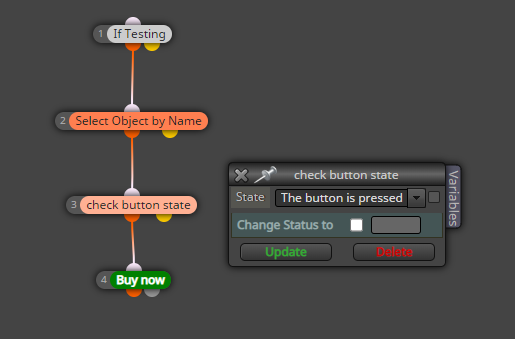
      4. The next step is to check when our button is pressed, so we will add the block "Check button state". If the button is pressed we want to Buy:
        0_1592561218573_328cffcf-991d-4cc5-bb45-520af33d9d56-image.png

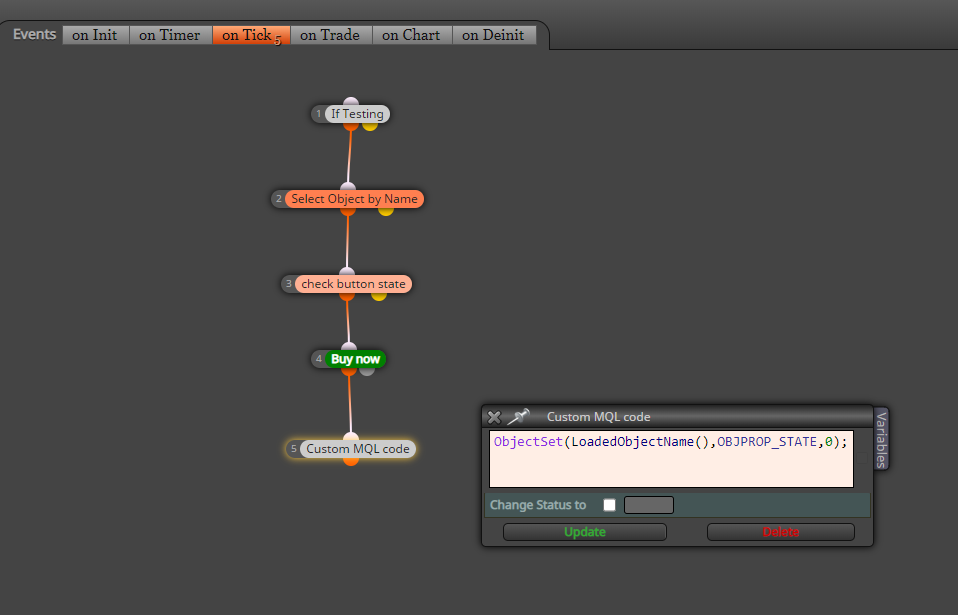
      5. Since the MT4 buttons are like a switch, after we press this button it will stay pressed until we click again on it, this will involve in multiple Buy Market action in just a click. To avoid that, I fount another good solution.
        Just add this custom MQL code to reset the button state on "Not Pressed". So we will have only the buy market we want:

      0_1592561460570_08cdd7ae-1239-49ad-9dfc-55d23f12d947-image.png

      You don't need to edit this code, it will work with any button.

      I hope this tutorial will help a lot of you.
      Enjoy!

      posted in Tutorials by Users
      F
      FenixTrading
    • RE: Moving Average Exit Trade

      @ambrogio Buy-Sell-Buy-Sell. I solved opening a new project and copy and paste the example.

      posted in Questions & Answers
      F
      FenixTrading
    • 1 / 1