[Solved]
F
Posts made by FenixTrading
-
RE: How to sum trades size?posted in Questions & Answers
@jstap @l-andorrà thanks for your answers these block are useful i never used it.
Basically what i'm trying to achieve is to sum the size of winning trades and the size of the losing ones and store these numbers into 2 variables.
I don't need the full hystory, just the trades after the EA initializzation.
-
How to sum trades size?posted in Questions & Answers
Hi everyone,
it's possible su sum the closed trades volume?For example, create a formula that does the following.
Trade1 Closed size = 0.1
Trade2 Closed size = 0.2
Trade3 Closed size = 0.5and so on and have a result in a variable?
Thanks in Advance
-
RE: ATR to PIPS new Formulaposted in Tutorials by Users
@jstap of course, this is just because you put "+" instead ":", so the ATR value still the same

-
RE: ATR to PIPS new Formulaposted in Tutorials by Users
@jstap EURUSD, 0.00323 ATR value ----> 32.3 Pips
-
ATR to PIPS new Formulaposted in Tutorials by Users
Hi everyone, thanks for supporting my first ATR to Pips Tutorial
I red your feedback and i realized that the first formula is focused just on forex market and a bit complex.
Here is an update with a newer and simpler way to achieve the same result. This formula can be applied to all markets automatically.
-
Create a new double variable like "pip_value"

-
Insert new Formula Block, copy these settings:

This time i used "Customized", so i picked up the EA builder Values, Sometimes this can work other could be better to use the "Original" setting. But in the next step we are going to verify if the formula works properly. -
You can verify if the settings are good with this simple Comment Block:

In this way we can see how the ATR value will be converted in pips.
If it is ok we can manipulate this variable in different ways, without complex calculations and multiple blocks.
Results:
Forex pair without JPY:

JPY forex pair:

Gold:

I hope this will be helpful for the community.
Enjoy. -
-
RE: BlockRequest - Dayposted in Questions & Answers
Oh my god! Thank you so much! i didn't recognized at all!
-
BlockRequest - Dayposted in Questions & Answers
Hi @FXDREEMA, it's possible to Add a block that allows to trade, for example, from a certain day of the month?
-
Day of the Month entryposted in Questions & Answers
Hello everyone.
I'm just trying to write a system that enter at certain day of the Month, let's say 28 and exit the at the 6th of the next one.
I didn't find any good solution in FxDreema blocks, can you help me? -
Write the high price in .csv fileposted in Questions & Answers
In the last 2 days i'm trying to find a solution to this problem:
For each day, detect when we hit the HIGH and write into the .csv in this format (HH:mm).
-
RE: How to pick the highest value in "n" barsposted in Questions & Answers
I will try! Thanks a lot mate!
-
How to pick the highest value in "n" barsposted in Questions & Answers
Hi everyone!
There is a way to pick the highest o the lowest value in a range of candle?In my case i want to pick the highest price in the last 5 bars.
-
RE: IF Demo Account Block doesen't regongnize account properlyposted in Bug Reports
I don't thinks so.
I use those blocks just to load buttons on chart.
I will try if the block works alone later, but i dubt.
Thanks a lot! -
IF Demo Account Block doesen't regongnize account properlyposted in Bug Reports
Hi guys, i'm using the Block IF Demo to limit the EA execution.
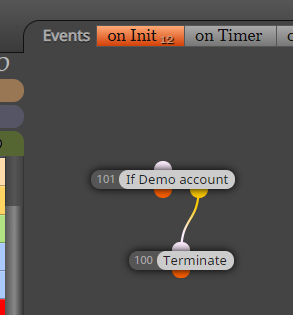
So the logic is simple, if the account is NOT DEMO, the EA will terminate.
I'm running my EA in a DEMO account but it got Terminated anyway.
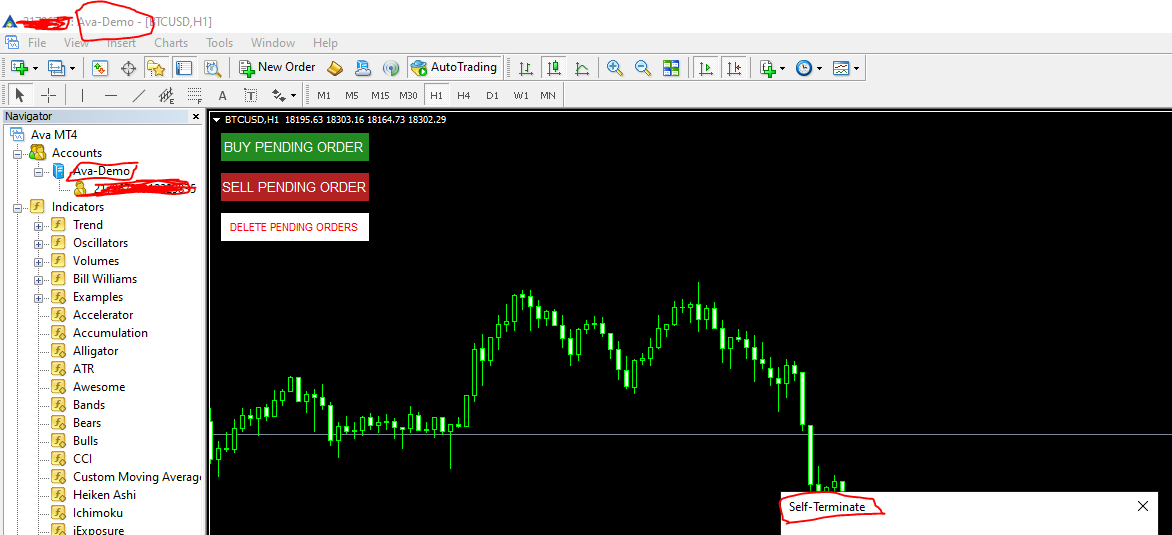
What's the problem? I think this is a bug.
-
RE: Mark price level with mouse clickposted in Questions & Answers
@l-andorrà @ajmd97fx thanks for your answers.
I found a good solution meanwhile:
I plot/delete horizontal lines with hotkeys and used their vaules as stoploss/tp levels.
I also used variables to save price levels and when buy/sell button is pressed i enter market with certain % depending of stop loss.Easy Risk managment and superfast stop loss settings.
-
Mark price level with mouse clickposted in Questions & Answers
Hi everyone!
I'm building a tool that allow trader to set position with perfect risk in very fast way.I want to set stop loss level with mouse button click. So i need to mark the price level when i click the mouse button and maybe save it in a variable.
Do you have some good solution?
-
RE: Miro1360, Please Help, Button informing the current profit. (Solved)posted in Questions & Answers
@xyon126
It could be interesting to know how you open and manage the trades on a certain pair.
Let's say you manage your trades with loop event, this version should work on a single pair. -
RE: Miro1360, Please Help, Button informing the current profit. (Solved)posted in Questions & Answers
@xyon126 I think it's possible, but you need different formula for the single pair. You just need to isolate a bucket of trades and calculate the netprofit.
Also you should create a loop for trades in the specific pair you load the EA so you can calculate and show the net profit on the button. -
RE: Miro1360, Please Help, Button informing the current profit. (Solved)posted in Questions & Answers
@xyon126 i have updated the EA
https://fxdreema.com/shared/QIeBYiIQcOpen the Button Block, check the DoubleToString funcion and change the last number. You can choose how much digit to show in the button.