I added a DoubleToString funcion in the button block.
If you prefer less digit just change the last number from 2 to 1 or even 0.
F
Posts made by FenixTrading
-
RE: Miro1360, Please Help, Button informing the current profit. (Solved)posted in Questions & Answers
-
RE: Miro1360, Please Help, Button informing the current profit. (Solved)posted in Questions & Answers
@xyon126 You can try it by copy and paste the same code in MetaEditor.
FxDreema should allow us to program also Indicators with the same system. -
RE: Miro1360, Please Help, Button informing the current profit. (Solved)posted in Questions & Answers
This version is actually working:
https://fxdreema.com/shared/Ne8Z35hdd -
RE: Trade amount of moneyposted in Questions & Answers
If you want to trade a certain amount of money, just use this money managment.

You can also set a variable and put it as Extern to control how much money to invest for each trade.
-
ATR value to Pips - Tutorialposted in Tutorials by Users
Recently I was looking for a good solution to get always the ATR value in Pips without currency problem.
So here is a useful tutorial for you:
-
The first step is to create a new double Variable where we are going to store the result of our calculation.
In my case, I used "ATRvalue"

-
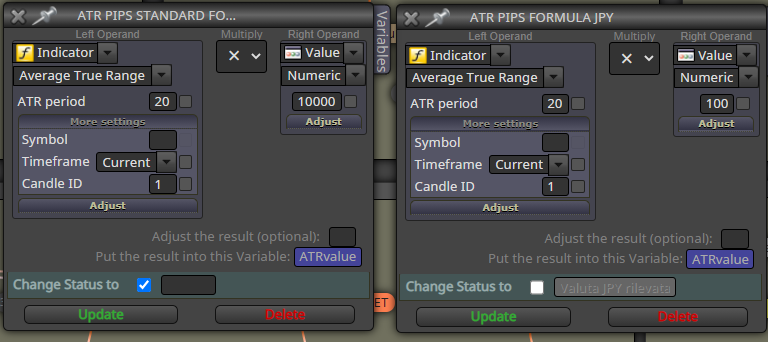
Let's create the formula using 2 different formula blocks
The formula to convert ATR value in Pips is really simple:
ATRpips = ATR * 10000 ----> For any currency
ATRpips = ATR * 100 ----> For JPY
Just copy the image and use the double Variable to store our results.
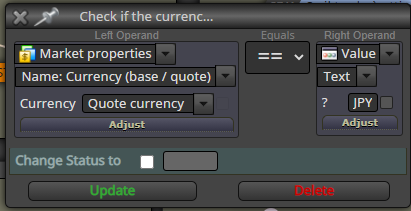
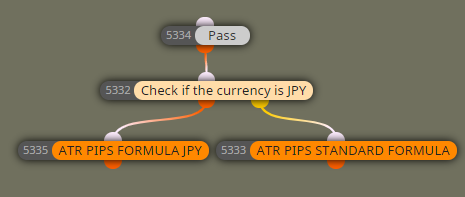
- Now we need a block that helps the EA to chose which one formula to use, so the only thing I need to know is if we are trading a JPY pair.
Since JPY is always the quote currency we need just one block:
The final results will be like this:
On Tick
Upvote if you found helpful this tutorial and have a nice day.
-
-
RE: My EA kept Opening Too Many Trades.posted in Questions & Answers
I use this to have only one trade. Turn off buy and sell blocks when trade is active, otherwise turn on buy and sell blocks.

-
RE: How to pop up alert when and arrow appears in MT4posted in Questions & Answers
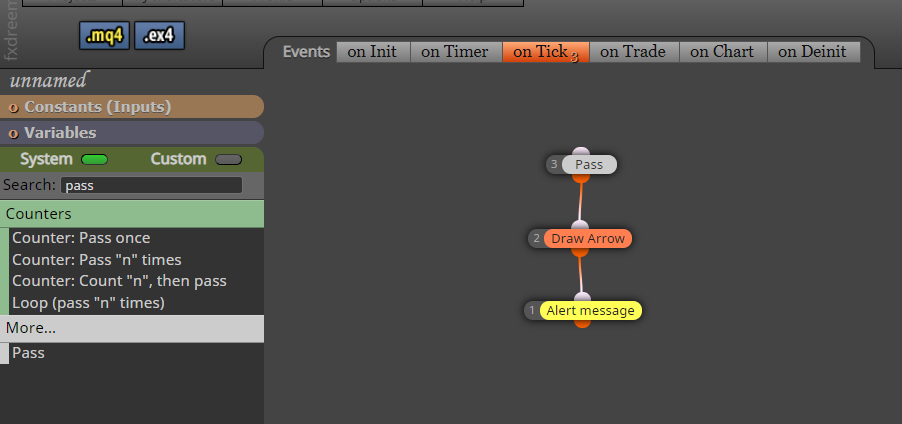
Try something like this
-
How to show daily loss on screen?posted in Questions & Answers
Hello guys i need to have the max daily loss on screen.
I know there is the "Check Profit (Period Time)" block in Fxdreema but it's good only to Terminate the EA when max daily loss is reached, i prefer to check it in real time. -
change the color of a block usingposted in Questions & Answers
@uchiha can you share the solution with custom block?
Thanks -
RE: Show indicator value on chartposted in Questions & Answers
First of all thanks for your answer.
I'll be more specific. I actually tried but i'm missing something.
I want to store the Bollinger Bands %B.
I'm just starting to work with variables in FXdreema and i'm not skilled on this topic.Can you show me how to do this?
-
Show indicator value on chartposted in Questions & Answers
Hello everyone. What's the best way to show an indicator value on the chart?
-
HOw to edit Global Extern Variables?posted in Questions & Answers
Hello guys! Is possible to edit this section in FXDreema?
Everytime i compile mql4 file i need to open and edit and turn this
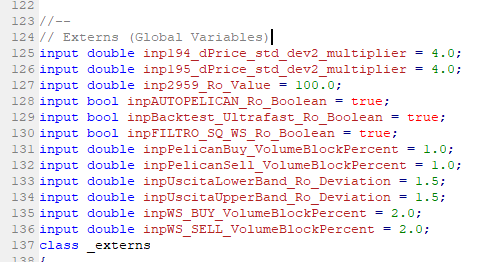
into this manually:
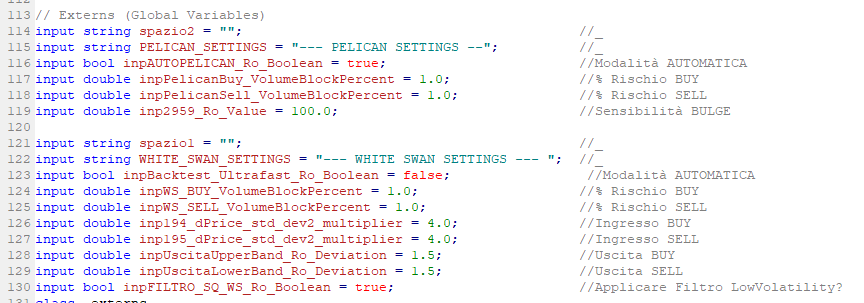
Of course i have a text file with the Externs formatted. But is really annoying to do that everytime i modify my EA.
-
RE: Button that works on Strategy Testerposted in Questions & Answers
@l-andorrà @StantonHitz i made a tutorial about it just now, check it out.
https://fxdreema.com/forum/topic/9883/working-buttons-in-strategytester
-
Working Buttons in StrategyTesterposted in Tutorials by Users
Hello everyone, someone asked to me in a old post how i solved the Working Buttons problem in StrategyTester, so i decided to make a tutorial about it.
-
Create buttons in onInit Section like this, name it as you want, I used "buy" as name.
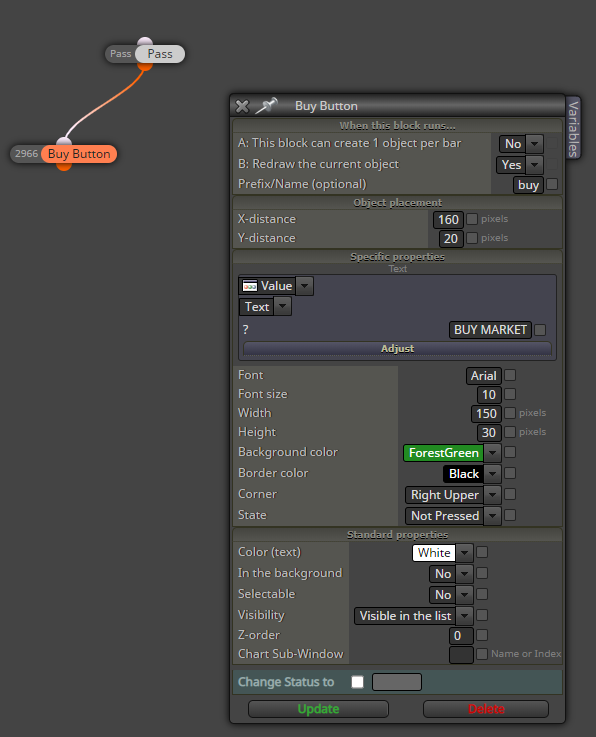
-
Now we need a block that detect the Test Mode, so we insert "If Testing".
-
After that we are going to select our object with the block "Select Object by Name", in the box write the same name of our button:
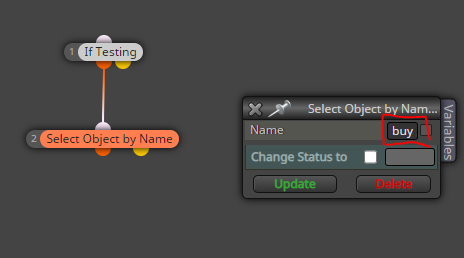
-
The next step is to check when our button is pressed, so we will add the block "Check button state". If the button is pressed we want to Buy:
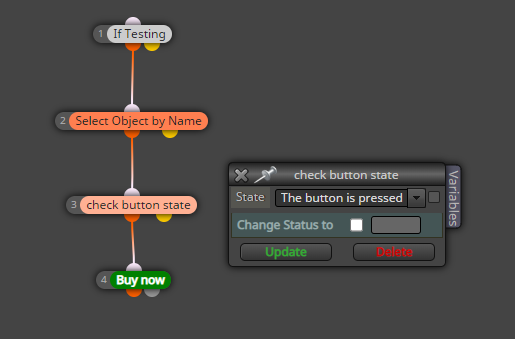
-
Since the MT4 buttons are like a switch, after we press this button it will stay pressed until we click again on it, this will involve in multiple Buy Market action in just a click. To avoid that, I fount another good solution.
Just add this custom MQL code to reset the button state on "Not Pressed". So we will have only the buy market we want:
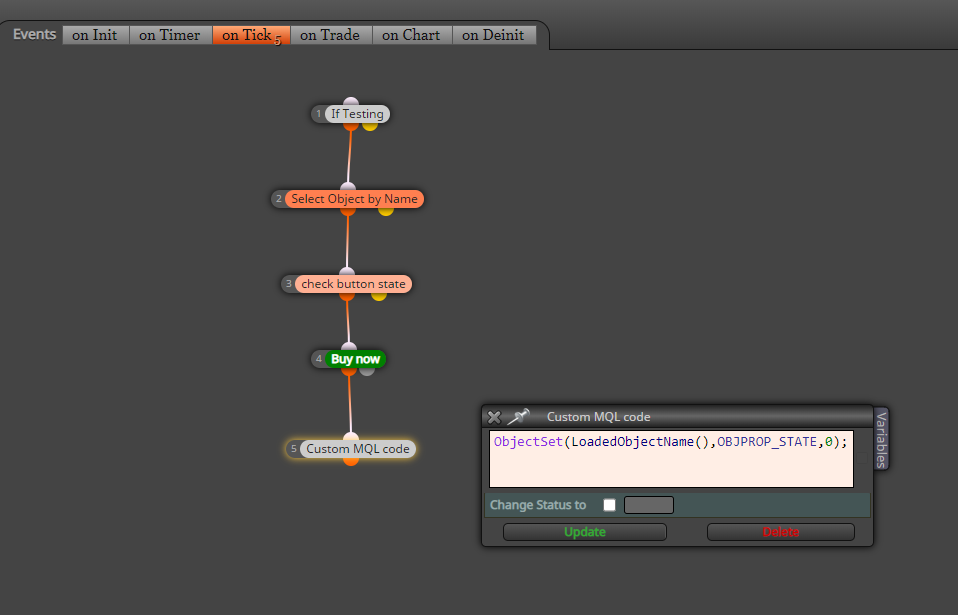
You don't need to edit this code, it will work with any button.
I hope this tutorial will help a lot of you.
Enjoy! -
-
RE: Check if more conditions are true in the last "n" barsposted in Questions & Answers
@l-andorrà i know that, i don't know what should i do in order to archive my goal.
-
RE: Check if more conditions are true in the last "n" barsposted in Questions & Answers
https://fxdreema.com/shared/fGD1mD4Cd
This is the project actually. The indicator is red correctly by FXdreema I tested the buffers with "Status" one by one. I just want isolate those true events in "n" bars.
-
RE: Check if more conditions are true in the last "n" barsposted in Questions & Answers
First of all thanks for your answer.
I have a custom indicator. This indicator has a Red Buffer if volatility increase and a blue buffer when volatility decrease under a certain level.In order to have a good entry pattern I need to check if initially, I have this Red Buffer and then the second blue buffer within a certain "n" of bars.
-
Check if more conditions are true in the last "n" barsposted in Questions & Answers
Is possible to check if more contitions are true in a period of "n" bars?
It could be very useful to check and automate patterns using indicators.
-
Only even numbers on lotsizingposted in Questions & Answers
Hi everyone. Simple question:
Is possible to force EA to place only even numbers on lotsizing?My pending order is 1% or 2% of Balance depending on stop loss, I need to keep this money management.
Sometimes the calculations results in a odd number, so when the EA scales 50% of the total volume something goes wrong in the long term.