I see your project. You don't need the pink block, just use "Pass" instead. For "Delete pending orders" set the Group number to 0. I see you set the magic number in the project's options to 0, so I expect that you are trying to close the manually created orders, which have magic number of 0. So, zeroes everywhere 
Best posts made by fxDreema
-
RE: Delete Pending Orders Scriptposted in Questions & Answers
-
RE: Check profit unrealized (total sum vs as position)posted in Questions & Answers
I think that you expect the sum of both profits to be > 3, but the profit is calculated in pips, not in money. Click on "Profit is the sum of...", there is small explanation there
-
RE: Once per barposted in Questions & Answers
It looks to me that you can "modify stops" right after the trade is created, or assign stops in "Buy now". At least I don't see some condition that can add some delay between the trade's creation and modification, but here I see only what you posted, so...

If i understand, you want when you have a trade stopped by SL/TP to wait until the current candle closes. I don't know what to suggest, this sound like a block that does not exists, something like "Check if trade was closed in this bar", which is not a bad idea. Or a block like "Pause until the new bar comes". Am I on the right track?
Otherwise you can check last trade's close time with For each Closed Trade (set Not more than n trades to 1) -> check age (set it to close time).
-
RE: Magic number of 2 EAs in same MT4posted in Questions & Answers
This is the base magic number for the EA:

If Group is empty or 0, this will be the magic number of the trade, let's say 6927. This is also that input parameter of the EA called MagicStart (I know, stupid name). If you use Group number 1 for example, the magic number will be 6928.
You can see the magic number when you put the mouse over the arrow icons of each trade.
-
RE: Testing my EA on BackTestposted in Questions & Answers
This error appeared in the past when in the code each indicator was used on demand - you call it when you need it, and this created this problem in the past. Then I make it like they say in MetaTrader's documentation - handles of all indicators are created in Init(), then used in in OnTick() or where needed. This update stopped that error message back then... at least on my PC. There is a little time delay between Init() and OnTick() probably. Now I wonder why you have the problem, because now everything is like it should be in the documentation. I guess your PC is even faster than that delay and indicators are loaded asynchronously. But now I want to turn back to the idea of using the indicators on demand and synchronously, so I fixed that problem (locally on my local fxDreema) by waiting for the indicator to load and then use it. But this is part of a bigger update, so I can't upload it right now

-
RE: Write unrealizad profit and loss when testposted in Questions & Answers
There is a block to write information "Write on file". But I used "Comment" for this example: https://fxdreema.com/shared/ooSeSTUHb
-
RE: Making a grid....posted in Questions & Answers
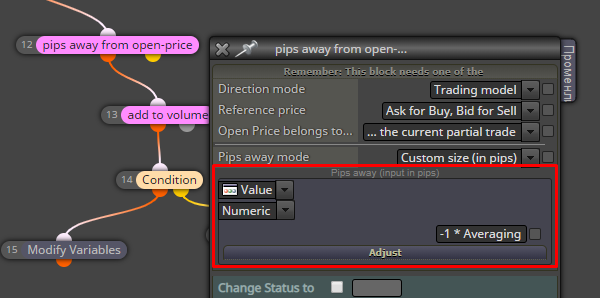
I think the first example will work if you use negative value for Averaging:

Instead of "add to volume" you can use the original Buy and Sell blocks, so you can use their money management settings. There is a "Betting: Custom Sequence" option as well. If you want to separate the money management rules between Buy and Sell trades, then you should use different Group number for the Buy part and for the Sell part
-
RE: Every "N" Barsposted in Questions & Answers
Now study this: https://fxdreema.com/demo/mt4-wrong-closing-rule
many people think that some block should wait for some time and then it will pass and go to the next block. Not true, this does not happen at all. What really happens is that blocks under "on Tick" become active on every tick, again and again, and again, and again - the very same blocks. Well, those on top level at least.
There is no block that will wait 15 candles for something. Blocks work NOW, at the moment. If it's some condition - it works now. If you want to check the current indicator values, fine. If you want to check past indicator values - also fine. Checking future indicator values... no way.
And because so many people think the wrong way, which is in fact the most intuitive way, I thought that I can make it that way... but then I realized that this is not a good idea for some reasons.
So again, you can check anything using the "Condition" block NOW, but the "Condition" block will not wait for the comparison inside to happen. The only block that can wait for some time (but not waiting for something to happen) is called "Delay".
What you can do is to check for crossover NOW and also check for the other indicator 15 candles in the past. Just thing in the opposite way.
Why is that better? Because MetaTrader already have history data that can be accessed. Also because saying that you want to check something in the future requires the use of some variables - the problem here is that if you restart the EA those variables will be gone, they are not persistent. But if you check the past data, in case you restart the EA, that data will still be there and the same, so the EA will continue working as before.
-
RE: ADX and STOCHASTICposted in Questions & Answers
I think this is simple. Put few Condition blocks and configure them with these values. But I guess that something else doesn't work you and I don't know what
-
RE: price distance from objectposted in Questions & Answers
First you need to select the object and get the price. Some objects have 2 or even more prices, because they are made out of 2 or more points. So, it depends. But when you select the object properly, you can compare its price with some other value in Condition block, let's say with Ask price, or Candle Close. In Condition you can use the "Adjust" field for the distance.
Also, there is a block "Check distance"
-
RE: CHECK DISTANCEposted in Questions & Answers
Probably, but I will suggest to put both MAs in Condition block and to use +5pips in the Adjust field on the MA 21 side. So then you have a condition that checks this: When MA 14 is bigger than MA 21 + 5 pips?
-
RE: make EA close all pending orders after Tp triggeredposted in Questions & Answers
The Trade event fires when there is some trade... event. Like a new trade created, deleted or modified. So the blocks under "on Trade" can run on any of these occasions. But you normally want to detect what exactly happened and that's why those purple blocks (like Trade closed) are used, so you can filter the particular trade event that you want. And of course, these blocks should be located at the top.
-
RE: i have problem with groupsposted in Questions & Answers
Only do that if you want to have something like 2 (or more) different strategies in the same EA. Like 2-in-1. But remember that it is still one EA and if the strategies are completely different, it's better to just make two separate EAs.
Otherwise... imagine that you have 2 different groups of blocks that are separate - one for the first strategy and one for the second. In all blocks in the second groups of blocks where you have Group, you should set it to 2 for example. Such blocks are "No trade", "Buy now" and basically all these blocks who are working with trades or pending orders.
The EA will have one master magic number (it's the MagicStart parameter of the EA) and where you have Group number that is different than 0 (empty value), the magic number will equal to MagicStart + Group.
-
RE: Cannot delete objectposted in Questions & Answers
I tested it with "Delay" block after block 43 and it looks that the object is deleted, but remains on the chart for some reason... until I move the chart with the mouse. I added function ChartRedraw() at the end of "Delete objects" and I think it works now.
-
RE: Helpposted in Questions & Answers
Error 403 most probably means that I blocked the IP address. Bad guys are trying to copy, spam or hack the website almost daily, I have different ways to detect this, and I block many IP addresses often. If someone uses VPN, it's possible that I have blocked the IP address in the past, if someone else used that address for bad stuff.
I also have some rules to block requests on particular patterns of the HTTP headers.
If somebody is having this error, send me an email mentioning the blocked IP address, so I can look unblock it.
-
RE: How to open a pending order at first day of the monthposted in Questions & Answers
This is my idea for detecting the real first day and last day of the month: https://fxdreema.com/shared/iB1YvWgSb
The first pair of blocks would print yellow arrows on each candle in the first day. the second pair prints pink arrows on the last day.For newbies, && means AND and || means OR. The whole formula can be written in 1 row only, but I wrote it like this. The condition is asking whether the first row OR the second row is true.
Let's take block 1 for example, the second row:
TimeDay(TimeCurrent()) < TimeDay(TimeCurrent() - 86400)TimeCurrent() gives us the current time of the current candle. This is the server time, not the local time on the PC. This is the number of seconds since 1.1.1970.
By the way there is also function Day() that can replace TimeDay(TimeCurrent()) .
86400 is the number of seconds in 1 day.
TimeDay gives us the current day. Today is 25 for example.
TimeCurrent() - 86400 is 24 hours in the past, so TimeDay(TimeCurrent() - 86400) gives us the day of yesterday. For example 24.
So, what I ask is whether the date today is < the date yesterday. If today is 1 and yesterday is 31 (or 30, or 29), then I detected the first day of the month.The first row:
DayOfWeek() == 1 && TimeDay(TimeCurrent()) < TimeDay(TimeCurrent() - (3 * 86400))DayOfWeek() is the day of the week, where 0 would be Sunday, 1 is Monday.... and 6 is Saturday. So DayOfWeek() == 1 asks if the day is Monday.
The problem is that Monday is not always day 1. Maybe Monday is 3rd. So I compare the Monday's day with last Friday's day.It's all pretty much the same in block 3, but the opposite.
-
RE: Proper inputs for Custom indicatorposted in Questions & Answers
First check if the number of input parameters is correct.
Then, for parameter names, you should use the original names, but they are not actually visible. They look like variable names - only latin letters and numbers, no empty space. What you see, for example "Applied Price" is not the real name. In the code you have something like this:
input ENUM_APPLIED_PRICE AppliedPrice = PRICE_TYPICAL; // Applied PriceI'm not sure about "AppliedPrice", because this exists in the source code.
ENUM_APPLIED_PRICE is the data type, also known as enumeration, which is some kind of integer data type, but not exactly. You can use "int" anyway, I think there will be no problem.
PRICE_TYPICAL is the name of one predefined constant that has value of 5. No, "Open price" doesn't mean nothing here.Here is about the ENUM_APPLIED_PRICE enumeration: https://docs.mql4.com/constants/indicat ... price_enum
Parameter values must be correct as well. For example "Open price" is a string value, it is not an "int" or ENUM_APPLIED_PRICE value. You can use PRICE_TYPICAL or even 5 here, but not "Open price" or any other non-numeric value.
The next thing is the data types, but I don't think this is the problem here. Yes, in the indicator each input parameter probably have different data type (or enumeration), but when you use the indicator form the EA, there should be no problem to use "int" instead of enumeration that is in nature an integer value.