One, me

I'm petty sure that all the other topic in this category contain the same reports, so I will answer to all of them here.
I'm sorry for 2 problems that happened. The first - the website was down for few hours. This always happen when suddenly the VPS is restarted. The problem is that the NodeJS server does not start automatically until I open the VPS, so in the whole time the VPS itself is up and running, but the website is not started. And I don't know how to fix this problem yet. I have some .bat file in the Startup folder to start everything when opened, but it doesn't open until I log in.
The second problem is that there was a serious problem with the database - some changes to the projects were not saved correctly. For that I suggest to go to "History" and click on some previous history point if you have something missing in your project.
Why that happened? Because of the first problem I decided to write a MongoDB script to add few extra days to all people who paid to use this program. And one keyword of that script required newer version of MongoDB. I installed it and it worked, but I did not realized that there are some other problems. I tried to find what is the problem, still without success. So I downgraded MongoDB back to its old version where everything works. I still don't know if that problem did serious damages to your projects. Just in case I have some daily backup of the database, although it would be very difficult for me to dig into it to find some project. But if someone has such damages, I will try to restore them.
Actually the reason of this logo to be there is not advertising, but recognizing that the EA is made with fxdreema. And it was fun for me to create it. In fact, this logo exists only in the MQL4 part, for MQL5 I was too lazy to create it  And it can be easily removed from the output source code - it exists somewhere in "init()".
Also, I think that EA creators (in general) are good to quickly build some strategy and backtest it, but for professional use it's better to write the strategy in MQL4/5 from scratch. Because EA creators are made to be universal, the biggest part of the output code is trash. At least this is the case with fxDreema, I can admit that. Yes, the EA can work, but every EA can be written with less code from someone who knows how.
Well, I will add some option to enable/disable if this is what many people wants. This is already planned update 
I found that this option didn't worked and I did some updates to fix it. Maybe something broke visually now, but in any case this option is only for x> and x<, so the fact that you see it under > is only a visual bug. Which is an old bug I think, I knew that something like this happened from a long time, but when I decided to finally fix it I forgot how to cause the problem. Now I know 
I will fix everything, but it takes time and work. I was fixing few issues all day and now I'm tired, so I will continue tomorrow. The whole thing now works on a different kind of server, different language, different database, different everything. The last time I did such a big update was 1 year ago. Few days in a whole year, I think it's not that fatal
Yes, sometimes it happens that all blocks suddenly appear empty. I don't know what is causing this, but fortunately it's easy to fix - just go one or more steps back in History (upper right corner).
Also, when you doanload .mq4 or .mq5 file, the whole project is stored in this file down at the end in form of a comment. Even if the project is deleted from the server, it can be imported back from such file. And you can also store versions of such files as backups, just in case.
I think I fixed this problem, although I could not understand why it happened.
I'm still trying to find why the whole website is being so slow. I was thinking that big projects are to blame, but I was watching how the EA builder is working from different angles and I can't confirm that this is the problem.
Now I will focus on the forum. Look at the traffic these days:

There is some obvious increase of traffic since these problems happened, although it doesn't seem too bad. But I will try what will happen if I disable the Search functionality or the whole forum for a while.
This is a very common problem and people often ask me why their EAs produce multiple trades non stop. Here is my answer...
Variant 1
The current count of trades is not checked before creating a new trade. Remember that blocks such as "Buy now" and "Sell now" are designed to create a new trade every time they run. If "Buy now" block runs 10 times, 10 trades should be created as a result. So, the idea is to not allow these blocks to run too often. The very first examples here show you exactly that - https://fxdreema.com/examples As you can see, the easiest way to be sure that you only have 1 trade at a time is to connect "No trade" block somewhere above "Buy now" and/or "Sell now".
Variant 2
You use "Close trades" somewhere and what really happens is that every time a new trade is created, it is closed immediately after that.
It's important to remember that every time you run "Close trades" block, it does its job - if there are trades to be closed, they will be closed. So it's important to run "Close trades" only when trades needs to be closed. Look at Variant 1 and you will see that this is also true for blocks "Buy now" and "Sell now" - you only need to run these blocks when a new trade needs to be created.
Again, you need to use some conditions or filters above blocks "Buy now", "Sell now" and "Close trades". But the conditions above "Buy/Sell now" and the conditions above "Close trades" MUST NOT be true at the same time.
What people often do is that they connect their "Buy now" and "Sell now" blocks with certain conditions and then they use the same conditions above "Close trades" block. And the result is that trades are created and immediately after that they are closed, because the conditions to create trades and close trades are the same.
How to fix the problem? It depends on the situation. For example, look at this project - https://fxdreema.com/demo/mt4-buy-sell-buy-sell-opposite-conditions You can see that "Close trades" blocks are used under exactly the same conditions to Buy and Sell. You may say "But fxDreema, you just said that this is wrong...". And again, it is wrong to close trades right after they are created, but if you try this particular expert advisor you will see that such thing does not happen and everything works fine.
Let me repeat that again - do not allow "Close trades" to run shortly after a trade creation.
I found yet another slow query. Well, this one is not always slow, it becomes slow when the user has 1000s of projects, because there is sorting involved, which takes few seconds. And all of this is to get just the id of the last modified project. But it's possible to make this query very fast, I'm now trying to see exactly how. At this point it should be obvious that I'm not very good with databases
It should be available now: http://prntscr.com/esicto
Tell me if it doesn't work
Meanwhile an hour ago I updated all database queries. My hope and expectation now is that the website will be a little bit more stable when the 1000s of projects and 1000s of blocks come tomorrow.
For the first question I can suggest this block "Indicator moves within limits". This block is a little bit scary, but it's a block who can actually iterate through candles and check values for each candle. Or, in "Condition" when you are using custom indicators there are few extra options available... for example you can find the candle number at which the indicator is "visible" (meaning, its value is different than EMPTY_VALUE)
Zig Zag, I hate this indicator Whatever I did for this indicator, I don't want to touch it anymore. I don't even know how this shit can be used, but anyway. In the indicators list you can find it, I have added few extra options on top of the original custom indicator that comes with MetaTrader. You can also import it as a custom indicator (in My Indicators) and use it like this... if you know how, because I really don't know
I see that in some blocks the Symbol is empty and in other it's "Any Symbol":
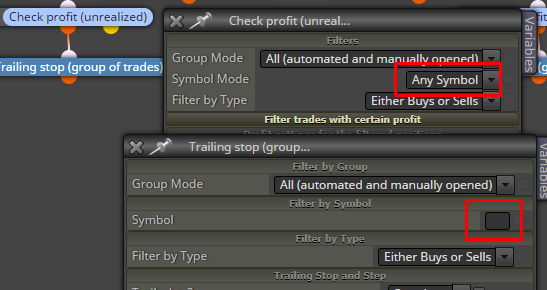
So, the idea of "Set Current Market...." is that it makes the following blocks to think that the current symbol is not the current symbol. Let's say you have EURUSD,GBPUSD. Then the block will pass 2 times. The first time it will make the following blocks to think that the current symbol is EURUSD and the second time it will make them think that the Symbol is GBPUSD. But when you use "Any Symbol" for "Check profit", the block will check the profit of all trades from all symbols.
Wow, you sent 15 emails to me. For a Bitcoin holder you are not really patient. I'm not even that late, it's just about 1 day. it looks that we are at least in the Anger stage of the market cycle:
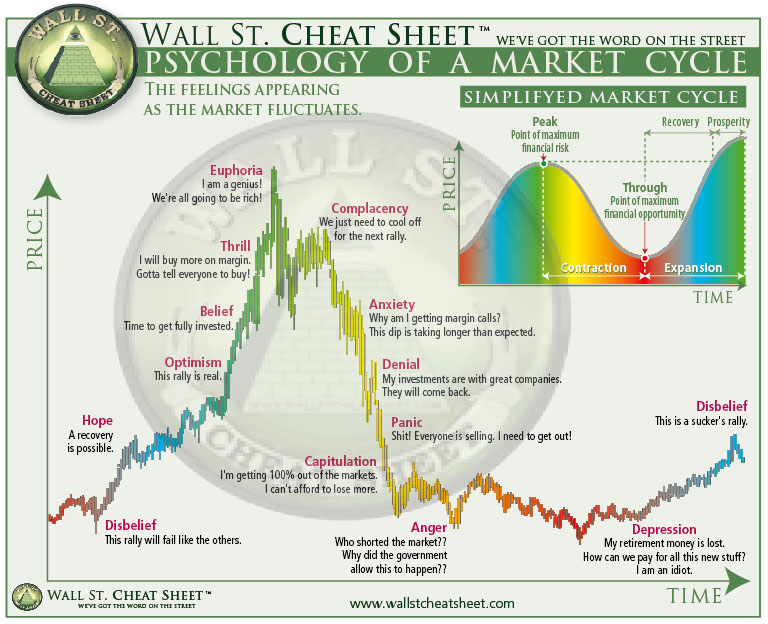
If you are depressive, I don't think the place for you is in Forex. We all know the reality - most people lose money in Forex. This is brutal speculation where you have no control on the price. And when we add margin, eventually you will only sit and pray for the price to go back in your favor.
There is a block "Bears in a row"
DoubleToStr() function takes a variable from "double" type and turns it into "string". "double" is a floating point number, while "string" is text. So it's not very correct what you are doing. Try NormalizeDouble() instead. The description of this function is like this: Rounding floating point number to a specified accuracy.
In Adjust there is some trick that you can do. You know that in Adjust you normally start with +, 0, * or /. But you can also do it like this:
= NormalizeDouble($, 5)
When it starts with =, it's a little bit different. The final value will equal to whatever is on the right side of =. Well, I want to change the value that I got a little bit, not to give it a whole new value, so I use the value itself. That symbol $ is the value.
The error is at line 13490 and 105 is the horizontal position at that line. It's about the lot size and I can tell you what is the problem
So, what you have is this:
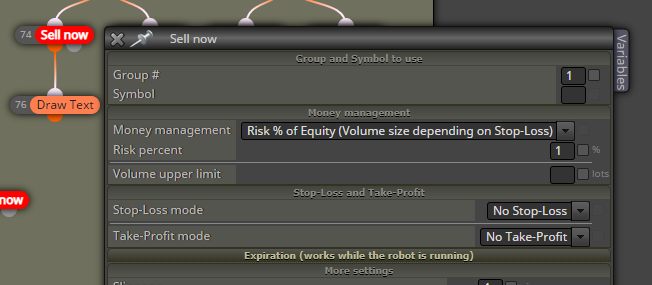
The thing is, this MM method requires some positive value for SL and you can read that "Volume size depending on Stop-Loss". To calculate the lot size, the size of SL is considered - the bigger the SL, the smaller the lot size. But when SL is 0, then the lot size should be infinity, which is of course not possible, and that's why the error is "zero divide".
@tipsywisdom said in Changes:
3 things at the top of my mind
- An easier loop solution for those not program savvy
- A way to just reference the last "Swing" high or low (Various Signals category) I understand this is essentially what the ZZ indicator is for, but the method of creating a loop to assign a referenceable candle ID so now you can pull a value from that swing....its a decent method, but not reliable because sometimes the HH or LL end up being somewhere on the chart that doesn't make sense.
- Another various signals category request, to be able to identify when we're forming a new high or low of the day with a single block
if thats not too much to ask
What is a loop and doesn't look as a loop are those Check blocks, Trailing stops and others. Maybe you want to say that you prefer such blocks. Otherwise I don't know how to make the loop itself easier. It's just like "if" in the programming, even simpler, because there is no index.
I prefer to stay away from indicator-like calculations in the EA. One reason is that such things like swing highs and lows are very abstract, it depends on how the developer decided to calculate them.
And the other reason is the calculations - in the indicator you can make it to NOT recalculate what was already calculated, but in the EA there are no such things. Performance issues. Not to mention that the process of drawing the data from the indicator happens automatically.
@AlphaOmega, @TipsyWisdom, I think I can prevent the ability to make connections. Connections are kinda useless in this case anyway. Without connections, there is no "connected" project. But then someone can arange his blocks and ask someone else to make the connections and compile it :))) Then I have to add limit to the number of blocks...
By the way, meanwhile I brought back the second option that currently is cheaper, because it still works with USD. But I did it because it seems that the PayPal for some reason doesn't show the option to pay with cards without registration, and some people don't have PayPal. I'm working on integration with Stripe.