fxDreema

    • Register
    • Login
    • Search
    • Back to the main page
    • Categories
    • Recent
    • Tags
    • Popular
    • Search
    1. Home
    2. fxDreema
    3. Posts
    • Profile
    • Following 0
    • Followers 691
    • Topics 32
    • Posts 7485
    • Best 277
    • Controversial 18
    • Groups 1

    Posts made by fxDreema

    • RE: How to do include in "Custom MQL code" ?

      @mndiarra said in How to do include in "Custom MQL code" ?:

      Is there any workaround for that ? Thanks in advance for your help.

      You can try to make a custom block here https://fxdreema.com/studio/MQL4

      Here is some example of the things you can add in the code of the block to make it functional:
      0_1638908503543_02d10922-e595-4673-b5a6-4790e475fe51-image.png

      Think of the ~Indicator~ thing as the value from the parameter Indicator (look at the right where the parameters are).
      ~datatype:Indicator~ is obviously there to deal with the different data types, but this is only needed in very few blocks like this one, you probably don't need this.

      Think of ~next~ as the orange output. ~inext~ is for the yellow output (the "i" probably means inverted). To have a gray output, which is normally to indicate that there is an error, try ~error~.

      Imports and such stuff is to be put below on the other code field at the bottom. But better don't put very fancy code.

      posted in Questions & Answers
      fxDreema
      fxDreema
    • RE: Fx dreema app desktop problem

      The only possible solution for problems with the desktop version that I could think of, is to try to run it as administrator. Or possibly put it somewhere outside Program Files.

      posted in Bug Reports
      fxDreema
      fxDreema
    • RE: My FxDreema is not working since Friday. I am a paid member

      It seems that this "loading..." problem is always about some browser extension that for some reason blocks some of the .js files of the website. But when people fix it, they don't write to me back saying what exactly it was the problematic extension.

      If someone has this problem and finds which browser extension makes the problem, please send me an email so I can try the particular extension and hopefully find what it doesn't like.

      posted in Bug Reports
      fxDreema
      fxDreema
    • RE: My EA does nothing

      @l-andorrà said in My EA does nothing:

      @crazycnw said in My EA does nothing:

      shared/oTgHrvqcb

      IIRC that feature was designed years ago and not updated so probably it doesn't work as initially intended.

      I forgot about this feature, now that I read this I was like "oh wow, look what I had". And it seems to work when you connect some block after the one where the feature is used. I don't remember if this was intentional or it is a bug.

      posted in Questions & Answers
      fxDreema
      fxDreema
    • RE: does the keyboard function on chart event actually work?

      The block works for me, but only in real work, not when testing in Visual mode.

      posted in Questions & Answers
      fxDreema
      fxDreema
    • Changes

      Hi all. I'm here to announce that some changes will be seen soon, maybe tomorrow. I have a company now, as well as a new business PayPal account for it, so those of you who decide to pay will see a company name instead of my name. I will also update the Terms of Use thing with uglier looking one, and there will be the details of the company as well. The website is not sold or anything, it's just a company that appears.

      With this company I will have to say bye to more than 20% of the money (VAT stuff). Combine this with the inflation, and it means that I will eventually raise the prices. Initially I will only convert them from USD to EUR (same amounts), which is some 13% raise by itself.

      Actually for some of you prices are like 10% or 20% lower than for others. I did raised the prices twice before, but only for the people registered after these dates. So for the old profiles here (let's call it the loyal group) the prices were never changed, they are the same as they were in the very beginning. I will probably keep this difference, but I don't know.

      I will probably remove the other payment processor and replace it with something else. People have problems with them regularly.

      With higher prices maybe people will become more demanding, which in turn should make me want to take more care of the website. Currently it seems that the prices are so low that there is virtually no hate, even if I don't respond to someone for days or even at all.

      posted in Questions & Answers
      fxDreema
      fxDreema
    • RE: MT4 to MT5 converter

      The names of the blocks is not a problem. In MT4 where you see the word "trade", in MT5 you see "position", but this is because I just left it that way.

      Each block has another hidden name, let's call it ID. Almost all blocks from MT4 have their MT5 variant. There are few differences, I thin in the blocks from "on Trade". Also, I think in MT5 there are 1-2 extra indicators. Maybe some parameters are also different here and there, but I forgot what it was.

      You can download .mq4 file, rename it to .mq5 and import it. This should create MT5 version of the project, but the block will be named as they were in the MT4 project. And just test how it works.

      Of course, there is one huge difference between MT4 and MT5 - if you have Netting account in MT5, it works in a different way, you can't have multiple "trades" in the same symbol at the same time. This changes the whole logic completely. Any equality between MT4 and MT5 is possible when you have Hedging type of account in MT5.

      posted in Questions & Answers
      fxDreema
      fxDreema
    • RE: "pips away from open price" alternative

      I think you have a problem in For each Position. You say "last opened order", which probably mean that in For each Position you intend to set that Not more than n trades to 1. Looking at the block we see that you have put some 1 there... but not exactly at Not more than n trades.

      posted in Questions & Answers
      fxDreema
      fxDreema
    • RE: Why my robot is not taking profit

      @jrpscanavini said in Why my robot is not taking profit:

      https://fxdreema.com/shared/io1TTN7hc

      I tested this in my MT5 and it closes the positions at their stop-loss or take-profit. I see that you used these checkboxes to make some parameters inputs for the EA:
      0_1637608577554_05b81b4c-5b05-404a-8dfa-3e5edd636707-image.png
      Check your inputs to see if you have value of 0 somewhere.

      posted in Questions & Answers
      fxDreema
      fxDreema
    • RE: Anyone knows how to deal with Error 4002?

      @l-andorrà said in Anyone knows how to deal with Error 4002?:

      @fxdreema So are you suggesting that we should not use any value 0 for any constant that is used on any indicator? I think I understand the problem, but not get the solution, sorry.

      Now I don't think that this is a new behaviour in MT5. I found that the files where these values are cached are located in MQL5/Profiles/Tester, they are .set files. I found many files there, almost as many EAs I have in MQL5/Experts. And these files are created since 2017 and even 2016.

      Maybe nothing is different, maybe only now you have this problem with this EA, because it has too many Inputs and you forgot to set at least one of them.

      I actually still do most of my tests in MT4, and I don't use Constants very often in my own projects. Only sometimes when I work on someone else's project I choose to change these values. And I normally assume that if someone shows me his project that contains Constants, the values for them are correct. So I don't have a good chance to fall into this problem. Also, when I have Constants/Inputs, I'm aware that they are there and I expect such problems.

      I think that MetaTrader should alert us when there is a change in the Input values in the code, or maybe automatically change those values that are changed in the code.

      posted in Questions & Answers
      fxDreema
      fxDreema
    • RE: Anyone knows how to deal with Error 4002?

      When I tested this, I got error for RSI, not for MA. I deleted all unnecessary blocks until I ended up only with block 134 (and one Pass block). In this block, a Constant is used for "RSI period" and that Constant is named RSI_period.

      0_1636402526462_1fe393ea-457e-4e78-82ad-10422177b469-image.png

      I noticed that if I remove the Constant, the EA works. When I put it back - it gives me error 4002. So I focused on the Constant.

      After some investigation I found the problem. Look at this screenshot:
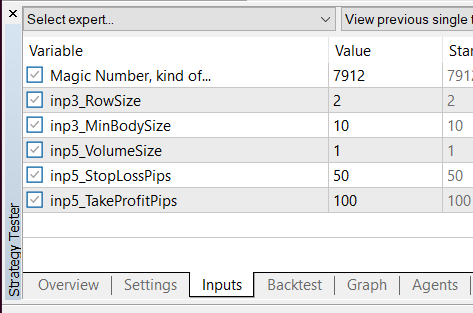
      0_1636401702657_d8fee72b-8867-48d3-b36c-c128b633d720-image.png

      I removed all Constants except RSI_period. But note that its Value is 0. This is interesting, because in the EA builder I changed it to 14. I also exported .mq5 file and changed the value there as well. However, it seems that there is some caching happening here and the value doesn't change when I change it in the code.

      Such caching also happens in MT4, I'm aware about it, but there it only happens after I manually go to change any of these values. But this can only happen when I want to run the Optimization process, which is rare for me. So normally I never touch the Inputs. They are never cached, so I'm free to change the values of the Inputs in the project itself via the Constants.

      Maybe they introduced this into MT5, to always cache the Inputs. And you see that error 4002, because some of your values are still 0. Turns out that if you try to run RSI or MA with period 0, this particular error appears. Its meaning in the documentation is "Wrong parameter in the inner call of the client terminal function"

      posted in Questions & Answers
      fxDreema
      fxDreema
    • RE: Indicator inside a sub window

      Even if it's possible to get the values from the horizontal line and the MA, how can you compare these values? I mean, visually they appear to be crossing, but I think this is only the way it looks on that particular subwindow with the particular zoom. If you resize the window or zoom a little bit, I think the MA line will move and the cross would appear somewhere else. So how can you detect such cross when the cross appears only visually. I mean, these are pixels on the chart that MetaTrader draws, but they cross only visually, not mathematically.

      Otherwise it could be possible to compare two indicators with different values, but if you can put limits on them. For example you have indicator that moves between 0 and 100 and another one that moves between 200 and 500. You can adapt the values, so that 0 relates to 200 and 100 relates to 500, and any value between 0 and 100 relates to some very particular value between 200 and 500. But how relatable CCI and MA are? CCI value 120 relates to what value of MA? If you can solve this problem, then you can compare both indicators. Here is some explanation for how CCI works: https://www.metatrader4.com/en/trading-platform/help/analytics/tech_indicators/commodity_channel_index
      Obviously CCI depends on MA values... but MA with other periods... I don't know, I'm very bad in mathematics, for me it looks unsolvable 🙂

      posted in Questions & Answers
      fxDreema
      fxDreema
    • RE: Object naming with arrays

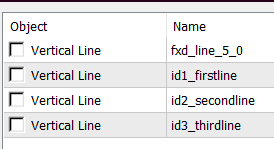
      They are in fact 4 lines printed on the chart.

      0_1613316388520_57ecc03e-7e3a-4d58-a38e-ff8beb9bf886-image.png
      fxd_line_5_0 is the one that appears first on candle 1. Eventually id3_thirdline appers on top of it.

      Well, as @miki says, there is right and wrong code in this particular situation. But the thing is that there could be a reason for "// Set variables (in)" to be at the bottom, and this is because in that Variables window you could use those P1, P2, P3 things, which are shortcuts for ObjName, ObjectType, ObjColor and the others. It's like the chicken and egg problem.

      It looks that my assumption was that in the Variables window we should be able to use the Px values after they are modified. And there could be an use case where we want this, for example:
      https://fxdreema.com/shared/5zi3oorD
      0_1613319210950_29fdf18f-54bc-42af-b934-44854e770b51-image.png

      But when I'm thinking about it, this use case is less intuitive and less possible from the one @roar stumbled upon, so I decided to fix the problem by moving "Set variables (in)" at the top. This means that the example that I'm giving above will be wrong.

      I hope that this update doesn't change anyone's project, because it is always possible that someone is doing the things in the way my example works.

      posted in Bug Reports
      fxDreema
      fxDreema
    • RE: fxDreema Last Update Error

      I found that Telegram.mqh file (and the other files) from this topic https://www.mql5.com/en/articles/2355 and I uploaded them on the server. There were some errors coming from Jason.mqh (because there they use variable names 'v' and 'c' that I use too), but I modified this file on the server, so these errors doesn't appear. But the errors that Miro posted now remain, they are coming from the code in the EA now.

      posted in Bug Reports
      fxDreema
      fxDreema
    • RE: Block Trade Closed

      I fixed it... I believe 🙂 I will give you all some extra time 🙂

      posted in Bug Reports
      fxDreema
      fxDreema
    • RE: new update bug

      I will take a look. Thank you guys for reporting the problems 🙂

      posted in Bug Reports
      fxDreema
      fxDreema
    • RE: Limit trades

      Well, I found that unfortunately the example above is very slow. I always try to find a solution that can work with some kind of permanent memory - to use the trades themselves, maybe some objects. But the results are often very slow. Here is another idea that uses a single Variable, which is a temporary memory and that EA would reset if restarted, but the backtesting is much faster: https://fxdreema.com/shared/yqieqWzAb

      The idea is that the variable keeps the number of opened trades - when a new trade is opened, the variable increments. And the variable is reset back to 0 when the fast MA is above the slow MA.

      posted in Questions & Answers
      fxDreema
      fxDreema
    • RE: Limit trades

      From what I understand, once the yellow MA is below the red MA, maximum 3 trades are allowed, no matter for how long the yellow line is below the red line. Then, when the yellow line goes above, everything resets and we are waiting for it to go below the red line again.

      Probably the best way to do this is when the yellow line is below, to count for how many bars it was below. While doing that, also count how many trades were closed in that whole period. If they are less than 3 - continue and make a new one. But thе EA Builder is not very good at making such loops. There is a block for making a loop (basically repeating itself multiple times), but there is no block for breaking this loop (to stop it), which is needed. Otherwise there is a block "(loop) break", but it works only for those "For each..." blocks right now.

      Here is another idea: https://fxdreema.com/shared/OpEWBBHjc
      Here I detect the cross with blocks 1 and 2 and I create an arrow with name SellSellSell (block 3). Additionaly I create one vertical line, only to then see where crosses happened. If there is no trade I search for that object SellSellSell. If there is none, nothing else will happen. But if there is one, I count how many closed trades were closed after the object (blocks 6 and 7). The object's Time property is used for that (in block 6). And if less than 3 trades were closed, I can create a new one (blocks 7, 8 and 9). Block 8 is whatever the extra condition needs to be, I chose something simple for the example. Otherwise I delete the SellSellSell object (the link between 7 and 10). Technically I can Not delete it here, but I guess this could help a little bit with the speed of testing. I also delete the object when the fast MA is > the slow MA (blocks 11 and 10). I can use crossover for this as well, but imagine that the EA is restarted... I just want to be sure.

      posted in Questions & Answers
      fxDreema
      fxDreema
    • RE: ARRAY OUT OF RANGE AND ERROR 4754 <<<SOLVED>>>

      This error happens in part of the code that is responsible for detecting the Trade events. I recently rewrote that code and I'm more confident with the new one. I will update it very soon 🙂

      posted in Questions & Answers
      fxDreema
      fxDreema
    • RE: Loading issue Firefox

      The problem is not in the browser, it's in the number of projects. You reached some count of projects that maybe causes the platform to respond in a weird way. I actually never tested this situation, I didn't even expected it.

      Here is the thing... if you open the list of projects, you can see that each of them has some number like mt4-1234. It's "mt4-" followed with 4 digits. When the platform is creating a new project, it tries to find available number that is not yet used between the numbers of 1000 and 9999. And I think you used all numbers available.

      In the database I can count that you have 9036 projects. Something like 9000 of them are for MT4 and there is a small number of MT5 projects. There is another limit of maximum 10000 projects to be made per person, that's why you will probably be capable of creating a new MT5 project, but not MT4.

      I will not raise the limit. In fact, I want to lower it, but you and few other people have few tousands of projects and I can't just lower the limit like that. But because I will not make it bigger, then I can say that what you can try is to maybe delete some old projects 🙂

      posted in Bug Reports
      fxDreema
      fxDreema
    • 1
    • 2
    • 8
    • 9
    • 10
    • 11
    • 12
    • 374
    • 375
    • 10 / 375