fxDreema

    • Register
    • Login
    • Search
    • Back to the main page
    • Categories
    • Recent
    • Tags
    • Popular
    • Search
    1. Home
    2. fxDreema
    3. Posts
    • Profile
    • Following 0
    • Followers 691
    • Topics 32
    • Posts 7485
    • Best 277
    • Controversial 18
    • Groups 1

    Posts made by fxDreema

    • RE: EAs not working

      @jstap It's not about the topic, but I noticed that your screenshots are always whole screen. I don't know what other people use, but I personally use this program called Lightshot to make screenshots. Not only I can easily cut just a small section of the screen (when pasted here it looks bigger and it's easy to see anything), but I can also add text, arrows, things that help.

      https://app.prntscr.com/en/index.html

      posted in Bug Reports
      fxDreema
      fxDreema
    • RE: Background option doesn't work

      What do you have here:
      0_1639419326833_dabf8bad-e208-48c6-a47a-4dd23bc5cf8d-image.png

      posted in Bug Reports
      fxDreema
      fxDreema
    • RE: Custom indicator values

      @jstap Lines are almost invisible. Even for that reason alone I wouldn't call this an indicator - it doesn't indicate anything, it's too dim.

      posted in Questions & Answers
      fxDreema
      fxDreema
    • RE: 1 Project Package

      @tristyfinance, it's not even dollars, I changed it to EUR. Well, cryptos still appear in USD, but in the past I gave extra 10% to everyone who used crypto anyway.

      So there is a problem with small payments - transaction fees. In PayPal for example, there is a fee of 3.49% plus additional fixed fee. That fixed fee is either 0.39 EUR or 0.49 USD. Here are more details:
      https://www.paypal.com/us/webapps/mpp/merchant-fees

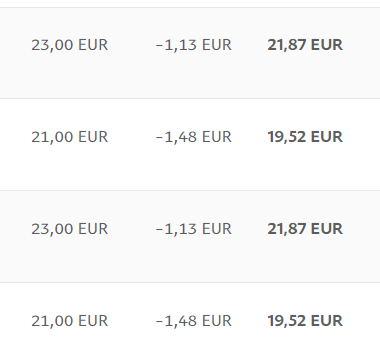
      This is actual example from some of the latest payments I've got:
      0_1639417994183_8f8ed6c1-c592-462d-926a-932e5aa4cbe4-image.png

      The fees are usually even bigger than 3.49% + 0.39. I don't know why, but for example, for 23 EUR the fee should be 0.8027 + 0.39 = 1.1927. But it's 1.48 for these particular payments. This is 6.43%.

      Let's say there is a payment of 5 EUR. Then, the minumum fee would be 0.1745 + 0.39 = 0.5645. This is 11.29% of the payment at least.

      So you see that I would rather remove the lowest price than adding even lower one. I'm not going to remove it of course, but I'm trying to explain my way of thinking about this πŸ™‚

      posted in General Discussions
      fxDreema
      fxDreema
    • RE: Changes

      @zackry No, you are in the middle level of prices as well πŸ™‚

      posted in Questions & Answers
      fxDreema
      fxDreema
    • RE: How to specify a Group Range

      @l-andorrΓ , I can at least try to finally make some kick-ass documentation πŸ™‚

      posted in Questions & Answers
      fxDreema
      fxDreema
    • RE: why does draw a line once per bar not work

      Vertical lines have only Time. No Price. You selected price value for its Time. I will suggest to manually draw a vertical line and inspect it - you will see that the only thing for it is Time:
      0_1639413838992_d1c57195-a760-4092-80c4-33660a036fdb-image.png

      As a matter of fact, your EA actually creates vertical lines, but you can't see them because they are set to appear at times like this:
      0_1639413984191_1f701249-d553-4fb8-bff4-5dd15101252c-image.png
      This happens because the Time is actually an integer value where the value of 0 means 1 January 1970. Since you get the value from the price, which is something like 1.2, the Time is like 1 second after 1 January 1970. Here is how the time looks as an integer value: https://www.epochconverter.com/

      By the way all those "Specific properties" are specific to the lines, but for some lines they don't apply. The vertical line doesn't have angle and it's all ray(s).

      posted in Questions & Answers
      fxDreema
      fxDreema
    • RE: How to move stop loss based on percentages?

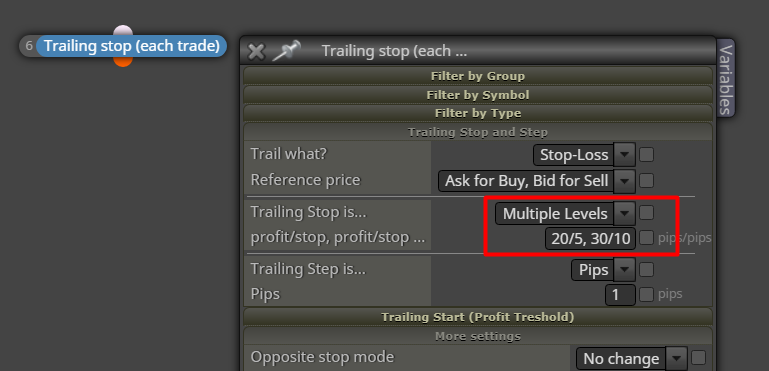
      If you want to quickly try it with particular pips levels, try this:
      0_1639412090371_129cf04f-5c9a-49d3-840f-10b4b2775100-image.png

      Otherwise something like this:
      https://fxdreema.com/shared/j8353dHqc

      posted in Questions & Answers
      fxDreema
      fxDreema
    • RE: Custom indicator values

      @jstap I don't understand what you are trying to do in the screenshot πŸ™‚

      To understand what buffers are, first look at their colors. For this indicator they were recognized quite well.
      Then, use the Trace block (connected with some Pass block in "on Tick") to see the values in Visual mode. While the EA is working manually add the indicator with the same inputs just to see it on the chart as well as the lines from the Trace block.
      I did that and saw what I expected:

      Buffer 0 is the middle DimGray line.
      Buffer 1 is the upper Maroon line.
      Buffer 2 is the lower DarkBlue line.

      These 3 buffers are continuous lines, so for them "Indicator appear" will not work.

      Buffer 3 is the Red X arrow.
      Buffer 4 is the Blue X arrow.

      For these buffers "Indicator appear" would work, because this block expects to see value that is EMPTY_VALUE most of the time and eventually turns into some different value.

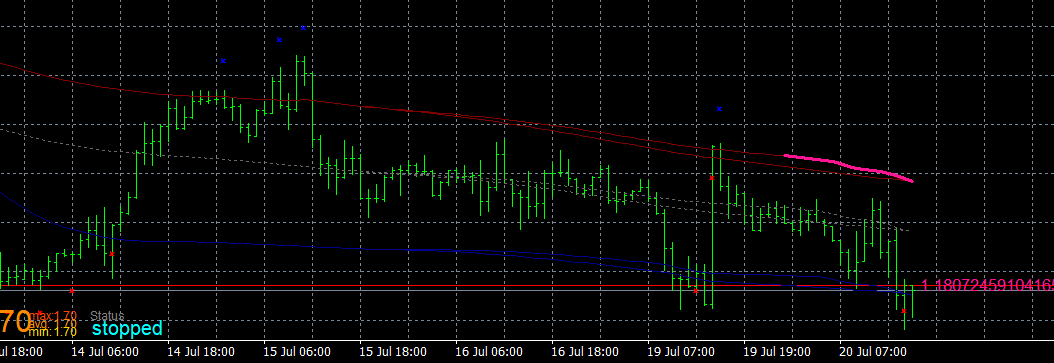
      But yes, the indicator repaints too much. Not only the X arrows, but the lines too. When I backtest it in Visual mode and I manually add it, I see the lines as expected... but at the end when I stop the test, the other instance of the indicator appears, but it looks different:
      0_1639411215034_07ca961a-3ea9-4b3e-b481-b6236b57b62f-image.png
      Both have the same input parameters. It matters when I manually add the indicator. If I add it at the end, both are the same.

      posted in Questions & Answers
      fxDreema
      fxDreema
    • RE: "Add volume" block not Working

      https://fxdreema.com/forum/post/68296

      posted in Bug Reports
      fxDreema
      fxDreema
    • RE: Problems with the "add volume" block

      It's not a bug, it's a feature :))) Try it with 0.1 initial lots and it works.

      The problem is that there is something called Lot Step. If the Lot Step is 0.01 (in most cases), you can open the following lots (assuming that the minimum lots are 0.01): 0.01, 0.02, 0.03 and so on. The difference between each possible value is the Lot Step. Above 0.1 lots the possible values are not 0.1, 0.11, 0.12, 0.13 and so on.

      The block would open open 0.012 lots if it was possible, but it itsn't. Instead, it opens whatever is the nearest possible lot. Try to open 0.012 lots manually - doesn't work as well.

      posted in Questions & Answers
      fxDreema
      fxDreema
    • RE: Changes

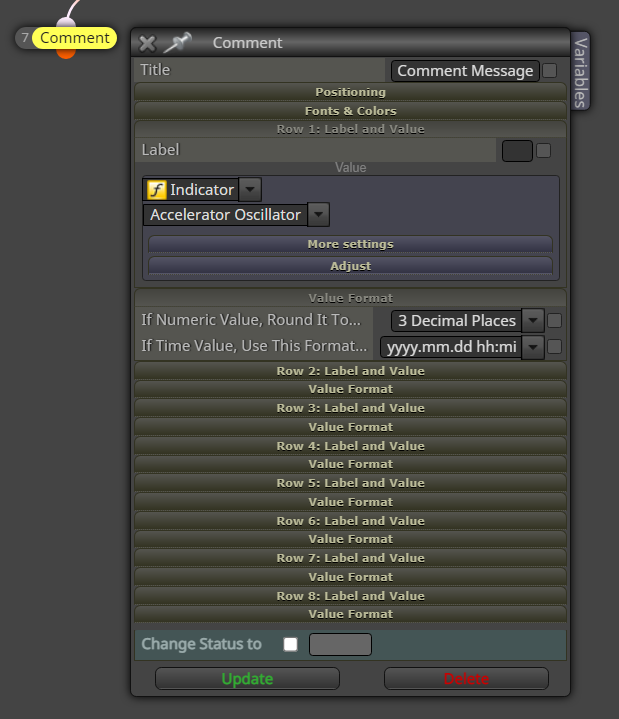
      @jstap, I added more options to the Comment block. Now it looks like that:
      0_1639404946014_6d630d24-6a2e-4598-927c-ff9304ae5da6-image.png
      I don't like it very much with so many options, but it is what it is. I was thinking in what other way we can do the same and I got an idea that where "More settings" and "Adjust" is, it can be also something like "Conversion". But this adds complexity, takes more space and I don't know if it's woth it.

      @alphaomega said in Changes:

      @fxdreema there are millions of indicators free available... this is not urgent or really needed. My 2 cents.
      And millions of expert advisors, I guess:)

      posted in Questions & Answers
      fxDreema
      fxDreema
    • RE: Login problems?

      Well, I expect that most people don't have this problem, but the idea is that I want to see if there are poeple who did have the problem :))) Because I think there is some problem, but I'm not entirely sure, maybe it was only on the PC of the person who reported it to me.

      posted in Bug Reports
      fxDreema
      fxDreema
    • Login problems?

      I think there is a problem that some people experience - they can't login with correct pass. There is an error that says "Invalid login credentials". But apparently, the login form of the forum works.

      Anyone experienced this problem lately?

      posted in Bug Reports
      fxDreema
      fxDreema
    • RE: EA not working. Any idea?

      Put "Draw Arrow" afrer block 2 - run the EA and see where or if there are arrows on the chart. Then disconnect that "Draw Arrow" and connect it after block 3. Again, run the EA and observe. Do this for block 12 and 8 as well. Eventually you will probably find after which block the arrows doesn't appear.

      By the way I'm not very sure with Monthly and Weekly timeframes. These timeframes don't exist in the Tester. I hope the blocks are working with them properly, but better check it (in the way I explained above).

      posted in Questions & Answers
      fxDreema
      fxDreema
    • RE: How to specify a Group Range

      @mantadiver said in How to specify a Group Range:

      The forum is a great source for solving many issues but I appreciate you must get frustrated with answering repetitive questions from new users. One solution might be a Premium Support service where individual questions can be answered for a fee or users can pay an additional subscription for advanced support. This wouldn't put off new users with prohibitive charges but would be a huge benefit for more advanced users wanting a guaranteed way to gain premium support.

      This topic is hard for me. I think I should hire someone to answer to the questions, but I'm afraid of this process πŸ™‚ And also I'm afraid of this Premium Support thing, although it sounds reasonable at this point.

      posted in Questions & Answers
      fxDreema
      fxDreema
    • RE: How to specify a Group Range

      @mantadiver said in How to specify a Group Range:

      The main issue for me is the gnawing uncertainty of how committed, you may or may not be to the product going forward. Certain comments & the lack of forum input over the last few years raise questions for people who rely heavily on this excellent software.
      Having said that I appreciate you responded to my post and also that you indicated an upcoming price increase in a separate post. I have no issue with a price increase. The more the product undergoes continuing development the more I would be happy to pay.

      If I have to be honest, I want to make similar site, but for crypto. The problem is that many things are very different there, mostly because in the crypto world there are exchanges instead of brokers and there are no such things like MT and MQL. So I have to make these missing things, maybe not it the same way, but something to fill the gap. Which could be used for this EA builder as well. I'm talking about the ability to run the strategy on the website with all the indicators. But this is not an easy task at all. So I'm commited by proxy, if you understand.

      The Group number is a string. So you want to convert for example 1-5 to 1,2,3,4,5. It's possible with a custom code and using some string functions. Detect that "-", get the first part of the string that is "1", also the second part that is "5". Convert these to integers. Then with a loop from 1 to 5 construct another string that will look like this "1,2,3,4,5". And then use this string as a Group number.

      But I don't know what is the performance with so much numbers. Yes, MQL is based on C++ (I think), but from my experience with it I know that sometimes it can be slow as hell.

      This is not a bad idea to show in which block the problem is. I have some idea how to make this, but I don't know if I'm ready yet to make it. But it's also not that hard to find the block by yourself. I do this every time there is a problem. Save the source code, try to compile it in MetaEditor, find the row where the problem is, and if it's in the class of some block, there is a comment above that class that says the number of the block that appears in the project. Here for example:
      0_1639249400328_dc214a42-d843-495b-9548-6dfff856c994-image.png
      The class names have different numbers, so don't look at them.

      posted in Questions & Answers
      fxDreema
      fxDreema
    • RE: Changes

      @jstap said in Changes:

      @fxdreema Can you add NormalizeDouble to blocks that display stuff like profit. To me 2 numbers past the decimal place is all I ever need, and numbers something like 100.2356189876528 are too long and give un-relevent information.

      NormalizeDouble doesn't help that much, even with it, crazy numbers still appear. DoubleToString has better potential, but if you want to show for example 5 digits, it shows 5 digits, even if they are all 0. This can be desirable sometimes.
      I was thinking to add options for this - for each value in the Comment block to add 1-2 new parameters. Or, one global options for all values. I'm not sure. What do you think?

      @gu95ckt8 said in Changes:

      @tipsywisdom Fxdreema Needs the creation of indicators urgently

      @fxDreema

      No way for this to happen urgently. There are other things that I'm working on in the background. One of the things is that I have to change how the data is written in the database.

      posted in Questions & Answers
      fxDreema
      fxDreema
    • RE: how to close manually opened trade by EA ??

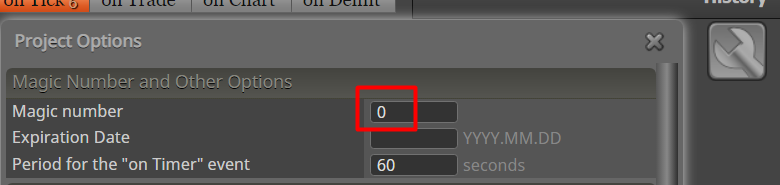
      Or, if the EA will only be used to work with manual trades, instead of setting this in every block, just set the magic number to 0 globally from here:
      0_1639084712864_9243d732-b120-4919-95c6-a625d3001d70-image.png
      This is actually that strange MagicStart input of the EA.

      posted in Questions & Answers
      fxDreema
      fxDreema
    • RE: Changes

      @stantham said in Changes:

      as you give review lets face both side of the coin fxdreema is good but it can be better if some changes are done

      Absolutely, this is true from day 1.

      Since your country is poor and you don't have money, here is an idea for you - make EA builder that is better than this one. At the time when I started it I was also broke and I was very, very bad as a programmer, I knew less than the basics. What you need is time and dedication.

      posted in Questions & Answers
      fxDreema
      fxDreema
    • 1
    • 2
    • 6
    • 7
    • 8
    • 9
    • 10
    • 374
    • 375
    • 8 / 375