No, I mean that by looking at this checkbox, you can see whether it works or not. Looking at the chart is a little bit... I think the option works.

No, I mean that by looking at this checkbox, you can see whether it works or not. Looking at the chart is a little bit... I think the option works.
It exists in the code, the function who sets the left ray is correctly called, but it seems that it just doesn't work. There is a predefined constant OBJPROP_RAY_LEFT, but MetaEditor doesn't highlight it. When you look at the properties of a trendline, there is only one checkbox "Ray". In the documentation they mention OBJPROP_RAY_RIGHT, but not OBJPROP_RAY_LEFT. Also I found this topic.
@jstap said in How do I round off Numbers?:
@l-andorrà True, but I don,t use it any way
Yeah, why would anybody use a block that has the word "ugly" in its name? :)))
By the way, maybe the right thing is to combine both blocks into one and have a selector to choose between ugly and beautiful way of printing the data. But since I made the beautiful version, I never used the ugly version and when I see people's projects, they are also using the beautiful version.
@alphaomega I think you clicked the same link twice 
I didn't know that the trendlines are moving. But they are just trendlines, what can you do with them? In my example I'm showing how to get some information from them.
Ok, just test the different money management options in an EA that looks like the first example here https://fxdreema.com/examples
It's also possible to use Condition to check the equity vs balance and then use "Close positions" to close.
Or, instead of Condition, use "Check profit (unrealized)".
Or, take a look at these Bucket blocks, they can calculate the total profit/loss from multiple positions.
Yeah, I'm often thinking about that. It will require the indicators, however. Currently they are not uploaded, only their parameters are read and the EA stays separate from them.
So I have this in mind, but who knows when. I'm currently working on rewriting the whole code (like I did few times in the past), which always takes endless amount of time
Yes, these lines are printed like lines from the indicator, here is the function:
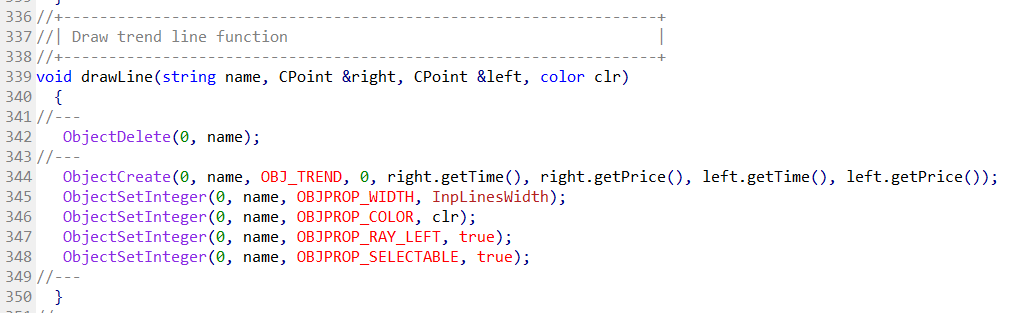
The red line has name Current_Support, the blue line has name Current_Resistance. You can deal with them as objects.
Here is something I just did: https://fxdreema.com/shared/mQVcuDd8d
Here are the results:
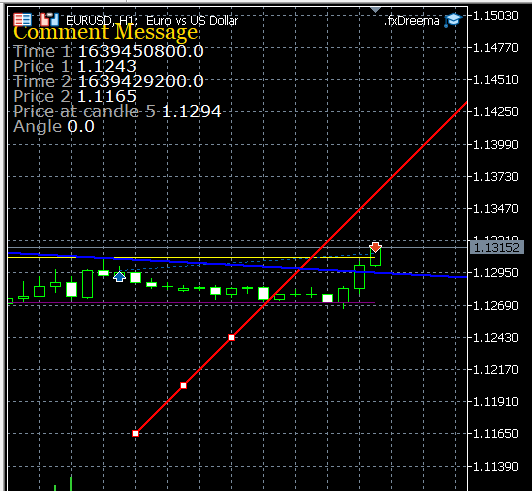
Unfortunately the times are nor very appealing, it's because they are converted to "double" values.
The angle is 0, I guess this is the case for trend lines.
I tried to get the value from candle in the future, but it gives me an error... I'm not sure if it's not possible or there is a bug.
Now we are at 47k for Bitcoin after its ATH at 69k, but my feelings about the crypto are darker than ever before. I'm tired of all these too steep ups and downs and too many strange coins entering the scene, only to be pumped and then dumped. The top coins are useless because of their huge fees. Old coins that otherwise perform well are sinking. 13 years since it all started, feels old now. There was so much enthusiasm before, but now I feel only speculation and manipulation. It doesn't look good to me.
I hope that I'm wrong as much as my last post in this topic from 23 Dec 2017, we will see.
Go to the Examples and find one that is called Partially Close (every 10 pips)
I don't recommend using "once per trade/order", because it uses temporary memory. When you remove the EA, the memory is gone. Better try to understand this "Open Price belongs to..." option. Imagine the first trade (the parent) and the following remains of it (children) and work with that.
By "gradation" I mean that the distance between each order is not the same, there is some gradation. If the first distance is X, the next one can be X2, then the next one can be X2*2 and so on. You control this with these settings. But better try them and you will see.
I don't really understand what happens at the last part where you say something about 900 and 1000 EUR. But anyway, take a look at the MM options that exist in the Buy/Sell blocks:
https://fxdreema.com/documentation/builder/money-management
You can also write your own formula at the same place where now you would see the value of 0.1 lots. This formula can use functions like AccountEquity(), AccountBalance() or others, but the end value should be in lots. The end value can also be any number, for example 0.11234, the EA will take care of this and it will take the nearest lot size possible.
The Tutorials section was a mess, I moved 2/3 of the posts here in the Questions section  I don't want to know what is the situation in the Bugs section
There are few Trailing stop blocks for different purposes. The one that is mostly used is the "(each trade)" one that works on each trade separatedly. I think you don't need this one.
Try the others. But if you don't like them as well, then it can only be something with multiple pink blocks. Here are few examples with them, but they require some understanding of how they work: https://fxdreema.com/examples#Loop-(For%20each...)
Or, if you want to get some values from multiple trades (for example the total profit), take a look at the "Bucket" blocks: https://fxdreema.com/examples#Bucket-of...
It doesn't happen, because the volume comes from the trade itself. If it opened with 0.01 lots, this is the volume, not 0.012. You can play with some variables to store the values as you want them, but this will be hard if you want to have more than 1 trade at a time. I'm not sure if the Comment of the trade can be used to store such information... it is a string value and the broker could change it on SL or TP events.
But the most accurate data you can get from the symbol infomation. See:

Maybe it was another broker.
In MT4 when you click on New Order, you can see something like this:

In MT5 there is no select-menu, but you have these arrows to change the value in steps:

I just fixed this issue
I don't know, it works for me. I tried with code 45 (I got it from here https://docstore.mik.ua/orelly/webprog/DHTML_javascript/0596004672_jvdhtmlckbk-app-b.html) that is for Insert, and it works very well.
But I think there should also be some mechanism to not detect key press too often, because what if you click the key by mistake multiple times or even workse - to put something on it. It would be better if it was key combination. This block needs some re-design
If you stop the timer, I think it stops forever... I mean until you start it from somewhere else. But yes, the Timer is the most accurate in this case, if we really care about the time. Because we can look at the ticks, but they can come very fast or too slow.
But there is another way to measure the time. If you have datetime variable and you save some time in it, which actually looks like this: https://www.epochconverter.com/, then in the future you can calculate what is the difference between the current time and that old saved time. The difference will be in seconds. I think it was seconds in MQL, because sometimes it could be in milliseconds (x1000).
In MQL you can use the TimeCurrent() or TimeLocal() function if it's easier for calculations.