I don't remember making changes that could do that. Take a look at the logs for errors. Also try what happens if you try very simple EAs.

I don't remember making changes that could do that. Take a look at the logs for errors. Also try what happens if you try very simple EAs.
@l-andorrà said in after closing profitable trades, Wait for remaining trades to profit before closing?:
Substitute your current 'close trade' paths for this (buys only)
https://fxdreema.com/shared/9G4rdekBb
Not tested, but that should work.
This is strange. The first 2 blocks are working for the loop - some trade is selected and we reach block 3 when that trade is profitable. But then block 3 is a condition. When the first block runs, it will load the first available trade, then run block 2... after a moment it will load the second available trade, then run block 2 again... but this all happens as quickly as possible. The only thing that slows the whole loop is block 4, because when you close a trade, it takes second or two.
Then this blue block is strange to me. Why not the pink "close" block?
The whole thing looks to me that you are trying to initiate the closing procedure, assuming that while the trades are being closed, some time can pass and the MA values could change. This is strange. I'm also not sure if wralyn was asking for that, but I don't telly understand what he means. I have some feeling that he wants to delete the currently profitable trades and "mark" the rest for deletion at a future time, maybe not caring about 500 ema anymore.
Browsers can zoom when you hold Ctrl and move the mouse scroll. But doing that, everything zooms in or out. There is no zoom for the blocks area only
if this is for visual purpose only, meaning you want to make a custom indicator, then of course the best is to make that - a custom indicator that prints arrows based on CCI. But I'm not good with custom indicators and if you ask me how... I don't know 
This option is missing in the Draw fibonacci block probably because it's a little bit complicated to make it. It could be similar to this one:

This works for numeric values, but imagine having longer descriptions separated with comma. So it's simply interface issue.
Each one of these Draw blocks should have all of the available settings (in MQL4/5) for the particular object.
I think the issue is that when the lot size is not valid and needs to be rounded to the nearest valid value, the EA rounds it to the nearest... maybe from the up side. I think it all happens in one of my functions called AlignLots in which I have this row of code:
lots = MathRound(lots/LotStep)*LotStep;
LotStep is the minimum lot step, normally 0.01 or 0.1. MathRound is described like this:
The function returns a value rounded off to the nearest integer of the specified numeric value.
The calculation is a little bit complicated, yes. This is mine:
size=((value/100)*AccountEquity())/(sl*((TickValue/ticksize)*point)*PipValue(symbol))
This is part of the code where this is calculated. size is obviously the result that we expect, in lots. value is the input value, the % to risk. sl is the stop loss, I think in pips. The rest of the formula is to make sure that everything works in any chart. Here are some of the variables:
   double TickValue=MarketInfo(symbol,MODE_TICKVALUE);
   double point=MarketInfo(symbol,MODE_POINT);
   double ticksize=MarketInfo(symbol,MODE_TICKSIZE);
what is tickvalue and what is ticksize... I don't really remember I think point is 0..00001 if the broker is 5 digits. PipValue() is a function that I wrote and this function makes it possible for these settings to work:
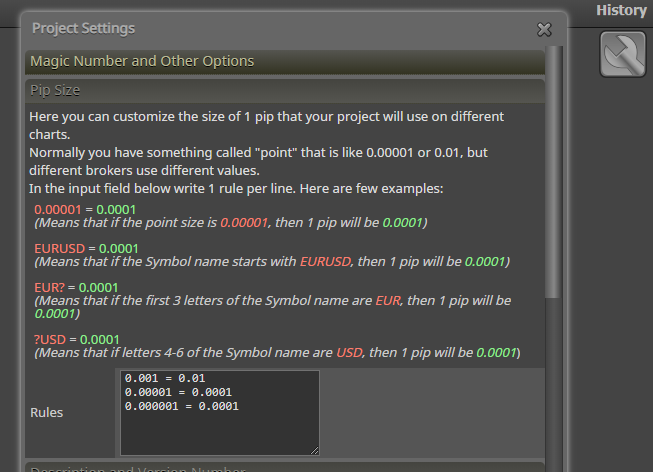
So obviously these are some crazy calculations. They can be simple if you omit all these tick value/size, pip and point things.
Yes, the ChartScreenShot() function is used for that. And that function has 2 arguments for width and height. In the block I see that the default values are empty values (which means 0), but in this case in the code I see that the current chart size is used instead of 0 I tested it and it seems to work properly for me as well. If you want, share the settings that you have in this block
Money management calculations happen inside the block and they can't be accessed from outside. If you want to display some information and then use it in particular block, then you should make the calculations outside this block.
By the way, in the past I was thinking about a little bit different way of opening trades. To have one Trade block Instead of Buy and Sell blocks, and some other block for doing the SL/TP calculations, and another block for the lot size calculation. In other words, instead of having all-in-one block, to have multiple block, one for each step. But my reasoning for this is not to be able to get some data (lot size, sl, tp) before buying or selling. I was thinking about this so we can connect one chain of blocks and that chain to be able to work for the buy part and for the sell part. Because now very often we have the same sets of blocks for both sides.
Here is what I made: https://fxdreema.com/shared/ZfD9Tt4Nc
I have 2 variables:

To simulate the indicator I have blocks 5--6-7 where I create a new arrow only in some candles. In your project these blocks should be like: Condition -> Once per bar.
At block 8 imagine that you just detected the appearance of a new candle. So, I increment ArrowsCounter with 1 and I set ArrowDetected to "true" to indicate that within this candle I detected a signal.
In block 10 I check how many candles I detected. And if I detected enough (in my case 4), I can continue doing whatever needs to be done. But first I reset ArrowsCounter to 0, so the counting starts again. "Draw Line" is to see when I detected 4 arrows in a row.
If no arrow is detected inside the candle, we need to start counting again. So, in blocks 1-2-3-4 what I do is once per bar to check if ArrowDetected equals to false and reset ArrowsCounter to 0 if this is the case. Also, block 1 passes in the beginning of each new candle, so here is where I reset ArrowDetected to false, so then in the middle of the candle it can be set to true.
Do you have buffers for the indicator, what is in its Colors tab?
Also you can try to doanload .mq5 file, rename it to .mq4 and import it back. I think the result will be MQL4 project.
I tested it with "Delay" block after block 43 and it looks that the object is deleted, but remains on the chart for some reason... until I move the chart with the mouse. I added function ChartRedraw() at the end of "Delete objects" and I think it works now.
Wait, what do you mean by "close of candle high" and "close at low of candle"?
When you see the word "Trade", it means running order. While pending orders are these Stop or Limit orders who are waiting to be triggered and become "trades". I think you are mixing the blocks that are supposed to work with trades and pending orders in a way that is not correct for the trading logic. For now don't use "Once per trades", I don't think you need this one. I don't even remember me using this block
I guess you have some condition blocks before Buy/Sell. Which one do you suspect that is not working when it should work at that date?