They are on different places if you are testing or running live. Search for them in Windows Explorer and you will find them. I think they are either in MQL4/Files or in tester/files, but I might be wrong.

They are on different places if you are testing or running live. Search for them in Windows Explorer and you will find them. I think they are either in MQL4/Files or in tester/files, but I might be wrong.
Maybe you get wrong information in that Comment block that is on the top. its number is 7190 and it will run before some of the blocks where the calculation happens - 7193, 7197 and so on. Block numbers matter when they are connected like that. There are 9 blocks connected after the Calculate block and the one with the biggest number is 7229. The Comment block (7190) should have a number that is at least 7230 in this situation.
I think the answer is logical - if the compiler is the same, then the output files are also the same, so the security is the same. Well, I think that technically every time you compile a file, the contents of the output file are not exactly the same, maybe there is something that changes every time. Or at least this was before. By "same" I mean that they are produced by the same program - metaeditor.exe.
By the way, still there can be difference between the files generated on the server and locally. Because there are few options when you compile them. Normally you can get .mq4 file from somewhere, open it in MetaEditor and hit Compile. But it is possible to create a project in MetaEditor, which contains one extra .mqproj file and then the project has this:
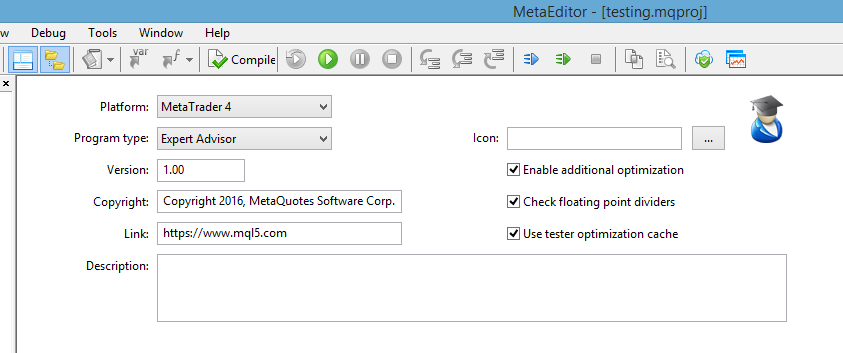
As you can see, there are some checkboxes and they for sure change the contents of the output file. Also the speed of compilation. And sometimes the ability for the EA to produce bugs... I noticed few times that the EA behaves differently when the additional optimization is turned on or off. Maybe these are the default settings for every .mq4 file without .mqproj. I think on the server some of these options is turned of.
These functions are also very easy to use - AccountEquity() and AccountBalance() - so you can use them directly in some input field. For example AccountBalance() * 0.01 or AccountBalance() * 1 / 100
For martingale there are multiple settings that can change the behavior so much. For example, the "Multiply on loss" parameter is 2 by default, but it can be 0.5, which will make every lot after a loss to be half of the previous one. But the changes are not liner in this case, and you want them linear. What is linear is "Add lots on loss", which is 0 by default. I didn't tried it with negative values, but it could work. If it doesn't, there is also Custom Sequence option that you can use instead of Martingale.
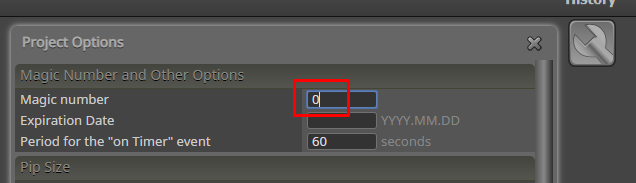
If this EA is supposed to work with manually created trades, the easiest thing to do is to set this to 0
By the way "Once per tick" is not needed. This block doesn't create the Tick event, it's some kind of a filter that can be used if you have 2 or more blocks connected to its input and you want to pass only once in the same tick.
If in the block you clear the text, this popup will not appear.
Expert Advisor - the program that will trade instead of you. You drag it over a chart and leave it to do its job. It will work until you stop it.
Script - I imagine scripts like extra buttons on the interface of MetaTrader. You can have for example a script called "Close Everything" and when you run it, it will close all orders. You don't have such button on MetaTrader, but you can make it as a script. A Script works when you double click on it. It does its job and exits as soon as possible. It doesn't work over the time as Expert Advisors do.
https://www.metatrader4.com/en/brokers
The software on the broker is also provided by MetaTrader. We can assume that if you place trades with magic number 0, this will make them look as they are created manually... but I would not bet on that. I don't know for sure, because I'm not a broker and I never worked with MetaTrader Server, but there is probably extra information sent from the client to the server when a trade is created. I don't see why not. But you can try the EA and see whether the broker will stop it from working. If you are able to trade with an EA, I don't see why you are afraid of such rumors.
On the server the EA is generated using the same compiler that is used locally, the metaeditor exe. Well, not always the latest version, but it doesn't matter. Then the file is downloaded. It is as secure as if you compile it yourself.
I have some ideas from where this problem can come, but it can be hard for me to easily fix it, because I have some ugly code there that needs extra care. The problem is that "Shift" parameter is already the actual name of the "Candle ID" parameter and there is a collision. It would be the same if you have parameter "Period". But I can tell you how to escape the problem - just rename the input parameter to something else. Parameter names of custom indicators doesn't really matter that much.
I got endless amount of Alert messages and the indicator seems to be loading.

Do you have the same problem with other indicators, or it's this one only? Also, what if you don't use variables for it and you try to load ATR with default settings?
There was a bug that is years old. I think I fixed it.
Fibonacci is an object, there is no difference if it's created by you or by indicator. You can find it in Objects List (Ctrl+B on the chart). So, you can work with it as an object. Here I wrote something about that (at the bottom):
https://fxdreema.com/tutorial/builder/chart-objects#3
And also here are 2 examples:
https://fxdreema.com/examples#Chart-Objects
I think I fixed this, try to import the project again 
So you place positions manually. Is the EA capable of working with manually created positions, because normally the EA uses some magic number, which is different than 0 (for manually created positions the magic number is 0)? Maybe the EA is doing its thing because it doesn't see that manually created position.
This is where you control the magic number - globally for the EA or in a single block:

The URL input is a "string" field, but you know that when you write code, you put " before and after the string". Well, not for that input field, because " is put after that when the project is generated. When you write ", the builder thinks that this should be part of the string and it is escaped. So, what to do...
This one is old fix. Put "" + in the beginning and + "" at the end of the input field. Something like this:
"" + "your url address" + Symbol() + "other part of the address" + ""
The desktop version uses very old format. On the server I have converter that should properly convert this old version, but obviously it fails on variables. I was able to create the same problem here, so I will try to fix it.
This video is unavailable.
I think that you also want each trade to has bigger lot size than the one before. Or, to make TP bigger every time.
There is another way - "Check profit (unrealized)" and then "Close trades". This way the trades will be closed when certain profit of money is reached.
Is this MQL4 or MQL5? I guess it's MQL5, because most of your projects are MQL5. I made a simple project for myself and it looks that it works as I expect. Can you make such simple project that doesn't work as expected, or which of your projects is the one that fails?
