It sounds to me like something like this: 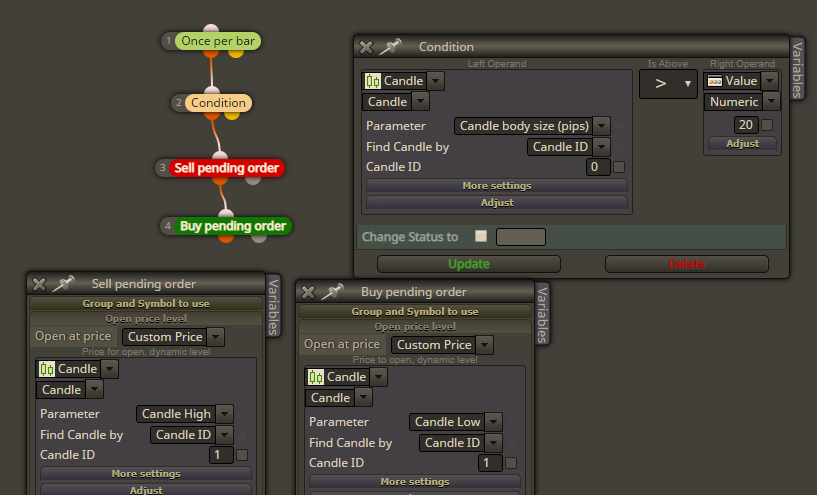

What order needs to be created and when? I mean, what is the order of actions?
There is a block "Round numbers detector", but if you only want to draw all of these rectangles on the chart, I think this is a job for some custom indicator
The tick event is fired when there is a change in the price, which is what is important in trading. If the price doesn't change, there is no reason to trade, so that's why the Tick event is the main event for expert advisors. If you don't care so much about the ticks, you can use the Timer. Better check if everything is correct when you test the EA, because the Timer event there is a little bit fake.
Otherwise when the EA is working live, these blocks in the screenshots are working pretty fast and I don't think there will be any CPU benefit. Well, I never checked that, but this is what I think.
If you want to make very custom rules and using less blocks, you can always use some of the MQL4 time functions (https://docs.mql4.com/dateandtime) in the second Condition block
Here is some example where I extract the currencies from the symbol name of one trade:
https://fxdreema.com/shared/tT6MjUDEd
Another example:
https://fxdreema.com/shared/xPfLEwQS
Here I have these global variables:
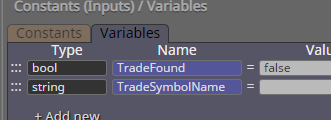
TradeSymbolName is a symbol name that is coming from somewhere... I don't know where, that's why I set it to two different values in blocks 3 and 6.
Then in block 4 (block 7 has the same code) I'm scanning all running trades that match one of the currencies in TradeSymbolName. If match is found, then TradeFound is set to true.
Shared projects (with /shared/ in the link) are like the example projects. When you open such project, you can modify it, but only you see what you modified. For every person who opens the shared link, a new copy of the project is created and only he can modify it. After a day or something this temporary copy is automatically deleted. The idea is that someone can share his project and someone else can see it + he can modify something small in it and try it, and on the next day the project is refreshed. So, don't make serious work over such a project. If you want to copy it, save it as .mq4/.mq5 file and then import this file in your projects.
@laneciar Everything in "Buy now" block happens at the time when the trade is created. Except the expiration settings, because I wrote a system that would check the time on every tick outside this block. But SL and TP are just levels and they will be placed at certain level and that's all. To close the trade on indicator signals, then you need to do it outside this block - to detect the signal (with Condition for example) and then to close it (with "Close trades").
But when you use "Close trades", it's important to NOT allow this block to close any trade immediately after the trade is created. Many people make this error, because the conditions to close the buy are the same as the conditions to sell, and the conditions to close the sell are the same as the conditions to buy. A loop happens and the EA buys and sells non stop. Take a look at the third example here - https://fxdreema.com/examples - where I used two "Close trades", but because of the settings in the blocks no such deadly loop happens.
If the EA gives error, then something is wrong with the code you wrote
Is this word "pipette" official word to describe this kind of value? I never knew how to describe it and in the blocks now I use "price fraction". I found this https://forextradingsystem1.com/pips-vs-pipettes-know-the-difference/ and here one pipette is what one "point" is in MetaTrader.
In fxDreema the size of 1 pip can be customized. And by default this is customized in the project settings. Click on this icon below "History" and you sill see these rules for pip size.
In all blocks, where you see "pips", the size of 1 pip depends on these rules I just mentioned. In some blocks for certain inputs there are multiple ways to select a value, this for example:  You can see 3 "Custom..." options here. For other inputs it is only one way, as you mentioned. Technically I can do this for all options, but it will be full of drop-down inputs.
The turnover option is there because of the way this block works. It compares values from the current tick with values from the previous tick, and eventually it detects a crossover. But this crossover is on such a small level, it really is detected only by looking at 2 neighbor ticks, so what stops the same crossover to be detected few ticks after? (because the price goes up and down). So, the turnover pips are there to prevent this from happening - the price needs to travel certain distance, then go back, and only then a new crossover could be detected. But sometimes it can be interesting when the price and the indicator are moving in the same direction very fast, the turnover could become useless 
I personally don't understand how and why people use ZigZag For the other blocks... I made them looong time ago when I was in this mood to create as much stuff as possible. But I don't like these blocks now and I keep them only because if I remove them, someone will complain. They do what some custom indicator should do, but in worse way.
It's enough to create the button once, so use Draw Button in Init, not in Tick. Block 10 is only to be used in "on Chart": https://fxdreema.com/demo/mt4-event-chart
Take a look at the 3rd example here: https://fxdreema.com/examples I think this idea can be adapted for your case.
Candle ID is the number of candle. 0 is the current candle, 1 is the previous and so on. Candle 3 is this one:
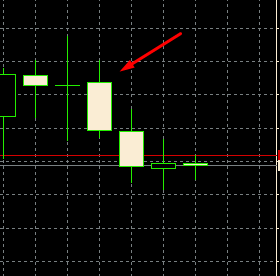
To get its Close, Candle ID should be 3. Also, to get MA that is above/below this candle, also set Candle ID to 3.
Try this example: https://fxdreema.com/demo/mt4-loop-add-to-volume-on-loss The result is that "add to volume" creates new trades with the same SL and TP with their parent trade.
There is no special block for such low level thing, but In "Custom MQL code" this can be done
The indicator works for me. It only has 1 buffer that can be accessed from the EA, not 3 or more.
"Condition" block always gives continuous signals. This block checks some values and passes (to one of its outputs). Normally this block is somewhere in "on Tick", so it runs over and over again, on each tick. If the values doesn't change so much in the period of few ticks, the block would pass the same way once for each of these ticks. That's why "Once per bar" can be used to produce only 1 signal of all these passes. If "Once per bar" is above "Condition", then the condition would be checked at the beginning of the candle. Or, if "Once per bar" is below "Condition", then "Condition" could pass in the middle of the candle and "Once per bar" will also pass at that time - in the middle of the candle.