fxDreema

    • Register
    • Login
    • Search
    • Back to the main page
    • Categories
    • Recent
    • Tags
    • Popular
    • Search
    1. Home
    2. fxDreema
    3. Posts
    • Profile
    • Following 0
    • Followers 691
    • Topics 32
    • Posts 7485
    • Best 277
    • Controversial 18
    • Groups 1

    Posts made by fxDreema

    • RE: Is FXdreema a SCAM

      It is not a scam. The sad truth is that most of the time I'm lazy to look at people's questions and often I'm late with days. I'm talking about the forum, forum messages, emails... everywhere 🙂

      About Bitcoin payments, I don't have system to automatically approve the payments... yet... I'm working on that. To see when someone paid I rely on a message from Electrum, but if for some reason I restart my PC, then I can forget to open the program and I'm not notified in time. Now I think I can just use some mobile wallet 🙂 But in any case, I'm secretly giving more days for Bitcoin people, so even if I'm late with day or two, I compensate that.

      posted in Questions & Answers
      fxDreema
      fxDreema
    • RE: make EA close all pending orders after Tp triggered

      I think I fixed it

      posted in Questions & Answers
      fxDreema
      fxDreema
    • RE: Need help with fractals

      Here is what I did. First, I used this custom indicator - https://www.mql5.com/en/code/7982 It works like the one in MetaTrader, but it is a custom indicator. Why? Because only for custom indicators in "More settings" there are extra settings.

      https://fxdreema.com/shared/EqWKTmPod

      Small problem is that in all Condition blocks my "My settings" are closed, which is because I use the current Symbol and Period settings... and "My settings" stays open if one of these is something different.

      In block 1 I'm detecting that the newest fractal is Up (red dot above the chart):
      0_1550736122626_70260d85-b751-4eb0-82d0-c45b3ad77ab1-image.png

      Block 2 is to limit the signal to 1 per bar.

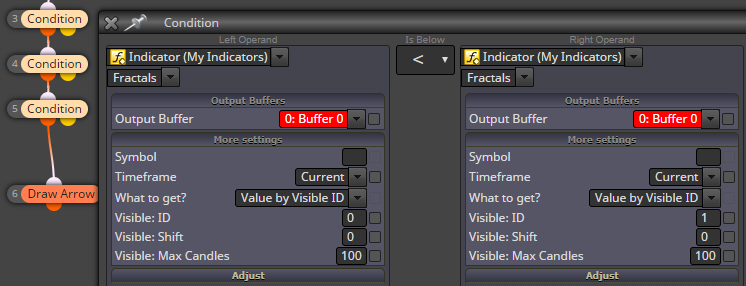
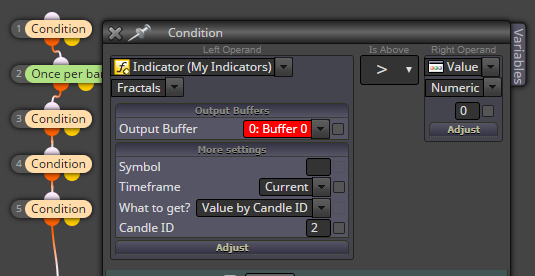
      In block 3 I want to know if the newest Up fractal is < than the previous Up fractal. See that I'm looking for "Value by Visible ID", where Visible ID is the relative number of the fractal on the chart - 0 is the latest one, 1 is the previous:
      0_1550736315674_2054a9c2-9449-4dd8-be33-657da5ddecd2-image.png

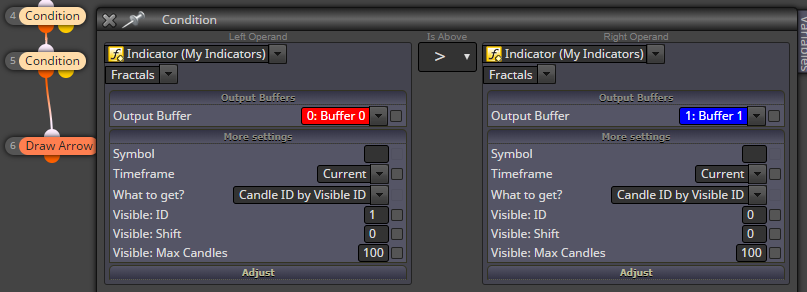
      In block 4 I check whether the position relative to the current candle of the previous Up (red) fractal is bigger than the position of the latest Down (blue) fractal. Or in other words, whether the previous red dot is left of the latest blue dot:
      0_1550736333635_4f368f7b-c086-4564-abeb-45b4337017a6-image.png

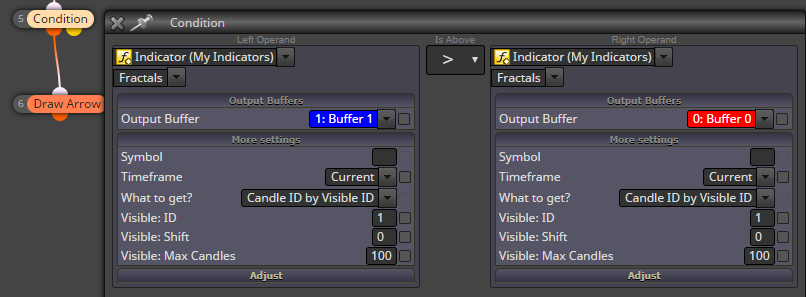
      In block 5 I check whether the previous blue dot is more left than the previous red dot. Because it looks that the indicator can place two consecutive Up arrows, or Down arrows.
      0_1550736503960_590a5b7f-ae6c-4adc-b914-8978b58d0e3f-image.png

      posted in Questions & Answers
      fxDreema
      fxDreema
    • RE: Complication Errors

      if you really want to have inputs, try Constants - https://fxdreema.com/tutorial/builder/constants-and-variables

      posted in Questions & Answers
      fxDreema
      fxDreema
    • RE: Trend following EA, manually trigger BUY to set 50 pips TP & SL, when hit TP open new Buy Entry with TP (50 pips) and SL (50 pips). To continue this loop, when price hit SL to automatically Open SELL 50 pips TP & SL?

      Under "on Trade" better don't put that Buy block above the event-filter purple blocks. Like that you would see a new trade every time some trade event happens...even the creation of the buy trade itself... the chance is that you now have endless loop of buying trades.

      First of all, for the EA to work with manually created trades, do this:
      0_1550688730449_1e224310-9791-47be-ac14-8c76a3a9a9a2-image.png

      To set SL/TP on a newly created trade, you can use the "on Trade" event, but with something like Trade created -> Modify stops

      It's similat to detect when TP or SL is hit - with those "Trade closed" blocks. Open their parameters and you will see options. You can detect the type (buy or sell) also in "Trade closed". "For each Closed Trade" are not needed.

      posted in Questions & Answers
      fxDreema
      fxDreema
    • RE: Complication Errors

      I think this is a bug when this check is used:
      0_1550687236788_c715d548-3476-49d0-afc6-f5ade1a3a1f4-image.png

      And I see you checked almost all parameters... there is no real need to do that. These are if you want to make some quick optimization and you need few parameters to be input parameters of the EA. I know that some people are checking all of those, but I don't know why, it's not mandatory. Maybe they want to try different parameters in MetaTrader, but I there is a better idea. What I personally do is to change the parameters in the project itself and export a new EA every time. This plugin helps - https://chrome.google.com/webstore/detail/fxdreema-download-files/lnlppnklledgeaafojedgemkdhjdgdkp

      posted in Questions & Answers
      fxDreema
      fxDreema
    • RE: draw arrow

      I also don't understand the question. "Draw arrow" is a block who can print an arrow on the chart and it has nothing to do with Buy and Sell blocks.

      posted in Questions & Answers
      fxDreema
      fxDreema
    • RE: Delay funtcion needed

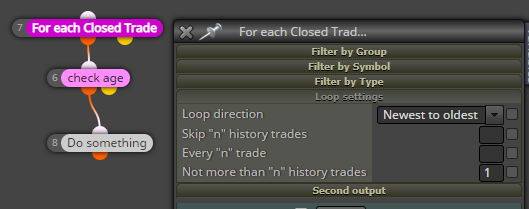
      I would ask for the age of the last trade, something like that:
      0_1550686893968_36a18fb6-d239-4299-9d52-f1289c8640d7-image.png

      This will also work if you restart MetaTrader, because no temporary variables are used.

      Also this block "Check profit (period of time)" can be used I think. The idea is that you can define certain period of time and ask for the profit... to be 0 I guess.

      posted in Questions & Answers
      fxDreema
      fxDreema
    • RE: price is close to support or resistance before trading

      Can you make a simple example that shows the problem? I can see your latest project, but it is big and also Buy and Sell blocks are disabled

      posted in Questions & Answers
      fxDreema
      fxDreema
    • RE: come chiudere un ordine aperto manualmente con il suo numero

      When I use Google Translate, it says that you want to manually close a trade with its number. But what number, the ticket number? And manually... you mean using your mouse in MetaTrader? I don't understand the question, because everybody know how to close a trade manually.

      posted in Questions & Answers
      fxDreema
      fxDreema
    • RE: Indicator RSI con Ma

      What is this, you want to work with RSI and MA, or have MA over RSI, or RSI over MA? By the way, I don't know how to put MA over another indicator. I know that this is possible in the terminal, but I don't know how to do it in the EA

      posted in Questions & Answers
      fxDreema
      fxDreema
    • RE: how i do that in fxdreema in equity ?

      To make things simple, don't make hedging strategies. As I said so many times, these strategies only make things complicated and it seems that this topic is a proof of that. The whole idea of trading is to make one number bigger - the money you have. There is nothing magical in using opposite trade instead of SL. So it's better to just close the trade and continue with the real strategy.

      posted in Questions & Answers
      fxDreema
      fxDreema
    • RE: Horizontal line with previous highs and lows.

      So the red line is a false break, because the candle closed below the line. And the blue line is a true break, because it closed above the line. It sounds to me that you want to check whether Candle Close is above the line, but after the candle closes... which makes it candle 1.

      posted in Questions & Answers
      fxDreema
      fxDreema
    • RE: Lot size based on a variable value?

      It should be possible. In any case, if something doesn't happen as expected, look at the logs for errors. Also note that the block will take the input value and turn it into the nearest possible value, because you can't open any lot size, there is minimum, maximum and lot step.

      The type of the variable should be "double".

      But I see your projects and I can see that now you are setting this value in the Init section... I don't think it can be very dynamic that way.

      Are you woman?

      posted in Questions & Answers
      fxDreema
      fxDreema
    • RE: ATR Value

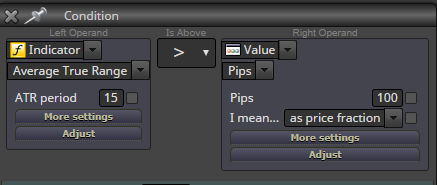
      Try this: 0_1550591199660_50d677d5-856c-429f-b5cc-d7012478e02c-image.png

      posted in Questions & Answers
      fxDreema
      fxDreema
    • RE: Trying to set buy/sell at candle close not working right

      I can see your project and I see that you have 2 Condition block in a row, both of which have x> inside. The problem is that x> detects a crossover that happens on the given candle, but before of after that candle you cannot find the same crossover. With your conditions you are saying that you want 2 separate crossovers (one with MA, one with Awesome Oscillator) to be true at the same candle. This could happen sometimes I guess, but I think that you don't want that.

      So, try with one crossover. Change the other with > or >=. The thing is that if now line A is > than line B, then for sure line A crossed line B somewhere in the past.

      Also I don't like where you placed the blue blocks - break even and trailing stop. Take a look at this example: https://fxdreema.com/demo/mt4-wrong-closing-rule
      Also, only one of these blocks can work for both, buys and sells. So in short, disconnect block 6 from block 3 and remove blocks 8 and 9

      posted in Questions & Answers
      fxDreema
      fxDreema
    • RE: make EA close all pending orders after Tp triggered

      The Trade event fires when there is some trade... event. Like a new trade created, deleted or modified. So the blocks under "on Trade" can run on any of these occasions. But you normally want to detect what exactly happened and that's why those purple blocks (like Trade closed) are used, so you can filter the particular trade event that you want. And of course, these blocks should be located at the top.

      posted in Questions & Answers
      fxDreema
      fxDreema
    • RE: saving lot size in variable

      Also instead of Numeric -> Value -> OrderLots() you can use that:
      0_1550590185923_354073aa-23e8-4204-a04c-ec7cf70091b1-image.png

      posted in Questions & Answers
      fxDreema
      fxDreema
    • RE: Add a new trade when the Close is < of the last open trade - 20 pips, and keep the same take profit of my last opened trade

      I think you want to add to volume on loss, here is an example - https://fxdreema.com/demo/mt4-loop-add-to-volume-on-loss

      posted in Questions & Answers
      fxDreema
      fxDreema
    • RE: Please Check Indicator Appear

      It should work in the same way. If you find a difference, show me small example of how you draw it and I will compare that in MT4 and MT5

      posted in Questions & Answers
      fxDreema
      fxDreema
    • 1
    • 2
    • 23
    • 24
    • 25
    • 26
    • 27
    • 374
    • 375
    • 25 / 375