fxDreema

    • Register
    • Login
    • Search
    • Back to the main page
    • Categories
    • Recent
    • Tags
    • Popular
    • Search
    1. Home
    2. fxDreema
    3. Posts
    • Profile
    • Following 0
    • Followers 691
    • Topics 32
    • Posts 7485
    • Best 277
    • Controversial 18
    • Groups 1

    Posts made by fxDreema

    • RE: candle berakout EA

      https://fxdreema.com/shared/BAO1mL5M

      I added the second Condition from me, to check the size of the previous candle, because without it there are too many trades. Maybe the upper wick should also be checked, and other checks too. But this is for example.

      Here is why I used blocks 5 and 6 - https://fxdreema.com/tutorial/builder/things-not-to-do#1

      posted in Questions & Answers
      fxDreema
      fxDreema
    • RE: Using Supertrend Indicator

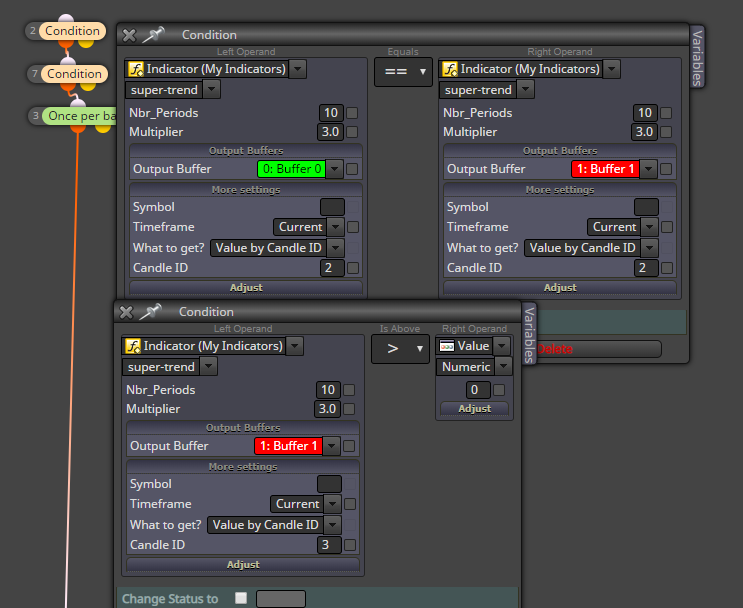
      This indicator works fine. If one of the line is not visible, the value in the buffer is EMPTY_VALUE, which is expected. Note that if one of the two sides in "Condition" equals to EMPTY_VALUE, then the block doesn't pass.

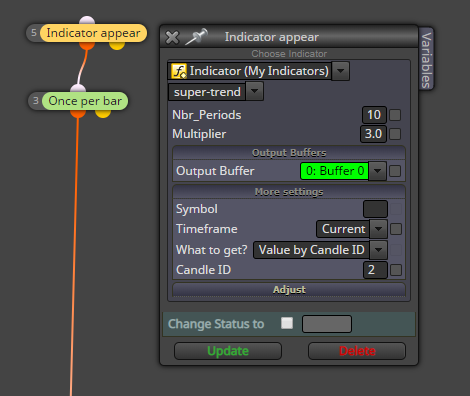
      So I used "Indicator appear" to detect line changes, it works. Well, if I use candles 0 and 1 I detected false signals... it looks that the indicator repaints a little bit. So I used candle 2:

      0_1550588521655_6526c6de-9107-488a-87cd-2e415ef53712-image.png

      To do the same with "Condition" block is a little bit tricky, but I did it like that:
      0_1550588467350_b920de11-121b-4d73-9681-800579c21ae7-image.png
      Normally you should not use == to compare prices, but in this particular case I was able to use it.

      posted in Questions & Answers
      fxDreema
      fxDreema
    • RE: A simple EA question

      ART gives us values like 0.0010. I call them "price fraction", because this is like a small difference between two prices, like a small fraction of the whole vertical axis of the price. And to use that as a SL value, instead of "Custom (price level)" select "Custom (price fraction)". Price level - this is the value as it is.

      About MT5... in which mode do you have it, because the profile can be in "netting" or "hedging" mode, and things are different.

      posted in Questions & Answers
      fxDreema
      fxDreema
    • RE: ID 1 = 50% of ID 2

      0_1550007560002_18aeab1c-d75c-43a4-8408-9a54902b6b04-image.png

      0_1550007630964_28328ed3-9a37-43e3-8bdb-fc6682a9386f-image.png

      0_1550007658352_3dcd00b5-a94e-4246-bd2b-086741aa04a7-image.png

      posted in Questions & Answers
      fxDreema
      fxDreema
    • RE: How to buy/sell/tp/sl at a main price level like 1.13, 1.14 ... etc?

      There is one block "Round numbers detector" which can pass at such levels.

      posted in Questions & Answers
      fxDreema
      fxDreema
    • RE: Is it possible to change the value of an indicator using an EA?

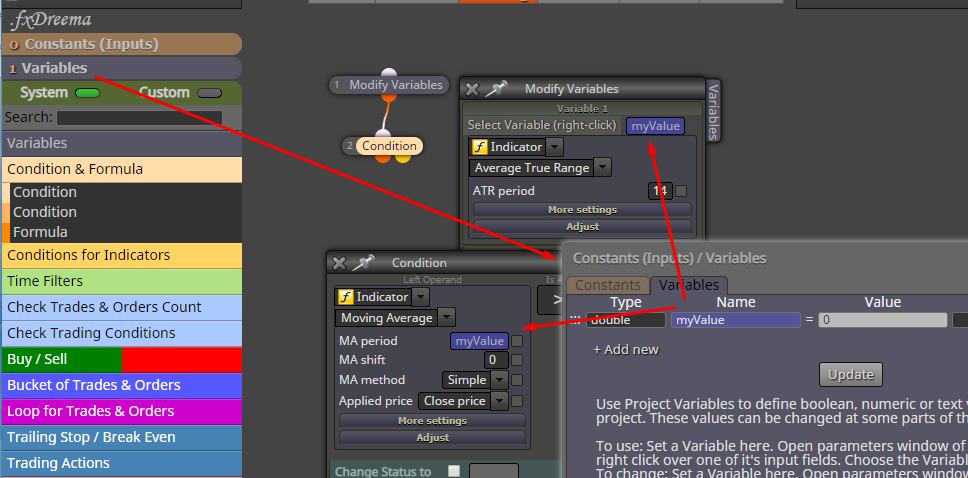
      Create a variable with some name. Then modify it. And then use it.
      That blue thing can be put there when you right-click on the input field. I used Moving Average for the screenshot, but it can be anything else. But ATR has a little bit different values.

      0_1550007052501_5142c291-ffe3-4c94-ad11-d823dc51bf78-image.png

      posted in Questions & Answers
      fxDreema
      fxDreema
    • RE: onTester()

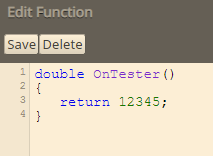
      Here is another idea. Go here: https://fxdreema.com/studio/MQL4 And create a new custom function (lower right corner, hit button New). Then write the OnTester() function with its contents.... something like this:

      0_1550005085776_6e37f5a1-91ab-4681-b815-423c36c8c1a5-image.png

      Then mention that function somewhere, for example in Init:

      0_1550005124789_abe12727-fb55-4af8-a1b6-77265aa0dbef-image.png

      Because the function is mentioned in the block, the EA generator will search for the function in the custom functions and will place it in the output code. Because this function is actually a system function, MetaTrader will run it when its needed.

      if (0) => this prevents the function from running, because we don't need to run it.

      posted in Questions & Answers
      fxDreema
      fxDreema
    • RE: I need help with a custom indicator implementation

      Yes, as I described here: https://fxdreema.com/forum/topic/6699/problem-with-out-buffers-pipfinte-trend-pro-any-help/8

      I think I should add some filters to disallow empty spaces or turn them into _

      posted in Questions & Answers
      fxDreema
      fxDreema
    • RE: A simple EA question

      It looks that it should work, but it really depends on the values you provide. Look at the logs to see if there are any errors.

      posted in Questions & Answers
      fxDreema
      fxDreema
    • RE: If H1 EMA, 9>20>50>200, then Open BUY (Close @ 20>9) If H1 EMA, 9<20<50<200, then Open SELL (Close @ 20<9) please help me to programme this

      I imagine few Condition blocks 🙂

      posted in Questions & Answers
      fxDreema
      fxDreema
    • RE: Problem With Read Object Description

      First make sure that you can really get the value, let's say in Comment block. If yes, then maybe the problem is that it is a string value, it is a text, which also contains "." and this probably makes it impossible to compare it with a numeric value. Comparing it with another text will not work for sure. But since there is no direct way to convert it to numeric, I will suggest plain MQL4 code. Something like this:

      0_1550001715645_5e84dbae-b6ef-4bee-a02c-41149ccc7e78-image.png

      I used these functions:
      https://www.mql5.com/en/docs/objects/objectgetstring
      https://www.mql5.com/en/docs/convert/stringtodouble

      This is the code:

      StringToDouble(ObjectGetString(0, "object_name", OBJPROP_TEXT)) > 5.0
      

      This is obviously the second Condition block, but the normal one can also be used.

      I didn't checked the code! I only assume that it will work, but I could be wrong.

      posted in Questions & Answers
      fxDreema
      fxDreema
    • RE: Using Supertrend Indicator

      Depends on the buffers. https://fxdreema.com/tutorial/builder/indicators
      Is this indicator available on the internet?

      posted in Questions & Answers
      fxDreema
      fxDreema
    • RE: Problem with EA(closed positions)

      I see you have "Close trades" blocks, so one of those is closing the trades. But if the problem is that trades from EA1 are closed by EA2 and EA2 should never touch those trades, then you have problems with the magic number. Take a look at this: https://fxdreema.com/tutorial/builder/groups-and-magic-numbers otherwise you can have the same exact EA with the same magic number working on 2 different charts without problems, but only if the Symbol names are different.

      posted in Questions & Answers
      fxDreema
      fxDreema
    • RE: problem with out buffers (pipfinte trend pro) any help ?

      If you upload the indicator in "My Indicators", the ugly names should be read. But if you are doing it manually... it depends. If you have the source code, you can open it and see the names, they are somewhere on the top. Or if you don't have it, just write some names. It's not mandatory for the names to be exactly the same as those in the indicator. Any variable names will do the job. Aaaaand better rename "Period" as well, because it makes some conflict with another variable in fxDreema. For example:

      string | separator1 | ==> S E T T I N G S <<=
      int | ThePeriod | 3
      double | TargetFactor | 2.0
      int | MaximumHistoryBars | 3000
      string | separator2 | ==> M I S C <<=
      bool | UniversalDrawBuffers | true
      bool | UniversalDrawObjects | true

      and so on...

      posted in Questions & Answers
      fxDreema
      fxDreema
    • RE: Help with making a Indicator into EA ( buy with Green arrows)

      About this indicator, I want to mention here that at the moment fxDreema reads its buffers incorrectly. There are 6 buffers, but only 4 plots and as a result the index of the buffers is not read correctly. Buffers 1 and 3 are some color index buffers and these are not understood by fxDreema. So if anyone is using this indicator, then he should manually add 2 more buffers and give them proper names. Here is how it looks like to me:

      0_1550000236630_8c47a0a5-7ebe-4d1d-b9b7-7ea944c29c74-image.png

      posted in Questions & Answers
      fxDreema
      fxDreema
    • RE: 'x' number of price movements in a minute

      With this error you should also see the row in the code where the error happens. Can you open the source code, find that row and paste here the code around that row?

      posted in Questions & Answers
      fxDreema
      fxDreema
    • RE: search chart for objects?

      Yes, depends on what the indicator have in its buffers. Only when the data in the buffers cannot be used, and the indicator really prints objects on the chart, only then you should go to work with the objects. Here are 2 examples: https://fxdreema.com/examples#Chart-Objects

      posted in Questions & Answers
      fxDreema
      fxDreema
    • RE: Loop through double variables to find variable name

      You can't get variable names. I think that when the source code is compiled, all variable names are just gone. They are used only for us, to be able to read the source code. The program itself works with the memory addresses behind variables. If you want to map values with names in MQL4, I imagine using 2 arrays. But arrays are very annoying for me in MQL4.

      By the way, I can see your project and it has more than 1400 blocks. I honestly don't understand how some people like you are able to work with such projects, for me personally even 20 blocks are much. But I think you can remove many blocks with different techniques. Like this row of Formula blocks starting with block 13 - all those are just calculations with Variables and one block with custom MQL4 code can replace them all.

      posted in Questions & Answers
      fxDreema
      fxDreema
    • RE: Lost pivot

      If you want to check that no candle touched the pivot line (like in the first screenshot), first you need to be able to read the level at which the line is. I don't know how your indicator works. But let's assume that somehow you know the level and the level is for example 1.2345. Then basically you need to compare that level with High of those candles below. And if High for one candle is > 1.2345, then there is "touch". But how to do that...

      The only block that I think is capable of doing this is "Indicator moves within limits". And the idea is that this block can compare 2 values... and do that for certain number of candles.

      The other way is of course some custom loop, or even custom indicator.

      posted in Questions & Answers
      fxDreema
      fxDreema
    • RE: Bug at conversion from MT4 to MT5

      What do you mean by conversion? Because since I made this - https://fxdreema.com/converter - some people tried it to convert .mq4 files generated with fxDreema with it... which gives some errors, but there is no need to do it at all.

      So, originally in MQL5 the running trades are called "Positions". Then they added this new "Hedge mode", so now MQL5 can work in the old "Netting mode" and in the new mode. I made fxDreema in 2011 and back then we only had positions, so basically the names are old fashioned. I wanted to wait for some time before renaming every "position" word to "trade".

      Otherwise some months ago I rewrote all blocks, so that they can be as equal as possible in MQL4 and MQL5. The names remained different with that "position" word, but the blocks should do the same in MT4 and MT5 (hedging mode). There are some differences in some indicators or some extra blocks for MQL5, but the most used blocks should be equal.

      posted in Bug Reports
      fxDreema
      fxDreema
    • 1
    • 2
    • 24
    • 25
    • 26
    • 27
    • 28
    • 374
    • 375
    • 26 / 375