It sounds to me like "No trade -> Terminate". But when are those trades created? If they are not created immediately after the EA starts, maybe you can put the blocks under the Trade event. I imagine this:
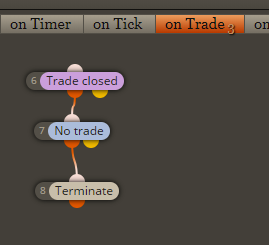

It sounds to me like "No trade -> Terminate". But when are those trades created? If they are not created immediately after the EA starts, maybe you can put the blocks under the Trade event. I imagine this:
Do this for your indicator: https://fxdreema.com/demo/mt4-trace-multiple You will see the values that it gives to the EA. Do you see any pink lines or values that can be used? If not, try to set Candle ID to 1 or more. Try everything in Visual mode, so you can easily see how things work.
Spanish to English translation is always a little bit messy. I think you want to say that some EA doesn't work. This problem is very general, there can be many reasons. Do you see errors somewhere?
Wait, doesn't "Multiply on loss" mean "Multiply after closing in loss" and also "multiply when last trade is closed in loss". All of these sounds to me the same.
Multiply buy side only - doesn't this mean that you want only Buy trades to work with Martingale and all Sells to be flat. What about setting some different Group number for the Buy block or the Sell block? If you have let's say Group set to 1 in "Buy now", the Martingale option will look at the last trade with Group number of 1. So, if you have different Group number in "Sell now", then those sells are skipped in the "Buy now" block like they don't exist.
@rnonnekes81 You tried some of those "Check profit..." blocks? Also those bucket blocks can be used, but you can easily use them in a wrong way. Can you make some simple EA that shows what is going on? I don't really understand that "no trade point" thing.
Do you see any lines of this indicator. On your screenshot I don't see any, and I think that this indicator should place some lines above and below the candles. If you see those lines, are they indicator lines (cannot be selected) or are they trend lines (objects)?
Yes, adding lots of blocks is generally a bad practice, but it is typical for people who are new to programming. Well, this is not exactly programming, but it also is in some way.
Do you want to say that you have pending orders, which are triggered and turned into running trades, and you want to do Trailing Stop Loss on them?
@tcanuto It sounds to me that you need to add some simple checks. But you are one of the "oldest" users here, it is strange to me that you are asking about something that it simple. Do you understand my example and how the line is created? Or maybe I don't understand you again.
What do you mean? You created an EA and then you don't know how to connect one block to another... I'm missing something here.
This indicator doesn't want to be downloaded... I used MA instead: https://fxdreema.com/shared/pczC8YSyb But will you understand how this works, even if it contains only 4 blocks 
Take a look at this reply, it is very similar to what you want, at least block 7. You should get the idea: https://fxdreema.com/forum/topic/6700/multiple-trades-once-t-p1-hit-remaining-open-trades-moved-to-be/3
The candle itself has high and low. If we take Moving Average for example, it can be applied to these prices:

By default the applied price is Close, which means that you get MA of only the Close prices of the candles. You can try to set MA to 1, change the applied price and you will get the idea.
If you are asking about something, I'm not sure what it is...
Better make some small example project that contains only what you to do. I will take a look if something is wrong in it.
This function only opens another charts, I don't know how to add EAs to them
I didn't tested it, but try something like this:
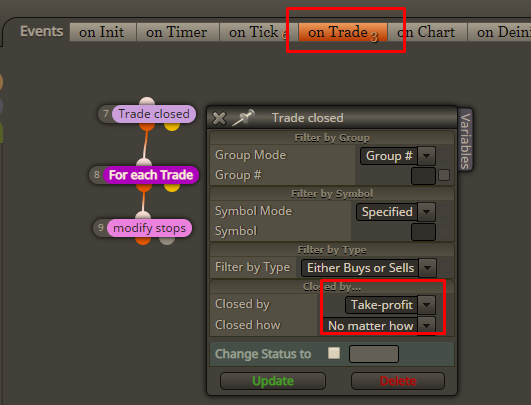
The idea is that in the Trade event you can detect when a trade closes by TP. And then do whatever. That "modify stops" blocks wants "For each Trade" above it, otherwise it may not work as expected.
Trailing stop, break even... they can be used as well.
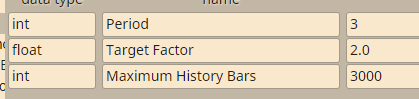
Give those parameters names without empty spaces. And I'm not sure about the Period name. If it still doesn't work, change its name a little bit as well.
Why do I have this feeling that you want to work with Renko charts. If you don't know these, look at them.
Otherwise what you want to do probably requires few variables, maybe arrays, or maybe a whole custom block to collect and process that data. Or indicator.
It sounds to that 1 loop is better, but I don't know the situation and I might be wrong.
Try something like this:

This block will create a pending order at that price, which is Candle Close of the previous candle (because I set Candle ID to 1) + 3 pips (look in Adjust). The price offset is 0.
And the other way is to use that price offset parameter:
