@rafaelgrecco I tested this and it worked on the tester. But when I tested it on real, it didn't work properly. I investigated it and eventually I found that in one function I forgot to put some code. I fixed this. I tested it and I think it works now.
Posts made by fxDreema
-
RE: "For Each Closed Position" block is not working.posted in Bug Reports
-
RE: "For Each Closed Position" block is not working.posted in Bug Reports
@l-andorrĂ said in "For Each Closed Position" block is not working.:
Yes, there ere some changes in the code a few weeks ago. You should use a new block in your projects instead of holding the old ones in your projects.
No, the blocks can stay the same, they don't need to be replaced with new ones. There is a situation when block replacement works, but this is when somewhere in its hidden properties (because they are all there, but some of them are hidden visually) some broken constant or a variable is lurking.
When I'm changing the code of some block, I prefer to do it in a way to not change it's assumed behavior. I only want to fix some bug or to add some new option. If I ever decide to really replace a block, which happened in the past, what I do is that I create a new block and the old one I deprecate. There is such functionality that when some block is deprecated, in the project where it used it appears darker and there is a warning message.
@ambrogio said in "For Each Closed Position" block is not working.:
@rafaelgrecco i tested your project in the strategy tester and it doesn't show the count, i replace the block "comment" with a new one, it works now
His "Comment" block is working fine, but he selected some dark colors and the text can't be seen on the default black background.
-
RE: Block logic "Indicator moves within limits"posted in Bug Reports
@Sparrow said in Block logic "Indicator moves within limits":
https://fxdreema.com/shared/c0utwZIkb
Meanwhile, I found another issue that might be related. When running EU M1 with block "Indicator fall" as in the demo project (see also screenshot below)
I checked this and the problem looks to be that I'm rounding the indicator value to 5 digits (or whatever the symbol digits are).
There was a time in the past when I decided that I should use the NormalizeDouble() function for each MQL5 indicator (doesn't apply for MQL4), mostly to minimize some crazy long numbers that often happen when doing calculations. I selected the number of digits for each indicator. In case of MA, it's the number of digits for the symbol, which is 5 for EURUSD. Usually this is not a problem, but in your case it is, because you are detecting very small MA changes.
I changed the rounding digits to 10 for MA. Now my tests are showing white vertical lines on every candle, so I guess I fixed something. I will do this for the other indicators as well.
I didn't tested "Indicator moves withing limits". Is there still a problem there?
-
RE: Forum updateposted in Questions & Answers
I think you are talking about the posts in the user's profile, like yours for example - https://fxdreema.com/forum/user/ambrogio. While I was clearing and banning spam profiles, I also noticed... strange things. I'm just not sure whether there is a real problem, or I don't know what to expect from the forum.
Note that posts are separated in 2 lists. You have Best posts made by ambrogio and below there is another list Latest posts made by ambrogio. Well, none of this lists suggest that we should see all posts from the user.
There is this blue icon with 3 vertical dots on the right side, and there I can see links for all your Topics, Posts, Best, Controversial and other things.
If you are talking about topics made by everyone in the forum... I don't know, I think I see them. In this category (Questions and Answers) I have to go at page 15 to see posts from 1 Feb.
-
RE: EA displaying error messagesposted in Bug Reports
I think your MetaEditor is an old version.
Lately I was touching some trading functions in MQL5, doing this on my local MetaTrader 5, which is updated automatically to the latest version. On the server I had old compiler (MetaEditor) and when it came time to upload the changes I made, I also noticed this error. So I updated the compiler on the server.
The problem seems to be that not a long time ago MetaQuotes added these two identifiers - DEAL_TP and DEAL_SL for the HistoryDealGetDouble() function. They don't exist in your version of MetaEditor/MetaTrader and that's why you can't compile that EA.
I wonder, if the EA is compiled by fxdreema, does it work on your MT5 at all? And if it works, does it work correctly?
Otherwise the easiest solution to this problem will be to update MetaTrader 5.
-
RE: Importing MT5 example indicator RSI.mq5 is failingposted in Bug Reports
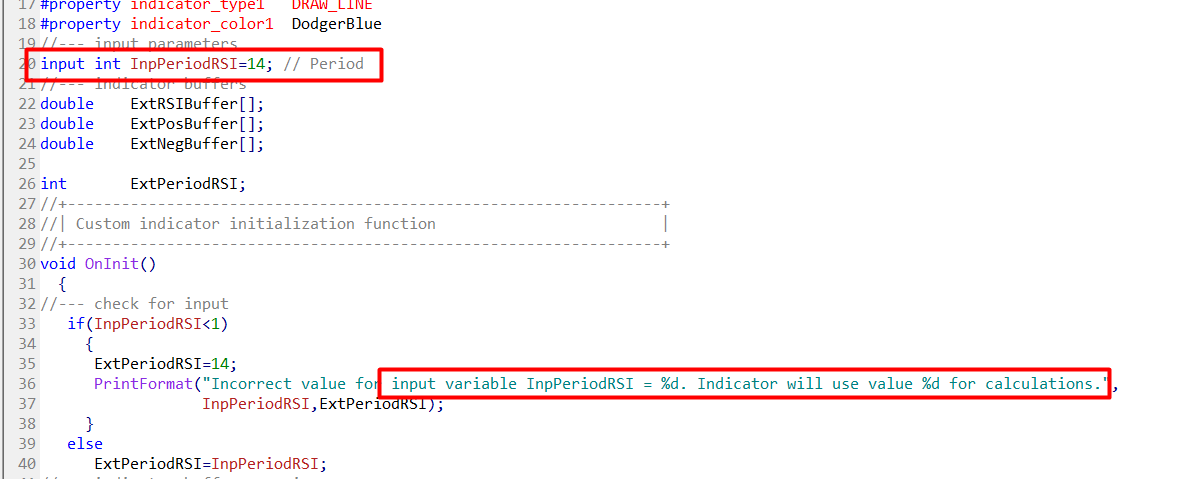
Well, the parameters extraction happens on the browser and the code I wrote for this is not very capable, it doesn't really understand the MQL language. In this case I can see why the problem happens:

the code that I wrote thinks that the variable is defined on line 36 where this is clearly a string. In reality the variable is defined at line 20.
The correct values are:
data type => int
name => InpPeriodRSI
default value => 14 -
RE: Observed bugposted in Bug Reports
Example project, as simple as possible, that can demonstrate the problem?
-
RE: URGENCY!!! Why am I getting this error?posted in Questions & Answers
MQL5 is too easy to break, but MQL4 not that much. I touched few functions in MQL4, but I don't think I touched something related to this problem.
In any case, please, when reporting some problem to me (or to the public), make some very simple example of the problem, something that can be tested quickly. Plus some extra instructions, if needed. I don't know why this is always so hard, but I can assure everyone - it's not, it's easy as connecting 2-3-4 blocks in a new empty project, takes few minutes.
When I don't have such simple example project, I have to imagine what could be the reason for the problem to happen, and there could be multiple possible reasons for the same problem.Let's get this problem for example. You are getting some critical error 4109 "Trade is not allowed in the expert properties" and you are thinking "Oh my God, what just happened, the admin must have touched and broken something". Ok, this is not impossible, but if you believe that I broke something so important that the EA cannot run, take a look at the other topics in the forum - is there someone else reporting the same problem? If there is, then sure, most probably I broke something. But if there is not, then the probability is that the problem is local to you, something makes your setup different than the others. And if your setup is somehow different than the others, we are now searching what is that difference. One thing that is different is the EA you have.
-
RE: Forum updateposted in Questions & Answers
@ambrogio What do you mean by comments?
I was doing many things with the forum, because this version turned out to be way different than I expected. I was working on user accounts, not on topics and posts, and I also installed those few plugins, but who knows what I did to reset those comments or whatever they are. -
RE: Question on arrays in fxDreema. Part 2posted in Questions & Answers
And by the way, there is a difference in the special "on Trade" blocks for MQL4 and MQL5. For MQL5 there are two additional blocks "Position incremented" and "Position decremented". I guess the "Position closed" block works only on the final close when there are multiple partial closes. If you ask me, I don't know if it works the same in MQL4. And if it works differently, I don't know which way is the right way - the MQL4 way or the MQL5 way... especially after having these blocks like this for years.
-
RE: Question on arrays in fxDreema. Part 2posted in Questions & Answers
Oh no, tickets. Tickets are crazy AF in MQL5, I don't recommend working with them at all. You know I recently worked on these blocks, and still I can't directly tell you what is going on with the tickets.
In MQL4 you create some order - running order, pending order - you got a new ticket number. Easy. A little bit more complicated when you decide to partially close a trade - the original one is closed and a new one is opened, but it's OpenPrice is the same as the original. Still easy.
In MQL5 there are positions, deals and orders. You decide to just open a new "trade", and you end up with a new order, which leads to a new deal, which leads to a new position. You got all three, and all with same or different tickets, depending on the environment. There is also something else called Position Identifier. If you think the arrays are complicated, try to understand orders, deals and positions in MQL5.
In MQL5 when you partially close a position, its ticket remains the same, but a new deal is created. You can have many deals (with different tickets) belonging to the same position. Even when you open and close a position, there are 2 deals - one IN deal for the open and one OUT deal for the close.
You are collecting ticket numbers in the Trade event, they are probably ticket numbers of positions. I'm not even sure what they are, and I don't really know what they should be - the tickets of the position or the tickets of the last deal.
When it comes to tickets, internally the blocks know when and what to do with them. I don't recommend working with tickets from outside. But if you do, and if you really understand how orders, deals and positions work in MQL5, you can experiment with them and give ideas for how the tickets can be used by users like you.
-
RE: Box 22:30 to 10:30 doesn't work!posted in Questions & Answers
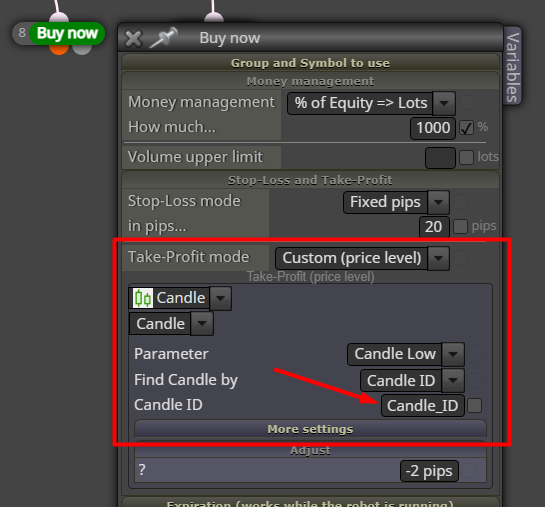
This doesn't work, becaue the "Buy now" block probably comes from another project where a variable Candle_ID was used, and this variable can still be found somewhere in the block's properties:

This is also kind of a bug, because "Custom (price level)" is not what is actually selected. The solution would be to go to that particular setting for "Take-Profit mode", remove the Candle_ID variable name, and then go back to the original "Take-Profit mode" setting. Or, as @ambrogio mentioned, to replace the block with new one.
-
RE: Ea conversion to ex5posted in Questions & Answers
MetaTrader 4 and MetaTrader 5 are two different platforms. MQL4 is different than MQL5.
.ex4files are different than.ex5files. You can't mix both. You can't run EA made for MT4 on MT5. You can't run EA made for MT5 on MT4. You either work on 4 or 5.By the way, I don't know how things work on that MQL5 market, but in another topic somewhere (could be deleted because of the hack) we discussed that they don't allow EAs generated by EA builders.
-
RE: My first MQL5 array doesn't workposted in Questions & Answers
@roar said in My first MQL5 array doesn't work:
Mql5 is such a diva, always demanding some weird special tricks lol
Absolutely. MQL5 is very annoying language. And I'm a JavaScript developer.
@Pheaktra-Capo Arrays contain multiple values, as many as you want. And you can iterate these values - access them one after another. So they are often used in
forloops. A simple array is like one row (or column) of data in a table. In MQL there are multi-dimentional arrays that are more like whole tables of data... but you don't want to try these. -
RE: USDT-TRC20 paymentposted in General Discussions
Yes, the transaction is at 5:21 local time. Every night I'm sleeping. I even woke up too early today.
-
RE: Ea conversion to ex5posted in Questions & Answers
I don't know about others, but I understood nothing from your question
But I know that MQL5 and MT4 are different things and they are not compatible. MQL5 is a programming language for MetaTrader 5. MT4 is MetaTrader 4, which works with programs written in MQL4. MQL4 and MQL5 are very similar, but there are many differences as well. -
RE: My first MQL5 array doesn't workposted in Questions & Answers
@l-andorrĂ , I did nothing to fix any compiling errors. The example you posted in the first post compiles sucessfully, it has no problems, not even warnings. I tested it and my results are the same as @roar. I don't know what you did to get these compilation errors, and I don't know what they are. Maybe you can tell us what your errors are.
About the Init event... I noticed few times that when I try to run some EA in MT5 on the weekend, it says Market Closed or something. I didn't investigate this problem, I only noticed it. Do you have such errors?
By the way, the
{10, 20, 30}thing doesn't work for Constants, because they are inputs. If we try to do this in MQL5:input double myArray[] = {3, 3, 3};it gives us error:
array is not allowed as input. -
RE: My first MQL5 array doesn't workposted in Questions & Answers
Ok, I made it now to work with initial values like
{10, 20, 30}.If no value is specified, and when the type of the array is numeric (int, double), the value will automatically appear as 0, which looks wrong when we work with arrays, but this 0 is not actually used. Even if you write any other numeric value, it will not be used. Only value containing
{will be used as initial value. -
RE: My first MQL5 array doesn't workposted in Questions & Answers
@l-andorrĂ said in My first MQL5 array doesn't work:
This is my last frontier to explore!
Haha, ok

What you did looks correct.
Technically you can also do this in MQL:
int array[] = {10, 20, 30};But for some reason in fxdreema if you define a variable with name
array[]and value{10, 20, 30}, the array is added in the EA, but the value is not applied. I don't know why. I know I worked on this few times and its possible that this is intentional. -
RE: Can someone give me 10 minutes to make an indicator ?posted in Questions & Answers
As @l-andorrĂ said, you can't build custom indicator, you can only build an EA. They are both programs, doing something on every tick. But there are differences.
The main idea of the indicator is that it produces one or more arrays of numeric data (called buffers). These buffers are read by MetaTrader, or the EA that is using the indicator. MetaTrader would produce visual output (lines, arrows, histograms...), the EA would use the numeric data somehow. All of this happens in the moment the indicator is loaded. Then, on every tick the indicator would recalculate the last part of the data. Indicators cannot trade.
Expert advisors... they don't have such specific purpose. They also receive the tick events, but usually on every tick they check some things and when needed they create/modify/delete orders.
In other words, indicators are programs, optimized to build arrays of data, who can then be visualized somehow or just read by other programs. EAs can also print some things on the chart, but usually after the moment they are started.