There are "Buy pending orders in grid" and "Sell pending orders in grid" blocks. You can change many settings there. Try with negative values for "Grid Size" to reverse the type of orders.

There are "Buy pending orders in grid" and "Sell pending orders in grid" blocks. You can change many settings there. Try with negative values for "Grid Size" to reverse the type of orders.
I think the first example will work if you use negative value for Averaging:
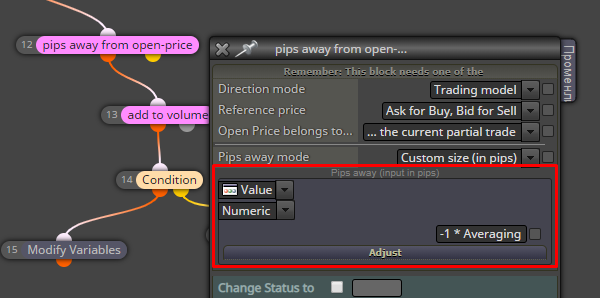
Instead of "add to volume" you can use the original Buy and Sell blocks, so you can use their money management settings. There is a "Betting: Custom Sequence" option as well. If you want to separate the money management rules between Buy and Sell trades, then you should use different Group number for the Buy part and for the Sell part
The EA can send a HTTP request to some server, I think this is the only way to get some information from outside the current PC. Well, also FTP, but FTP is normally used for files.
I don't understand that cAlgo, I didn't tried it. I don't know about this website as well, it may or may not work 
"Price Offset" is to change the "Base Price", which is Bid by default. From that level, the first order will be located at distance of "Grid Size". To change the direction of the orders, use positive or negative value for "Grid Size". Try different values of "Grid Size" with "Price Offset" set to 0, which is the dafault value.
You are using those (on trade) options, but they are only do be used under the "on Trade" event. Are those blocks under "on Trade"?
I think you have this calculation:
OpenPrice - (ClosePrice - OpenPrice)
To which trade that ClosePrice belongs to? While the trade is running, this is the current price and only after it closes it is the real price where it closed. Do you mean the current price of the current trade and do you want to do this for each trade?
I'm not sure, but maybe you want to do something like this:
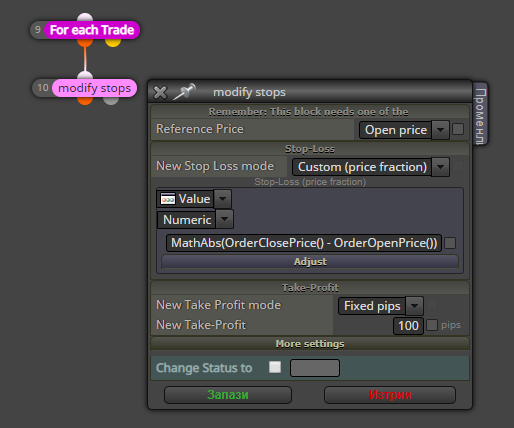
The formula I wrote here is:
MathAbs(OrderClosePrice() - OrderOpenPrice())
...where MathAbs(), OrderOpenPrice() and OrderClosePrice() are native functions in MQL4. Note that I selected Custom (price fraction)
So there are 2 main ways to select objects - by name (because each object has unique name) or by searching/filtering (loading each object and checking if it is what we want). The first way you can do in "Condition" directly. The second way is with using this "For each Object" block. I guess that you can't use the first way, so you should use "For each Object". I don't know why it is not working for you, but if you can give me more details and even a small project for an example... I need to know what you are doing exactly and what the goal is, so then I can test it here and see what is the problem.
In the EA I don't know how can you put one indicator over another. Some time ago I tried that, but I failed.
Don't look at the description down on the right side. It looks that I imported some project from the examples and then used that project to put those blocks on top.
@edmundtan Don't forget to connect the block with another block. You can connect it to "Pass" block if you don't have any other good block.
Be careful with the first 2 options in "Draw Line" (and each Draw block). Click on their titles (the first 2 options, A and B) to see explanation.
But I think you don't want particular name for the lines. Names are unique and you can't have 2 objects with the same name. So I will suggest to create your lines with whatever names, then use:
For each Object -> Condition (where you check the price, but the Source of the object will be "Picked in loop") -> delete (orange block, to delete the line) -> Buy/Sell
I will suggest to use that Adjust field. Click on its title, which is simply "?" and you will see some examples. No Formula and Variables needed.
What is wrong with the normal Stop-Loss?
Check profit (period of time)
Yes, this is a commont problem, not only for this website. It's because the mouse is positioned oves the input field while you are scrolling the page. I can think of some JavaScript trick to fix this, but I can't guarantee that I will find a good solution One way is probably to allow increment/decrement on fields only when you click on them, so they will not be affected when you just put the mouse over, but I don't like that, because I like to increment/decrement them without clicking on them
Can you test those functions provided by the broker? You can also check the custom block I made for you (https://fxdreema.com/studio/MQL4), it's not so much of a code. I may be missing something, but it looks correct for me. I can't check it because I don't have an account in this bloker
What a fail, I made the project on my local development version of fxDreema. And now I am not on the same PC, but I think it was something like this: https://fxdreema.com/shared/FYMVugR8e
@traderz I saw the report in the Bugs forum, but I tested these blocks and they work for me. I don't see problems with this. I also tested your latest project where you have 3 "Trade closed" blocks. They work only for groups 2 and 1 and you have many different groups, but I can change the number and it works.
But I don't know what is going on there. I see you calculate the difference between two Open prices, but you are doing this over trades from group 2 only. And then you are using the calculated values (GapAuto1 and GapAuto2) for other groups.
For the Tester you can just open and close some trade. Sometimes I do that. There is a block to check if the EA is working in the Tester.
The biggest problem I see is in the name of the project, it contains the word "Hedging". And no wonder that in the project you have the same group of blocks copied multiple times. Those hedging strategies only lead to such complexity and nothing good
Whatever you write in this field goes almost directly into the output code. The contents of this field are MQL code, it's not just a value of some variable. You can use a variable there if you write its name, for example "+ VariableName", where VariableName is the name of the variable you define in Variables