I never set any value such as 200 in the code, so I suppose that this happens when you reach the maximum number of pending orders allowed by the broker. But if you did that, I think the broker will eventually complain 

I never set any value such as 200 in the code, so I suppose that this happens when you reach the maximum number of pending orders allowed by the broker. But if you did that, I think the broker will eventually complain
Well, the block is called "Indicator rise", so the idea is that the value for every candle is higher than the value of the previous candle. If you want some candle to be lower, then there is this "With exception of few candles" option.
So you can check the spread in a regular "Condition" block. I'm not sure whether the "Spread filter" block is slower or faster for the tester, because it has some more options, but you can test it and choose which block to use.
"For each Closed Trade" can go to the yellow output if no trade has been selected, there are also some "Second output" settings in the block, you will see them. After that maybe place "Pass once" block, just in case.
I don't like how block 55 is connected. You can imagine that you still have 2 separate paths, but when 55 is connected like that those 2 paths are now merged. I'm also not sure why you have this block somewhere under "For each..." block. If the blue block can be above "For each...", I think it's better to put it there.
What is inside blocks 62 and 64?
I don't know what is wrong, I see that other people are making payments normally and for now I don't see other reports like this. If there are problems, they happen in FastSpring, the other payment processor that I use. I know that few days ago VISA crashed in Europe, but this should already be fixed. I can manually process payments of course, I do that for bitcoin payments... which doesn't happen every day.
I wonder what the problem is, what happens after you click the button, do you see that PayPal Checkout page with the email, the price and the quantity (1) pre-filled?
By the way I tried to reply on your email and look what I got as an automatic response:
The message you sent requires that you verify that you
are a real live human being and not a spam source.To complete this verification, simply reply to this message and leave
the subject line intact or click the link below:
... which is also very weird. I have never seen such auto-response before
I think there was a bug in "modify stops" some weeks ago, maybe because of that you needed to set TP.
I am testing it now and I saw the problem 2-3 times, but then it disappeared and I don't know why
Certain people really have hard times simplifying something and you seems to be one of them :))) Why even use Sell blocks when the problem should appear only on the Buy side. This example could be cut in half
Here is my simple test example: https://fxdreema.com/shared/YercJCq3e
I don't see why you are using any Variables, because at any given time we can get OpenPrice, TP, SL and other parameters of any trade. So I'm getting them in "SL to OpenPrice" (aka "modify stops"). I also don't understand why you set TP in this block if TP remains the same, so I set it to "No change".
Ok, so my backtest looks like this:
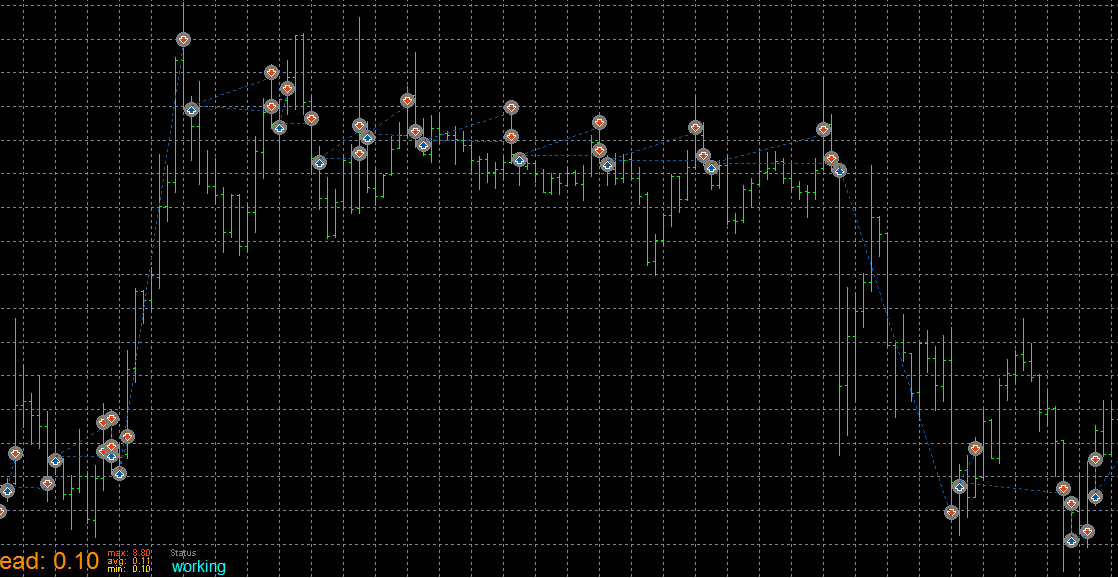
... and this is what I would expect from this project. The only thing is that I don't see any arrow from that "Draw arrow" block, so I suspect that "modify stops" doesn't pass correctly and I will check the code for that. I will also put that EA on a demo to see what happens.
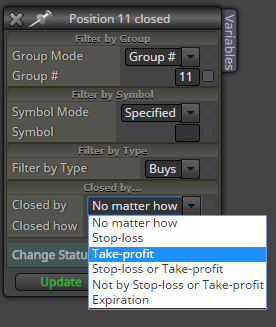
In the first post here you wrote that you see some "Invalid SL request..." messages. I'm not sure, but maybe you can get some of those when SL is triggered. Both trades have the same SL, so it is hit at the same time, but who knows... maybe the EA is somehow tricked into thinking that one trade still exists. So I think that you should set this just in case:
I'm not sure that someone will share his profitable strategy if he has one
What if "Pips to rise" is 1 pip or something small like this?
There is a block "Spread filter" somewhere, you can put it on the top.
I'm not sure about having this thing in the Buy/Sell blocks directly, because this can prevent the Buy/Sell block to create the trade. Sometimes this can lead to confusion if the blocks above Buy/Sell are expecting that a new trade is created. For example, you can have "Once per bar" right above "Buy now" and the idea is that one new Buy trade should be created in the current candle. "Once per bar" passes, "Buy now" doesn't produce a new trade because of the spread, but "Once per bar" doesn't care - it will not pass again few seconds later when the spread is normal. So the strategy is now a little bit broken.
There is no block to change this value, because the value is an input parameter and in my opinion it is not supposed to be modified in the EA. Actually if you try this trick in MQL5 you will get an error message.
In the EA, in all trading blocks you can find this Group parameter. If you want to somehow have 2 or more strategies in the same EA, you can try do it with this parameter.
Pending orders are sent to the broker and the broker is responsible to trigger them and turn them into running orders. In the time between PENDING ORDER and START BUY the EA doesn't even need to work. If you are asking why your orders are not triggered in the next candle after PENDING ORDER... I don't know really. Does this happen with manually created pending orders?
While there are no incoming ticks, the EA will do nothing. Whatever request is sent to the server, the server processes it. So I don't know, I guess you can try it to see what will actually happen and if there is any problem - report it to me. And to be honest, I don't understand those futures and fancy symbols very well, because I never traded them, so I might be missing something
I know for sure that there was a bug that caused these big numbers and few months ago I fixed it... or at least I believe so. But who knows, maybe there is another bug or I didn't fully fixed it.
Otherwise block numbers doesn't matter much. If you want to use the number of particular block in let's say "Turn ON blocks", then mu suggestion is to give that block a custom number that is not a number. Yes, block numbers can contain letters, so you can have block numbers such as a or b or MyBlock1 or something that means something in the strategy, but better don't use fancy symbols. I think I have a report that in some situation empty space causes a problem, so use _ instead of empty space for now.
But why using variables for that. The idea of this Group number is to have 2 or more different strategies in the same EA and normally these values are written in the blocks directly, because you know which block is for which strategy.
Block names doesn't matter. At some point I plan to rename the word "position" with "trade" for MT5.
Your MT5 account should be opened with this checked:
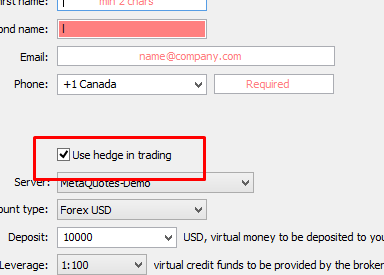
... otherwise it is working in Netting mode, which means that you can only have 1 position per symbol. This is something that can explain immediately closed trades, because if you Buy and then Sell the same lot size, the result is that the initial Buy position is closed.
If your MT5 account is in Hedge mode, then the problem could be because of some bug that I am not aware of. In this case I want to investigate the problem, so if you have some relatively simple example that shows the problem, give it to me
This is a problem that I don't know how to fully solve
So you mean Close Price of the last closed trade. Something like this, I guess:
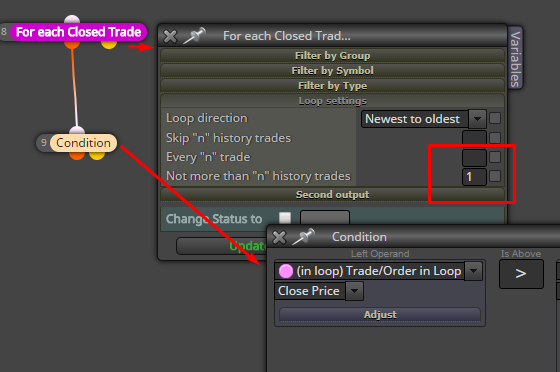
I don't know if this helps:
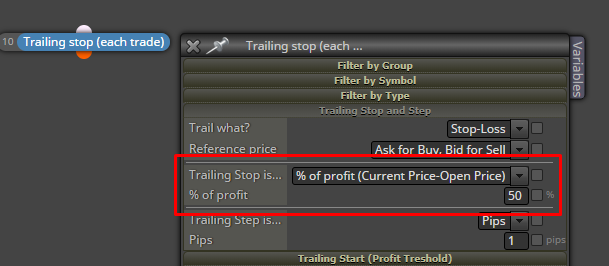
... but remember that when the profit is still small, % of it is even smaller, so if you want to do something like this you should use the Trailing Start parameters to prevent the block to put too small stops in the beginning. Or, if you have some formula, you can also use those "Custom..." options of "Trailing stop is...".
Once a day - Close trades
In "Once a day" there is a hours filter option where you can put that time.
I think that you want to start with certain exposure, let's say 0.4 lots, and then to close 0.1 lots at few levels in profit - at 5 pips, at 75 pips, at 85 and finally close all at 85 pips. Do you know that it is possible to open 1 single trade and then close parts of it again and again (until you can)?
Now what is your definition of the words "position" and "trade"? I'm pretty sure that "position" means the whole exposure to the market => the sum of all opened running orders for the given symbol. In MT5 in their classic "Netting mode" it was only possible to have 1 single position per symbol. And by "trade" I imagine a single running order. So I don't really understand what "4 positions per trade" means.