fxDreema

    • Register
    • Login
    • Search
    • Back to the main page
    • Categories
    • Recent
    • Tags
    • Popular
    • Search
    1. Home
    2. fxDreema
    3. Posts
    • Profile
    • Following 0
    • Followers 691
    • Topics 32
    • Posts 7485
    • Best 277
    • Controversial 18
    • Groups 1

    Posts made by fxDreema

    • RE: how do this condition ?

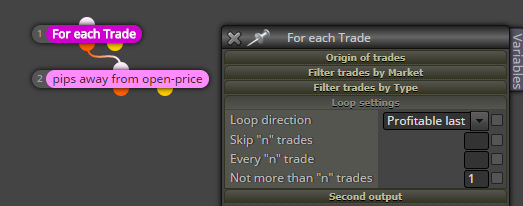
      If these Sells have the same lot size, then the lowest one have smaller profit. In "For each Trade" you can sort by profit and with "Not more than n trades" set to 1 you can select only that trade. Then you can compare its Open Price with something else. Something like that: 0_1521675434487_4bc9dd83-9524-46d0-a65d-61c7d1f27a2a-image.png

      posted in Questions & Answers
      fxDreema
      fxDreema
    • RE: same ea works differently on diferent pc's

      Live or backtest? If live, do candles look the same? If backtest... different ticks data, I guess.

      posted in Questions & Answers
      fxDreema
      fxDreema
    • RE: Project Lost

      So I got few emails with the same problem - some blocks are missing and the project appears to be empty. I don't know why that happened, I was out of town and I didn't uploaded any updates in more than a week. Few days ago the website was very slow for some reason and I just restarted it. Maybe this explain those missing blocks somehow, but I honestly don't know why the website was slow 🙂 It was working good since then.

      Here is a quick hint for how to "fix" missing blocks - just go to that "History" link in the upper right corner and go to some previous history point that works. Also, every time you export .mq4 or .mq5 file, the project itself is embedded in the end of that file, so the project can be imported back into fxDreema at any time (or at least when the website is working normally :))).

      By the way these days I will move the website to another VPS. New VPS - New problems 😄 Well, I actually hope that after that it will work a little bit better, at least I will have 1GB of RAM more.

      posted in Bug Reports
      fxDreema
      fxDreema
    • Forum goes off

      Something is happening with the forum these days, I don't know what. The process on the server just stops and unfortunately I don't see any logs that explain why. This never happened before and I actually don't know how to fix it.

      Now I started the forum in another way, so I can probably see error messages in the console if it turns off again.

      It all started at the same night when I was testing the website with many requests, but I think this was a coincidence, because I never attacked the forum, which is a different process.

      I also noticed that spam registrations started some weeks ago and I believe I stopped them, but who knows what are these bots doing.

      Also I see that something is wrong with the chat (shoutbox). It was problematic before, but it worked. I updated it lately and I can see some logs that look like this:
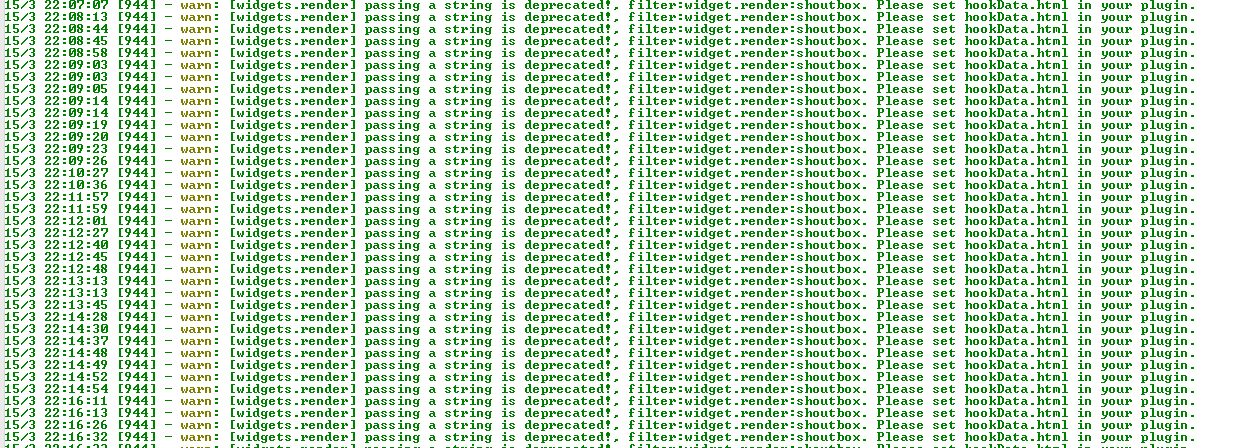
      0_1521152669390_c7bd7333-1219-4996-a2ee-3e7e8d951a5e-image.png
      And I tried to post something in the chat, but it doesn't work. So I might stop it for now.
      posted in Bug Reports
      fxDreema
      fxDreema
    • RE: Trade Closed block is throwing an error

      It should work now.

      posted in Bug Reports
      fxDreema
      fxDreema
    • RE: Error on trade close event

      Fixed. I copied some code from my local fxDreema, but I didn't noticed that the names of some parameters were different. I renamed those parameters in my local version and eventually I will rename them in the web version 🙂

      posted in Bug Reports
      fxDreema
      fxDreema
    • RE: Order expiration. Expires too early, on midnight.

      In my backtest all orders expired at 23:00. Check your input parameters, maybe they are cached and different values are used.

      posted in Bug Reports
      fxDreema
      fxDreema
    • RE: unable to download mq4/ex4 from web

      Something appears to be wrong with one input of one block, there is extra ' letter that appears in the output code from somewhere. I "fixed" it by replacing the block with another block with the same settings.

      posted in Questions & Answers
      fxDreema
      fxDreema
    • RE: Create an average Heiken Ashi

      Ooo, I don't know 🙂 This is something for a custom indicator I think.

      posted in Questions & Answers
      fxDreema
      fxDreema
    • RE: Take profit at the end of canlde with minimum pips distance

      The problem is that you don't exactly know when is the end of each candle. The end is where the last tick is. If you can try something with "Hours filter", "Minutes filter", "Seconds filter" or similar blocks, if you want to do something somewhere at the end of the candle. But again, you can never be sure that the final tick will come at the last second. And this is more true for the Tester where the ticks are generated and their time is stupid.

      If you want to do something at the last second every time, then go to "on Timer" (set it up in the project's settings). But this can't be backtested correctly, because again - all ticks are generated with some fake times.

      posted in Questions & Answers
      fxDreema
      fxDreema
    • RE: MT4 to MT5 converter

      No, I never this that. And by the way, I still don't recommend full copy from MT4 to MT5, because for some blocks probably doesn't work fine. I'm now in a process of making all blocks with the exactly the same code, but at this moment there are still differences. But you can try to export .mq4 file, then rename it to .mq5 and import it again - I think you will see the constants and variables in a new MT5 project.

      posted in Questions & Answers
      fxDreema
      fxDreema
    • RE: How to create a variable of type "List of values" for selection?

      But in the EA builder there is no place where to put that definition.

      posted in Questions & Answers
      fxDreema
      fxDreema
    • RE: Closing all trades at a price level

      I think you asked this question in an email.. My answer is that the fibonacci (also the horizontal line) is an object, so you treat is as such. And this is some simple example to see what is the value of level 0 of Fibonacci object made with the EA (in "on Init")- https://fxdreema.com/shared/0yolplgU.

      posted in Questions & Answers
      fxDreema
      fxDreema
    • RE: Dashboard

      Well, this is more specific stuff. I guess there are custom indicators to show such information. If you are in MetaTrader 4, try this indicator iExposure, it comes with MetaTrader.

      posted in Questions & Answers
      fxDreema
      fxDreema
    • RE: how i can know orders buy or sell created by people ?

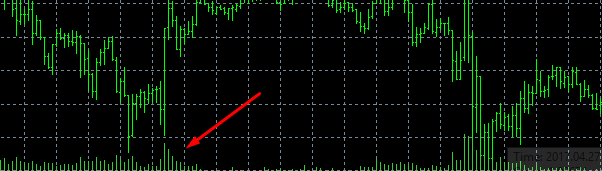
      Volumes show you something, but I think that in MetaTrader it shows the number of ticks in the bar.

      0_1520884162797_6df24f5c-6064-428e-bf52-4dda41055691-image.png

      posted in Questions & Answers
      fxDreema
      fxDreema
    • RE: Remove Stoploss and Target Profit, blank instead of "0.00000"

      Button or block? 0 means nothing, no SL and no TP

      posted in Questions & Answers
      fxDreema
      fxDreema
    • RE: manual trade closed by expert

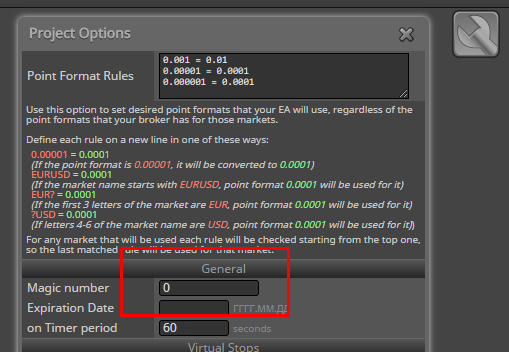
      The idea is that manual trades have magic number of 0. You can for example make an EA that only works with such trades if you only do this: 0_1520882525647_99a722d3-c500-47d4-b96b-2e8c0cb3e083-image.png

      posted in Questions & Answers
      fxDreema
      fxDreema
    • RE: Martin gale system - Just started coding so all this is new to me

      Well, what I see in your projects is this:
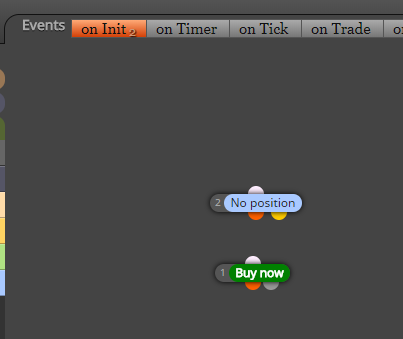
      0_1520882343867_56ad301b-126b-4849-a871-7e65e6fce618-image.png

      I can imagine that there is a connection between both blocks, but they are under "on Init", which means that they run only once when the EA starts. Try them under "on Tick" 🙂

      posted in Questions & Answers
      fxDreema
      fxDreema
    • RE: Check trades count not working properly, allows too many trades with multiple charts open

      I already said that, but you are showing me piece of code that comes from the constructor of a class. These values are some initial values and they could be changed. The actual values are written in other place, for example:

      // Block 2 (Check trades count)
      class Block1: public MDL_CheckTradesCount<string,int,string,string,string,string,string,string>
      {
      
      	public: /* Constructor */
      	Block1() {
      		__block_number = 1;
      		__block_user_number = "2";
      		_beforeExecuteEnabled = true;
      		// Block input parameters
      		MarketMode = "all";
      	}
      
      	public: /* Callback & Run */
      	virtual void _callback_(int value) {
      	}
      
      	virtual void _beforeExecute_()
      	{
      		Market = CurrentSymbol();
      	}
      };
      

      Here you can see this: MarketMode = "all";

      posted in Questions & Answers
      fxDreema
      fxDreema
    • RE: Check "Latest close position" before trade

      Try this example, I think you want to use those purple blocks: https://fxdreema.com/examples#Bucket-of...

      posted in Questions & Answers
      fxDreema
      fxDreema
    • 1
    • 2
    • 63
    • 64
    • 65
    • 66
    • 67
    • 374
    • 375
    • 65 / 375