@l-andorrà lovely... thanks
F
Posts made by fxgjg
-
RE: Why doesn't my EA place trades when i use a negative (-) value for the MA shiftposted in Questions & Answers
@roar okie dokie..... i see now... thanks ever so much!!
if only we could predict the future...... -
RE: Why doesn't my EA place trades when i use a negative (-) value for the MA shiftposted in Questions & Answers
@roar i dont quite understand.... i thought i was comparing MA 10 (shift -5) to MA 40 (shift +5).
Are you saying i cannot use a (-) minus value for comparison? -
RE: Why doesn't my EA place trades when i use a negative (-) value for the MA shiftposted in Questions & Answers
@l-andorrà ok yes here is a link to my project.... whenever i use i (-) minus value for moving average shift no orders get placed...
https://fxdreema.com/shared/9r3jbJZ2d -
Why doesn't my EA place trades when i use a negative (-) value for the MA shiftposted in Questions & Answers
I am trying to place the Moving Average indicator 10 with a shift of -5... but when i use a -5 in the indicator block for the MA shift... it doesn't place and trades.
-
RE: How can i compare/check the position of a BUY/SELL tradeposted in Questions & Answers
yes... i wouls like to know how to check the open price levels so as to find out which trade is higher/lower etc...
-
How can i compare/check the position of a BUY/SELL tradeposted in Questions & Answers
I would like to compare/check the position of a BUY trade and compare it the position of a SELL trade... thanks in advance
-
RE: EA error for no stop loss and no take profitposted in Bug Reports
i'm not sure what had happened.. but the stop loss error seemed to have resolved itself.... i have no clue what i may have done wrong....
thanks for all your help -
RE: Problems to check average profit or check profitposted in Questions & Answers
@fxgjg OK solved... i used the 'no trade' block... thanks for all you help
-
RE: Problems to check average profit or check profitposted in Questions & Answers
@l-andorrà ok so ive moved the block over to the 'on tick' tab... works fine BUT puts in multiple orders...i.e so as long as the trade is in profit by over 10 pips it will keep placing new orders...... hmmmm. how can i solve this?
-
RE: EA error for no stop loss and no take profitposted in Bug Reports
@titangeorge hmmmm never thought that it may just be my broker.. (alpari)...
-
RE: Problems to check average profit or check profitposted in Questions & Answers
only trades 1 or 11 will ever be open at any given time as they alternate...
i have made the suggested changes to the group orders.... still no success...
I believe i have tried every block that indicates a check profit or pips away etc...
i cant seem to get any of them to work.... not sure what i'm doing wrong here
Have you any suggestion of how to do this. (place an order once a previous order gets to 'x' pips in profit...ive updated the group numbers and only used group 11 or 12.. new link updated.
https://fxdreema.com/shared/J2kKIs63 -
Problems to check average profit or check profitposted in Questions & Answers
hi, thanks in advance. i am having issues trying to check the profit of a current trade and once it get to 'x' number of pips in profit then execute another trade. Please see the link to my EA... under the 'on trade' tab check average profit. https://fxdreema.com/shared/E6XXnP1Od
-
EA error for no stop loss and no take profitposted in Bug Reports
hi, whenever i choose the no take profit or no stop loss option..... the EA does not run (i.e. runs but doesnt place any orders) when i check the journal there seems to be an error linked to and stating 'no take profit, stop loss etc'
-
Do something only onceposted in Questions & Answers
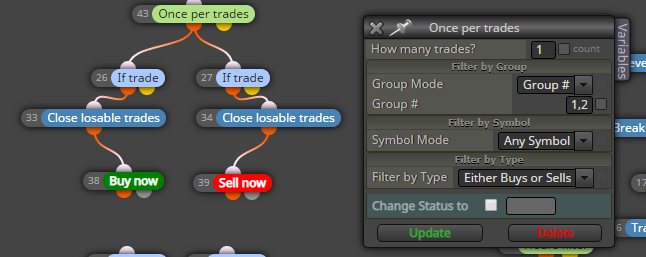
Hi i am trying to do these set of blocks only once per day or only to execute once (BUY or SELL)... i have tried various methods but none seem to work... Thanks in advance...
-
RE: modify a pending orderposted in Questions & Answers
i realised what happened here.... the slide order was actively pushing the pending order into the market price... ive had to change this strategy as the slide order would not work... thanks for you help
-
RE: modify a pending orderposted in Questions & Answers
so i am trying to move a buy pending order down inline with the market price at a 3 pip slide..
the slide direction is set to downwards and the slide with pips is set to - (negative 3).. -
RE: modify a pending orderposted in Questions & Answers
this only seems to me modifying the take profit and stop loss of the pending order (thousands of times) but not the order price itself...
-
RE: modify a pending orderposted in Questions & Answers
thanks @l-andorrà. im gonna try it now and let you know how i get on...