@l-andorrà I understand putting it below block 8 but i dont understand where you said put block 6 within it
G
Posts made by GTOAT777
-
RE: How to move stop loss based on percentages?posted in Questions & Answers
-
RE: How to move stop loss based on percentages?posted in Questions & Answers
I understand putting it below block 8 but i dont understand where you said put block 6 within it
-
RE: Lines = Stop or Limit Orders EAposted in Questions & Answers
@l-andorrà No i havent got an initial project started i wouldnt know where to start in regards to this
-
RE: Lines = Stop or Limit Orders EAposted in Questions & Answers
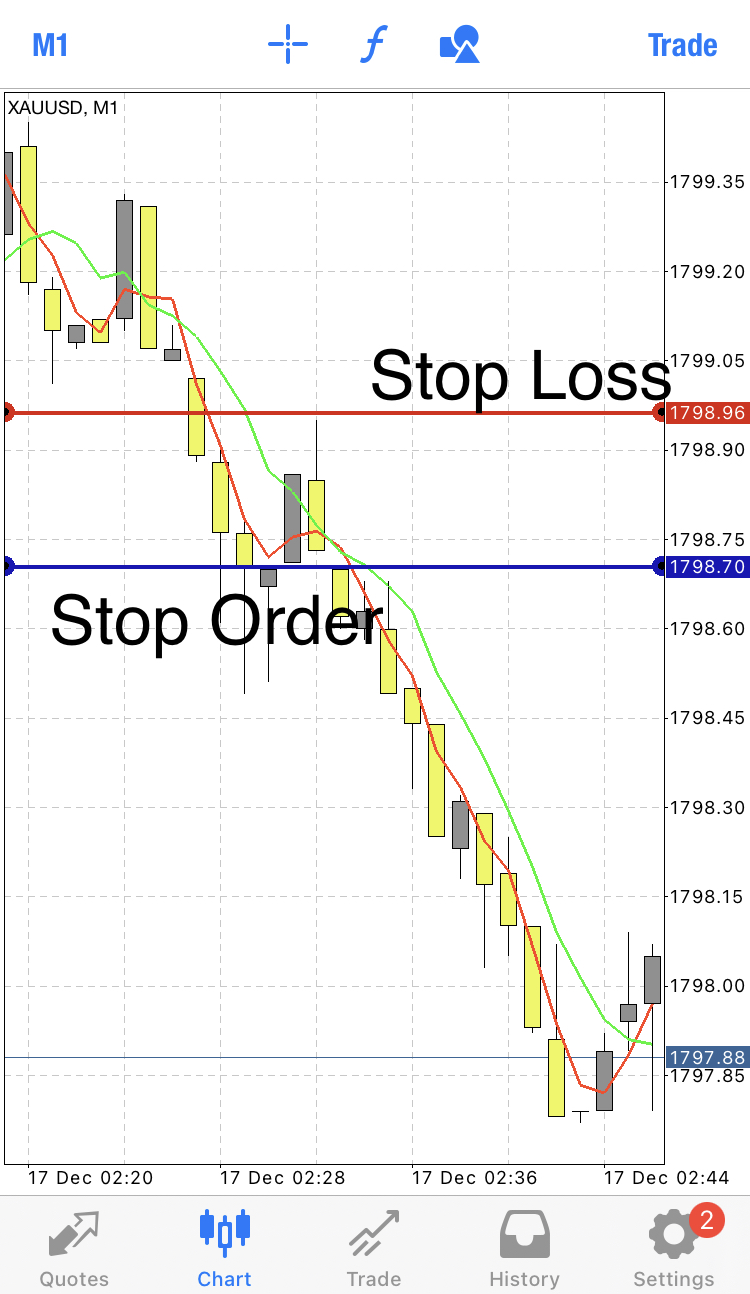
@gtoat777 So the picture is a sell stop order trade.
I would have dragged it below that candle, clicked “Stop” button which creates a stop order, then a second line would appear and I would have dragged to make the stop loss above the candle
-
Lines = Stop or Limit Orders EAposted in Questions & Answers
I want to create an EA simply where it draws a line and that is the entry, then it gives me an option to click for it to be a stop order or limit order, then a second line appears and I drag that for the stop loss.
I trade on the 1Min chart so it’s use has to be simple and quick. I want to program my lot size to the line and TP when clicked.
It would also know that if the line is dragged above current price the stop order button would be for a buy and limit would be a sell then vice versa for if it’s below price.
I’ll add a picture just as a quick example
-
RE: How to move stop loss based on percentages?posted in Questions & Answers
@l-andorrà https://fxdreema.com/shared/OSbjv7h7c I tested it live, block 6, 7 and 8 work fine but when blocks 9,10 and 11 were meant to initiate it glitched and kept flicking back and both between block 7s SL and block 10s SL, ultimately it kept staying with 7s SL and wouldnt make the new adjustment
-
RE: How to move stop loss based on percentages?posted in Questions & Answers
https://fxdreema.com/shared/nZvDGoTQc Should block 10 be connected the way it is or should it be linked to block 7?
-
RE: How to move stop loss based on percentages?posted in Questions & Answers
Thank you that was very helpful, i'm going to go with the shared project version, do I keep those blocks "On Tick" or do I put them "On Trade"
-
How to move stop loss based on percentages?posted in Questions & Answers
How would i add a feature that my EA moves my SL to break even when price is 50% towards my TP.
Then when price is within my 75% to my TP my SL moves to 40% position
-
RE: Lot sizes and TP errorposted in Questions & Answers
Its ok i just changed it to "lots % of balance" it made things more simple
-
Lot sizes and TP errorposted in Questions & Answers
Im am back testing my EA however in MT4 it doesnt adjust my lot size i input in testing and it doesnt do my TP properly, i did a variable for my lot size and TP but when i put it in MT4 and test it doesnt seem to register
-
RE: How to create double cross MA bot?posted in Questions & Answers
@jstap Ok so how do I do that? How do I do it that if the fast MA is still beneath the slow MA after more than 6 candles then cancel the trade?
-
RE: How to create double cross MA bot?posted in Questions & Answers
@jstap hahaha my inexperience is showing, so what I was trying to program was, if it is still below the fast MA after 3 candles it’s still a go-ahead but if it’s 6 then cancel the potential trade
-
RE: How to create double cross MA bot?posted in Questions & Answers
@jstap https://fxdreema.com/shared/N9Pp9ZJNb Ive made a rough simple version, let me know if this is correct, i did it that if the fast ma is still below the slow ma after 3 candles is TRUE but if its below 6 candles its FALSE and i linked it back to no trade. The following condition was then if the fast ma crosses back above the slow ma
-
RE: How to create double cross MA bot?posted in Questions & Answers
@jstap ah ok thank you, looking back I think I worded my original post wrong, scrap what I said about candles the premise is basically this
Part 1: X_Ma crosses below Z_Ma
Part 2: When X_Ma crosses back above Z_Ma then BUY.Part 1.5
Only “BOOL” I guess would be that if X_Ma has not crossed back up with 5 candles then cancel the potential trade. -
RE: How to create double cross MA bot?posted in Questions & Answers
@jstap Ive gone through the part 20 stuff you sent and ill be honest i have no idea what any of that means, i'm a beginner at this FXdreema stuff so I don't know what terminology like "BOOL" means. When I click on the conditions and variables all the stuff input in there is confusing to me as of now.