set spread value in condition ...
like Spread>5
M
Posts made by miro1360
-
RE: Condition for spreadposted in Questions & Answers
-
RE: Trend folowing strategyposted in Questions & Answers
rsi and moving average
rsi7 above level 60 is up trend, two moving averages as
MA13>MA42 is up trend
... but all depends on your criteria, what is period of trend (long or short trend?) set it with periodes/timeframe -
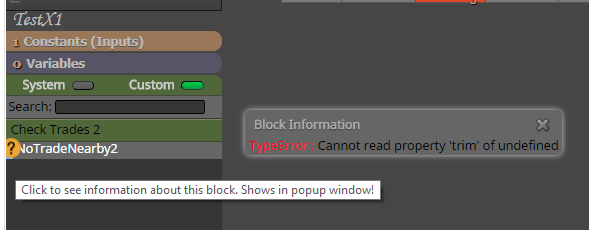
RE: Custom Block Help -> TypeError : Cannot read property 'trim' of undefinedposted in Questions & Answers
I think he is talking about this:
-
RE: Points in timeposted in Questions & Answers
give specific name for these lines and with EA condition check if such object with that specific name exist ... and if exist, do another blocks for creating lines ... you need do some calculation (like find distance between first two lines) ....
-
RE: Export from Tickstoy in filter duplicate ticks modeposted in Questions & Answers
better avoid filtering .... if you filter duplicated ticks away and your EA depends on them (like your EA is opening/closing trades with current price) than result is not accurate ... this accuracy depends mostly on logic used in your EA ... so all this depends on logic used in your EA, somewhere you can use for tester only open prices, somewhere you need all ticks (without filtering) ....
-
RE: something strange on my EAposted in Questions & Answers
it is spread, spread is Ask-Bid price ... chart is constructed by Bid price
Buy is opened by Ask price, and closed by Bid price
Sell is opened by Bid price (from which are candles constructed) .. and closed by Ask price (you dont see exactly this Ask price on chart/candles, but you can imagine it from spread value)
.. this was often discussed ... -
RE: Input for block Buyposted in Questions & Answers
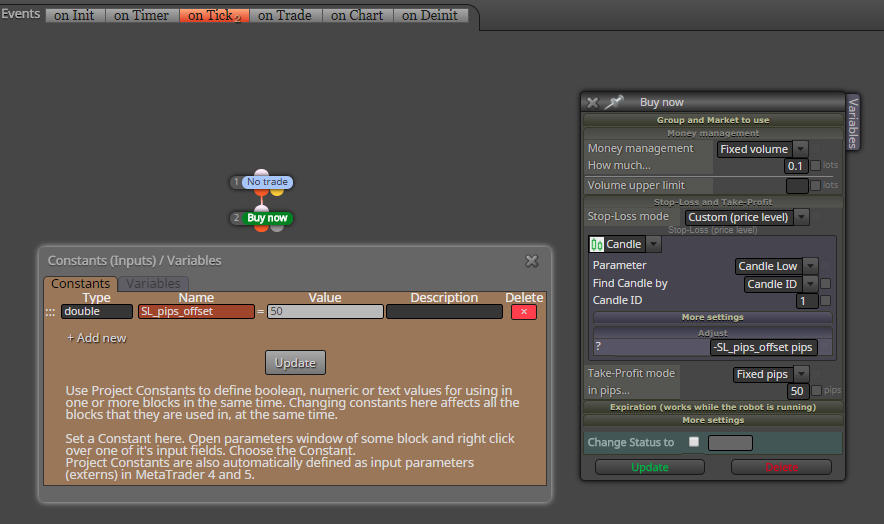
in that case it is not working and you need to do something another ... this is working
-
RE: Using iCustom Featureposted in Questions & Answers
if this is your indicator:

you can see, that here is a lot of buffers from which is indicator line constructed, blue color is one buffer, orange color is another, than here is red and orange arrow as another buffers ...
these buffers are sometimes active (have value) and sometimes are not (they have value too but it is called EMPTY_VALUE)trace block is for visual tracking (finding) values from buffer and observing how behave these values (in visual tester) ... it is NOT for runing other blocks (for trading as in your example) ... with trace block you can find buffer behaviour and with Condition block you set right condition for buffer ... in your example replace Trace with Condition block ...
-
RE: Using iCustom Featureposted in Questions & Answers
there is possibility that your indicator plot only arrows as objects and not into buffers ... it is way how some indicators are done .... are you using adx crosses? if yes, than arrows are simple only adx cross based on DI condition:

-
RE: Break even line on mutiple tradesposted in Questions & Answers
0_1515969165308_miro1360_GravityBE_1.0.mq4
not sure if this helps you, I created it in past and now I dont remember exactly how it is working, but you can find it in code
 ... it is probably not working in tester because it calculates in on Timer function ...
 -
RE: Trades open then close right awayposted in Questions & Answers
maybe something from pink blocks can help you, you can check age of opened trade ... (for each trade - check age - conditions ....)
-
RE: Easiest way to measure ADR distance value of price to EMA 240?posted in Questions & Answers
place ADR and EMA into two variables (varADR, varEMA)
add third variable (result) and use custom code block where you put this:result = toPips(MathAbs(varADR-varEMA));
result is in pips ...
-
RE: logic does not execute properly or maybe i understand it differently.posted in Questions & Answers
change candle ID to 1 in both logic sides (click on More settings)
-
RE: How can I integrate Renko charts?posted in Questions & Answers
renko charts are mostly offline charts (in MT4) and they have some name, like EURUSDM2 ... M2 means timeframe 2, so in fxdreema blocks change timeframe to 2 (with variable or constant value)