it is error, it must be repaired by admin ...
M
Posts made by miro1360
-
How to use ZigZag [advanced]posted in Tutorials by Users
After longer time I am adding new trick how I am using ZigZag indicator in fxDreema.
First something about ZigZag. ZigZag is indicator mostly used for plotting another lines based on its highs/lows, or placing pending orders here.
... but it is repainting indicator == dont expect 100% accuracy.
Most repainted is current leg - it can be used for comparing with previous legs (if last leg value is more or less as leg previous, but last leg is not good to use it for placing pending orders). Pending orders is good to place into previous legs.This current leg can have two scenarios, these (and it is important for understand) :


Question is, is it possible in fxdreema to find, if current leg is "low" or "high" ?
Yes, it is, but it is little tricky.
In fxdreema can be legs found by ID. But you cant find if last leg is L0 or if it is H0. You can not use simple condition for comparing current price with zigzag leg ID(0).
For right comparison you need some small algorithm which create order for IDs (or in another words, find if L0_id is > or < as H0_id).For this I create small algorithm which write zigzag candle ID values into variables called var_zz_H0_ID, var_zz_L0_ID, .......
parameter zz_ID_interval is candles interval, where searching is done
(note, important are only H0/L0 IDs, but I am creating this from my previous project where I had also H1 2 and L1 2 IDs, just for this example ignore H1,2 L1,2):

After this algorithm I can compare/find if last zigzag leg is Up/high or Down/low:

When I know this, I can use zigzag prices in right way (here for pending orders or ploting lines where current (not closed) zigzag leg is ignored) :

Inputs and variables used in project:


And result: ploting lines in tester where ZigZag current leg is ignored:


Shared project:
https://fxdreema.com/shared/8eW5li27dImportant note: Algorithm in this project was created fast, is not perfect, is slow and crazy behaviour can be expected. It can be done in better way, but I never needed another form

Have a fun

-
RE: buy stop and sell stopposted in Questions & Answers
do it with highest/lowest, it is non-coding solution what I give you
-
RE: buy stop and sell stopposted in Questions & Answers
not so simple, because you need there additional calculations with custom code to find right zigzag high or low ... I think when you tune this highest / lowest you can get the same or better result with pending orders ...
-
RE: Missing headers of blocks in the setsposted in Questions & Answers
better if you use extern (inputs) and own structure instead of check boxes ...
-
RE: UPDATE time, write here if you have problems!posted in Questions & Answers
yes thats true ... another true is, tester can give you different results when you use candle ID 0 ... I dont know this situation but I think this is caused by tester and metatrader (because now EAs are compiled with strict parameter and that ticks math modeling can be different in this mode - but I am not sure with this) ...
-
RE: UPDATE time, write here if you have problems!posted in Questions & Answers
not shift but Candle ID ...
-
RE: UPDATE time, write here if you have problems!posted in Questions & Answers
try with ID 1 ... because ID 0 can cause this ... maybe it is more metatrader issue ...
-
RE: buy stop and sell stopposted in Questions & Answers
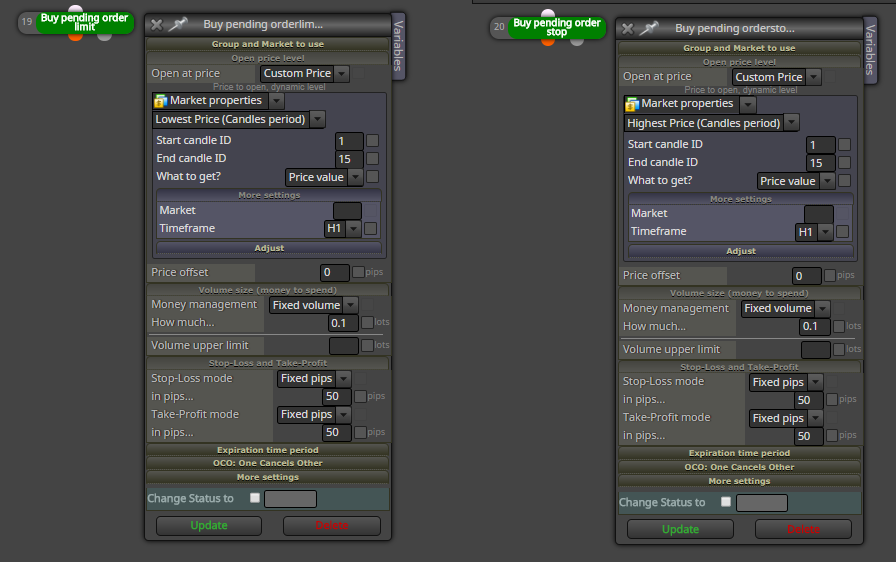
not with zigzag ... use something else, like this:
-
RE: buy stop and sell stopposted in Questions & Answers
for buy :
buy stop is placed above current price and buy limit is placed below current price
buy stop guarantee execution but not guarantee price (it can be filled at worsier price)
buy limit not guarantee execution (sometimes is not filled) but it guarantee price (it can be filled at better price)
-
RE: UPDATE time, write here if you have problems!posted in Questions & Answers
@anse33 are you using candle ID 0 or candle ID 1 in that block?
-
RE: how to re-open position after take-profit or stop-loss frist tickposted in Questions & Answers
look for "on Trade" section ...
-
RE: Any suggestion for Renko Chart !?posted in Questions & Answers
hi, renko is tricky ... because first what is renko ... it is generated in specified pips range as current price is oscillating up and down ... most of renko generators are holding all renko candles generated from time when generator started - this means if you want good history of renko candles, you need leave runing generator long time without restart, but when it is restarted, renko chart is generated from new time and all history bars are lost ... most of renko generators have function "generate history bars from M1 candles" -- this is good, but not perfect because you have not real ticks in these candles and they are generated only on price range of M1 chart - the smaller renko candle is, the less accurate in history candles, and opposite ... this small perfection detail is in renko big problem, because in most cases you cant test your EA in tester - you can test is if it is working as open/close, but you cant test it for profit in tester ... the only way how to test renko is forward demo (this take months and most probably fails in all scenarios
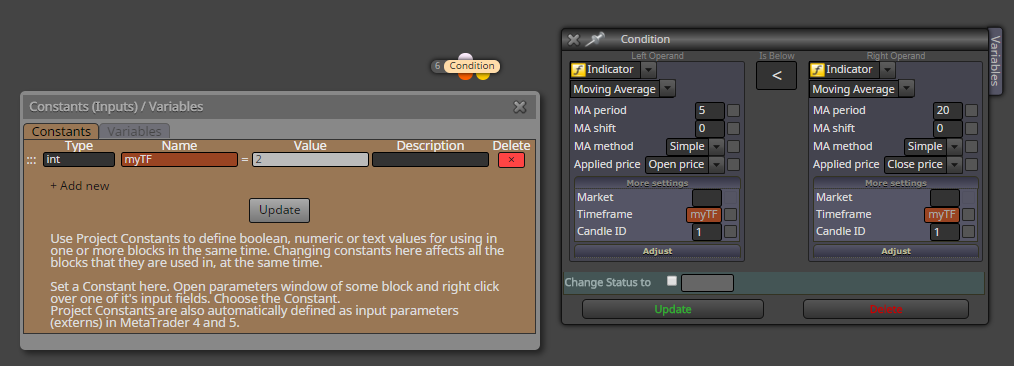
) ...renko generators in most case generate offline charts in some period (in settings can be specified), like M2 ... this means timeframe == 2 ... so in fxdreema insert your timeframe in constants/inputs as int type and in condition timeframe apply this constant:
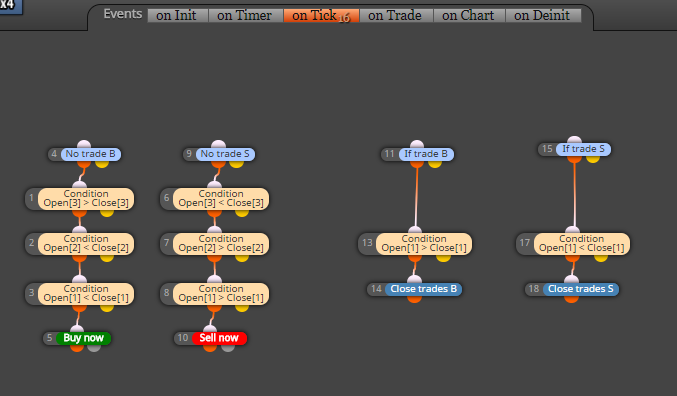
example below is well known renko strategy (2 new candles in same color opens trade in direction and one opposite it close) ..
https://fxdreema.com/shared/XgbcqQb9d
-
RE: Change "Comment Message" text colorposted in Questions & Answers
yes, this was my problem with white template too, I changed it manually but manually it is not very nice

-
RE: self updating/refreshing grid, compare two groups of tradesposted in Questions & Answers
it is not string, but color, as this:
color yourColor = clrGreenwhere color is type
your color is name
and clrGreen is value -
RE: Modify Stops no working!!!!posted in Questions & Answers
better if admin check it (I have not MT5) ...
-
RE: Modify Stops no working!!!!posted in Questions & Answers
and are there some errors returned from broker or EA in terminal log?
-
RE: Modify Stops no working!!!!posted in Questions & Answers
when you open trade without SL and TP, is it opened?