fxDreema

    • Register
    • Login
    • Search
    • Back to the main page
    • Categories
    • Recent
    • Tags
    • Popular
    • Search
    1. Home
    2. miro1360
    3. Posts
    M
    • Profile
    • Following 0
    • Followers 257
    • Topics 27
    • Posts 1611
    • Best 192
    • Controversial 5
    • Groups 0

    Posts made by miro1360

    • Tutorial 05 - EMA cross, part 5 - Buttons behavior [beginners]

      in this tutorial I show you how to apply some behavior to Buttons, like turn off Button after trade is opened and also how to use custom code block to recolor this button, hope you will like it ...

      with this Tutorial 05 we also closed this EMA cross EA tutorials, for next tutorials I choose another example

      //////////
      you need to know, that with this button behavior you can work also in on Chart section which have faster reactions (or on Timer), but that is not working in tester, so that is why I show you how to work with this behavior in on Tick section to have your EA with buttons under fully control in tester
      //////////

      https://fxdreema.com/shared/Lti2EttK

      MQL5: https://fxdreema.com/shared/f8D0nyZKc

      0_1480644201764_upload-aea06637-ccbc-4ff5-b30a-c6749731e506

      0_1480644391991_upload-1a9aed2c-c532-4433-a476-8f805cea43ab

      posted in Tutorials by Users
      M
      miro1360
    • Tutorial 04 - EMA cross, part 4 - more Buttons [beginners]

      In this tutorial you can see, how to control part of blocks with more buttons, here is also solution of homework from tutorial 3

      https://fxdreema.com/shared/UIUJQBy7d

      0_1480640827545_upload-a5dc4e37-d904-475f-9eb9-81da5fd67425

      posted in Tutorials by Users
      M
      miro1360
    • RE: Telegram to MT4

      exactly for this case no 😞

      posted in General Discussions
      M
      miro1360
    • RE: Telegram to MT4

      I think when you use in some way global variables it can be possible, it can be possible also in some way of reading external files, or even using portion of custom code ...

      posted in General Discussions
      M
      miro1360
    • RE: How to check if a trade is in break even?

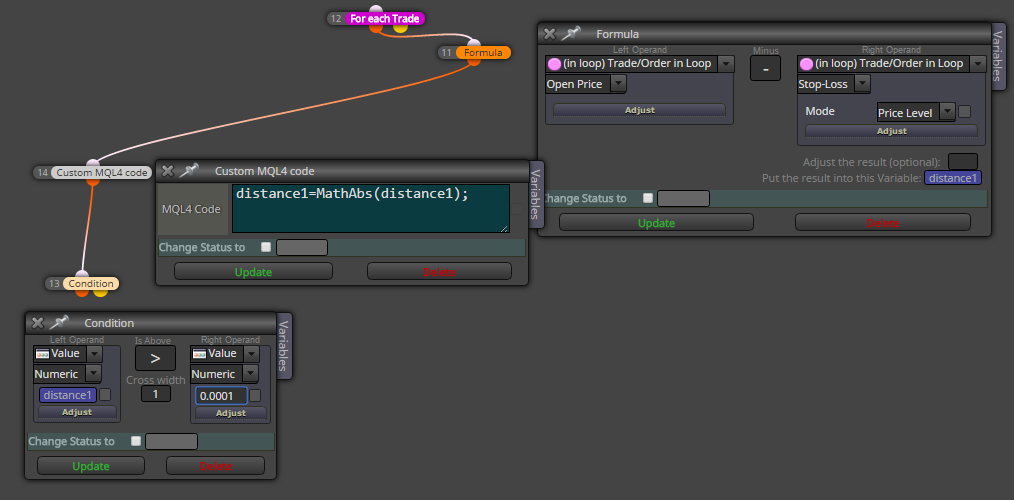
      I forgot this, you can that result with function MathAbs convert to absolute value because there is possibility of negative result ...

      0_1480429331087_upload-a69e4f35-6660-4486-a296-7103a5920f3e

      posted in Questions & Answers
      M
      miro1360
    • RE: How to check if a trade is in break even?

      have you tried this?

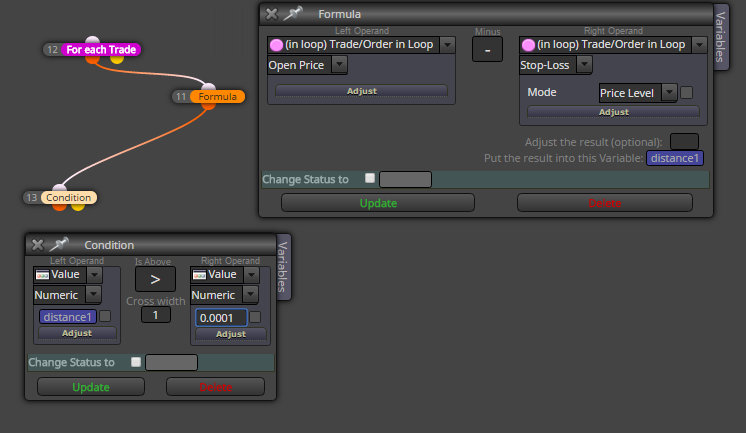
      save it into variable, but dont forget, in variable it is saved in price fraction (if you need that in pips, you need adjust result with some multiplier (*10000 or *100 for jpy pairs) ... or with function ...)
      For each Trade block goes through all trades, if you apply some filter in parameters, you can control it ...
      0_1480429038222_upload-b61efdbc-81f6-4443-a8ff-454f4249d3de

      posted in Questions & Answers
      M
      miro1360
    • RE: After upgrade I lost the remains days counter

      yes web version, I also dont see it in web ... (offline is ok)

      posted in Questions & Answers
      M
      miro1360
    • RE: how use custom indicator ?

      import it into fxdreema ... but also you can work with candle volume directly ...
      use Condition block, select Candle, parameter: Candle Volume ... (when is candle down, volume is red, up candle is volume green)

      posted in Questions & Answers
      M
      miro1360
    • RE: how use custom indicator ?

      I am working on tutorial for this, but for now you can check this:
      https://fxdreema.com/help/working-with/custom-indicators

      posted in Questions & Answers
      M
      miro1360
    • Tutorial 03 - EMA cross, part 3 - Buttons [beginners]

      This tutorial is about buttons and how to use them with EA.

      0_1480218178919_upload-a1d665cf-fca8-40f8-8a96-9ec2723d1d71

      All steps are here:
      https://fxdreema.com/shared/wtzLlcfXc
      you can again import this EA into your projects

      This is our first use on Init section where are inserted buttons (they can be inserted also in on Tick, but I explained you how to work with section on Init and why sometimes use it):
      0_1480217321962_upload-c3f939a5-0f1e-4d18-8277-aa8514cac13a

      Do your homework (description in EA).

      posted in Tutorials by Users
      M
      miro1360
    • Tutorial 02 - EMA cross, part 2 [beginners]

      In tutorial 01 I showed how to create easiest counter cross EA, in this tutorial you will see how to add inputs into EA with fxdreema.

      Click on this link with EA for more details:
      https://fxdreema.com/shared/G8goTenZb

      When you will directly import that EA without creating block after block, do this:

      1. generate mql code and save it somewhere:
        0_1480122176119_upload-0a09ca4d-c0c2-408b-89a4-f56362be3375

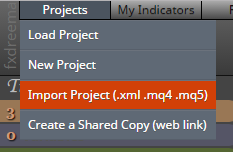
      2. import this generated file into projects:
        0_1480122237797_upload-5ecb5fca-bf4c-421b-b173-edd748e04ccf

      Now is EA imported in projects and you can start work with them.

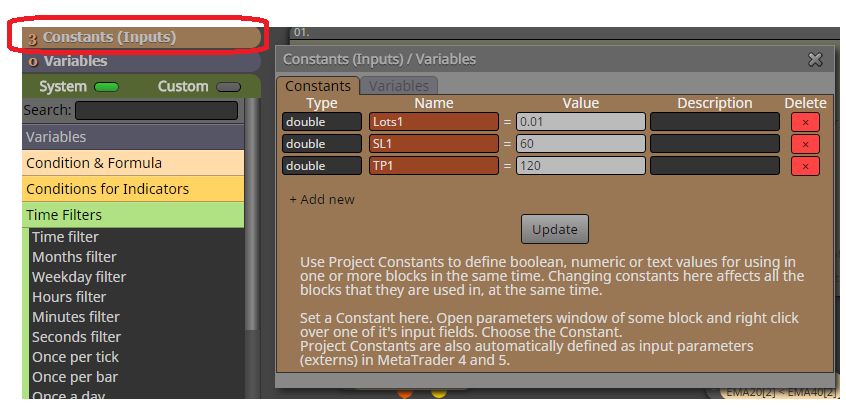
      See step 1. (description in EA). where I am talking about constants, constants in fxdreema:
      0_1480122525662_upload-04b307ad-aa5a-4ac8-871d-2da8f2387387

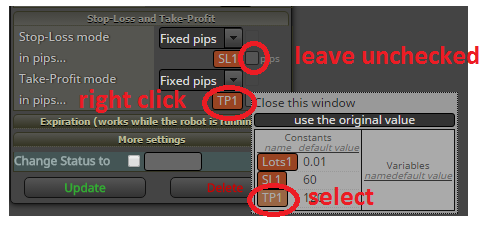
      For adding constant into block parameter, do this with mouse right-click in field where you will add constant and select this constant. Now is this constant as Input parameter. But when you use constant as input parameter, leave input check-box unchecked:
      0_1480122748059_upload-ba434f1b-163f-4c38-b723-07726fce25da

      Why to use constants in fxdreema instead input check box? Because you can add the same constant into more blocks.

      You have successfully created input parameters for EA. Values are changeable in tester.

      Hope it was fast and clear.

      Next tutorial will be about buttons for this EA.

      posted in Tutorials by Users
      M
      miro1360
    • RE: problem with pending orders

      using some of filters, like Check trades

      posted in Questions & Answers
      M
      miro1360
    • RE: Trader3487

      @Trader3487

      When you set spread in tester to 0, you have spread 0 .... (I have it) ...
      with your EA you can not test results line to be horizontal ...
      but spread is 0, if you check your trades with visual tester, ther are not offseted from Bid price (that means bid and ask is aligned) ...

      posted in Questions & Answers
      M
      miro1360
    • RE: Why the BUY block is missing variable lot size? Where is the tick box?

      @fxDreema ... that is bug .... but you can use Constants instead of this input, I am working on tutorial how to do this ....

      posted in Questions & Answers
      M
      miro1360
    • Tutorial 01 - EMA cross, part 1 [beginners]

      Hi, I decided to share few tutorials, how to work with fxDreema.

      All what I share is my style of creating EAs in fxDreema. If you are newbie, you can learn something here.

      I start step by step, from beginners to advanced tutorials. I am not best in teaching somebody, also my english is not oxford, but I created a lot of EAs.

      I share link with fully working EA where you find a lot of comments. You can work in this link, or better, you can generate mql code and import it into your new project to work with.
      In next tutorials I will not commented all things, only news, or what I decided as important.
      For next questions you can ask here in forum.

      First tutorial is, how to create easiest EA, when 2 moving averages crosses, in this cross we open trade in counter-direction of cross. This tutorial is splitted into more parts, because I will show you how to make this "nonProfitable" strategy into human control to be potential profitable.

      Click here for first part and enjoy:
      https://fxdreema.com/shared/UOM1aUO5b

      posted in Tutorials by Users
      M
      miro1360
    • RE: Add RSI as a buy/sell signal

      in free time I am working on tutorials where is this king of crossover explained, I share first of tutorials in one week or so 🙂

      posted in Questions & Answers
      M
      miro1360
    • RE: Can't compile projects

      when this happen, I think you can fast download .mql4/5 and compile/recompile it with metaeditor from metatrader directly .... I am sure, @fxDreema is working and make things better 🙂

      posted in Bug Reports
      M
      miro1360
    • RE: Working with the Ichimoku Kinko Hyo indicator in FxDreema

      here is all ok, I told him how to work with this indicator in proper way 🙂

      posted in Questions & Answers
      M
      miro1360
    • RE: Help Needed

      stochastic indicator is in fxdreema, you can work with this indicator directly in blocks ...

      posted in General Discussions
      M
      miro1360
    • RE: does my block 7 & 8 really ensure 1 trade at a time?

      that must @fxDreema check 🙂

      posted in Questions & Answers
      M
      miro1360
    • 1
    • 2
    • 72
    • 73
    • 74
    • 75
    • 76
    • 80
    • 81
    • 74 / 81