I'd like to know that also.....
Or you could try something like this:
https://indicatorspot.com/?post_type=product&product_cat=&s=ATR
Regards*

I'd like to know that also.....
Or you could try something like this:
https://indicatorspot.com/?post_type=product&product_cat=&s=ATR
Regards*
If trade>Condition block>Close Trade.....
However, you'll get whipped in a sideways market....which is 60%+ of the time.....
Jus' saying :))
@l-andorrà - Damn....
So have you successfully changed parameters in custom indicators before and actually had it work....?
Regards*
Just so you know, I built an EA almost just like that.....
It wasn't profitable.....
Just saying ;))
Yes you are correct.....
So perhaps it could go at the top of the tree or under the 'If trade' block....? :))
@l-andorrà Hello my friend. Thanks for replying*
So the weird thing is: If I select int the field comes up as empty.
If I select double, the field comes up with 14 in the box....
However, if I change it to 28, the EA still reads the value as 14 in the backtesting....
In the indicators inputs, it looks like the int icon....
Any further ideas....?
Regards*
There you go Polo. You can try this..>> link removed
Just send me 10% every month ok 
Regards*
@William29 Thanks for replying. Yes I tried that....
I'm not sure TradingView Indicators can be used in MT4/MT5.....
If you do a Google search, sometimes TradingView Indicators have been recoded for MT4.....sometimes....
Regards*
Perhaps something like this?
https://fxdreema.com/shared/jOcq2zPCc
Notice one is 10 and one is -10
Just a thought*
Regards*
Hello Dreemas,
I am using a custom indicator with only 1 parameter.
Length = 14

Yet when I open the Indicator block the field is empty.
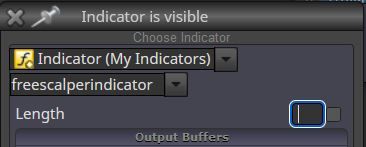
Also in the settings it doesn't show up.
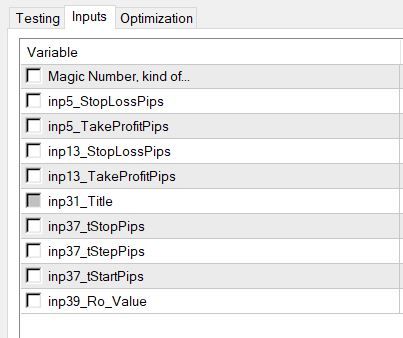
I want to change the Length to 28 but if I input 28 in the Block, the EA will still only read the default of 14......
How do I do this...??
Regards*
@jstap said in Clear History Trades*:
.....set each block to a group and see if this helps.
If you mean Group Numbers, yes I already tried that.....
Appreciate your replies*
I've noticed the 'Running Trades/History Trades' thing is only in the Market Order blocks, not the Pending Order blocks*
Or perhaps if I set it to 'Running Trades Only' it will only look back at the current trade, not the history....
Which means perhaps it will need to place the initial trade to restart the process....(?)
@jstap said in Clear History Trades*:
...... you could use a different magic number.
Yeh I already tried that. Didn't work....*
If I remove the EA, make some adjustments, then reload it back on the chart, the money management resumes lot sizes from the previous time.
I want the EA to start again with the initial lot size.....
I think I can solve this by using 'Running Trades Only'......perhaps*
Thanks guys....I was trying to avoid adding more blocks but it might be the only way.
Sometimes the trade expiring works in your favour....and sometimes it doesn't....
I'll have a look next week and let you know*
Mm yes. That might be the only way to do it.....
Open trade shouldn't expire though...*
How do I reset the MT4 or the EA so it doesn't look back on the previous trades when I remove the EA and reload it on the chart....??
Regards*
I have just spoken with my broker....
Apparently it's a Forex industry standard for Pending Orders to have an 11 minute minimum expiry time...
Which means if you set your Pending Order expiry to less than 11 minutes and that order gets executed, the Open Trade will get closed by expiration by the EA!
Doesn't seem right to me......
Once a trade is open there should be no expiry time.......!??