Have you tried using the MACD as an Indicator rather than a Value?
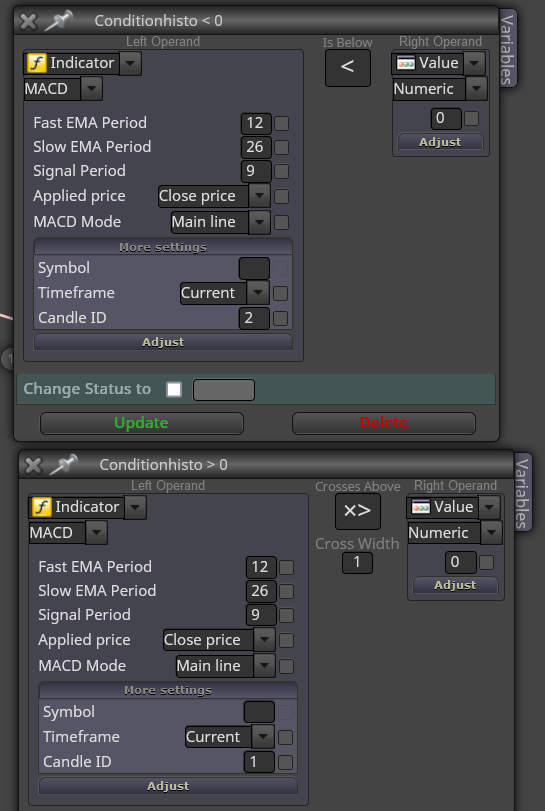
I may have the Candle IDs wrong.....*

Have you tried using the MACD as an Indicator rather than a Value?
I may have the Candle IDs wrong.....*
Try this...>>
Notice it says (Minus)200......

Being your using Martingale, hopefully you have an Equity of 100K and using 0.01 as starting lot size.....
.....just saying :-))
No worries. I don't know the Indicator so bit hard for me to tell.........But all indicators either work with Buffer No.s or Objects on the Chart.
Also some indicators appear 3-4-5 or more candles back, not the last Candle printed....
Keep at it*
Then you'll need to work with 'For Each Object' under the 'Loop For Chart Objects' tab....A whole other world of confusion, but not impossible.
To get the Object details, try to double click and then right click on the dots......or right click the chart, select Objects List and try to find them in there.
Normally I try to change the colour of the most recent object to try and find out which one it is.
Hope that helps*
Does it throw out buffers or objects on the chart?
Is it visible on the Candle ID you are specifying...?
Some indicators appear on candles way back, not Candle ID1....if that makes sense*
I'm constantly trying different EAs yes...
I don't know much about Prop Firms but if they involve borrowing money or going into some kind of debt, I definately would NOT use them!
Trade Mgnt: Trade lot sizes relevant to your account size. Always use SLs.
Martingales or Grids will always eventually blow your account, unless you have $100K balance and trade 0.01 lot size.... and even then they are still risky....
Multiple TPs etc depends on the strategy and time frame....*
Regards*
You could try opening 2 trades. TP1 is at middle Bollinger Band. When hit, move SL to Break Even on the 2nd trade to see if it runs further.
Yes Trailing Stop can be good or bad. Just a matter of testing it to see if it's better to use it or not....
Trade definately needs room to 'wiggle'....
Keep at it.
Regards*
Oh....Fractals don't appear on the last candle....They usually appear within a range of 1-5 or so....or on the 3rd candle back I think......
So try changing the Candle ID to 3 or something, or you could try something like this.....>>
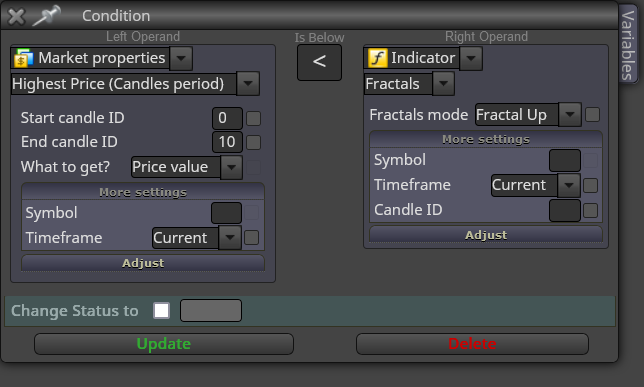
That's for the Sell side. Lowest Price for the Buy side....*
First question: Yes. New area/Different tree....etc...
Second Question: In Bollinger Bands for example, it has the setting Upper Band/Middle Line etc...Which means it is placing the SL at that level. Whereas a candle never actually touches a PSar dot.....Hope that makes sense* :-))
You could draw a line at a previous PSar dot and tell the EA to close trades if it touches that line...etc*
@papalezov said in EA based on bullish/bearish candle:
I am going to have much more respect to the guys on fever charging 500-600$ for EAs
Yeh....Pity most of them are shit 
Oh yeh, sry......
Should be Candle High +10 pips or Candle Low -10 pips....if using that Market Property*
But looking at that screenshot, it IS putting it under the Low from 0-10 candles*
Extra tree altogether...Like this...>>
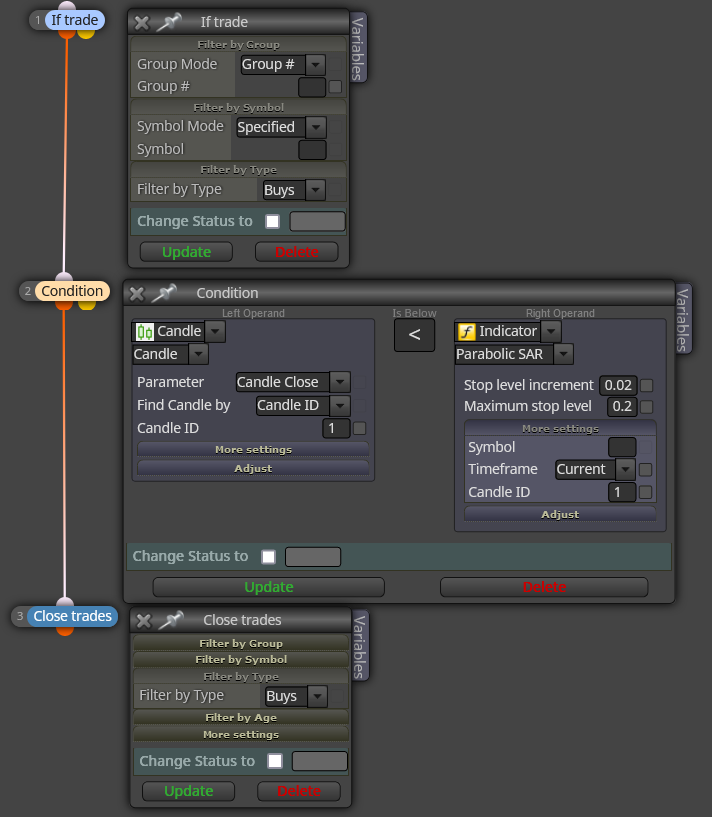
It won't close directly because the TP field is not stating if the candle is above or below the PSar yeh....*
Hope this helps*
Here mate. Try this...>>
https://fxdreema.com/shared/AvzGE1jdd
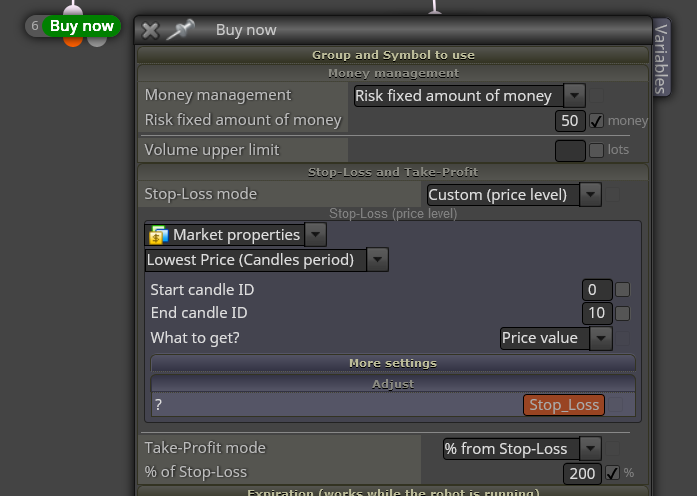
Also if you right click on the Stop Loss Adjust field you can input the Constant....Not sure if you've already done that*
Use Condition Block> Candle (Close/High/Low/etc) is above/below Psar..> Close Trades block.....
If Trade > Condition > Close Trades.....*
In the Buy/Sell block select No TP....*
Can you post a link to the project so we can take a look ya...?
Top Left>Projects>Create a shared link......
Ok. Well that setting is not risking a %....It is risking $100 and adjusts the SL accordingly*
Top right there is a ink to the Instructions page, but that can be just as confusing....lol
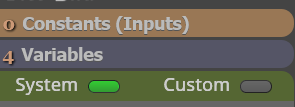
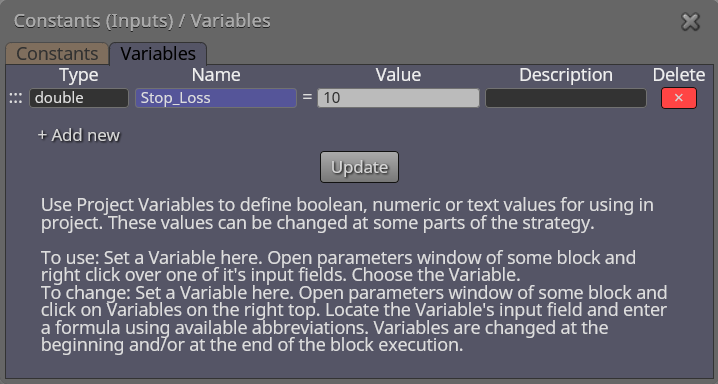
Try inputting the data as a Constant rather than a Variable.....It should then show up in the settings*
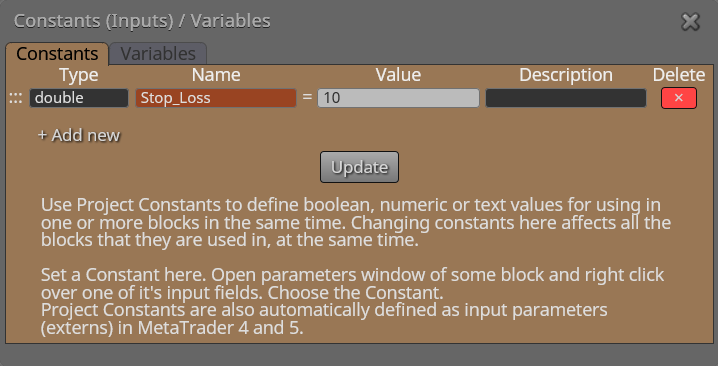
No probs.....
Have you first input the value in the Variables here...>>
How different is it...?
Could be due to spread or price movement....
Also with that set up it will open a trade every candle...Is that what you want...?
And yep, building EAs will put you in a straight jacket no doubt :-))
