P
Posts made by PhiLykia
-
RE: Need help with making EAposted in Questions & Answers
Hi, It may be necessary to reconsider the TP calculation.
-
RE: Multi-time frame analysis of Ingulf patternposted in Questions & Answers
This is just a tip for you to improve your EA..
-
Indirect solution method for Compilations Error problemposted in Bug Reports
Unfortunately, I could not get any comments or solutions from the relevant people regarding the "Compilation errors" problem in FxDreema.
It was up to me to come up with a solution:
If there are "enum" inputs in the indicators you use and FxDreema does not support this, you will receive this error. All you do is use the indicator without implementing enum variables.
However, using the indicator without enum variables often leaves the indicator meaningless.
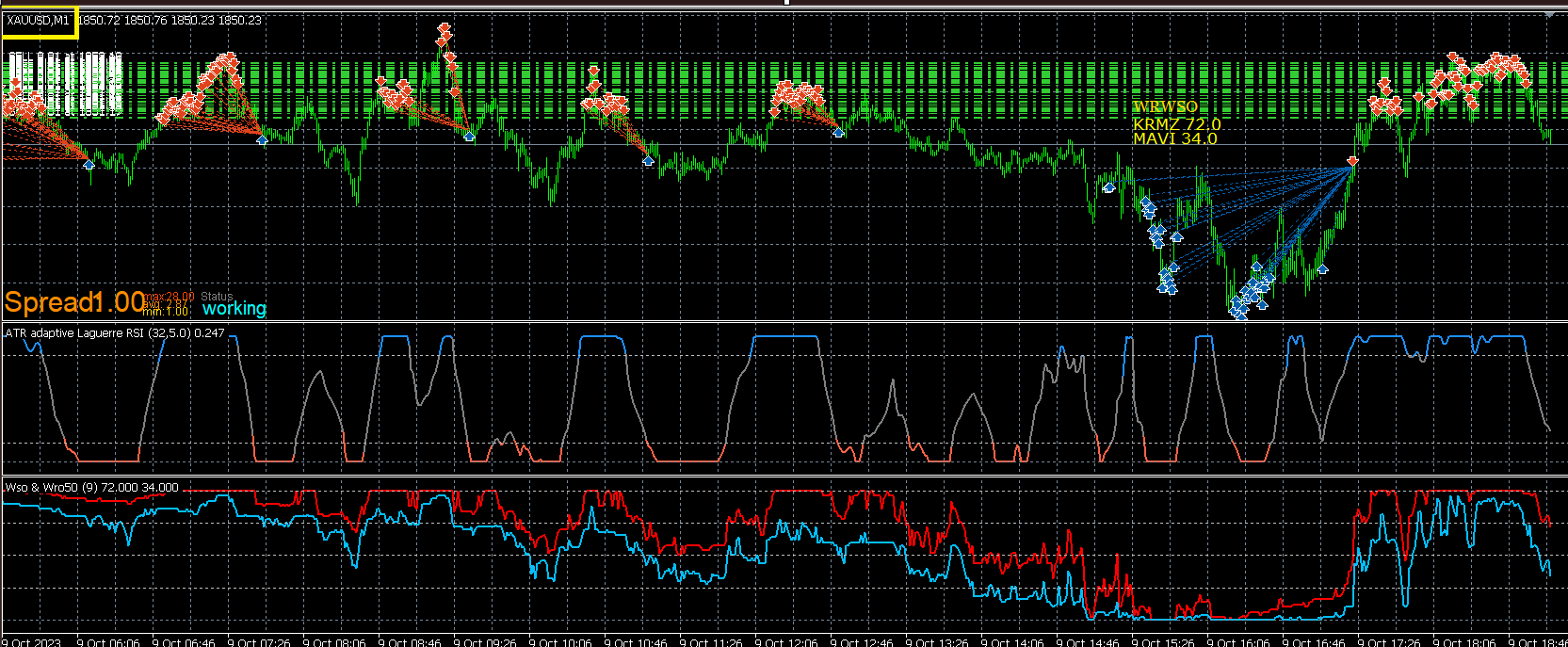
This is the error you will get in FxDreema if you use enum variables:
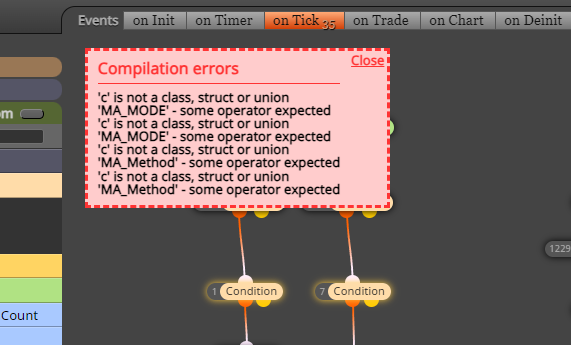
Let us solve the problem that FxDreema cannot solve ourselves. Save your project without enum variables and open your saved project with the IDE editor.
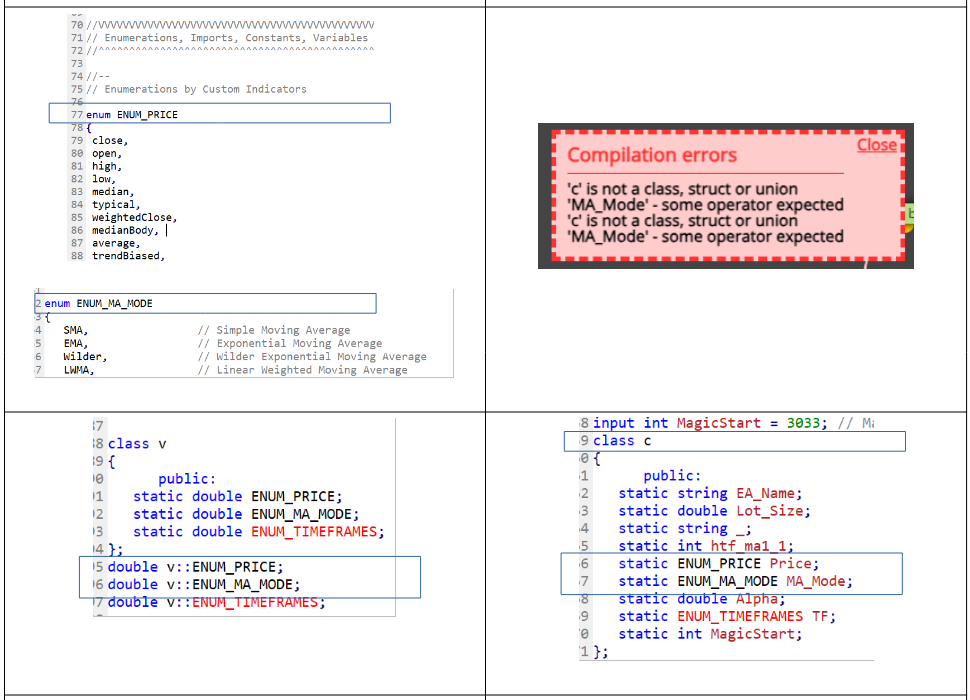
Here are the enum options in our code:
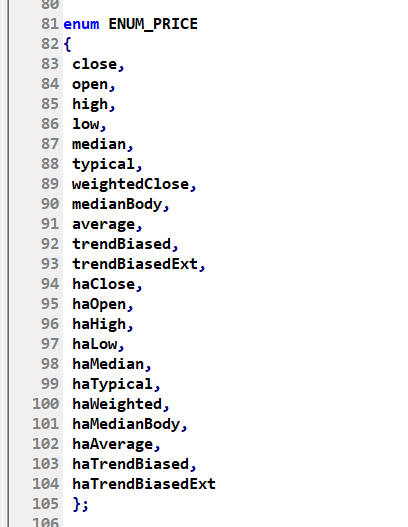
Manually define your enum in input fields:
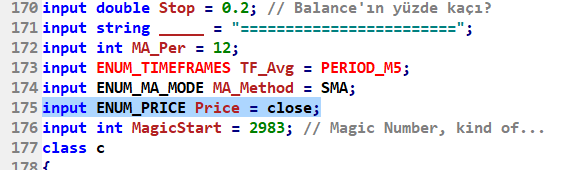
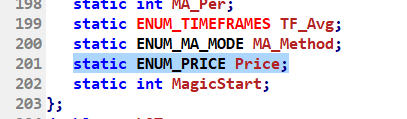
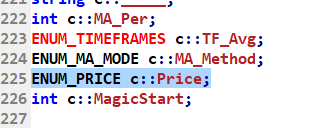
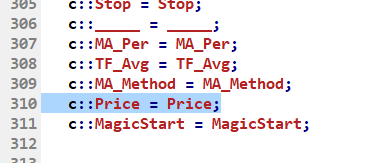
This is what the variables for your indicator look like:

Also change the enum variable as follows:
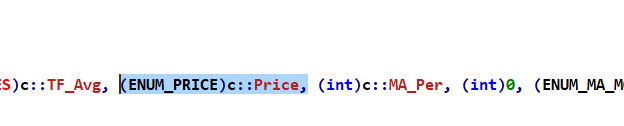
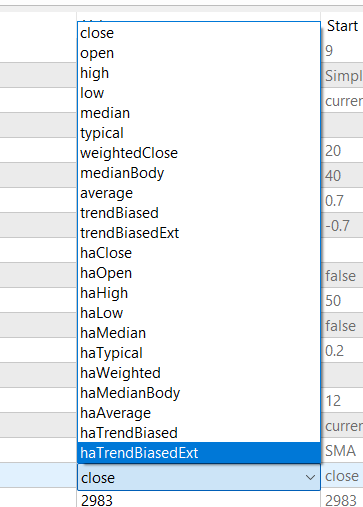
Save your project and open it in Metatrader Strategy Tester. Here are the enum variables that you cannot create with FxDreema.
-
RE: Decisive indicators, supporting indicatorsposted in Tutorials by Users
@Alex81 I use indicators such as HalfTrend, PTL, AlphaTrend to determine MTF Trend direction. Using two moving averages to compare Slow/Fast for performance will not produce the opposite result.
The critical aspect of opening a transaction with microLots in each bar in the Lower Periods is that you must be in the direction of the trend. The point to be careful is that you do not come across a trend reversal. For this, you can add a check in front of the buy/sell to start trading when the upper frame trend reversal begins. You may have to wait for a while, but you will get on the train at the first stop. The journey will be long and trouble-free.
Stop Loss is not for me at all. More precisely, I think there is a serious danger for the investor with low capital; if you make two stops, almost 20%-30% of your capital will be lost. Trust the power of the trend, use as high leverage as possible and keep your free margin as high as possible.
When the trend turns, the number of your open positions and the total lot size will be enough to create a rule. -
RE: Decisive indicators, supporting indicatorsposted in Tutorials by Users
Suggestion 4:
trend_1_time_frame_1 (M15)
trend_2_time_frame_2 (M30)
trend_3_time_frame_3 (H1)Test it in your current frame according to the main trend direction in the upper frames and see what happens.

-
RE: Decisive indicators, supporting indicatorsposted in Tutorials by Users
Suggestion 2: In the Buy/Sell Open rule set, go with the "Once per bar" box without using No Position, and let it open a POS in each bar.
Suggestion 3: sell stop: red buffer>= sell_stop_value
buy stop blue buffer <= buy_stop_value (e.g. 50)Even the time frame is in a subframe.
-
RE: Decisive indicators, supporting indicatorsposted in Tutorials by Users
Create two variables for position closing. Like Pos_Sell_Close_Flag, Pos_Buy_Close_Flag.
For Sell Close, set Sell_Flag to 1 at Red Buffer=0 and wait. When red !=0, close the position and reset the flag. Blue Buffer=100 for Buy Close
This saves a lot of time (Profit) for the situation where the trend continues and has not yet reached a full bottom/peak.
-
RE: Decisive indicators, supporting indicatorsposted in Tutorials by Users
Although I have not experienced much negativity, it may be preferable to use the indicator ending in 25 rather than the one ending in 50, as it will be faster in terms of calculation.
However, if you use this indicator in front of the check box (ATR Leguare RSI v2 (By Mladen) in the example screenshot), this box will notice before the check.
One more piece of advice. If you add the trend indicator control in the 2-3 upper periods, I'm sure the results will be more positive. For example, Half Trend, PTL, Alpha Trend etc. This way, you can continue buying or selling in the direction of the main trend.
-
RE: My text not display/show upposted in Questions & Answers
@l-andorrà you are absolutely right. This indicator repaints and has very low reliability.
-
TUTORIAL - Creating a new buffer to use indicator colors.posted in Tutorials by Users
Hello friends, there are often questions in the forum about how to use the color change of an indicator as a signal.
As you know, the color change is created in the indicator as a result of a calculation. If we can assign this calculation result as a value along with the color to a separate buffer (although it already exists but is not available as a buffer), you can use it as you wish.
Let's now examine how to do this.
(First of all, be sure to save your indicator under a different name. We don't want to lose its original state.)
First, let's open the indicator with IDE.

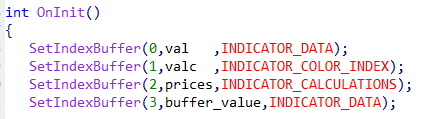
Let's add buffer with a new name to the buffer definitions under OnInit. I used the name buffer_value as an example. Use the sequence number when adding a new buffer.
(the following number is 3 in the example).
We increase the number of available buffers by one. Along with this, we also increase the number of buffers to be displayed by one.
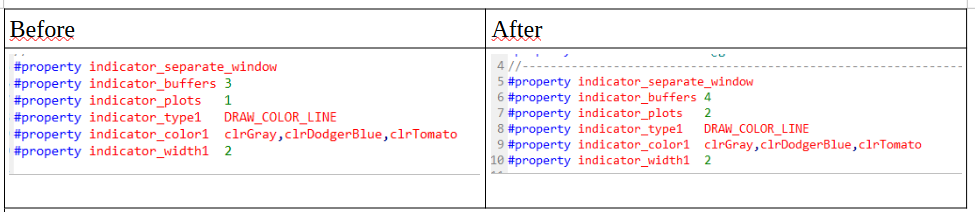
In addition to the existing buffer definitions, we add a newly named buffer definition.
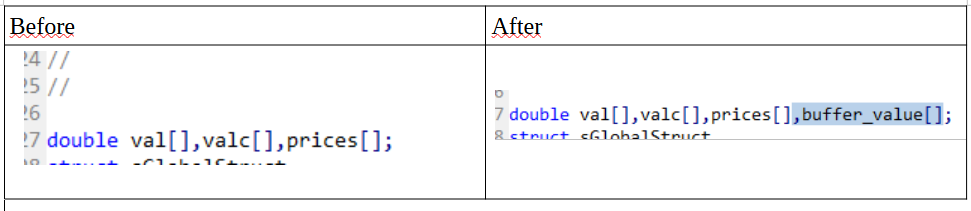
Our buffer definitions are finished. Now let's make this buffer get a value:Again, we determine the name of the INDICATOR_COLOR_INDEX buffer in the buffer definitions under OnInit. In this example "valc"
We go to the calculation section in OnCalculate and find the valc calculation (assignment).
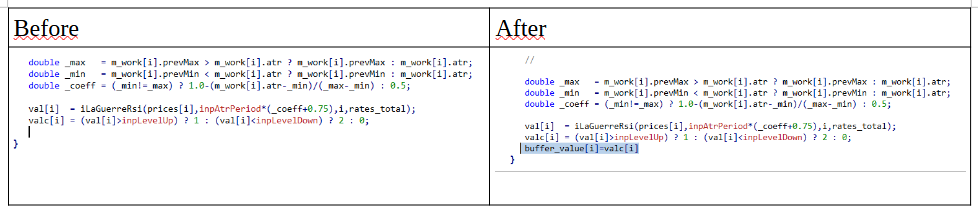
What we are looking for is here, the result of Level Up and Level Dn:
((val[i]>inpLevelUp) ? 1 : (val[i]<inpLevelDown) ? 2 )Compile the code you edited and start using it. While there was only one buffer listed before, two buffer options will appear after these operations.
If the buffer value = 1, you can use it as an increase, and if it is 2, you can use it as a decrease.
-
RE: Compilation errors when using indicators with Multi Time Frame.posted in Bug Reports
Hi @jstap,
Thanks for your interest. The problem is not being able to update or design a new one using the indicators we were actively working with before. In other words, we are no longer able to use the service we received.Although we provide support to identify the problem, it is sad that there is a lack of interest.
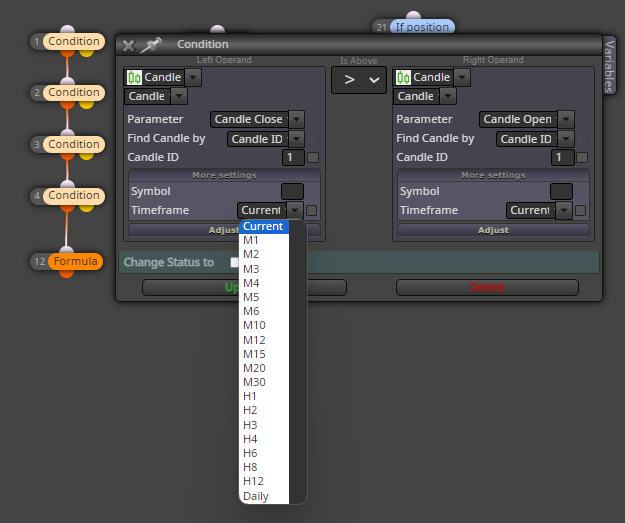
We need to work with time frame variables, especially in MTF indicators, you know. In this case, instead of using the ENUM_TIMEFRAMES structure, we need to give the variable a different name and switch to its standard structure (with the code block below) at the last stage.
ENUM_TIMEFRAMES timeFrameGet(int period)
{
int _shift=(period<0?MathAbs(period):0);
if(_shift>0 || period==PERIOD_CURRENT) period=_Period;
int i; for(i=0;i<ArraySize(X);i++) if(period==Y[i]) break;return(X[(int)MathMin(i+_shift,ArraySize(Y)-1)]);}
Again in the same example, at the beginning of the code;
_tf = inpTimeFrame;
ENUM_TIMEFRAMES timeframe;draw_begin = inpPeriod; // initial PLOT_DRAW_BEGIN value//---
timeframe=_Period;
if(_tf<=timeframe)_tf=timeframe;// if the TF is less than or is equal to the current one, set it to PERIOD_CURRENT
pf=(int)MathFloor(_tf/timeframe);// calculate coefficient forI can't do this part with "input ENUM_TIMEFRAMES = PERIOD_MX".
I'm not sure if I explained it.
You may ask, if you can do these things and compile them in the code editor, why use fxDreema?
For me, there is only one reason: time. I can do it much faster with fxDreema.
-
RE: Compilation errors when using indicators with Multi Time Frame.posted in Bug Reports
@fxDreema Problems continue, especially in compiling multi-time frame indicators. Can you provide an explanation or solution suggestion on this issue?
Example of the problem: In codes containing MTF, it is necessary to define this as a variable to call the data of the time frame. But since we cannot use this variable, we cannot work with these indicators.
#define _mtfCall iCustom(_Symbol,timeFrame,getIndicatorName(),0,inpx,inpy)
-
RE: Decisive indicators, supporting indicatorsposted in Tutorials by Users
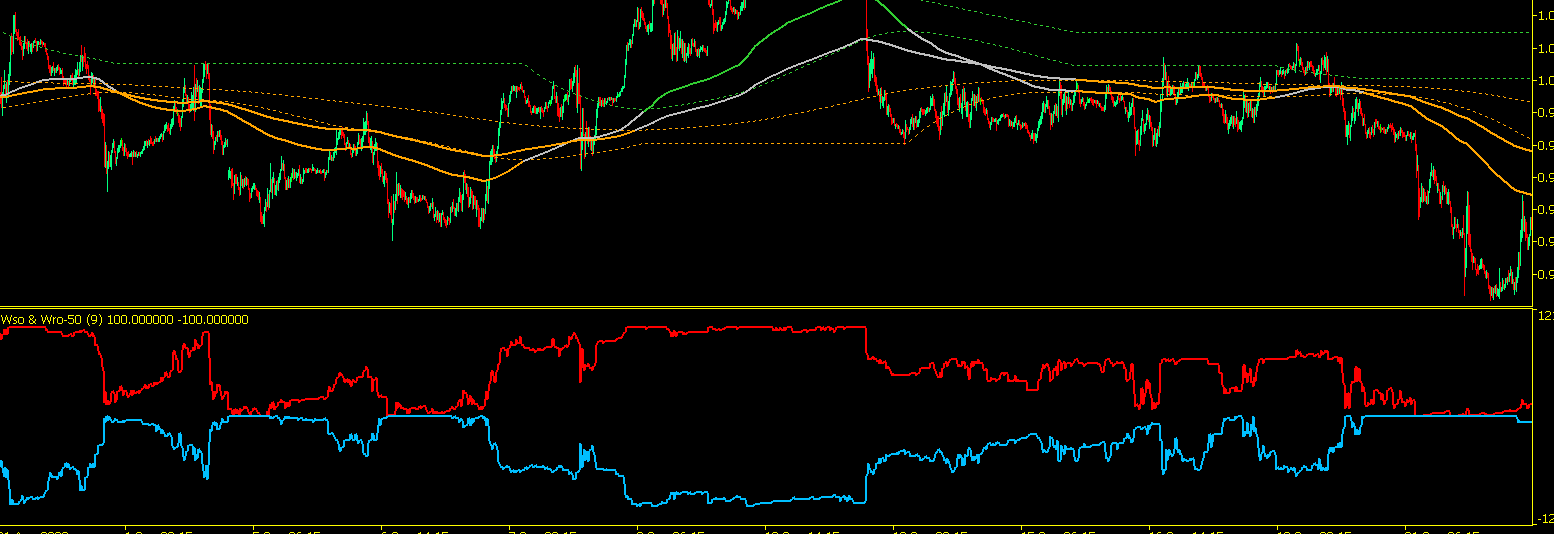
In this version, one of the indicators is reverse (negative), which can be interpreted differently. Like when the indicators move further/closer. It can be used for trend reversals.
-
RE: Decisive indicators, supporting indicatorsposted in Tutorials by Users
@Alex81
In principle, there is actually no difference. Only the levels get sharper.For example, in one case you base the level of 24.33, while in the other you base it on the net figure of 25. This allows you to enter the level value more precisely when creating the condition. Like cutting above/below x level, up/down.
This version is sharper :
-
RE: Decisive indicators, supporting indicatorsposted in Tutorials by Users
@tec-nacks Hello friend, I converted this indicator to 25 and 50 for smoother querying, you can find it in the attachment. As I mentioned in the previous message, you can use it to predict the trend direction. (If the red buffer exceeds the x value, it is considered a buying direction; if the blue buffer falls below the z value, it is considered a selling direction.)
Both reaching 0 and 100 values can indicate certainty. (For example, when both buffers are 100, the bull market can be said to have become clear; when both buffers are 0, the bear market can be described as starting.)
As I conveyed, it is a supporting indicator.
-
RE: Compilation errors when using indicators with Multi Time Frame.posted in Bug Reports
Hello, It is positive that updates are made to the application and that it continues to be developed. I am sure that the stable operation of the application is very important for all of us. It is undesirable for an EA that is currently working to not be working after development. We are ready to provide testing support in this regard, if necessary.
Among the indicators, Moving Avg, Price Type, Time Frames, etc. are included in the standard library. It is important that we also use the special parts we coded.
This is a problem for me if I am going to update the code that I have compiled in FxDreema on the IDE. I hope the developers resolve this quickly or suggest alternative solutions.