fxDreema

    • Register
    • Login
    • Search
    • Back to the main page
    • Categories
    • Recent
    • Tags
    • Popular
    • Search
    1. Home
    2. roar
    3. Best
    • Profile
    • Following 0
    • Followers 184
    • Topics 35
    • Posts 2406
    • Best 422
    • Controversial 6
    • Groups 0

    Best posts made by roar

    • RE: Scan Historical Data for Conditions/Values

      @cdwilder1 hi!

      Here's your example https://fxdreema.com/shared/ov3z3743b
      Its... a bit tricky for a new user, I think πŸ˜„

      posted in Questions & Answers
      roar
      roar
    • RE: Scan Historical Data for Conditions/Values

      @cdwilder1 its a pleasure to help such a fast learner!

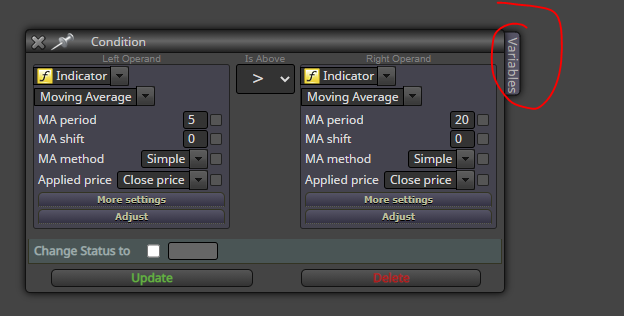
      The box to the side is just a quick method to modify your variables, without the official "modify variables" block. Open the box by clicking the "Variables" tag in the corner
      0_1603276650357_7586ea1e-38c6-453e-8898-fb363dc16e4b-image.png

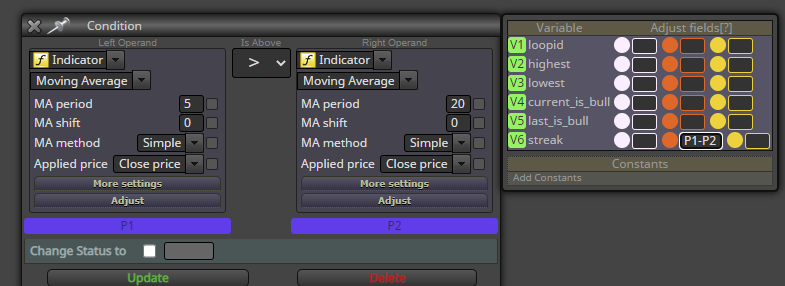
      The green V's are shortcuts for corresponding variables, just to save your fingers from writing the longer variable name. The 3 colored columns are as follows:

      • White column modifies the variable before the main block does its comparison
      • Orange column modifies the variable only if the result from the main comparison is TRUE
      • Yellow column modifies the variable only if the result from the main comparison is FALSE

      Blue P's are shortcuts for the comparison values. Just for example, this would record the gap between the MA's into variable "streak", only when MA5 is above MA20:
      0_1603277065852_fb8f4591-5231-43a8-9106-437a17fcbc82-image.png

      posted in Questions & Answers
      roar
      roar
    • RE: Scan Historical Data for Conditions/Values

      @cdwilder1 lets go through each block from top to bottom, just to clear any misunderstandings (using the same example link https://fxdreema.com/shared/ov3z3743b😞

      Block #2 (once per bar)

      • Firstly, its often good to have this block on top of your project, as it saves your CPU when backtesting. You rarely need to run your code on every new tick, especially when youre only interested in the past candles.
      • I also reset all the variables here, so the following loop structure resets for every new candle.
      • Take exit from the orange output, that activates on the first price updates on each candle. The yellow output would activate for all the other price updates on each candle.

      Block #1 (condition) (sorry for the silly numbering lol)

      • The condition restricts the loop to max 500 iterations. Otherwise your tester might run into endless loop and crash
      • This block also increases the ID number for each cycle. At the beginning, loopid is 0, and it grows by 1 on each cycle (until we break the loop or reach 500)
        "V1+1" is shortcut for "loopid+1", either way works.
      • We have 2 variables for the bull/bear status of successive candles, current_is_bull and last_is_bull. Here I save the "current" variable value into the "last" variable, before the "current" value gets updated again in the next blocks. This part is probably a bit difficult to grasp, but hopefully it becomes clear later.
      • Take exit from the orange output (TRUE)

      Block #3 (condition)

      • Here we check the bull/bear status of some history candle, identified by the loopid variable.
      • If candle is a bull, modify the variable to 1. Otherwise (so its bear), modify variable to 0.
      • Take exit from either of the outputs, orange or yellow

      Block #4 (condition)

      • This block is a text-based condition, but it behaves just like the "normal" condition.
      • Here we check if there are successive bull-bull or bear-bear pairs (so the two variables are either both 1 or both 0).
      • If the condition is true, increase streak by 1 and continue to next block with orange exit.
      • If false, reset the streak and go back to the beginning of the loop through yellow exit (block #6 is just some "cable management", would make more sense in a bigger project)

      Block #5 (condition)

      • Here we check if the loop has found 4 successive bulls or bears
      • If true, proceed to orange exit
      • If false, go to next loop iteration through yellow exit

      Block #7 (modify variables)

      • This block just finds the highest and lowest prices
      • As you can see, we can use variable calculations in any edit field, for example "loopid - 4" for the starting candle ID

      Blocks #8 and #9 (draw line)

      • Draw lines to the highest and lowest point of each bull/bear streak, just for visualization purposes
      posted in Questions & Answers
      roar
      roar
    • RE: Scan Historical Data for Conditions/Values

      @cdwilder1 said in Scan Historical Data for Conditions/Values:

      Also,

      Where you typed "loopid - 4", would "V1 - 4" have also worked?

      What if there was a constant 3 that I used as an input in my settings.

      Would something like "loopid - constant_3" work?

      How about "V1 - C3"? (I'm not sure if constants also get that handy little shortcut like the variables do)

      The C's and V's only work in the side box, I think (not sure, though).
      "loopid - constant_3" would work anywhere, that's certain.

      About storing the values, I'm not sure what youre after here. Store all the highest and lowest points and their corresponding candle ID ranges? The most efficient way is using an array, I think. Search the forum for array projects, thats a whole new framework to wrap your head around, lol πŸ˜„ MQL4/5 documentation is great help as well https://docs.mql4.com/array

      I modified my example. https://fxdreema.com/shared/J1g1qH0dd

      • Now it has constants for the desired minimum streak, and also the loop length.
      • The streak can also be longer than minimum
      • Minimum/maximum price now accounts also for the candle wicks immediately outside the bull/bear streak. This may or may not be your intention..
      • I connected every block back to the loop, so it will now always run through the whole loop until max iterations is reached (while the first version stops at the first match).
      • I made this version work by adjusting the streak by +1 in block #5, and +2 when doing the final calculations. To be honest, I'm not sure why this configuration works like this, but it seems to work lol - this is how I build these projects, trying and failing until something works πŸ˜„

      I probably missed some of your questions here, just remind me in that case

      posted in Questions & Answers
      roar
      roar
    • RE: Condition Sunflower indicator.

      @ontrade In my personal opinion, all custom indicators (especially repainting ones) do more harm than good, because they are black boxes: you cant see their inner workings, you cant modify them, you never learn anything new. I dont use them, and I think you shouldn't either. This is why I dont like answering custom indi questions very much - its counterproductive.

      To check possible crosses before the sunflower, you need to run a candle ID variable through a loop. Search the forum for more loop instructions, (https://fxdreema.com/forum/topic/10894/scan-historical-data-for-conditions-values), I made one detailed example today and dont feel like writing another right now lol

      posted in Questions & Answers
      roar
      roar
    • RE: Scan Historical Data for Conditions/Values

      @cdwilder1 yeah, working with arrays is usually custom code.
      But in essence, an array is just a storage space (a table) of multiple variables. And the number of these part-variables is dynamic, you can "declare" 10000 variables inside the array just as easily as 2 variables - thats the useful thing in arrays.

      Could you possibly explain the logic behind the streak being set to -1, why if condition five is false streak gets adjusted in block 6 by +1, and the V6+2 in the same block? I'm trying to understand the thought process behind this. I'm sure you have very good reasons for doing it this way, but I don't immediately understand why. Hahah.

      • I dont see where I set streak to -1. I set current_is_bull to -1 in the first block, just because the value has to be something else than 0 or 1. If it was 0 and the loop detects a bear candle in the first iteration, that one bear candle would be counted twice, in a sense.
      • I adjusted streak by 1 after my visual testing suggested trying it πŸ˜„
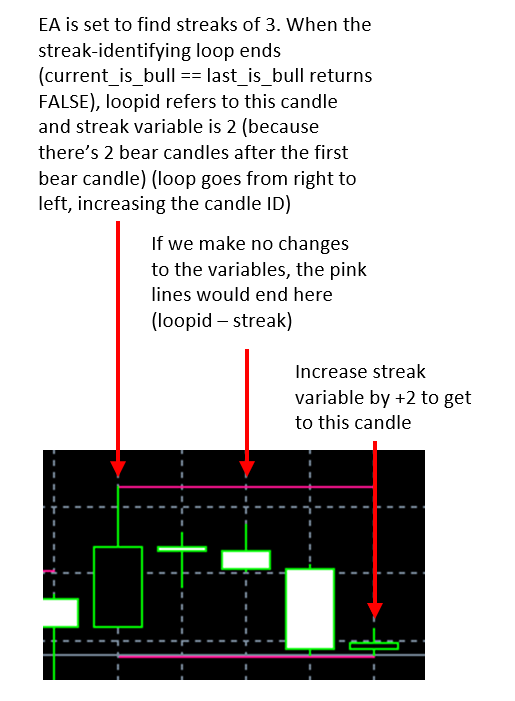
        I think the reason is that streak actually counts the successive bars after the first bull/bear candle has been detected -> when there is actually 2 successive bull candles, the streak variable value is only 1 at that point, before making the adjustment...
      • Reason behind the +2 adjustment: 1 for the reason I explain above, +1 to extend the id range to the candle before the streak began (reading from right to left), in case there's a candle wick making the extreme point

      I find this a bit difficult to explain, I'll make a picture as well πŸ˜„ Hope you get at least something out of it
      0_1603386459189_2b0cb793-cfee-4124-88f4-cc9b512e82d4-image.png

      posted in Questions & Answers
      roar
      roar
    • RE: Scan Historical Data for Conditions/Values

      @cdwilder1 nowadays you can open conflicting positions on MT5 as well, if you open a hedging account with your broker.

      The MT5 default account type is netting account, but many MT5 brokers seem to offer more hedging accounts as its a familiar system for old MT4 users.

      posted in Questions & Answers
      roar
      roar
    • RE: Reliable software for testing Expert advisors.

      @jsauter86 FXTM has good history, for EURUSD and other majors at least.

      posted in Questions & Answers
      roar
      roar
    • RE: How can I turn DD into a percentage?

      @l-andorrΓ  "relative" sounds a lot like percentage. Never tried this though
      0_1604058695715_4f40f8c0-5f6d-49c1-9977-320cdf000fd1-image.png

      posted in Questions & Answers
      roar
      roar
    • RE: So many lines of codes!

      @reader1 for a beginner EA builder, fxdreema is surely more "bug-proof" than trying to code from scratch.
      EAs will be slower, though, thats for sure. I'm ok with that, as building EAs with fxdreema is much faster than coding. I save time, computer loses time, my time is more expensive lol

      posted in Questions & Answers
      roar
      roar
    • RE: Copy object values

      @robertk "Chart ID" specifies the target chart. Apparently the fxdreema block doesn't have that parameter, so I'd guess you have to use the actual mql4 function in a custom code block
      https://docs.mql4.com/objects/objectcreate

      posted in Questions & Answers
      roar
      roar
    • RE: Copy object values

      @robertk behind the draw line block in fxdreema is this exact mql4 function, its just in graphical form with some nice drop down menus. You should be able to use the function, you have kind of used it before.

      posted in Questions & Answers
      roar
      roar
    • RE: Fibonacci level option isnt working

      @zackry the source is "picked in loop" -> you must use the "for each object" block to tell your EA which object you are targeting.

      posted in Questions & Answers
      roar
      roar
    • RE: Variable uses and examples

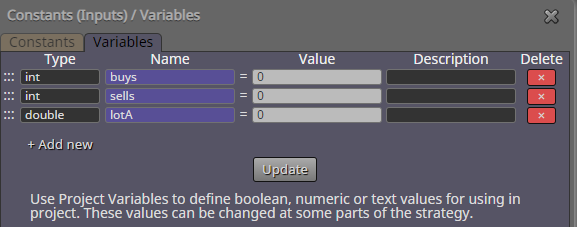
      @fideld003 all right, here's an example project. It keeps track of order counts, and uses that value to calculate lot size. Its a dangerous betting strategy, just for example - dont trade it.
      https://fxdreema.com/shared/IQDWzM8qc
      0_1610639586093_224ee7ee-4153-4b84-b2ec-0f01aad0d225-image.png

      posted in Questions & Answers
      roar
      roar
    • RE: Dropdown Constants

      0_1610822205452_7c6e519f-096e-446f-a294-f6c3f79ce62b-image.png

      posted in Questions & Answers
      roar
      roar
    • RE: MQ4 Indicator to Custom Block

      @mikemanahan basically, paste the mq4 code as "Custom function", set inputs as "Parameter used in block" and then call the function. This way you can convey the buffers to fxdreema variables. I dont know if thats the best way to manage it, I dont really use the studio - I dont think anyone on this forum does lol

      0_1610825156757_d300255e-5150-47b5-9049-8dd063822447-image.png

      posted in Questions & Answers
      roar
      roar
    • RE: My Best Result Ever, Check this out guys.

      @jsauter86 said in My Best Result Ever, Check this out guys.:

      Im not a fan of 88% equity drawdown...

      Didnt notice that, lol

      posted in Questions & Answers
      roar
      roar
    • RE: Custom price crossing MA condition with minimum turnover distance

      @osryan in other words:

      • if price is less than 20 pips below MA,
      • check if price has been 100 pips below MA at some point
      posted in Questions & Answers
      roar
      roar
    • RE: Custom price crossing MA condition with minimum turnover distance

      Here's a loop trick for that
      https://fxdreema.com/shared/oGxoWZwX

      posted in Questions & Answers
      roar
      roar
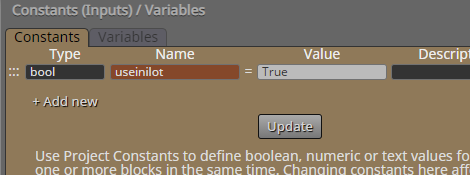
    • RE: Simple Condition. Is there a bug? Or did i missed anything?

      @biztet I cant replicate that result.. Try to change the cross condition to simple < 0 condition, maybe thats it somehow..
      posted in Questions & Answers
      roar
      roar
    • 1
    • 2
    • 14
    • 15
    • 16
    • 17
    • 18
    • 21
    • 22
    • 16 / 22