fxDreema

    • Register
    • Login
    • Search
    • Back to the main page
    • Categories
    • Recent
    • Tags
    • Popular
    • Search
    1. Home
    2. roar
    3. Posts
    • Profile
    • Following 0
    • Followers 184
    • Topics 35
    • Posts 2406
    • Best 422
    • Controversial 6
    • Groups 0

    Posts made by roar

    • RE: Help needed in modifying values in a sequence

      @rafaels919 said in Help needed in modifying values in a sequence:

      Alright, so I've replaced the indicator and adjusted the condition for the shiftback (so it triggers starting from 2nd loss) and this seems to work now

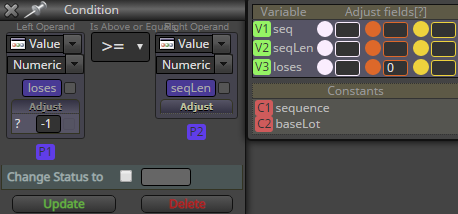
      Great, this makes sense - here the loses variable can drop to 0 but not below.

      posted in Questions & Answers
      roar
      roar
    • RE: Help needed in modifying values in a sequence

      @rafaels919 said in Help needed in modifying values in a sequence:

      @roar If I remove the first "Modify Variable" block and leave only the second one attached, I get a critical error in the tester almost immediately and it stops working:

      I suspect the configuration now allows the loses variable to repeatedly lose - 2, so eventually it becomes a negative number. The array can't have negative indexes.

      @l-andorrà

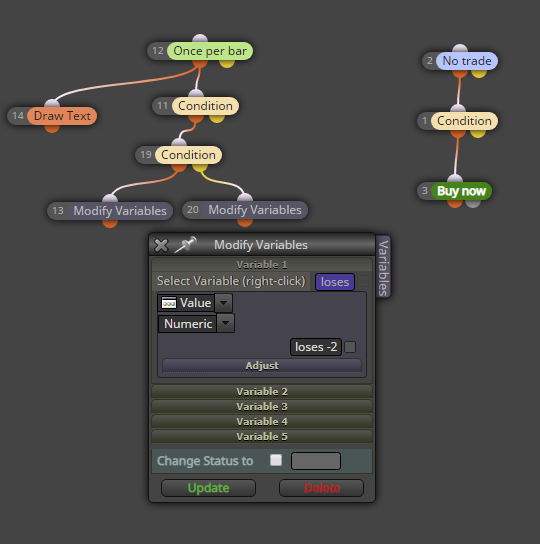
      I guess that 'loses -2' text is the reason for that failure. I'm not sure, though. I would say this is not the correct way to write that variable there.

      It is not the default way, but actually that works fine 😉

      posted in Questions & Answers
      roar
      roar
    • RE: Help needed in modifying values in a sequence

      @rafaels919

      The "base volume" bet is being skipped from time to time (0.01):

      Skipped>:alt text

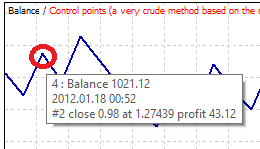
      It appears the base lot is skipped when old trade closes and new trade opens at the same time (09:12). Not sure what is causing this..
      If you provide details how to reproduce this bug, I'll look into it. (is it USDJPY, what tester settings, which version of the EA?)

      Is it possible to not use the "yellow" block output?

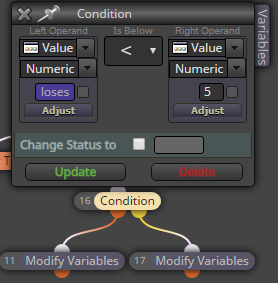
      The color doesn't really change anything. Orange is for TRUE, yellow is for FALSE. In my example, when loses variable is less than 5, it goes to the orange output. When it's more or equal to 5, yellow output is activated. Some blocks miss the yellow output, because their function can't have a "false" output. It doesn't harm your system in any way.
      0_1579368172302_c7698c01-d9c1-40cc-8004-368c9be0237c-image.png

      posted in Questions & Answers
      roar
      roar
    • RE: Help me please,im Newbe

      @l-andorrà Yeah, objects are usually drawn this way

      posted in Questions & Answers
      roar
      roar
    • RE: Help needed in modifying values in a sequence

      @rafaels919

      For example:

      1. We have the "loses" variable changed to "2" by "modify variables" block when RSI crosses 60 (just as in your example)

      2. If we are on 5th value - we don't revert back to the 2nd value - instead -> we shift back two values (so we would be on the 3rd value instead of 2nd value) -> so it doesn't REVERT to two when the condition triggers but SHIFTS BACK two values.

      To shift back in value, just modify loses = loses - 2.
      0_1579352990293_b49e12a8-f8fe-4940-8827-2831c950aa3a-image.png
      Here's your example:
      https://fxdreema.com/shared/CB4cAPh9c

      posted in Questions & Answers
      roar
      roar
    • RE: Help needed in modifying values in a sequence

      @rafaels919 I fixed the bugs you found, check this one:
      https://fxdreema.com/shared/J3efZjb2e

      posted in Questions & Answers
      roar
      roar
    • RE: How to organize the EAs

      @trader-philipps That's the way. You don't even have to make a new project, it is created automatically when you import.

      So,

      1. Rename your project to "project1.1"
      2. Export to .mq
      3. Rename it back to "project"

      ta-dah, now you can import your project1.1 anytime you want to go back.

      posted in Questions & Answers
      roar
      roar
    • RE: Help me please,im Newbe

      @pantek Your fibo grid is 0 candles wide. Candle ID is the setting to refer to history candles: ID 0 is current candle, ID 1 is previous candle, ID 2 is 2nd previous candle and so on.

      Working with graphical objects is not very noob-friendly project, I'm sorry but you will have some hard time 😄

      posted in Questions & Answers
      roar
      roar
    • RE: Simple money management rule

      @vikasone24
      0_1579264113834_ef360a00-a512-421b-82b9-a421f0f236e9-image.png
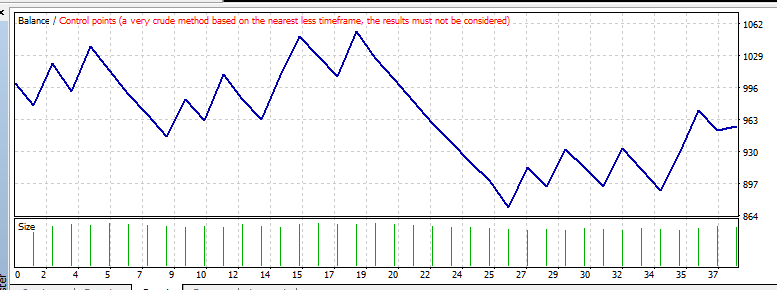
      Here's my backtest:
      0_1579264146597_719eb87c-a6cf-4823-898d-a9d5a7dd1a9c-image.png
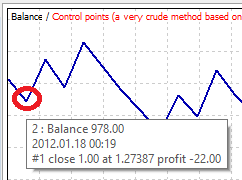
      -22/1000 = -2%

      0_1579264209541_fb2a19ef-0849-44be-b4f2-ecbd56749b56-image.png
      43/978 = +4%

      It works, but very roughly (because of spread, commission, swap, slippage and what not...)
      To get a money-based SL, check this topic:
      https://fxdreema.com/forum/topic/8169/how-can-a-sl-based-on-currency-be-set-up?page=1

      I'm probably missing some obvious solution here, I'm sorry if thats the case 😄

      posted in Questions & Answers
      roar
      roar
    • RE: The clock seconds do not count well.

      @juan-manuel-quiñonero
      0_1579263680568_354e5a2e-699b-4d63-a207-2b598326fddb-image.png
      This happens because the EA code is not run on a continuous basis - instead, it is run on every new tick. That's what the "on Tick" means. To run your code on every second, use the "on Timer" tab in the builder, and modify the timer interval from the project options 🙂

      posted in Questions & Answers
      roar
      roar
    • RE: Help needed in modifying values in a sequence

      @rafaels919

      Also, as I mentioned before - I need to be able to freely utilize the "shiftback", using conditions and what not. Could this be possible with your configuration?

      https://fxdreema.com/shared/hjSUXN3Zb
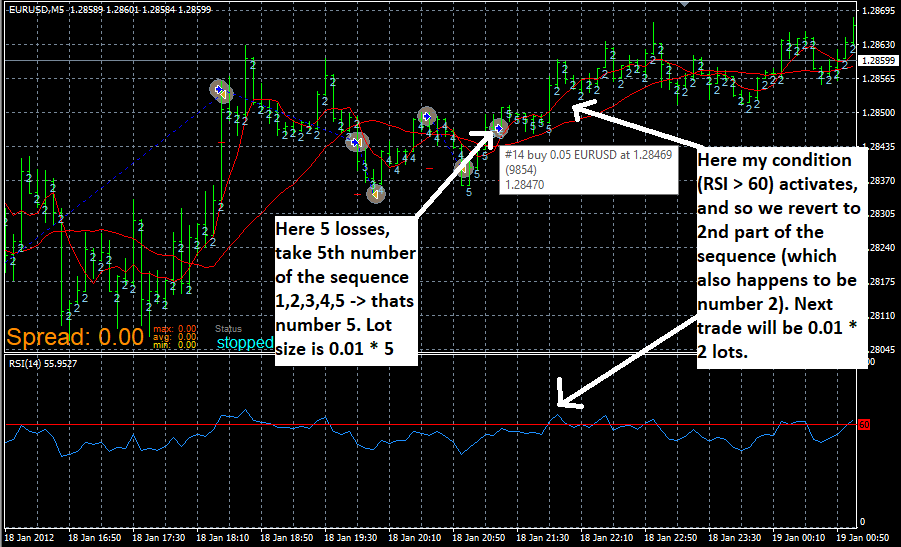
      Here I continue my example, with an arbitrary condition: when RSI crosses above 60, modify loses to 2.
      The sequence is the default "1,2,3,4,5,6".
      I also added a text under each candle to keep track of the active sequence value.
      Here's how it behaves:
      0_1579263051405_878ce1e6-d4f8-4da6-8995-5e1a4fa3380e-image.png

      posted in Questions & Answers
      roar
      roar
    • RE: Help needed in modifying values in a sequence

      @rafaels919 said in Help needed in modifying values in a sequence:

      So I tried to run a little test following your description, but it didn't shift back neither did it reset at the "seqLen" Limit.
      0_1579263290588_749e022c-c000-44f4-844b-fea9569f8d80-image.png

      You can't modify the variables in that builder window, just leave them 0 (because any value will be overwritten in the next step). The variables and arrays will be initialized according the given constants (see the "on Init" tab).

      By the way, if the sequence string is now an "Array", would it be possible to change that array using "Modify Variables" instead, which I described in my introduction text?

      Yes, you can use the "modify variables" block to modify your array, but only one element at a time. For example, if you want to take the first element of the array, use seq[0]. For second element, use seq[1] and so on... But why would you want to modify the sequence itself? Doesn't it suffice to just modify the "continuation", take a different part from the sequence?

      If I could somehow use a single block like that to change the whole array at a given condition, that would solve everything.

      Changing the whole array requires a loop and possibly re-sizing the array, if the resulting array is longer or shorter than the original. I don't think that is the easiest solution 😄

      posted in Questions & Answers
      roar
      roar
    • RE: Testing Historical Trades with a new Strategy

      @trader-philipps said in Testing Historical Trades with a new Strategy:

      @l-andorrà I have tried some approaches to open an order at a specific time (Unix Timestamp), but didn't find a solution, yet. If that is done, it looks almost like a no brainer.

      Couldn't you just use the time filter to create a small "window" for the order?

      posted in Questions & Answers
      roar
      roar
    • RE: Help needed in modifying values in a sequence

      https://fxdreema.com/shared/i6NwpEuZc
      Here I fixed the array so that you can forget about the 0-start thing:
      If you need 3rd value, use seq[3] and so on. (seq[loses] when loses = 3)
      So now it is the same as the default "custom sequence" setting, I think it is more convenient to use this way.
      (I did this by adding "1" to the beginning of the actual array)
      0_1579252312712_77704fbc-4618-4131-9491-03107924dd68-image.png

      posted in Questions & Answers
      roar
      roar
    • RE: Help needed in modifying values in a sequence

      @rafaels919 Hi!

      That's right, my approach is to convert the sequence string to an int array (because you can't use a string in any calculation). This converting is done in the "on Init" tab.

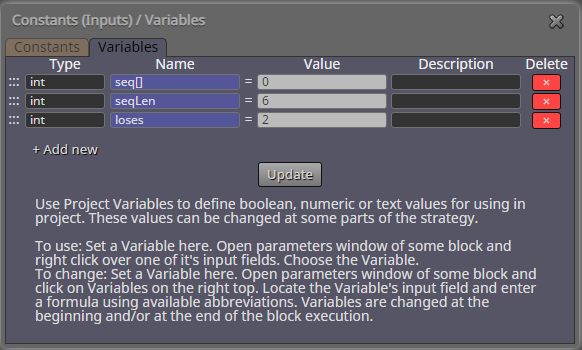
      • What is the Variable "seq[]" used for?

      This is a special kind of variable: an array. Arrays dont store just one value, but multiple values - like a list, or a table.

      In MQL, array indexing starts from 0, so the first value of your sequence is seq[0] = 1,
      if the original sequence string was "1,2,3,4,5,6".
      Last value would be seq[5].
      0_1579251339989_18ca4577-095c-457d-8935-3326f526c40b-image.png
      ^ This part is for resetting the sequence, in case we go to a 7th loss (and the array doesn't have a value for that). "seqLen" is the size of the array, and because arrays start from 0, the actual last index in the array is seqLen - 1.

      I admit, this is very confusing setup, lol. But you don't necessarily need to know every detail, just know that you can modify the loses variable to set the sequence to whatever value you like.
      If you want revert to 2nd sequence value, modify variable loses to 1.
      For 3rd sequence value, modify variable loses to 2.

      posted in Questions & Answers
      roar
      roar
    • RE: break even point after negative value

      @clacky Hi!

      The "break even" block is for stop-loss, not take-profit.
      You should use "pips away from open price" and then "modify stops" 🙂

      posted in Questions & Answers
      roar
      roar
    • RE: Help needed in modifying values in a sequence

      @rafaels919 Hi!

      I cannot offer a beatiful one-block solution, but putting the sequence into an array is one solution - check my example: https://fxdreema.com/shared/YYdcM1Wbb

      The array determines the sequence number with a variable loses, which tracks consecutive loses (and you can modify the variable directly as well)

      posted in Questions & Answers
      roar
      roar
    • RE: Leaving Candle ID Blank

      @tanjiayi1
      0

      posted in Questions & Answers
      roar
      roar
    • RE: Expire order in n bars *** SOLVED ***

      @trader-philipps Does the expiration mode account for closed market time? Just curious

      posted in Questions & Answers
      roar
      roar
    • RE: Expire order in n bars *** SOLVED ***

      Hi!

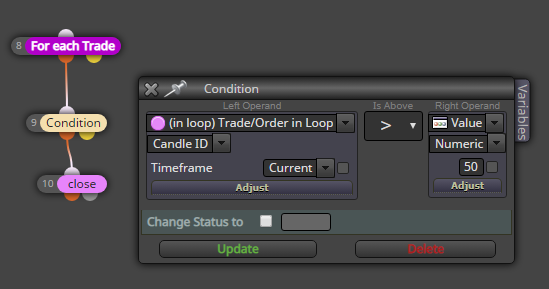
      I think this candle ID function gets the "candle age" of each trade
      0_1579098210211_a2730340-cb6a-4338-8bbe-54846e6f50a0-image.png

      posted in Questions & Answers
      roar
      roar
    • 1
    • 2
    • 71
    • 72
    • 73
    • 74
    • 75
    • 120
    • 121
    • 73 / 121