fxDreema

    • Register
    • Login
    • Search
    • Back to the main page
    • Categories
    • Recent
    • Tags
    • Popular
    • Search
    1. Home
    2. roar
    3. Posts
    • Profile
    • Following 0
    • Followers 184
    • Topics 35
    • Posts 2406
    • Best 422
    • Controversial 6
    • Groups 0

    Posts made by roar

    • RE: struct member undefined

      @bluemoon This bug happens when you insert a variable to some field (so it turns blue), but the builder doesn't actually register it as a variable (for some reason, maybe there was already some value in the field).

      Solution: as Philipps said, go to your metaeditor and find the corresponding block ID -> then return to the builder and re-create that block.

      posted in Questions & Answers
      roar
      roar
    • RE: Auto Modify Trailing Stops?

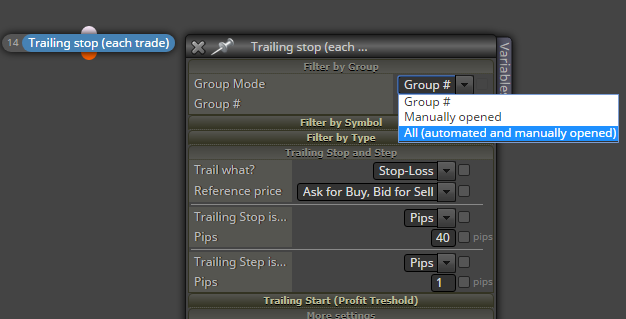
      You mean this setting?
      0_1574312717033_b80f6a27-da79-4639-a9d2-59f684e8871d-image.png

      posted in Questions & Answers
      roar
      roar
    • RE: guys please test and rate

      Yes, works in a ranging market, until a new trend takes place.
      If a new trend NEVER appears, you make profit.
      If a new trend does appear (today, tomorrow, maybe next year) -> you lose everything.
      This sad fact doesn't change with the settings 😞

      posted in Questions & Answers
      roar
      roar
    • RE: guys please test and rate

      The EA suffers from the usual flaw of grid systems: not allowing for any losses. This will always blow the account, because nothing can predict the market with 100% certainty
      0_1574281644904_249a31a4-ef93-492f-9040-5ccc55c76ca4-image.png

      posted in Questions & Answers
      roar
      roar
    • RE: when creating candle crosses above candle high, the body is used as high not the wick? is this to fix somehow?

      @serioza Ah, I think I got it now. The crossing condition doesn't work tick-by-tick, but only bar-by-bar.
      So you can't use that condition to track intra-bar changes.
      To track intra-bar changes, you could use a variable to store the last tick values.. This setup finds the crosses you need:
      https://fxdreema.com/shared/ILF2RuVjd
      0_1574274845466_df8001c9-b00f-46de-890d-ef796591348a-image.png

      posted in Bug Reports
      roar
      roar
    • RE: when creating candle crosses above candle high, the body is used as high not the wick? is this to fix somehow?

      @serioza But your project draws arrows on candle close, not high/low ?
      0_1574272317527_eff86c78-ef3f-406a-a5e6-a24635d593ea-image.png

      posted in Bug Reports
      roar
      roar
    • RE: when creating candle crosses above candle high, the body is used as high not the wick? is this to fix somehow?

      By default, high and low are the upper/lower wicks of the candle.
      If you need the body values, use candle open and close.

      posted in Bug Reports
      roar
      roar
    • RE: Simple Bar Close Issue

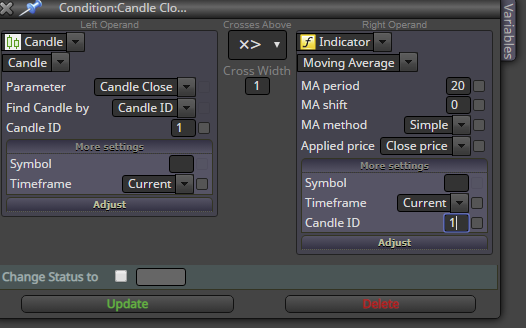
      @jcalow Use 1 in the candle ID setting. 0 is for current candle, 1 is for last completed candle.
      0_1574264582196_726f60fd-3fca-4674-b049-f80196351013-image.png

      posted in Questions & Answers
      roar
      roar
    • RE: Here, take this profitable ea

      @line I think youre right, it's the lot sizing. And yeah, this EA will not make profit on the ETF, withouth any modifications. The ETF probably has bigger trading costs and smaller volatility, and thus the 5-min timeframe can't be very proftable in the long run.

      posted in Tutorials by Users
      roar
      roar
    • RE: Here, take this profitable ea

      @fabiobioware The EA uses the symbol of the chart.. I don't know anything about WINZ19

      posted in Tutorials by Users
      roar
      roar
    • RE: Here, take this profitable ea

      @fabiobioware That's great, the EA should be suitable for your system. Does it work on EURUSD 5-min?

      Btw, you can see the account mode here as well:
      0_1574183379529_68b44626-e6b4-4d61-a81b-7ab5b0bd566c-image.png

      posted in Tutorials by Users
      roar
      roar
    • RE: Advanced tabs

      @shovel52 I'm afraid I can't help you with any custom indicators... I stick with the default ones

      posted in Questions & Answers
      roar
      roar
    • RE: Here, take this profitable ea

      @fabiobioware Ok, I might now the problem now. I guess your mt5 can have simultaneous long and short trades? That means, your mt5 account is a hedging account.

      My mt5 project is designed for netting account. That account will automatically close any sell trades if new buy is opened, and vice versa.

      posted in Tutorials by Users
      roar
      roar
    • RE: Once per minutes/bar issue

      @paragorundu Hi!
      Personally I use the "once per bar" with a suitable timeframe setting, always works with no errors...

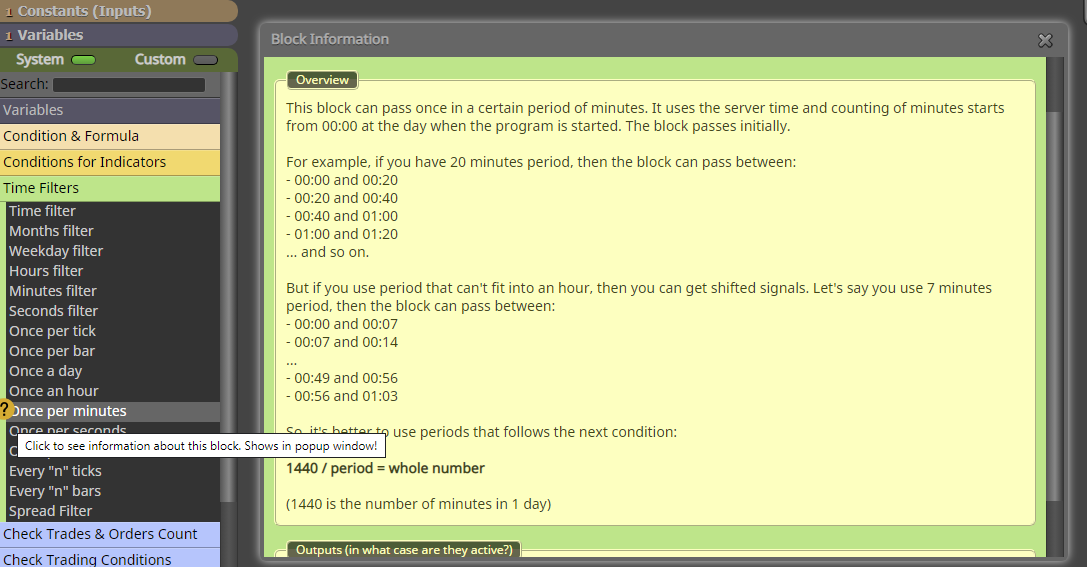
      "Once per minutes" bases its calculations on 60-minute intervals, maybe that (somehow) causes your issue.
      Check the info button on the "once per minutes" block:
      0_1574168127449_bcec5c01-3032-45b6-a4d4-d979542fc669-image.png

      posted in Questions & Answers
      roar
      roar
    • RE: Here, take this profitable ea

      @fabiobioware Hi!
      I can't think of a reason right away, tbh I don't even remember all the details of this project...

      Do you use mt4 or mt5? If mt5, do you use netting or hedging position system?

      Do you see any error messages in the mt4 journal, about the failed trade opens?
      Have you backtested it?

      posted in Tutorials by Users
      roar
      roar
    • RE: Advanced tabs

      @shovel52 There is a tutorial section on the website: https://fxdreema.com/tutorial
      Personally I have never used it though... learnt by just trying different things

      posted in Questions & Answers
      roar
      roar
    • RE: Advanced tabs

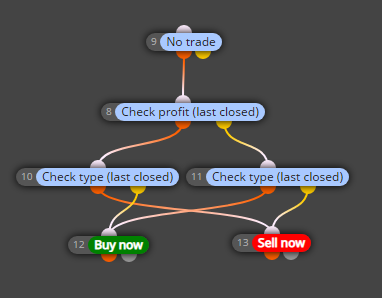
      @shovel52 It doesnt have the instrument, only half of the process - checking last closed trade and then opening another. The loop will continue, if you open the first trade manually and use SL and TP

      posted in Questions & Answers
      roar
      roar
    • RE: Compile Error

      @jzfusion Export your project to .mq4 (.mq5) and try to compile it in metaeditor. It will show you the exact line of the broken code. Go to that line and scroll up a bit, and you will see the corresponding block ID. It may be of help 🙂

      posted in Questions & Answers
      roar
      roar
    • RE: Importing Variables and constants

      Yeah I tried the same. You actually have to put your variable in 2 different places. Use the search function to find the places..
      But yeah, those variables still don't show up when imported back to builder...

      posted in Questions & Answers
      roar
      roar
    • RE: Advanced tabs

      @shovel52 Hello there! Speak of the devil lol 😄

      I just renamed the blocks to better fit their settings.
      They are actually these blocks:
      0_1574112465469_92288b2f-8d1e-4c32-95ab-77eee89a49bc-image.png

      posted in Questions & Answers
      roar
      roar
    • 1
    • 2
    • 77
    • 78
    • 79
    • 80
    • 81
    • 120
    • 121
    • 79 / 121