fxDreema

    • Register
    • Login
    • Search
    • Back to the main page
    • Categories
    • Recent
    • Tags
    • Popular
    • Search
    1. Home
    2. roar
    3. Posts
    • Profile
    • Following 0
    • Followers 184
    • Topics 35
    • Posts 2406
    • Best 422
    • Controversial 6
    • Groups 0

    Posts made by roar

    • RE: Getting values from other Indicators

      @zackry Honestly, I don't have a clue - try it 😄

      I guess you can also leave it empty and use the fxdreema block "set current timeframe" instead. Whichever fits your project

      posted in Questions & Answers
      roar
      roar
    • RE: Getting values from other Indicators

      @zackry No problem lol

      And yes, just set up the constants and parameters, and then copypaste the lines from mq4 to calculate

      posted in Questions & Answers
      roar
      roar
    • RE: Getting values from other Indicators

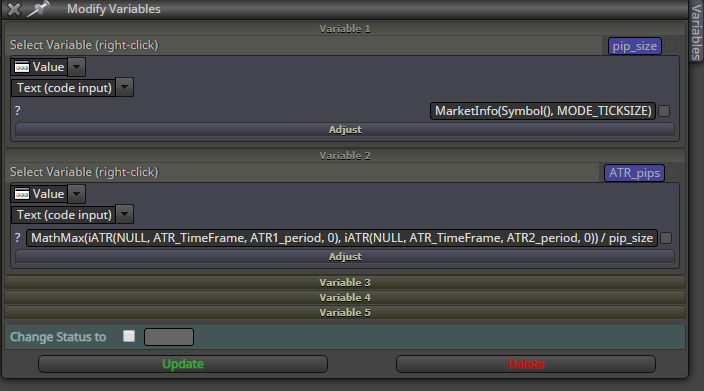
      @zackry Here is the ATR_pips calculated:

      https://fxdreema.com/shared/ap4ilIBmb

      0_1563983215787_93c3cf13-b66e-40c2-b371-f89b9ae4c42f-image.png

      posted in Questions & Answers
      roar
      roar
    • RE: Getting values from other Indicators

      @zackry
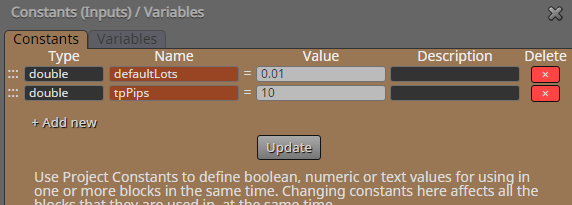
      You must first declare the constants and variables in your fxdreema project.

      The red ones (ATR_TimeFrame, Risk_per_Trade, etc...) goes to your fxdreema constants list
      The black ones (ATR_pips, RRR, lots) goes to your fxdreema variables list

      posted in Questions & Answers
      roar
      roar
    • RE: Getting values from other Indicators

      @zackry Ok, lets study the mq4 code:

      • The first 3 values ("PT", "SL" and "ATR") are probably calculated by these 3 functions:

      0_1563979750141_d2318c2a-d4fe-41ac-9bf9-7edddb850de1-image.png

      • The "RRR" is here:
        0_1563979838176_6d9c1f97-3da6-4ca6-9a0f-a4cf48f16617-image.png
      • The "Risk" is just the Risk_per_Trade constant
      • The "Lots" is probably here:
        0_1563979985382_f69da118-cbbb-4a91-ad3b-992ac042cc3f-image.png
        money is your account equity, pip_value is a tool for converting pips to raw number:
        pip_value = tick_value = MarketInfo(Symbol(), MODE_TICKVALUE)

      Hope this gets you started 🙂 Ctrl+f is useful when browsing the mq4 file

      posted in Questions & Answers
      roar
      roar
    • RE: Getting values from other Indicators

      @zackry Hi. I don't really know much about custom indicators, they are too much hassle for me.
      Those values shown as object are probably calculated with some simple algorithm. I would just find out how they are calculated, and just copy that part to my EA. The custom indi is an unnecessary complication

      posted in Questions & Answers
      roar
      roar
    • RE: How can we display the profit ON chart after a closed trade?

      @fxdreema Oh, of course, thanks!

      posted in Questions & Answers
      roar
      roar
    • RE: How can we display the profit ON chart after a closed trade?

      Something like this should be ok:
      0_1563913396589_357f3531-2e67-4c3a-80ac-343d459bd096-image.png

      Note the correct Event, and also the custom function. I found the function from here: https://docs.mql4.com/trading/orderprofit

      posted in Questions & Answers
      roar
      roar
    • RE: Once per trade doesnt work pls help

      @setsuna When you measure the RSI of the current candle, you will notice that it constantly changes. If you measure two constantly changing RSI's, they will make many crossings every second. This tiny fluctuation doesn't show up in the historical graph, because that shows only the final value of each candle.

      Measure only the completed candle (ID 1) to solve this problem.
      0_1563912957087_a64ef036-81c0-41a1-9194-e7586d275339-image.png

      posted in Questions & Answers
      roar
      roar
    • RE: Infinite sleep loop when tryingto test more than one symbol.

      Might be a history data problem - your terminal can't find the data for all pairs

      posted in Questions & Answers
      roar
      roar
    • RE: auto lot sizing issue

      @wolamen No, just "custom value"

      posted in Questions & Answers
      roar
      roar
    • RE: Once per trade doesnt work pls help

      @setsuna Share the current version pls

      posted in Questions & Answers
      roar
      roar
    • RE: auto lot sizing issue

      Try putting this to your lot field:

      MathFloor(AccountBalance()/1000)*0.01

      posted in Questions & Answers
      roar
      roar
    • RE: How to make Time like 02:00 as a constant input (Double?)

      @ibrahamt
      Working with time is a pain. If it fits your system, it would be much better to count the bars and work from there.

      https://fxdreema.com/forum/search?term=barcount&in=titlesposts

      posted in Questions & Answers
      roar
      roar
    • RE: how can i test mt5 for free as mt4 ?

      Oh, I see. I guess you could open some shared mt5 project from this forum, and then use 2 browser tabs to copy-paste blocks from the mt4 builder.

      I recommend buying the subscription at some point, though. 10 connections are not enough.

      posted in Questions & Answers
      roar
      roar
    • RE: Need some advice regarding this

      @zackry
      In English:
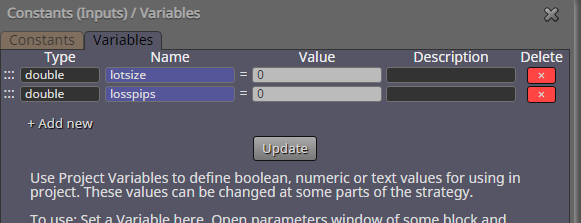
      lot B is bigger when loss A or lot A is bigger, and smaller when tp B is
      bigger.

      In math:
      lot B = (loss A * lot A) / tp B

      In computer:
      https://fxdreema.com/shared/pCTJzt5D
      0_1563815885965_d75203e5-04a3-45dc-9454-35111d8006e4-image.png
      0_1563815899472_f35aa33d-4900-4850-9a93-60c2308642e4-image.png

      Hope my math checks out lol

      posted in Questions & Answers
      roar
      roar
    • RE: how to lock account

      @gomen
      https://fxdreema.com/forum/topic/6115/how-to-set-ea-password-for-1-account

      posted in Questions & Answers
      roar
      roar
    • RE: how can i test mt5 for free as mt4 ?

      @wolamen I don't understand. Yes you can do this with mt5, just open a demo account on some broker.

      posted in Questions & Answers
      roar
      roar
    • RE: help on time filters

      https://fxdreema.com/shared/ZCoTSeTDb

      The plan is to count seconds in the On Timer tab. You must set the onTimer period to 1 second from the options -> project options.

      Now that we have the seconds counting, when bull candle appears, set the count to 0 -> now the variable can increase to 10, and we have our 10 seconds delay -> buy!

      posted in General Discussions
      roar
      roar
    • RE: "Check Age" for Pending Order based on Candle Time

      @eklonsousa Okay, thats interesting... Can you check the order age later on, with the pink block?

      0_1563798977764_be90bf0e-bc91-47ae-9072-d74e8899dde5-image.png

      posted in Questions & Answers
      roar
      roar
    • 1
    • 2
    • 90
    • 91
    • 92
    • 93
    • 94
    • 120
    • 121
    • 92 / 121