@chuahb said in Builder not working for about 13 hours so far.:
Glad that the builder page is up again. However, when I export a mql4, rename and load back in, I get a blank project.
@fxDreema I am having the same issue.
@chuahb said in Builder not working for about 13 hours so far.:
Glad that the builder page is up again. However, when I export a mql4, rename and load back in, I get a blank project.
@fxDreema I am having the same issue.
You're very good. Thanks @miro1360
@miro1360 that's what I thought I could do but it doesn't seem to work. Maybe I'm doing it wrong?
I've made a simple EA as follows https://fxdreema.com/shared/LejuBVIHb.
If the first trade is magic number 8043 I would expect the 2nd trade to be 8044 but instead it shows in the comment as 80431. If I hover the mouse over the trade in MT4 it shows as 8044 it's just in the comments I can't get it to be right.
Is this because in the comments the magic number is being picked up as text and not actually as a number? So it is adding text + number instead of number + number?
How do I record the magic number of say group 2 or group 3 in a comment on the screen when a trade is taken? @miro1360 you helped me earlier with a comment for the magic number in a comment which works well. But when I use the same logic with a comment after a group 2 trade is taken it still references the original magic number.
i.e. magic number say 1010 for 1st trade. when 2nd trade is taken it uses magic number of 1011. But in the comment it still shows as 1010.
Is it possible to show the magic number of 1011?
so if I have groups of trades then each group will have its own magic number? This is automatically assigned by the EA or MT4 when the new group of trades starts? And is used by the EA to control each different group?
So if I put an EA on the chart and assign it magic number 1010 then the first trade/s will use this number but when a trade is actioned from a new group then these trade/s will have magic number 1011 etc?
So to avoid confusion between trades on different charts then I should use magic number of say 1020 on the 2nd chart? Then the trades on this chart will use 1020, 1021, 1022 etc?
Hopefully I've got this right. I'll give it a try.
Thanks again for your reply.
Thanks for your reply. I have changed the magic number but it has happened again. It doesn't happen all the time which I find weird.
Something like this on the example page? https://fxdreema.com/demo/mt4-loop-add-to-volume-on-loss
My EA has taken a trade on eurusd with magic number 1501. This is the EA on the chart. At a certain level, which is correct as per my methodology, and as per the EA attached, a 2nd trade has been taken. This trade though shows magic number 1502.
The EA with magic number 1502 was previously on a different eurusd chart. It is exactly he same EA but with a different magi number for each chart it is attached to.
The only way the EA knew to take the 2nd trade and at what level to take it was by previously taking the 1st trade. i.e. The same EA but with a different magic number wouldn't have known the level to take the trade at.
Any explanation as to why this has happened? Is there something I need to do within the EA to prevent this happening again? How do I know that the EA with magic number 1501 is going to control both trades?
I am trying to add a comment that shows the magic number on the screen.
When I put the comment straight after the Buy Now block like in this https://fxdreema.com/shared/mtYfhhftd the trade is opened but closes straight away by 'close at stop' even though it's nowhere near the stop level.
When I put the comment in On Trade after the trade is closed like in this https://fxdreema.com/shared/z5oQ6VTEc the comment includes the magic number when the trade is closed.
What do I need to do to show the magic number from the time I add the EA to the chart?
Does the number of pips need to be a whole number? i.e. 2 or 3 but not 2.5?
Does there need to be a gap between 2.5 and pips?
I don't know but that's a couple of things I would try.
@miro1360 Thanks again. That works well.
If I have the same EA on the same pair how do I know which one is taking the trades?
I have changed the magic number for each EA.
Is it possible to see which magic number relates to each trade, SL, TP etc.?
Is there a solution for this? @fxDreema
Is it because of your adjust value?
For the buy you are placing your order at the highest price of the last 32 candles + 6 pips?
For the sell you are placing your order at the lowest price of the last 32 candles + 6 pips?
I have attached a copy of the Inputs of when I load an EA.

What is the last input? i.e. inp2_ExpDays? The Value is 3?
How do I find out what this does? It's not part of the Constants(Inputs) from my EA?
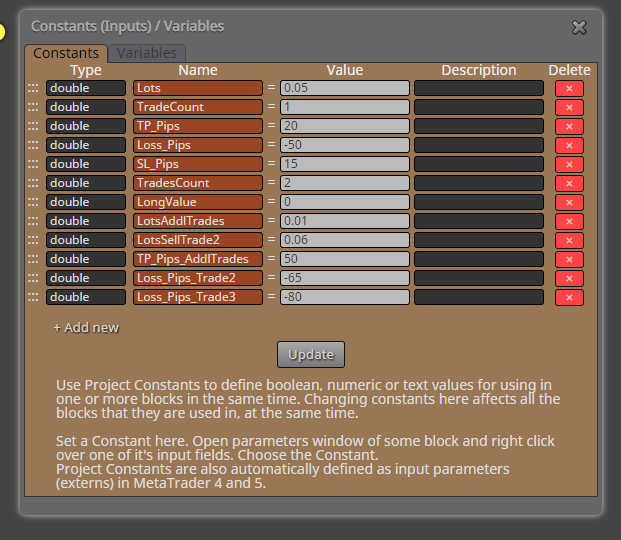
How do I get the comments from multiple comment blocks to write in the same area of the screen without overlapping on each other?
On the 2nd comment block I tried leaving Data Row 1 blank and using Data Row 2. When the 2nd comment block activated this simply wrote the comment over the top of the comment from the 1st comment block.
Next I tried putting the same information in Data Row 1 (Buy Level) in the 1st block into Data Row 1 in the 2nd block so that it would over write the same information. This worked well when comment block 2 activated (Buy Trade: Executed).
So I tried the same thing with comment block 3 but when this activated both Buy level and Buy Trade: Executed are now illegible.
I have attached screenshots of when each of the three comments blocks were activated.
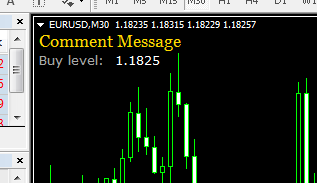
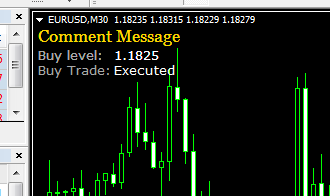
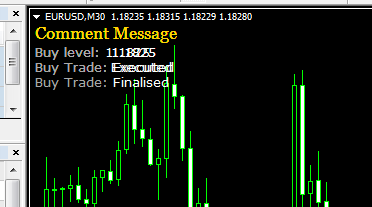
I have also attached a copy of the EA here https://fxdreema.com/shared/4wYlVdaGb.
Thank you @miro1360 for spending your time to provide your response. I will see if I can incorporate it into my EA. I'm sure I'll be back with more questions.
Is there anyone on here that can provide some assistance? @fxDreema ? @miro1360 ? Does anyone else on here have any knowledge about how FxDreema works?