fxDreema

    • Register
    • Login
    • Search
    • Back to the main page
    • Categories
    • Recent
    • Tags
    • Popular
    • Search
    1. Home
    2. SydneyFox
    3. Posts
    S
    • Profile
    • Following 0
    • Followers 1
    • Topics 29
    • Posts 121
    • Best 3
    • Controversial 1
    • Groups 0

    Posts made by SydneyFox

    • RE: Silly question. Please don't laugh at me...

      When you drag the EA onto your chart, go to the inputs tab where you input your variables. Bottom right of mine there's a 'load' and a 'save' button.

      Click on the 'save' button and you can save your settings as a .set file. When you load the EA again or on another chart you click on the 'load' button and you can use a previously saved .set file.

      I have one for each pair I'm trading as it has my SR lines saved.

      posted in Questions & Answers
      S
      SydneyFox
    • RE: Compiling?

      @josecortesllobat said in Compiling?:

      @SydneyFox

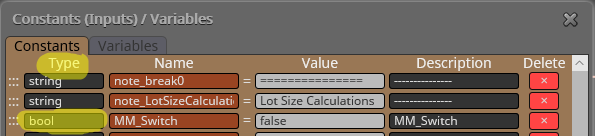
      1. Check out if the constant/variable you want is set as "boolean" in the Constant/Variables menu

      0_1528818573773_0120cdc8-aba4-4daf-bda4-71fcb9218a54-image.png

      1. Might be related to 1 if it is the same constant/variable as you want as boolean

      You fixed it again! Thanks!!!

      Under type I had used 'boolean' instead of 'bool'. Sorted now.

      Thanks you very much for all your help. @josecortesllobat @roar

      posted in Bug Reports
      S
      SydneyFox
    • RE: Compiling?

      @josecortesllobat said in Compiling?:

      After you get the EA compiled file, you should find it in that folder.

      This bit answered it thanks. It was in the folder where the mq4 folder was. Which was not in the MT4 platform folders.

      posted in Bug Reports
      S
      SydneyFox
    • RE: Compiling?

      @josecortesllobat @roar another question if I may? As you both seem to be a lot more knowledgeable than me.

      I have a variable that I want to modify as either True or False. In the Modify Variables block it says it's Value / Boolean. I thought as this uses boolean I would need to use this when I set up the 'Type' when I add the new variable?

      When I compile I get the following errors:

      1. 'boolean' - declaration without type
      2. 'MyVariableName1' - struct member undefined

      Any suggestions as to how I fix this error?

      posted in Bug Reports
      S
      SydneyFox
    • RE: Compiling?

      Thanks again @roar @josecortesllobat I really appreciate your help.

      I have been able to compile but still can't find the .ex4 file? I have a demo mt4 open and have refreshed and looked in the MQL4/Experts folder but it's not there.

      Can it be because I have other MT4 platforms on my laptop and need to open those to see if it's there?

      posted in Bug Reports
      S
      SydneyFox
    • RE: Compiling?

      Thanks @josecortesllobat @roar

      When I compile in metaeditor I get: 0 errors, 35 warnings, compile time 1131 msec.

      The warnings I get are:

      1. possible loss of data due to type conversion
      2. implicit conversion from 'number' to 'string'

      Does this mean it has now been compiled in metaeditor? If so where do I find the .ex4 file?

      posted in Bug Reports
      S
      SydneyFox
    • RE: Compiling?

      Sorry to be ignorant but how do I do that?

      Is it easy to explain or is there a link you could point me to to explain what I need to do?

      posted in Bug Reports
      S
      SydneyFox
    • RE: Compiling?

      I don't get any error. It just says that it's compiling and stays like that for ages (20+ minutes) until I get sick of it and have to either compile the .mq4 or load another project to stop this one.

      posted in Bug Reports
      S
      SydneyFox
    • RE: Compiling?

      @fxdreema I'm having the same issue again. Do you have any suggestions as to why it won't compile?

      Is it size of EA? Number of blocks? etc.

      I can compile .mq4 but not .ex4? Any reason why?

      posted in Bug Reports
      S
      SydneyFox
    • RE: Silly question. Please don't laugh at me...

      What if after you load the EA with all of your manual variables you save the .set file?

      I haven't used the terminate block, but when I remove my EA and then add it to the chart again I load the .set file I have saved so that I don't have to re-input my variables. With my current EA it's only 8 (my SR levels) but it saves time in having to input them again.

      posted in Questions & Answers
      S
      SydneyFox
    • RE: Stochastic Direction Confirmation

      With what you've written above I don't think you need the condition blocks for the Signal Line. On the left hand side of your diagram you have:

      1. If %Kp < %Kc passes then
      2. If %Dp < %Dc passes then Buy Now or if %Dp < %Dc does not pass then Buy Now.

      i.e. it doesn't matter if %Dp < %Dc passes or not. As long as %Kp < %Kc passes then it will get to Buy Now.

      I think you need to re-look at your logic.

      I've only once used an indicator that wasn't available in fxDreema. I used this link to figure out what I needed to do https://fxdreema.com/tutorial/builder/indicators.

      To share a project click on Projects -> Create a Shared Copy (web link). This will bring up a pop up box and you click on Get a Link. This gives a link that you might just be able to copy and paste into your message? What I do is click on this link which opens up your project in a new tab. I then copy this link from the browser and paste into my message. I might be doing one step more than is needed.

      posted in Questions & Answers
      S
      SydneyFox
    • RE: Stochastic Direction Confirmation

      Something like this perhaps? https://fxdreema.com/shared/687P7ImN

      posted in Questions & Answers
      S
      SydneyFox
    • RE: Stochastic Direction Confirmation

      How do you determine that it's "pointed upwards"? i.e. what is the definition you are using to determine pointing upwards?

      Is it say higher values for each of the past 3 days? Or higher value today than x days ago?

      I'm no expert at this but might be able to help with a basic idea if you can give a bit more information.

      posted in Questions & Answers
      S
      SydneyFox
    • RE: How does this variable change value?

      Hi @miro1360 I have no idea why it worked but your suggestion of putting all formula blocks one after another seems to have worked. Thanks for your help.

      posted in Questions & Answers
      S
      SydneyFox
    • RE: How does this variable change value?

      Hi @miro1360 I'm working with such strange block numbers as per this query https://fxdreema.com/forum/topic/5926/block-ids that I am yet to receive a response on. I could normalise the block IDs in this small EA as it's only trying to sort out the variable change value issue but it'll take me longer to change the various delete comments in my full EA. Unless you have any suggestions on that as well?

      I will try placing the formula blocks one after the other but I can't see how this can help as the correct formula result is in comment block 237258 which is after all of the formula blocks.

      The other thing that doesn't make sense to me that I didn't mention previously is the two comment blocks I have placed after sell condition block 473965. Only one of these two comment blocks (473966 and 473967) should show depending on whether the condition is met or not. i.e. is the close of candle ID 1 > sellzone_4?

      When this is the case only comment block 473966 is actioned. This is correct. However, when the candle close is less than sellzone_4 both comment blocks are actioned. How can this be? @fxdreema? The condition is either met or it isn't, so surely only one of the comment blocks should be actioned? Is this a bug in the system? I assume not and it's something that I'm doing wrong but i'm pulling my hair our trying to figure it out.

      If you place the EA on a chart you will see that if block 473965 is correct that both comment blocks 237258 and 473968 will show the same levels for each sellzone. But when a value is used that means that block 473965 should not pass then comments blocks 237258 and 473968 show different sellzone levels. In fact block 473968 shows all sellzone levels as 0.

      There must be someone on here smarter than me who can give me an explanation as to how to fix this issue?

      posted in Questions & Answers
      S
      SydneyFox
    • How does this variable change value?

      I am developing an EA to trade from user defined support and resistance zones. Generally price will be outside the zones when the EA is initialized but sometimes that is not the case. If price is within a zone I have blocks to change both a flag (BuyZone_5 or SellZone_4) and variable (BuyZoneBars or Sell ZoneBars).

      It works correctly for zone 5 (buy zone) but not zone 4 (sell zone). It is determined by the close price of candle ID 1.

      For sell trades if Close candle id 1 is greater than SellZone_4 it works correctly but if it is less than SellZone_4 then it still acts as if it is greater than the level. This is because it thinks that SellZone_4 is equal to 0.

      A copy of the EA can be seen here https://fxdreema.com/shared/rrJB9hDsd.

      I have a number of comment blocks so that I can see where the EA breaks down. Unfortunately I can't understand why it is happening.

      If you enter a value in Res_1 that is say 50 pips above the close price then one comment will say that SellZone_4 + true even though it isn't so.

      Comment block 237258 will give the correct value but comment block 473968 will give a value = 0. This is very confusing to me as block 237258 activates before block 473968 and the only block in between 473965 makes no change to the variable.

      I would really appreciate some help with this? @fxDreema @miro1360 ?

      If I change the value of Sup_1 (zone 5) it works correctly but not for zone_4. I;ve spent about 6 hours trying to figure this out today but with no luck.
      posted in Questions & Answers
      S
      SydneyFox
    • Block IDs?

      My current EA has about 600 blocks. The latest Block ID is 237246.

      Why is the ID so large? Does it matter? Does it slow down the EA either in live, demo, testing or compiling?

      I tried to Normalize IDs but I have a number of Comment blocks that I delete and to delete the correct one it uses the Block ID, so when I Normalize IDs all of these delete comment blocks are now pointing to an ID that doesn't exist.

      What if anything do I need to do?

      posted in Questions & Answers
      S
      SydneyFox
    • RE: Delay EA start to first bar closes

      Thank you very much for your reply. I really appreciate it as there's not a lot of help on here.

      Your suggestion makes sense. I'll give it a go and see if I can get it to work.

      posted in Questions & Answers
      S
      SydneyFox
    • RE: Delay EA start to first bar closes

      I am counting how many bars close within a defined support/resistance zone. Usually when loading the EA it’s outside the zone and I then use variables to count the closes within to use as a set up for a trade.

      But if the last closed trade is in the zone on initiation I want it to count that bar. It does this but then the once per bar counts it again.

      posted in Questions & Answers
      S
      SydneyFox
    • Delay EA start to first bar closes

      I have some once per bar blocks that I don't want to action until the first bar after the EA is initiated has closed. i.e. I load my EA and the onced per bar should start on the first tick of the next bar that opens.

      Is this possible? Anyone able to help me on this one? Thanks

      posted in Questions & Answers
      S
      SydneyFox
    • 1
    • 2
    • 3
    • 4
    • 5
    • 6
    • 7
    • 2 / 7