@xyon126 Thank You. Someday, I am expecting to create it using fxdreema 
Z
Posts made by zedeai2
-
RE: Delete all object on the chartposted in Questions & Answers
-
RE: Delete all object on the chartposted in Questions & Answers
@xyon126 Hello,
It's very interesting to see it. Could you please to share it?
Thanks and best regards!
-
RE: Trailing to Blockposted in Questions & Answers
@jsauter86 Hello,
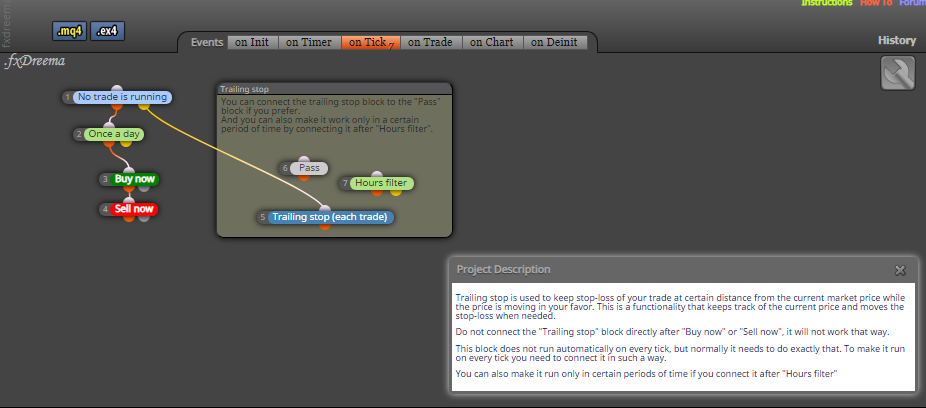
I read on this article about trailing https://fxdreema.com/howto#Trailing
Is that mean there is some options to do trailing : if trade, no trade is running, Pass, hours filter?
Thank you!
-
RE: Delete all object on the chartposted in Questions & Answers
@l-andorrà Hello,
I see.. I'll try it... Thank you!
-
RE: Open One Chart for some pair tradingposted in Questions & Answers
@l-andorrà Hello, it's always thanks a lot for your advices @l-andorrà !
-
RE: Trailing to Blockposted in Questions & Answers
@jsauter86 if I don't use "if trade", so what will be happening?
-
RE: Trailing to Blockposted in Questions & Answers
@jsauter86 Hello, I don't know why this number is too much:)
-
Trailing to Blockposted in Questions & Answers
Hello all,
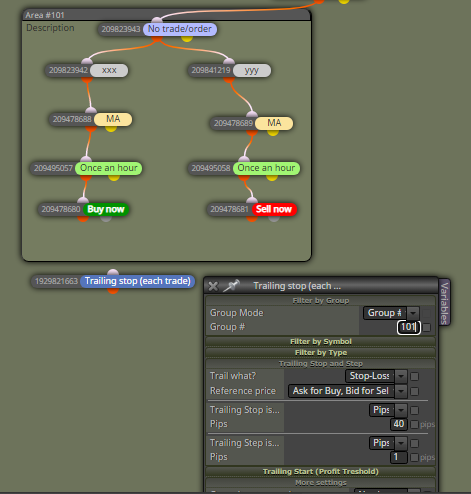
I want to do trailing to the selected block.
To connect them, I do type 101 inside of the trailing block (section filter by group), because this number 101 is the target block area number (101)Is this structure correct?
Always Thank you for your all support!
-
RE: Delete all object on the chartposted in Questions & Answers
@l-andorrà Hello
Any way, how to delete for every 30 minutes? Is there any kind of time filter, or?
Thank you
-
Open One Chart for some pair tradingposted in Questions & Answers
Hello,
- I have 3 different logic for 3 different pairs (Block area : EURUSD, GBPUSD, EURGBP)
- For trading purposes, So then I want to only attach a single EA into one chart, then I don't want to attach it to all others chart of different pairs
Is these below block structure correct?

-
Connect Button to the block areaposted in Questions & Answers
Hello,
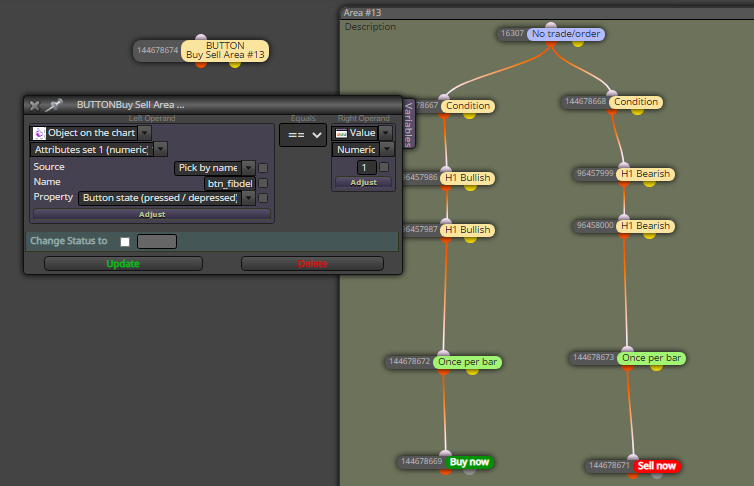
I want to activate the trading once the button is pressed. An the logic are inside the block area (Area #13). I want to connect the button to the block area.. (not the block "no trade / order")
So what should I do or type inside of the button?
Thank you
-
RE: Draw Horizontal Line of value variableposted in Questions & Answers
@cpbonzo Hello,
Thank you for you reply. I will try it
By the way, do you have any sample?
Because I have no idea on this caseRegards
-
RE: Draw Horizontal Line of value variableposted in Questions & Answers
@cpbonzo Hello, I just tried. And it's working. Thank you
Another question : how to show the value of this horizontal line at around of this line?
Thank you very much!
-
RE: Draw Horizontal Line of value variableposted in Questions & Answers
@l-andorrà Hello,
the price value of a horzontal line is stored into a variable--> yes
so that you can use it later as a number (ie, price level)-->yes, so then I can show up this price level on the chartHow to do that?
Thank you @l-andorrà
-
Draw Horizontal Line of value variableposted in Questions & Answers
Hello all,
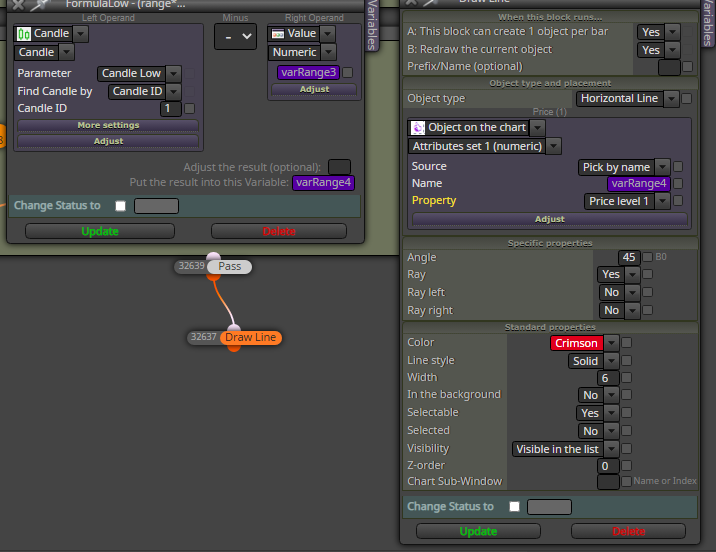
I am trying to draw a horizontal line based on a variabe value that generated by previous formula (variable output is varRange4). But there is no drawn horizontal line yet.
Any suggestion?
Tank you very much
-
RE: Delete all object on the chartposted in Questions & Answers
@l-andorrà Hello again, I always thank you for your reply
Sorry, I don't understand what you mean : "use thios block on top of all other blocks used to identify what you need to be deleted"
Because I was thinking it's only need to type the object name inside this blok, or is there another new block under this block "for each object"?