fxDreema

    • Register
    • Login
    • Search
    • Back to the main page
    • Categories
    • Recent
    • Tags
    • Popular
    • Search
    1. Home
    2. zedeai2
    3. Posts
    Z
    • Profile
    • Following 0
    • Followers 1
    • Topics 41
    • Posts 161
    • Best 0
    • Controversial 2
    • Groups 0

    Posts made by zedeai2

    • How to avoid sudden open position of ea?

      Hello all,

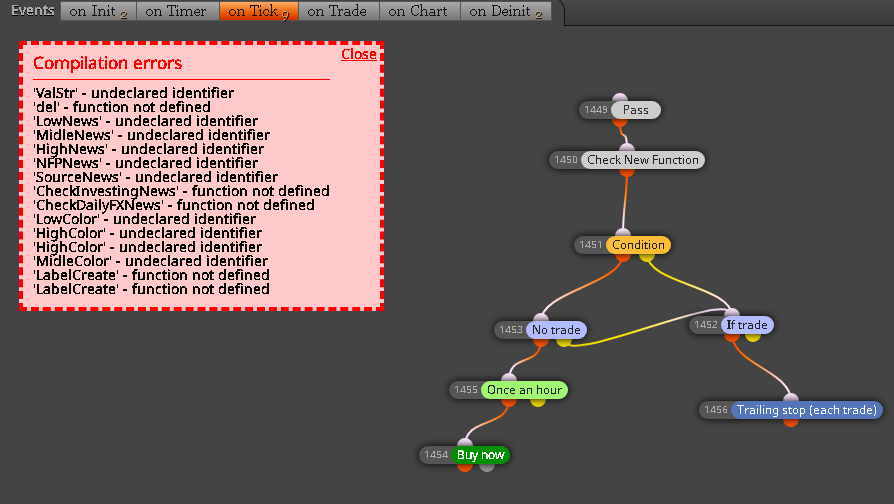
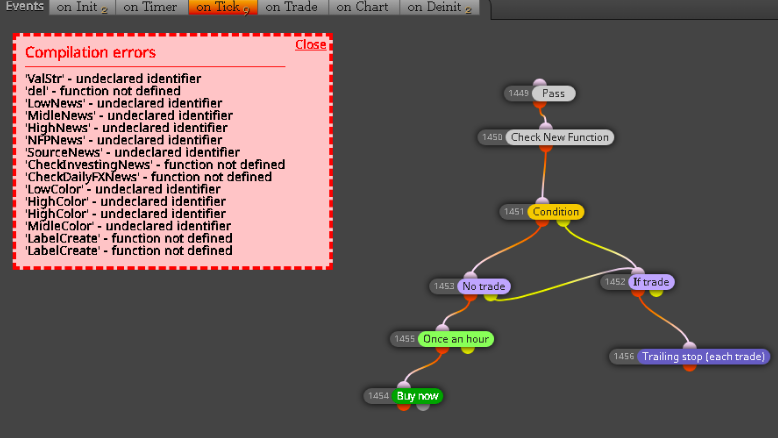
      How to avoid the ea will be open suddenly once it's attached to a chart? Any block to filter it? Because my ea was always open the position suddenly once it's attached the chart, as shown on below blocks filter

      1 I tried to put the button block to filter it. But I think it's fail.
      2 and are these my blocks correct to filter the sudden open position?

      Thank you all and best regards
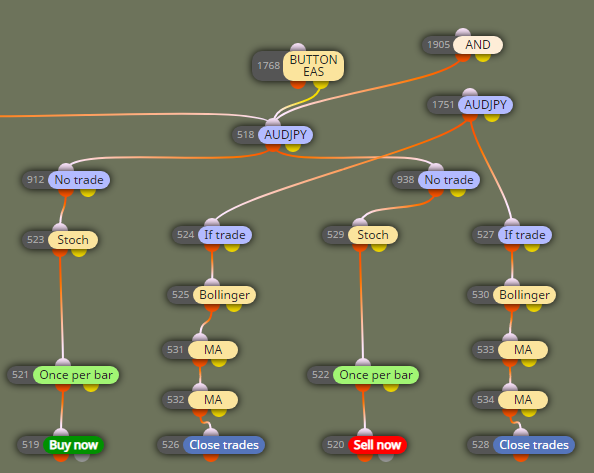
      0_1608615786333_4bd7fc0a-f777-4244-9924-a98bd1208a97-image.png

      posted in Questions & Answers
      Z
      zedeai2
    • RE: Finally , Integration of News Filter :) [ MT4 Only ]

      @ambrogio Hello, It's working. Thanks a lot for you help on this ea! đŸ™‚

      posted in Tutorials by Users
      Z
      zedeai2
    • RE: Finally , Integration of News Filter :) [ MT4 Only ]

      @zedeai2 Thank you. I will try it . regards

      posted in Tutorials by Users
      Z
      zedeai2
    • RE: Finally , Integration of News Filter :) [ MT4 Only ]

      @ambrogio Hello, Thank you very much for your reply :).

      Here are the steps I did as mentioned by you guideline :

      1 Steps compilation wass generated successfully inside the mt4 metaedior
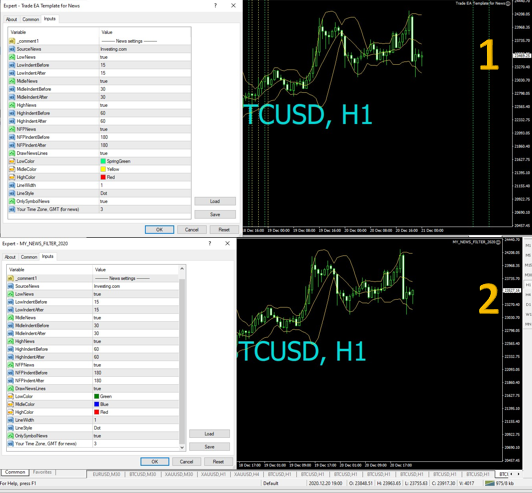
      2 But I don't see any line as should be seen on the original ea template (pic 1 was generated by the original ea template, and the pic 2 wass generated by your ea as downloaded on your link here https://fxdreema.com/shared/twV9ZV9zb

      So, any problem to my steps of compilation, or is there no vertical line as should be seen as original version?

      Thank you very much for your great help đŸ™‚

      0_1608510962699_3fcb3cae-136d-4312-9095-d22dd3b88d58-image.png

      posted in Tutorials by Users
      Z
      zedeai2
    • RE: Finally , Integration of News Filter :) [ MT4 Only ]

      @ambrogio Hello, thank you for reply. And is this you link working properly? https://fxdreema.com/shared/sSJwC65Ob

      Otherwise do you have the final project that working well?

      Because I don't undersand the compilation steps.

      1...
      2...
      3.. etc

      Thank you very much for your attention

      posted in Tutorials by Users
      Z
      zedeai2
    • RE: Finally , Integration of News Filter :) [ MT4 Only ]

      @ambrogio !Hello, this project had been 3 years ago. Is is still working? Because I just tried and there is error as this pic

      0_1608354902687_8c3ffa49-a73e-4391-afe2-9d06e64231f7-image.png

      posted in Tutorials by Users
      Z
      zedeai2
    • RE: Finally , Integration of News Filter :) [ MT4 Only ]

      @traderz Hello, this project had been 3 years ago. Is is still working? Because I just tried and there is error as this pic0_1608346415151_92f33c5a-14a2-419e-a6d3-f66e10284b0f-image.png

      posted in Tutorials by Users
      Z
      zedeai2
    • RE: How to draw a block automatically on the chart?

      @l-andorrĂ  Hello, okay thank you very much! I will come back for any feedback đŸ™‚

      posted in General Discussions
      Z
      zedeai2
    • RE: How to draw a block automatically on the chart?

      @l-andorrĂ  Okay I wil try it :). So basically, all plotted object will not be so different with the draw shape, right?

      posted in General Discussions
      Z
      zedeai2
    • RE: How to draw a block automatically on the chart?

      @l-andorrĂ  Hello, it's working now. Thank you very much! đŸ™‚
      Any way, now I would like to create an fibbonacci that plotted to chart automatically . And it's also triggered by the same blocks

      Any suggestion on how to make it ?

      Thank you

      posted in General Discussions
      Z
      zedeai2
    • RE: How to draw a block automatically on the chart?

      @l-andorrĂ  Hello, thank you and I will try it and will come back with feedback đŸ™‚

      posted in General Discussions
      Z
      zedeai2
    • RE: How to draw a block automatically on the chart?

      @l-andorrĂ  Yes. But is this block correct? because I don't see any plotted rectangle yet

      posted in General Discussions
      Z
      zedeai2
    • RE: How to draw a block automatically on the chart?

      @l-andorrĂ  Hello,

      Let me give a block condition example here : https://fxdreema.com/shared/YtEFdx6Jc

      So once this block is happening, then the shape will be automatically plotted on the Time Frame H1 (The shape area are between candle 1st to 4th, and the limit max and minimum shape are based on the highest and lowest candle at that shape area)

      Thank you

      posted in General Discussions
      Z
      zedeai2
    • RE: How to draw a block automatically on the chart?

      @ambrogio Hello, thank you for your info. I had tried it but it's not working. I don't know yet how to create a block condition to trigger this shape block on the chart

      Any idea?

      posted in General Discussions
      Z
      zedeai2
    • RE: How to draw a block automatically on the chart?

      @l-andorrĂ  Hello, Thank you very much for your reply :). I have been waiting for your reply đŸ™‚

      I wanna have the box with this condition :
      1 static box : it's only plotted at certain hours, let' say based on previous candles : 1st and 4th previous candles (it's trigerred by a block condition)

      2 Once it's visualized on the chart, it's seen able forever. And anytime new condition meet the block condition so there will be new box

      So what I mean the block condition is : the box is plotted if the block condition is meet

      Thank You đŸ™‚

      posted in General Discussions
      Z
      zedeai2
    • How to draw a block automatically on the chart?

      Hello,

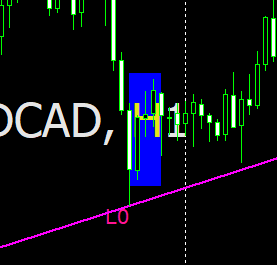
      Does anyone know how to draw a box automatically on the chart using an EA?
      The box should be drawn automatically once it's triggered by a block function

      Thank you

      0_1601050821680_dae04268-29ef-4a98-8a28-229fa1249ca9-image.png

      posted in General Discussions
      Z
      zedeai2
    • RE: Video Tutorial - Signals Dashboard EA [advanced] - looping Objects, arrays

      @miro1360 Helo Sir,

      Please help me...

      I am want to combine both 2 block condition into one chart (as shown below) :

      1 https://fxdreema.com/shared/sfv0yDtF (Sorting)
      2 https://fxdreema.com/shared/ZA1quekHb ( I did in mt4)

      But there is error because the table can't appear together in one time for both pair table. Below is the illustration that I want it

      What should I do? any edited blocks etc?

      0_1600749327862_kombinasi table fxdreema.png

      posted in Tutorials by Users
      Z
      zedeai2
    • RE: Video Tutorial - Signals Dashboard EA [advanced] - looping Objects, arrays

      @miro1360 Hello Miro, this is very interesting to me. Can you share the constant and variables setup, or anything else guideline? Because I got difficulties.

      Thank you and waiting your reply

      posted in Tutorials by Users
      Z
      zedeai2
    • RE: How to Lock EA using Acc number, password, etc?

      @l-andorrĂ  Thank you very much for your reply! I will try it as your mentioned.

      Thank you đŸ™‚

      posted in Questions & Answers
      Z
      zedeai2
    • RE: Lock expert to account / broker

      @fxdreema Could you check whether this my blocks is correct ? https://fxdreema.com/shared/7MjkIjd0d

      posted in Questions & Answers
      Z
      zedeai2
    • 1
    • 2
    • 5
    • 6
    • 7
    • 8
    • 9
    • 8 / 9