fxDreema

    • Register
    • Login
    • Search
    • Back to the main page
    • Categories
    • Recent
    • Tags
    • Popular
    • Search

    How to implement TDI indicator on fxDreema

    Questions & Answers
    4
    26
    1682
    Loading More Posts
    • Oldest to Newest
    • Newest to Oldest
    • Most Votes
    Reply
    • Reply as topic
    Log in to reply
    This topic has been deleted. Only users with topic management privileges can see it.
    • C
      Chandler last edited by

      Hello fxDreema Community,

      I am currently working on developing an EA to automate my trading strategy within the fxDreema platform. However, I've encountered difficulties integrating the TDI indicator into my EA due to only having the .ex4 file and not the .mq4 file for the indicator. Despite configuring the variables and buffers manually within fxDreema, the EA is unable to detect or read the indicator properly.

      Below you can see the indicator's settings:

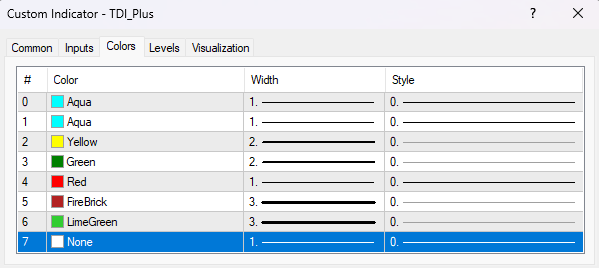
      TDI+ (Custom Indicator)

      2b96b816-d66e-4adb-b758-713d7f7a48bf-image.png

      Inputs (Variables/Values)
      Screenshot 2024-05-20 170328.png

      Colors (Buffers)
      Screenshot 2024-05-20 170401.png

      EA: fxdreema.com/shared/MMxZy8GKd


      I'm seeking assistance from the community. If anyone has experience with integrating custom indicators into EAs within fxDreema or can provide guidance on this issue, I would greatly appreciate your support. Additionally, if there are alternative approaches or suggestions for building the TDI indicator within fxDreema, that would be the best approach I believe.

      Feel free to reach out to me directly or reply to this post if you're able to assist or have an questions.

      Thank you for your time and assistance.

      Best regards,
      Chandler

      1 Reply Last reply Reply Quote 0
      • jstap
        jstap last edited by

        Have you got the values in the data window?

        Learn fxDreema Without the Wait!

        My comprehensive book, available on Amazon, is packed with examples and invaluable insights to help you fast-track your learning journey.

        The paperback and hardback editions include MT4 & MT5 QR codes for easy access to all prebuilt projects and robots, including my latest gold trading robot!

        Don’t miss out

        Click here➡️ https://mybook.to/fxDreema to get your copy today!

        Enjoy! 😊

        C 1 Reply Last reply Reply Quote 0
        • C
          Chandler @jstap last edited by

          @jstap
          This is the only piece of info shown in the data window for the TDI+ Indicator:
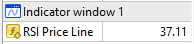
          7cc5d528-d59b-433e-8021-3fc4e6b4b0fb-image.png

          1 Reply Last reply Reply Quote 0
          • B
            biztet last edited by

            @Chandler So it's BB+RSI+MA. I'm thinking maybe you can just use standard indicator, understand and play with it.

            C 1 Reply Last reply Reply Quote 0
            • C
              Chandler @biztet last edited by

              @biztet
              To provide some more context the TDI Indicator is made up of 3 separate indicators combined into one resulting in an advanced indicator.
              It consists of:
              1. RSI
              Period: 13 or 21
              Apply To: Close
              Levels: 32, 50, 68
              Color: None

              2. Moving Average
              Period: 2
              Method: Simple
              Apply To: Previous Indicators Data
              Color: Black

              3. Moving Average
              Period: 7
              Method: Simple
              Apply To: Previous Indicator's Data
              Color: Red

              4. Bollinger Bands
              Period: 34
              Deviation: 1.618
              Apply To: First Indicator's Data
              Color: Aqua

              5. Moving Average
              Period: 34
              Method: Simple
              Apply To: First Indicator's Data
              Color: Yellow

              1 Reply Last reply Reply Quote 0
              • jstap
                jstap last edited by

                @Chandler As @biztet has said you will need to get these values and work with them from the standard indicator, or find a custom indicator with buffers. If no data is in the window, then FX cannot get the value

                Learn fxDreema Without the Wait!

                My comprehensive book, available on Amazon, is packed with examples and invaluable insights to help you fast-track your learning journey.

                The paperback and hardback editions include MT4 & MT5 QR codes for easy access to all prebuilt projects and robots, including my latest gold trading robot!

                Don’t miss out

                Click here➡️ https://mybook.to/fxDreema to get your copy today!

                Enjoy! 😊

                C 2 Replies Last reply Reply Quote 0
                • C
                  Chandler @jstap last edited by

                  @jstap @biztet Thank you both for your insights.

                  Given your advice, it seems that the EA needs to access these values via buffers from the indicator. Unfortunately, I only have the .ex4 file and not the .mq4 file, which complicates things. Do you have any suggestions on how I might obtain a custom version of the TDI indicator that includes accessible buffers? Alternatively, if there are standard indicators or other methods within fxDreema that can replicate the TDI's functionality, I'd be eager to explore those options as well.

                  I appreciate your guidance and any further assistance you can offer.

                  1 Reply Last reply Reply Quote 0
                  • jstap
                    jstap last edited by

                    Google is how I would search for it, you can use the EX file but if the values aren't in the data window you can't use it.

                    Learn fxDreema Without the Wait!

                    My comprehensive book, available on Amazon, is packed with examples and invaluable insights to help you fast-track your learning journey.

                    The paperback and hardback editions include MT4 & MT5 QR codes for easy access to all prebuilt projects and robots, including my latest gold trading robot!

                    Don’t miss out

                    Click here➡️ https://mybook.to/fxDreema to get your copy today!

                    Enjoy! 😊

                    C 1 Reply Last reply Reply Quote 0
                    • C
                      Chandler @jstap last edited by

                      @jstap Thank you for the suggestion. I actually found my way here through searching Google. Nonetheless, I appreciate your advice and will continue to explore available resources. If anyone has further insights or alternative suggestions, I would be grateful for your assistance.

                      1 Reply Last reply Reply Quote 0
                      • C
                        Chandler @jstap last edited by

                        @jstap @biztet Thank you for the clarification. Do you have any suggestions on how to work with the standard indicator within fxDreema? Since the TDI indicator is built upon the RSI indicator, is it possible to configure and extend the RSI functionality directly within fxDreema? Any guidance on this would be greatly appreciated.

                        1 Reply Last reply Reply Quote 0
                        • jstap
                          jstap last edited by

                          You'll have to check this, thank chat gbp if works:

                          MT4 TDI.mq4

                          MT4 TDI.ex4

                          //+------------------------------------------------------------------+
                          //| CustomIndicator.mq4 |
                          //| Copyright 2024, MetaQuotes Software Corp. |
                          //| https://www.mql5.com |
                          //+------------------------------------------------------------------+
                          #property indicator_separate_window
                          #property indicator_buffers 6
                          #property indicator_color1 Black
                          #property indicator_color2 Red
                          #property indicator_color3 Aqua
                          #property indicator_color4 Aqua
                          #property indicator_color5 Yellow
                          #property indicator_color6 Blue

                          // Indicator buffers
                          double rsiBuffer[];
                          double ma2Buffer[];
                          double ma7Buffer[];
                          double bbUpperBuffer[];
                          double bbLowerBuffer[];
                          double ma34Buffer[];

                          // Input parameters
                          input int rsiPeriod = 13; // RSI period: 13 or 21
                          input int maPeriod1 = 2; // MA period 1: 2
                          input int maPeriod2 = 7; // MA period 2: 7
                          input int bbPeriod = 34; // Bollinger Bands period: 34
                          input double bbDeviation = 1.618; // Bollinger Bands deviation: 1.618
                          input int maPeriod3 = 34; // MA period 3: 34

                          //+------------------------------------------------------------------+
                          //| Custom indicator initialization function |
                          //+------------------------------------------------------------------+
                          int OnInit()
                          {
                          // Indicator buffers mapping
                          SetIndexBuffer(0, ma2Buffer);
                          SetIndexBuffer(1, ma7Buffer);
                          SetIndexBuffer(2, bbUpperBuffer);
                          SetIndexBuffer(3, bbLowerBuffer);
                          SetIndexBuffer(4, ma34Buffer);
                          SetIndexBuffer(5, rsiBuffer);

                          // Indicator lines
                          SetIndexStyle(0, DRAW_LINE);
                          SetIndexLabel(0, "MA(2)");

                          SetIndexStyle(1, DRAW_LINE);
                          SetIndexLabel(1, "MA(7)");

                          SetIndexStyle(2, DRAW_LINE);
                          SetIndexLabel(2, "BB Upper");

                          SetIndexStyle(3, DRAW_LINE);
                          SetIndexLabel(3, "BB Lower");

                          SetIndexStyle(4, DRAW_LINE);
                          SetIndexLabel(4, "MA(34)");

                          SetIndexStyle(5, DRAW_LINE);
                          SetIndexLabel(5, "RSI");

                          // Levels for RSI
                          IndicatorSetInteger(INDICATOR_LEVELS, 3);
                          IndicatorSetDouble(INDICATOR_LEVELVALUE, 0, 32.0);
                          IndicatorSetDouble(INDICATOR_LEVELVALUE, 1, 50.0);
                          IndicatorSetDouble(INDICATOR_LEVELVALUE, 2, 68.0);

                          IndicatorShortName("Custom Indicator");

                          return(INIT_SUCCEEDED);
                          }

                          //+------------------------------------------------------------------+
                          //| Custom indicator iteration function |
                          //+------------------------------------------------------------------+
                          int OnCalculate(const int rates_total, // size of the price[] array
                          const int prev_calculated, // bars handled on a previous call
                          const datetime &time[], // Time
                          const double &open[], // Open
                          const double &high[], // High
                          const double &low[], // Low
                          const double &close[], // Close
                          const long &tick_volume[], // Tick Volume
                          const long &volume[], // Real Volume
                          const int &spread[]) // Spread
                          {
                          int limit = rates_total - prev_calculated;
                          if (limit > rates_total - bbPeriod - 1)
                          limit = rates_total - bbPeriod - 1;

                          // Calculate RSI
                          for (int i = 0; i < limit; i++)
                          {
                          rsiBuffer[i] = iRSI(NULL, 0, rsiPeriod, PRICE_CLOSE, i);
                          }

                          // Calculate MA(2) on RSI
                          for (int j = 0; j < limit; j++)
                          {
                          ma2Buffer[j] = iMAOnArray(rsiBuffer, rates_total, maPeriod1, 0, MODE_SMA, j);
                          }

                          // Calculate MA(7) on MA(2)
                          for (int k = 0; k < limit; k++)
                          {
                          ma7Buffer[k] = iMAOnArray(ma2Buffer, rates_total, maPeriod2, 0, MODE_SMA, k);
                          }

                          // Calculate Bollinger Bands on RSI
                          for (int m = 0; m < limit; m++)
                          {
                          double bbMid = iMAOnArray(rsiBuffer, rates_total, bbPeriod, 0, MODE_SMA, m);
                          double bbStdDev = StdDev(rsiBuffer, bbPeriod, m);
                          bbUpperBuffer[m] = bbMid + bbDeviation * bbStdDev;
                          bbLowerBuffer[m] = bbMid - bbDeviation * bbStdDev;
                          }

                          // Calculate MA(34) on RSI
                          for (int n = 0; n < limit; n++)
                          {
                          ma34Buffer[n] = iMAOnArray(rsiBuffer, rates_total, maPeriod3, 0, MODE_SMA, n);
                          }

                          return(rates_total);
                          }

                          //+------------------------------------------------------------------+
                          //| Custom function to calculate standard deviation |
                          //+------------------------------------------------------------------+
                          double StdDev(const double &array[], int period, int start_index)
                          {
                          double sum = 0, mean = 0, stddev = 0;
                          for (int p = 0; p < period; p++) // Use a different variable than 'i'
                          {
                          sum += array[start_index + p];
                          }
                          mean = sum / period;
                          for (int q = 0; q < period; q++) // Use a different variable than 'i'
                          {
                          stddev += MathPow(array[start_index + q] - mean, 2);
                          }
                          return(MathSqrt(stddev / period));
                          }
                          //+------------------------------------------------------------------+

                          Learn fxDreema Without the Wait!

                          My comprehensive book, available on Amazon, is packed with examples and invaluable insights to help you fast-track your learning journey.

                          The paperback and hardback editions include MT4 & MT5 QR codes for easy access to all prebuilt projects and robots, including my latest gold trading robot!

                          Don’t miss out

                          Click here➡️ https://mybook.to/fxDreema to get your copy today!

                          Enjoy! 😊

                          C 1 Reply Last reply Reply Quote 0
                          • C
                            Chandler @jstap last edited by

                            @jstap Thank you for sharing the code! It's fantastic to see that the data window is able to pick up the values, which allows fxDreema to properly read a custom indicator. I appreciate the guidance.

                            The only issue I'm encountering is that the RSI levels are not being picked up. However, thanks to your help, I now have a better understanding and will try to configure it accordingly.

                            If there's any option to build on the RSI within fxDreema to enable it to directly read all the values, including the RSI levels, and eliminate the need for a custom indicator within the EA, that would be amazing.

                            I'm relatively new to the forum and fxDreema. While I'm beginning to understand how indicators work within the platform, I don't yet have the expertise to create and implement them in an EA. Any additional advice on this would be greatly appreciated.

                            Thank you again for your support!

                            1 Reply Last reply Reply Quote 0
                            • jstap
                              jstap last edited by

                              Ask any question and I'll help you with what it does, there is too much to try and explain it all. In most blocks, you can select RSI indicator, the value from this is the current line value

                              Learn fxDreema Without the Wait!

                              My comprehensive book, available on Amazon, is packed with examples and invaluable insights to help you fast-track your learning journey.

                              The paperback and hardback editions include MT4 & MT5 QR codes for easy access to all prebuilt projects and robots, including my latest gold trading robot!

                              Don’t miss out

                              Click here➡️ https://mybook.to/fxDreema to get your copy today!

                              Enjoy! 😊

                              C 1 Reply Last reply Reply Quote 0
                              • B
                                biztet last edited by

                                @Chandler if you have no need to change the setting, maybe you can just use the ex4 itself and the buffer which i can see there is no black color, just dark green.

                                C 1 Reply Last reply Reply Quote 0
                                • C
                                  Chandler @jstap last edited by

                                  @jstap Thank you for the offer to help! I have a specific question: How can I configure fxDreema to read and use the RSI levels directly in my EA (example the RSI crosses above the static (RSI Level 50))? I've been trying to work with the custom TDI indicator, but integrating the RSI levels would simplify things greatly.

                                  1 Reply Last reply Reply Quote 0
                                  • C
                                    Chandler @biztet last edited by Chandler

                                    @biztet Thank you for the suggestion. If I understand correctly, you're saying I might be able to use the .ex4 file directly with the buffers as they are? The reason for the dark green instead of black might be because I changed it, not realizing it should match the original indicator exactly.

                                    I've added the original indicator without any changes to it, but it's still not working. Could you clarify how I can ensure the buffers are correctly identified and used in fxDreema when working with the .ex4 file? Any specific steps or settings I should be aware of?

                                    EA with Original TDI Indicator and Input Parameters and Output Buffers settings: fxdreema.com/shared/WEMw78nCd
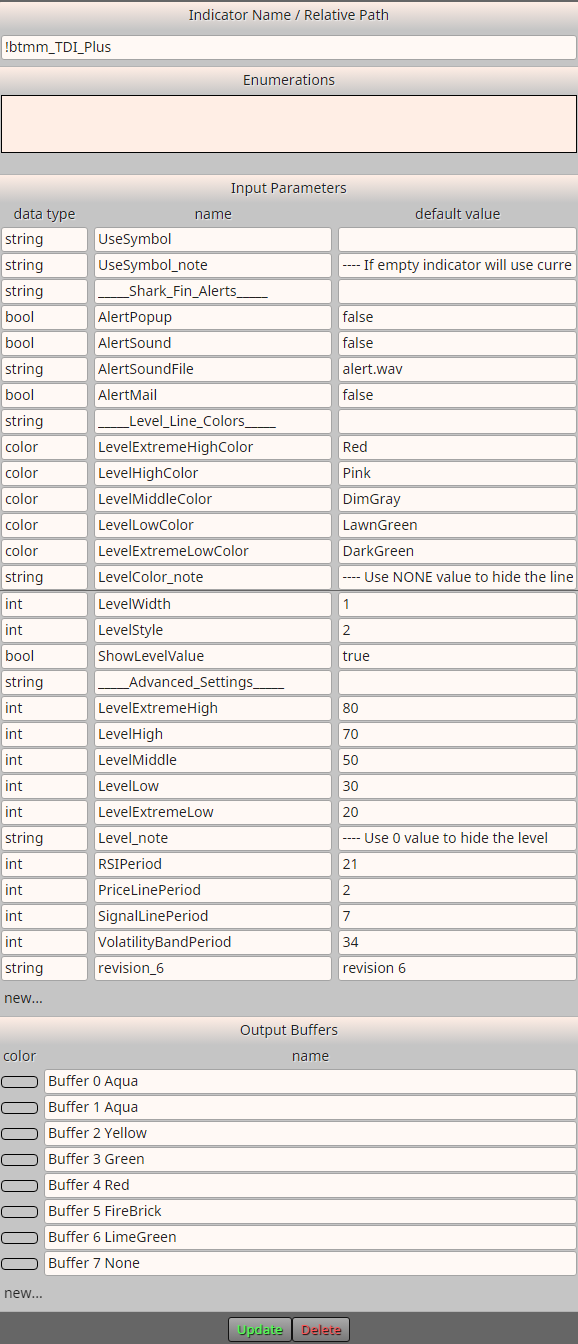
                                    30b344bc-2b96-4ee6-afff-df90e16615e2-image.png

                                    1 Reply Last reply Reply Quote 0
                                    • B
                                      biztet last edited by

                                      From the link i can see you're trying to trade when green and yellow crossing, right? U will use buffer 2&3, and the condition will be
                                      2 x> 3 || 3 x< 2, candle id = 1.

                                      Unless, the buffers doesn't stick at its possition. Eg. You can cross MA with BB lines at main chart, but crossing BB with MA@RSI will not happen correctly.

                                      C 1 Reply Last reply Reply Quote 0
                                      • C
                                        Chandler @biztet last edited by

                                        @biztet What I'm trying to do is:

                                        BUY Condition:
                                        Yellow Line is above the static RSI Level 50
                                        Green Line is above the Red Line

                                        SELL Condition:
                                        Yellow Line is below the static RSI Level 50
                                        Green Line is below the Red Line

                                        However, since I cannot detect the static RSI Level 50 within the buffers, I first want to see if it can detect
                                        3 x> 4 || 3 x< 4, with candle id = 1, when the Green Line is above (buy)/below (sell) the Red Line, which it doesn't seem to do.

                                        Could you also clarify what you mean by "buffers don't stick at their position"? The indicator opens as a separate indicator window and not on the main chart.

                                        I appreciate any additional advice you can provide.

                                        1 Reply Last reply Reply Quote 0
                                        • B
                                          biztet last edited by

                                          @Chandler You can separate the RSI if you need to use the level.

                                          About that "sticky" thing, you can test by placing standard RSI+MA in the same window, and then move it left right left, watch the lines crossing, then you'll understand what i mean.

                                          1 Reply Last reply Reply Quote 0
                                          • C
                                            Chandler last edited by

                                            I've recreated the TDI Indicator to output all necessary values (visible in the data window) and set the buffers accordingly, as @jstap mentioned that the values must be printed in the data window for an indicator to work on fxDreema. I have tested it within the EA: fxdreema.com/shared/FRlDp0V5

                                            Is there a way to visually test when trades are being placed, like showing an arrow each time all conditions are met and a trade is executed? I currently have no way to confirm if the EA is working as expected. Additionally, it doesn't seem to be functioning correctly on certain days during my tests.

                                            I'm testing it on MT4 via the Strategy Tester Window. Is there something I might be missing or doing wrong? Any advice would be appreciated.

                                            l'andorrà 1 Reply Last reply Reply Quote 0
                                            • 1
                                            • 2
                                            • 1 / 2
                                            • First post
                                              Last post

                                            Online Users

                                            Q
                                            C
                                            T
                                            S
                                            A
                                            M
                                            R
                                            G
                                            G
                                            Y
                                            C
                                            S

                                            24
                                            Online

                                            146.7k
                                            Users

                                            22.4k
                                            Topics

                                            122.6k
                                            Posts

                                            Powered by NodeBB Forums | Contributors