fxDreema

    • Register
    • Login
    • Search
    • Back to the main page
    • Categories
    • Recent
    • Tags
    • Popular
    • Search
    1. Home
    2. fideld003
    3. Posts
    F
    • Profile
    • Following 4
    • Followers 0
    • Topics 12
    • Posts 64
    • Best 3
    • Controversial 1
    • Groups 0

    Posts made by fideld003

    • RE: Take Profit Trail

      @jsauter86 honestly, I don't get how this works. Does it show kind of a broken horizontal line when it's working?

      What happens if I do something like this?
      0_1611540532278_51f12ab9-60e5-46c8-a975-73d38e83cb2c-image.png

      or like this?
      0_1611540548909_fb13f461-3e7e-4c8d-9366-c04a0e22f4c2-image.png

      posted in Questions & Answers
      F
      fideld003
    • RE: Take Profit Trail

      @l-andorrà yeah, do you know how to do this? "Wouldn't you mean moving at a specific distance in profit but BEFORE hitting TP?"

      posted in Questions & Answers
      F
      fideld003
    • Take Profit Trail

      Hi fxDreema Community,

      Seeking your advice again if this is possible or not and a few other questions as well.

      • What I would like to accomplish here is once my Buy order's Take Profit is likely to be HIT or HIT, it would adjust 20 Pips above from the original Take Profit position, is that possible? Currently, I'm using the "Trailing Stop" block for this.
        0_1611418250188_6a12f108-cbce-4d1f-9fe3-ebdef297e24c-image.png

      (Optional to answer the question below)

      • Also, I was trying to play around with conditions "Trailing Step is" "Trailing Start is" and "Opposite stop mode" but I can't seem to make them work as I think they should be. I am not seeing any moving horizontal lines that indicate that it is working or it's just that there's no indicator that it is working. Is there another explanation for this or an example? I would very much appreciate it.
        0_1611418733598_3e261f96-ff86-477c-a3b9-8bc4c26e4af5-image.png

      Thanks,

      posted in Questions & Answers
      F
      fideld003
    • RE: How to search hammer candles

      @extrabroker awesome. Works as intended. Thank you for sharing this.

      posted in Questions & Answers
      F
      fideld003
    • RE: Tutorial 08 - Candle Formations

      @miro1360 awesome. Very useful. Thank you for sharing this.

      posted in Tutorials by Users
      F
      fideld003
    • RE: Initiate with bears are bulls

      @jsauter86 Yeah, it was okay. It did what I wanted to do which is only select three candles less than 10 pips. I need to do more experiments and observations to further incorporate this into my project.

      posted in Questions & Answers
      F
      fideld003
    • RE: Initiate with bears are bulls

      @jsauter86 what do you mean? Kindly elaborate.

      posted in Questions & Answers
      F
      fideld003
    • RE: Initiate with bears are bulls

      @l-andorrà, It seems that I have gotten it, but I still used "this value, as is". This is awesome, I feel that I've gained another tool to use as I've learned basics on how to control candles because of your assistance. I couldn't have done it without your help, so thankkkssss.

      posted in Questions & Answers
      F
      fideld003
    • RE: Initiate with bears are bulls

      @l-andorrà I used "as price fraction" but it seems to be not doing any trades.

      Please see the screenshot and shared project link:
      https://fxdreema.com/shared/vNSeWYKJd
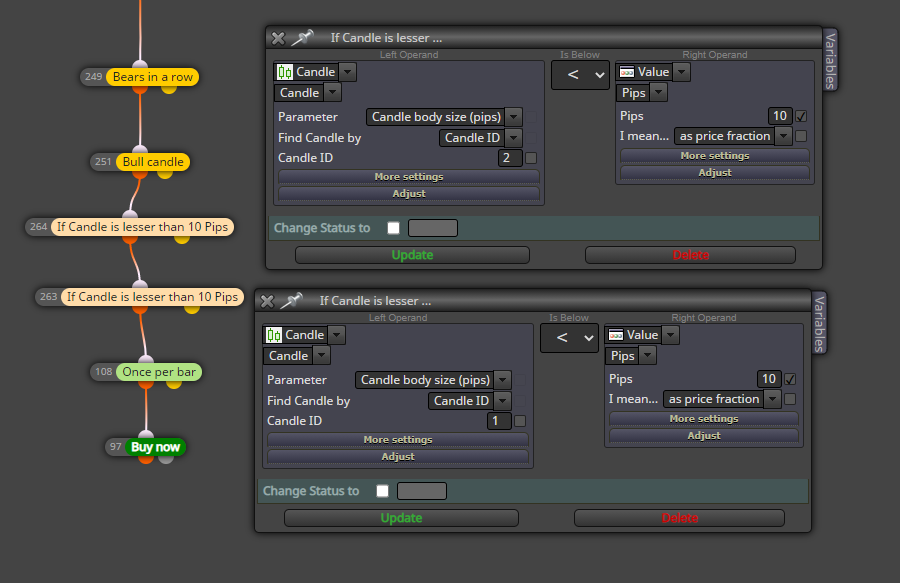
      0_1611032260906_32f47000-7252-4e86-b927-4ae047296a71-image.png

      Thanks,

      posted in Questions & Answers
      F
      fideld003
    • RE: Initiate with bears are bulls

      @l-andorrà I have another question if you don't mind ... Is there a way to specify that the two bears and the bull candle only be less than 10 pips per bar?

      What I did was to add two more conditions that relate to candle body size below 10 Pips. However, I'm seeing it's still selecting bears that are higher than 10 pips.
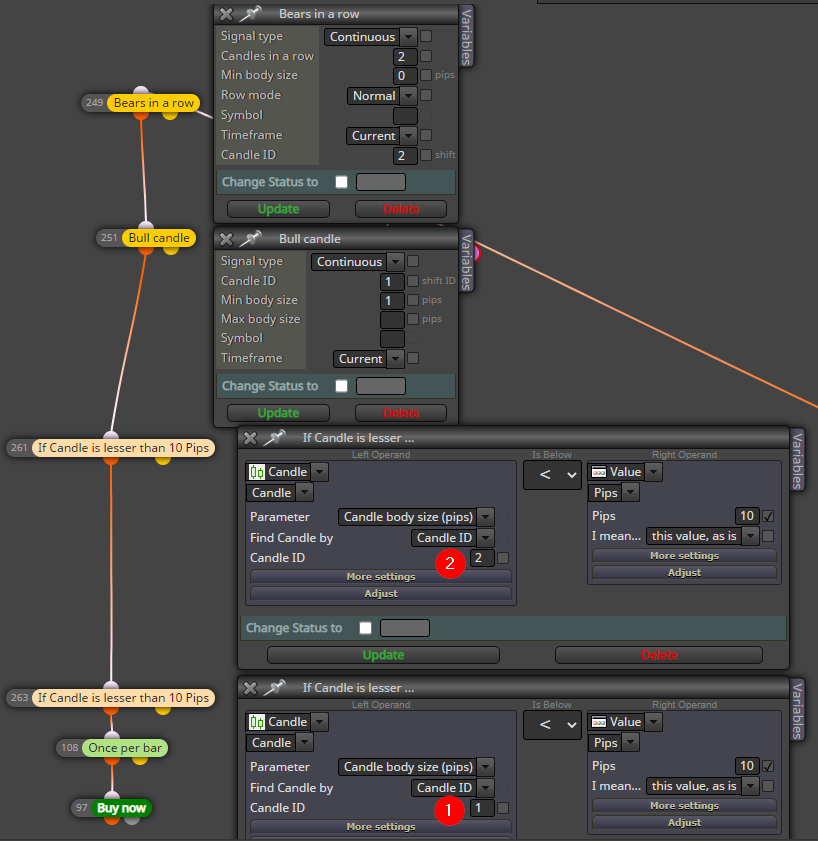
      0_1610945341517_6881c99e-96c5-4711-98be-76ae0c5e4190-image.png
      Result of the config above:
      0_1610944765068_e8b783bc-c32b-4380-9c99-8a55bf0043e6-image.png

      I also tried to remove block "Bears in a row" and just use the condition on block 261 and 263 experimented for candle body size or bull candle body size but the results were worst.
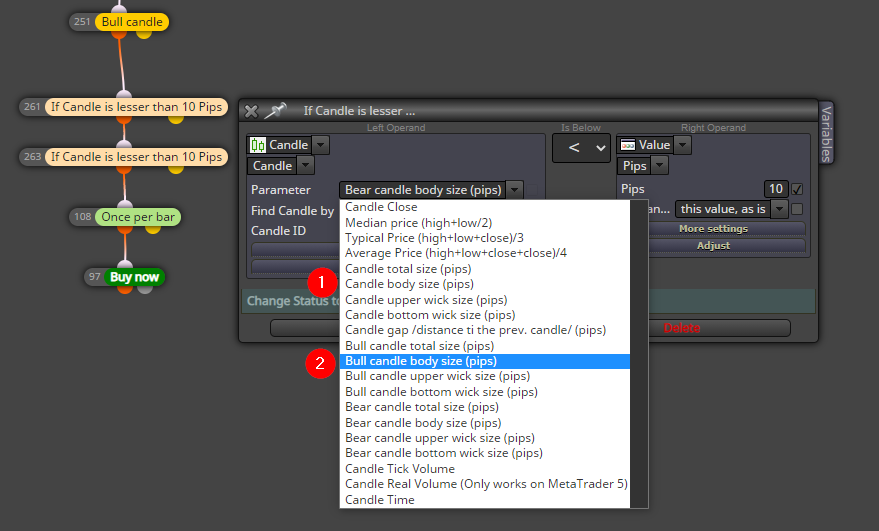
      0_1610945591480_7efcfbba-8429-498c-bbfb-3793d99615a3-image.png

      Thanks,

      posted in Questions & Answers
      F
      fideld003
    • RE: Initiate with bears are bulls

      @l-andorrà Oh I see, I've made it Candle ID 2 and it works fine now. That really did not occur to me. Thank you for the tip.

      posted in Questions & Answers
      F
      fideld003
    • Initiate with bears are bulls

      Hi fxDreema Community,

      I would like to request your advice on how to initiate a buy order when there are two continuous bear candles and one bull candle as the initiator. It would look something like this.
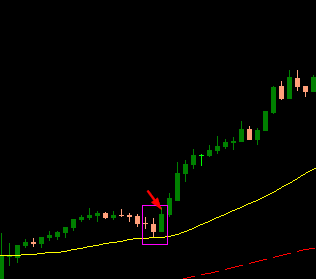
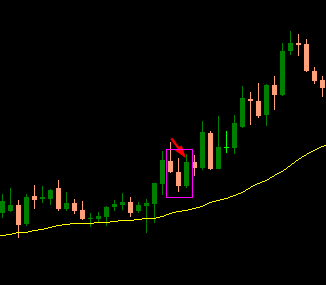
      0_1610885211727_a5c70bda-9d80-4a41-a8cd-c8122172b8a2-image.png

      0_1610885305021_60e3dacc-4c9b-42e8-aa3c-f96c53a6ad20-image.png

      What I tried to do before was to use blocks "Bears in a row" and "Bull candle" but unfortunately it did not work. I also tried to use once per bar on the "Bull Candle" block but did not work. It did not even initiate any trade on both scenarios.
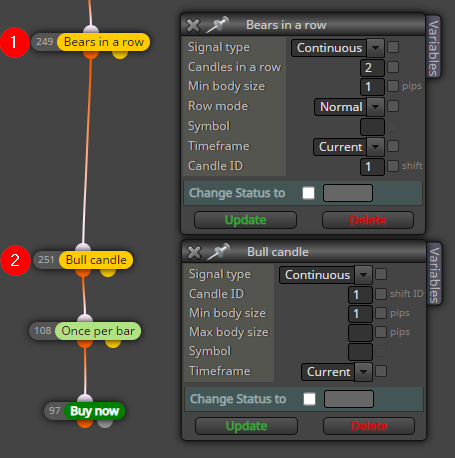
      0_1610885419377_d6fbb71d-bfe2-441e-8a6b-8615e53fbfef-image.png

      posted in Questions & Answers
      F
      fideld003
    • RE: pls help

      @fideld003 nvm, I found it.

      For reference: https://fxdreema.com/forum/topic/8618/tutorial-expert-advisor-with-some-recent-issues-solved/2

      posted in Questions & Answers
      F
      fideld003
    • RE: Variable uses and examples

      @roar ohhh, I got it. Yeah, the example was nicely done so I was able to grasp at least 80% of it. Thank you for this awwweeeesome example. 🙂

      posted in Questions & Answers
      F
      fideld003
    • RE: Variable uses and examples

      @roar Thanks for the example.

      0_1610694196393_7ebd0625-003f-4148-b7b0-baa9eb42bd74-image.png

      Let's see if I got it right ...

      1. So you've created three variables which are, "buys, sells, and lotA" with a value of zero.
      • Zero meaning that's the starting value, right?
      1. On the "For each Trade" block, there's this orange field that says buys+1
      • This is where the counting happens right? So meaning 0 +1(count of buy) +1(count of buy)
      • The white box there is related to what we defined on the variables tab right?
      • What's the use of the yellow box?
      1. On the "Custom MQL code" block, there's kind of an equation. Upon checking https://docs.mql4.com/math/, these seem to be Math Functions available on MQL4.
      • In layman's term could you describe to me how these lines work? I tried to read the description of those two functions but I just couldn't get it.
        lotA = 0.01*MathLog(buys)*2;
        lotA = MathMax(lotA, 0.01);

      For reference as well, this is the closed trades for Buy.
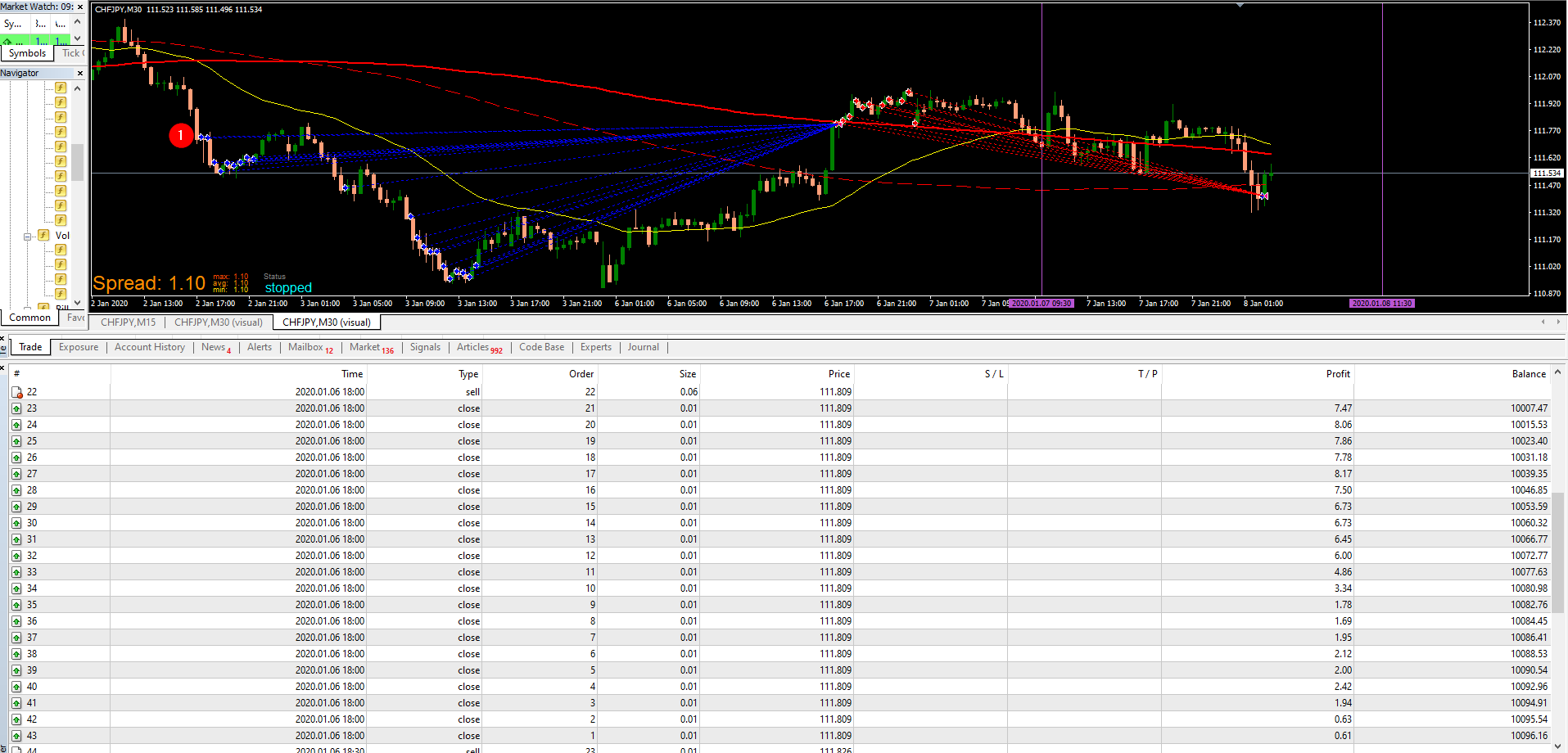
      0_1610696505855_9e87f58e-fa62-47a0-8704-ef6ebadeb1bb-image.png

      posted in Questions & Answers
      F
      fideld003
    • RE: Variable uses and examples

      @roar Yeah, that 100x possibilities are what I'm actually looking for. The kind of like the, "Ahhh" moment. Maybe I'm looking for how to use variables because ... Where I am right now is kind of the basic stuff. I know if I get more examples using variables then maybe I could get ideas or inspiration that I could use on my current project or future project. Do you have some kind of a variable related example on how to open trade or close a trade?

      posted in Questions & Answers
      F
      fideld003
    • Variable uses and examples

      Hi fxDreema Community,

      I'm trying to learn the use of Variables and the likes of it, but I'm not really sure about their usefulness. Do you guys very much use variables and the likes on your projects? How do you use them for? Do you use them to initiate Buy/Sell orders, store values, etc? Appreciate it if someone could also provide sample files for learning and inspiration purposes.

      Thanks,

      posted in Questions & Answers
      F
      fideld003
    • RE: Limit trades

      All, thank you for the response.

      @fxDreema I'll review this for a while. Thanks.

      posted in Questions & Answers
      F
      fideld003
    • RE: Limit trades

      @biztet hmm, I see so that's how the "Count Trade" block works. What if the Order needs to close first before opening up another order and be limited to only three when Yellow line is below the Red line?

      posted in Questions & Answers
      F
      fideld003
    • RE: Limit trades

      @biztet I tried it, but it still opened more than three orders and even opens when there is still an order open.
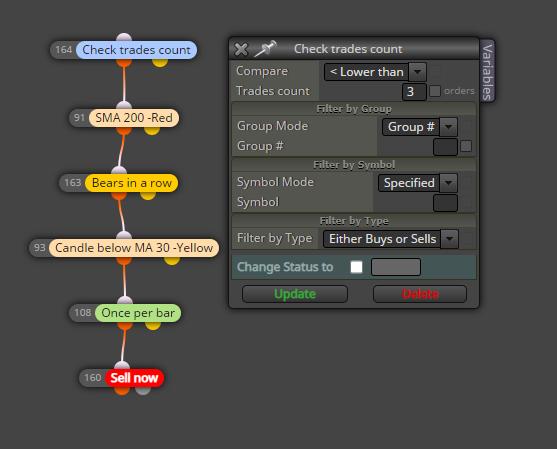
      0_1610363154542_f0598d35-57e1-4d8a-9339-5167214be501-image.png

      0_1610363215278_6b8723db-7020-4e35-a67c-5ed84f5b0e8b-image.png

      I'll experiment for a while. Thanks for the assistance.

      posted in Questions & Answers
      F
      fideld003
    • 1
    • 2
    • 3
    • 4
    • 2 / 4