fxDreema

    • Register
    • Login
    • Search
    • Back to the main page
    • Categories
    • Recent
    • Tags
    • Popular
    • Search
    1. Home
    2. fxbam
    3. Posts
    • Profile
    • Following 0
    • Followers 1
    • Topics 27
    • Posts 96
    • Best 1
    • Controversial 1
    • Groups 0

    Posts made by fxbam

    • RE: Increase Lot Size and Close all?

      @jstap I was hoping there was a way to have more precision with my entries. I have no way of knowing how much further the next entry will be from the last one.

      If those are the only options this will require me to guess and will give me inconsistencies with the level of risk I'm taking and the profit I'll be making. The problem for me is I need the option to trade no matter how far away it is.

      Are there still people who write and create new blocks for fxDreema?

      What I'm looking for is the option to open a trade (Buy & Sell or Buy or Sell) that factors in all open trades in (lot size x pips) drawdown + fees, so when it hits TP it closes it in the profit amount I want. Is there any way that something like this can be done?
      I sure know how to make things difficult. ๐Ÿ™‚

      posted in Questions & Answers
      fxbam
      fxbam
    • RE: Increase Lot Size and Close all?

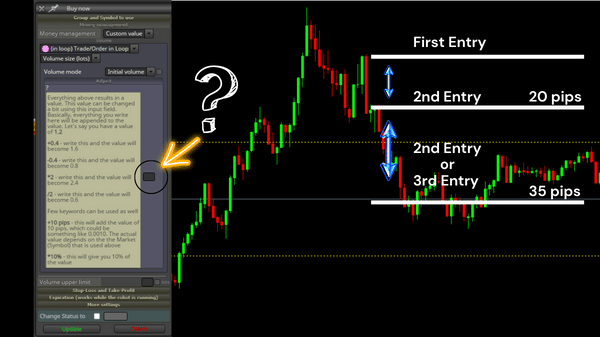
      @jstap I think this is what you are talking about but I'm not sure if that solves my problem. I'll include an image to try and add some transparency.

      I can see the option to increase the value of the previous lot, add pips, or increase lot size by a percentage. The problem I'm struggling with is I don't know when my next entry will be.

      If my entry is much further away than anticipated then the amount I have entered in the "Adjust" section will end up putting me in a negative balance even though my trade was successful, and if I add to much it increases the chance of me running too much risk.

      My goal is to only gain a little bit of profit regardless of where my next entry is. Regardless on how many trades are open and the different pips distances between them, I would like to see the trade that hits TP close all the other trades at the same time with just a tiny profit.

      I'm sorry if I have misunderstood what you were saying. Was this the only options, or was there something else?

      How to figure out what lot size to use.png

      posted in Questions & Answers
      fxbam
      fxbam
    • RE: Increase Lot Size and Close all?

      @jstap the problem is I don't know what the appropriate lot size will be. If I have one trade open but it doesn't hit my TP, then a little while later I get another entry.

      When the new entry hits the TP I want all those trades to close but it also needs to show some type of profit after those trades close and factoring in the broker fees. So when everything closes I should see an increase to the balance before I opened those trades.

      Using fixed lots won't work for me. If entries are too far away from one another I run the risk of carrying a negative balance even though I was successful with the trade. There must be a way to do this.

      posted in Questions & Answers
      fxbam
      fxbam
    • RE: Increase Lot Size and Close all?

      @Morpheus_0 I appreciate the feedback. What I want to do isn't Grid or Martingale. I can see a little bit of similarity but that's not exactly what I'm trying to do.

      Let's say I get a Buy entry but my TP is never hit. Now I happen to get another Buy but I don't want to use a preset lot size increase because I have no idea where my entry is going to be. When I get my new entry it will also have a new TP.

      When the new entry hits the TP I want it to close all trades down with a small profit after the drawdown from the opening trades that just closed and the broker fees.

      posted in Questions & Answers
      fxbam
      fxbam
    • RE: Increase Lot Size and Close all?

      @Morpheus_0 can you tell me what the profit amount is? I can see you have 2 listed there but what does that represent? My goal is to cover the drawdown on the open positions and show some profit when the most recent trade closes after broker fees.

      posted in Questions & Answers
      fxbam
      fxbam
    • RE: Increase Lot Size and Close all?

      @jstap do you mean pink add to volume/%of current trade volume? The problem is what to use and how do I add the correct amount. Let's say I have one or more positions open when the price ends up moving quite a bit against me before giving me another entry. If this happens the open position(s) will be in drawdown. I want to make sure that the new order will factor in the current open positions, and still give me a small profit after all the spreads/commissions.

      posted in Questions & Answers
      fxbam
      fxbam
    • Increase Lot Size and Close all?

      Let me explain what I would like to do. ๐Ÿ™‚
      Increase lot size: If I place a trade and it doesn't hit my target, then I enter another trade, and another one, and another one...what I'm wondering if there is a way to increase the lot size on the new trade to cover the cost of all the open positions.

      Close all: Once take-profit has been hit on most recent trade it will close all positions at the same time with a little profit, so all the open positions would adjust take-profit levels to match most recent position so they can close at the same time.

      Doing both together, separately, or just one
      I'm also trying to figure out if I can have the option to have this run combined or independently. Example: If I wanted the option to apply the lot sizing and Close All on Bullish and Bearish, independently from each other, or just the Buy or Sell.

      I know this community is filled with a lot of great minds. Is there anyone that can shed some light on how to do this?๐Ÿ˜•
      Increase Lot Size and Close all.png

      posted in Questions & Answers close trades lot size close condition increase size close all
      fxbam
      fxbam
    • RE: News Filter Block

      I'm also looking for this type of option. It would be nice if we had the option to not trade during low, medium, or high impact news. I hope someone can make something for this.

      posted in General Discussions
      fxbam
      fxbam
    • RE: Expert Advisor Self Terminated. Why?

      I figured out what the problem was. The bear and bull blocks needed to be removed and used as a condition instead.

      posted in Questions & Answers
      fxbam
      fxbam
    • Expert Advisor Self Terminated. Why?

      I've tried different variations and all have failed to work. I'm not sure what I'm doing wrong. Please ask me any questions about it if you don't understand what I'm trying to build. Can someone offer some suggestions to put me on the right path?
      https://fxdreema.com/shared/AXJmh6kvd
      0_1648562741755_2022-03-29 (8).png

      posted in Questions & Answers
      fxbam
      fxbam
    • My MA Cross Strategy won't work in the mt5 tester...please help. :(

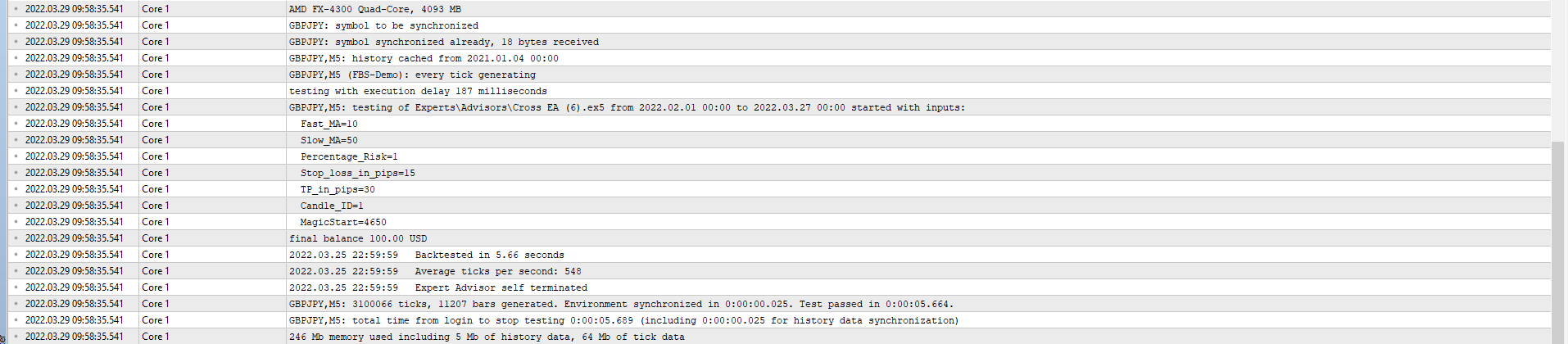
      I'm not sure why it won't work in the strategy tester. I must be missing something but I'm not sure what? It waits for one moving average to cross the other then waits for a candle to close in the opposite direction before entering a trade. Does anyone know what I'm missing? https://fxdreema.com/shared/SdaB6yVCc

      New link below

      I've modified the construction numerous times but can't get it to work in the mt5 tester. New construction here...https://fxdreema.com/shared/JEFQsV7jc
      2022.03.28 16:14:22.291 Core 1 Trade_lower_than=2
      2022.03.28 16:14:22.291 Core 1 Min_Bear_Candle_Size=2
      2022.03.28 16:14:22.291 Core 1 Max_Bear_Candle_Size=15
      2022.03.28 16:14:22.291 Core 1 Min_Bull_Candle_Size=2
      2022.03.28 16:14:22.291 Core 1 Max_Bull_Candle_Size=15
      2022.03.28 16:14:22.291 Core 1 MagicStart=7715
      2022.03.28 16:14:22.291 Core 1 final balance 100.00 USD
      2022.03.28 16:14:22.291 Core 1 2022.03.25 22:59:59 Backtested in 1.69 seconds
      2022.03.28 16:14:22.291 Core 1 2022.03.25 22:59:59 Average ticks per second: 256
      2022.03.28 16:14:22.291 Core 1 2022.03.25 22:59:59 Expert Advisor self terminated
      2022.03.28 16:14:22.291 Core 1 GBPJPY,M5: 431717 ticks, 1704 bars generated. Environment synchronized in 0:00:04.679. Test passed in 0:00:01.863 (including ticks preprocessing 0:00:00.047).
      2022.03.28 16:14:22.291 Core 1 GBPJPY,M5: total time from login to stop testing 0:00:06.542 (including 0:00:04.679 for history data synchronization)

      I'm not sure what I am missing? I've changed it several times hoping to solve the issue but haven't had any success. I know I'm probably overlooking something very simple but I don't know what it is. Any suggestions would be greatly appreciated and help me climb out of this confusing mess.

      posted in Questions & Answers
      fxbam
      fxbam
    • RE: How to set the risk per trade on buttons?

      I'm still trying to figure out how to place buttons. When I choose both to be in the top left corner, I only end up seeing the sell.

      posted in Questions & Answers
      fxbam
      fxbam
    • How to set the risk per trade on buttons?

      I want to risk 5% of the balance every time I place a trade. Can someone help me with this?
      I'm not sure what I'm missing or if this looks right? https://fxdreema.com/shared/2Hbc52Hic

      posted in Questions & Answers
      fxbam
      fxbam
    • RE: How to load EA on one chart only but allowing it to watch several charts?

      I'll give it a try, thank you for the suggestion.

      posted in Questions & Answers
      fxbam
      fxbam
    • RE: How to load EA on one chart only but allowing it to watch several charts?

      My goal is to target a specific variety of currency pairs from one chart. When the changes are made to that EA on the main chart then it will apply to any other position it takes on another pair.

      posted in Questions & Answers
      fxbam
      fxbam
    • How to load EA on one chart only but allowing it to watch several charts?

      I've seen this in action so I know it can be done, but I can't figure it out. I want to load an EA on only 1 chart, but it should be able to watch several charts and make trades if the conditions are met. Has anyone here been able to do this? Any feedback will be greatly appreciated.

      posted in Questions & Answers
      fxbam
      fxbam
    • RE: How to use Toggle Blocks?

      I guess what I'm trying to do is be able to switch the 2 Buy buttons and the 2 Sell buttons if I want to.

      posted in Questions & Answers
      fxbam
      fxbam
    • RE: How to use Toggle Blocks?

      @jstap I'll take a look, thank you.

      posted in Questions & Answers
      fxbam
      fxbam
    • How to use Toggle Blocks?

      I'm planning to make a couple of different strategies that I would like to switch from one to another if I wish. I haven't done anything with the blocks yet but you can see what I'm trying to do. If I was on my chart, I would like the option to go into my EA settings and toggle to another strategy if I want to. Does anyone have an idea on how to do that?https://fxdreema.com/shared/yo5mz5VX

      posted in Questions & Answers
      fxbam
      fxbam
    • RE: Increasing Lot Size at Different Price Targets?

      Okay, thank you.

      posted in Questions & Answers
      fxbam
      fxbam
    • 1
    • 2
    • 3
    • 4
    • 5
    • 4 / 5