@l-andorrà They are 2 different cci lines (one fast, one slow) in a custom indicator in window. When they cross a trade is entered. But being fluid the fast line can cross occasionally and then uncross. I need to close if the lines uncross. I can not find anything to help do this, for example as in the' indicator appear', 'indicator disappear' blocks.
J
Posts made by Johntyr
-
RE: Line cross entry EA to close trade if the lines uncrossposted in Questions & Answers
-
Line cross entry EA to close trade if the lines uncrossposted in Questions & Answers
Hi all,
I have a straight forward line cross EA that opens and closes trades when 2 lines cross.
Occasionally a line cross will momentarily occur, thus triggering a trade and then the lines uncross and continue in the original direction. This leaves an open trade running in the wrong direction.
I would like the trade to close if the lines uncross. Can anyone offer any suggestions how I may achieve this?
-
RE: Press Button Draw buttonposted in Questions & Answers
I was able to sort it myself, quite simply by modifying variables of the draw button Y-distance.
https://fxdreema.com/shared/RZiDj6CWb
Thank you.
-
RE: Press Button Draw buttonposted in Questions & Answers
@l-andorrà Hi, thank you for responding. No not really infinite, a bit of exaggeration.
The press button is a trade entry button and the following buttons are individual trades. If I click on the any of the individual trade buttons it closes that single trade.
I scale into trades and may make numerous small entries as the trade progresses. I am able to close individual trades as needed without closing everything.
I scalp and need the speed of hitting a button as opposed to other slower closing methods. I would appreciate your ideas.
-
Press Button Draw buttonposted in Questions & Answers
Hi everyone. I draw a button called "press". I wish to draw another button each time I click that button. The first click draws a button titled "1" immediately below the "press" button.
When I click the "press" button again I wish to draw an other button "2" immediately below button "1", and so on , 3,4,5 indefinitely.I cannot work out how to add to the Y value with each button press to draw a button below the previous button. Can anyone help
-
RE: Switch part of the EA on and off as required.posted in General Discussions
@roar I setup as you suggested. It works great. Thank you very much for your help.
-
RE: Switch part of the EA on and off as required.posted in General Discussions
@roar Thank you, I will work on it and share my results.
-
RE: Switch part of the EA on and off as required.posted in General Discussions
With that off all trading stops, auto and manual
-
Switch part of the EA on and off as required.posted in General Discussions
I have a semi autonomous EA that I use to enter trades on a 1 minute timeframe, which I then manage. When market conditions are not optimal for this EA I want to temporarily disable it (to stop false entries) while I continue to trade manually, and then quickly switch it back on again when the market picks up (as it is far faster than I am in this timeframe). Anyone know how to make this ON/OFF switch, as opposed to a button which simply activates a trade or other function once. I have not found anything that can do this yet.
-
RE: Moving trade panel as a block to anywhere on the chartposted in Questions & Answers
I am happy to share. Can I pm you.
-
Moving trade panel as a block to anywhere on the chartposted in Questions & Answers
Hi all,
I have constructed a trade panel using numerous buttons. I want to be able to move this panel as a block to any location on the chart. I have tried constants on the X and Y coordinates of each button, but without success. Any suggestions would be appreciated.
-
RE: Comments overlapping with 4k screen.posted in Questions & Answers
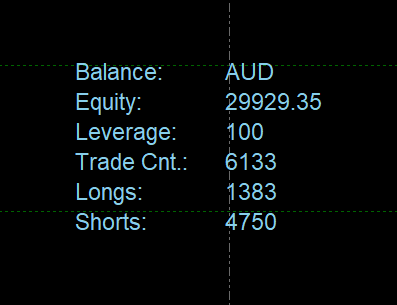
I could not find individual X Y positions in comments blocks to do this. I ended up using Draw Text Blocks to do it. A Bit cumbersome, but it achieved the desired result. Thank You.
-
RE: Comments overlapping with 4k screen.posted in Questions & Answers
Hi l'andorrà using comments block.
-
Comments overlapping with 4k screen.posted in Questions & Answers
Hi,
I have a 4k computer and comments overlap at native resolution. Is there any way to correct this from within FxDreema, without rescaling my screen.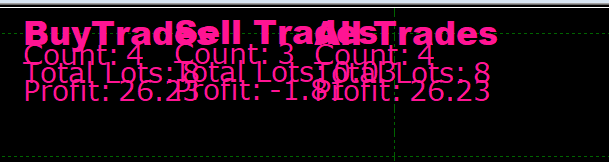
-
RE: multiple indicator entry over 4 to 5 barsposted in Questions & Answers
Hello Fx Dreema,
I want to enter a trade after 3 indicators trigger an entry in any order over a period of 4 or 5 bars. To date I can only get multiple trades or no trades when this happens. Is there a method to do this?
-
RE: Apply Templateposted in Questions & Answers
Hi Fxdreema,
Thank you for your reply. I still cannot get it to work. Could you please show the setup. I can insert lines and shapes but not templates.
Regards,
John -
RE: Apply Templateposted in Questions & Answers
Hi Fxdreema,
I cannot seem to use the "Apply Template" block to attach a template to a chart using strategy tester. I can get all other chart objects to work but not this one. Am I missing something. I am having difficulty using properties to define the relative path.
-
RE: adding ex4 custom indicator link errorposted in Questions & Answers
Hi Fxdreema,
When trying to add an .ex4 custom indicator, I cannot open the "page" link at the bottom of the page
You only have .ex4/.ex5 file, then read the bottom half of this page.
When I click the "page" link the URL repeats forever and I cannot load it.