@PandaBotha This is how you can share links:

That configuration will not work on that tab. You need to use the purple blocks instead as suggested by jstap.

@PandaBotha This is how you can share links:
That configuration will not work on that tab. You need to use the purple blocks instead as suggested by jstap.
Purple dot options need to be connected below purple blocks only.
@kestra Now you need to position the first variable in its position here:
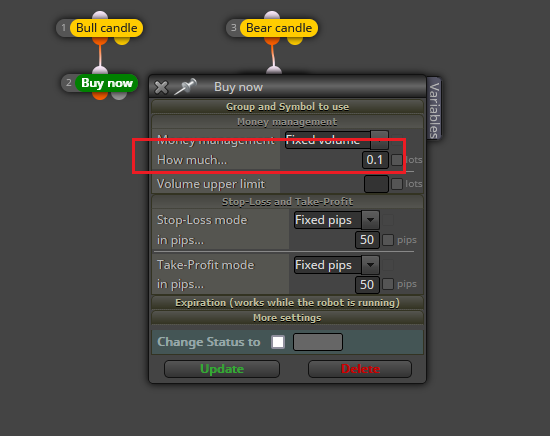
However, we need to consider if buys and sell will always share the same lot size value. Will it happen of they can have different values?
Didn't notice that. I have no idea why it was removed but I guess it was because no one used it?
Why do you need to use terminal variables? I don't get the logic behind that.
@Fibonatic That block will check all open trades profit combined at the moment, whereas the pink block can search for each individual trade separately.
Can you please share the link to the project to review it?
@Lacone THANK YOU very much for this detailed analysis. Simply priceless!! 
@ehsan1362 It's a really wide fields to cope. Here you have some useful threads to begin with:
https://fxdreema.com/forum/topic/19814/edit-field
https://fxdreema.com/forum/topic/5155/how-do-i-use-the-edit-field
https://fxdreema.com/forum/topic/13862/how-to-use-edit-field-object
Can you please share the latest version of the bot?
Then you can connect this structure below both 'buy/sell pending orders.
https://fxdreema.com/shared/xnA2tXNQc
It should delete all pending orders with a SL distance bigger than 22 pips immediately after having created it.
@vijithtr Then you need to use this structure in the 'on trade' tab:
https://fxdreema.com/shared/gfIgcFVFd
Please beware of the variables. Both need to be reset when necessary.
Did you try contacting the admin directly? He's not reading all forum's threads all the time.
Technically they should be selectable. Did you try jstap's suggestion?
@jo-smith Tecnhicaly yes, but honestly never tried while using a free account. Is you subscription payment confirmed?
Well, I have no idea how your SL distances are calculated in the first place. Could you please share the link to your project?
Probably something wrong happened to those variables, but if it works, it works.
Sadly, the PSAR is a cheating indicator. The first point of the new trend is repainted. That makes it impossible to use as per the second, third or further points. This is why I stopped using it. long ago The best you can do is waiting for the fist point to be confirmed. That usually happens at half current candle's development. However, there is no guarantee that will hold there. The safest option is waiting for the second point to appear at the beginning of the second candle of the trend.
