@anonyms405 No. None of those blocks will create any panel button. Additionally, your structure should be splitted into two parts. The first two blocks on top need to be separated from those below. I'm afraid I don't see what you exactly need. Do you need buttons?
Posts made by l'andorrà
-
RE: Panel button partialposted in Questions & Answers
-
RE: Stop Order Wrong Placeposted in Bug Reports
That depends on the info selected on the 'comment(ugly)' block. Can you share the link to your project?
-
RE: Blocks titles and variables remove by bugposted in Bug Reports
I remember someone else found that same problem some time ago. Can you download the file and compile it correctly on your MT4 terminal? If so you can import the compiled file again on your account ans dee if everything is fine again.
-
RE: Is the admin modifying the code on variables?posted in Bug Reports
I finally found that the problem was in the platform I used. For some reason the code was not fully functional on it. As soon as I tried on a new one, everything worked fine. Maybe this is not a bug after all.

-
RE: Custom indicator using MA crossover of RSI levelsposted in Questions & Answers
The only way to get that is by having a custom indicator doing so and then import it into fxDreema. Otherwise it is not possible.
-
RE: MISSING PROJECTS FROM LOAD PROJECT TABposted in General Discussions
Did you know the hacking happening a few months ago? All projects from the second half of 2022 were lost for everyone. Were your bots created then?
-
RE: Panel button partialposted in Questions & Answers
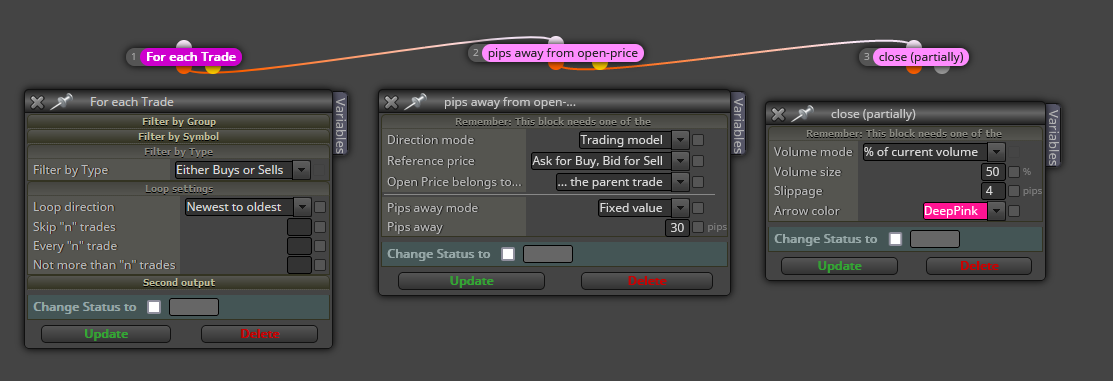
@anonyms405 Firstly, some of your blocks are in the wrong tab. Opening and closing trades need to be on the 'on tick' tab. On your question, you will need this separated structure on the 'on tick' tab too:

In this example, when any trade is 30 pips in profit, it will be partially closing 50% of its initial lot size.
-
RE: Martingale in the direction of the trendposted in Questions & Answers
I can understand the martingale part, but I'm afraid I do not understand that part of 20 pips intervals. Do you mean a martingale is combined with a grid, maybe?
-
RE: BUILD ZONE RECOVERY EAposted in Questions & Answers
Ok. But are are all those feature be mutually dependent on each other? I guess so, so what are the conditions to those connections?
-
RE: Working with Chart Objectsposted in Questions & Answers
Are you sure the indicator's buffers are correctly identified by fxDreema. I guess they are not. Here you have a tutorial to emulate buffers when the mql4 file is not available:
https://fxdreema.com/forum/topic/4208/tutorial-06-my-indicators-in-fxdreema
-
RE: Finally, News Filter for MT5 in 1 easy to use Block !!posted in Tutorials by Users
Impressive work. Thank you very much!
-
RE: Need help with EA based on indicatorposted in Questions & Answers
I didn't notice blocks 2 and 4 are exactly the same. Why are they duplicated?
-
RE: Please Help With This Problemposted in General Discussions
Ok. So let's do it. How would you like to switch from buy to sell? Using buttons maybe?
-
RE: SL as a percentage of account balanceposted in Questions & Answers
If you want to use fxDreema blocks only, the only way is calculating that percentage before opening the trade and then close the trade via 'for each trade' loop. If not, you will need custom code to do it via SL as you request.
-
RE: The first order has been dragged over 1000 pips. What should I do if I want to open another order?posted in Questions & Answers
do you mean using the same conditions as the closed one? Well, the bot will have to wait until they are met on the chart again.
-
RE: Need help with EA based on indicatorposted in Questions & Answers
Did you try to use the same indicator on a completely different project? Maybe the problem is somewhere within this specific one.
-
RE: "Check position count" and "No position" Block checkes other magic number order under same symbolposted in Questions & Answers
If you are using different magic numbers there should be independent separated counts.