@od Block numer 16 cannot work on the 'on tick' tab. It can only work on the 'on chart' tab. You should move that tree to that tab and then add a 'chart modified' block on top of it.

@od Block numer 16 cannot work on the 'on tick' tab. It can only work on the 'on chart' tab. You should move that tree to that tab and then add a 'chart modified' block on top of it.
@renatojjs An ugly but efficient way to do it is by linking 7 consecutive condition blocks requiring that low proce of all candles ID 1 to 7 is strictily ABOVE that MA for a buy. Then below it for a sell.
@ramimoujaes This is the way to program the stop loss for a buy:
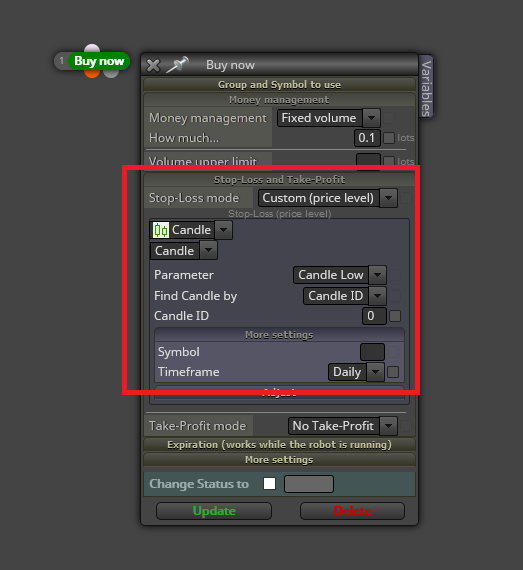
Obviously you will need the high for a sell. However, please notice that if a trade is open at the beginning of today's daily candle, the SL price will be the same as the open and the trade will immediately close. Are you aware of that?
@laudable222 For question 1, that block allows you to hold one open trade only on chet chart until it is closed. You will not get several open trades atthe same time with it.
For the second question you can use this block:
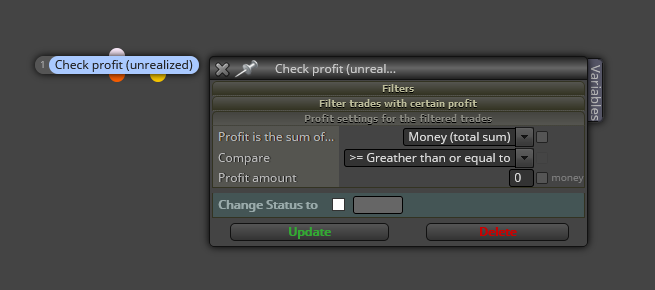
@lanrayy You need to change this:

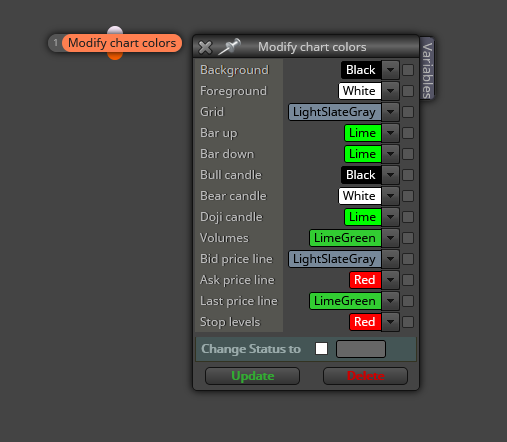
@lomcio You can modify those colours here:
@plutofx I don0t see any problem with the logic. Is the distance in pips from open price correctly executed?
@luanainteglia I'm afraid you will need help from a real programmer. Custom mql code is not my field of expertise, sorry.
@luanainteglia What values can that 'constante' variable can show?
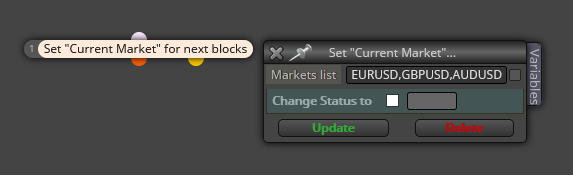
@johntech77 Put this block with all cuurencies comma separated on top of the whole EA structure:
@implosion They work normally for me. Are you sure they don't work?
@max-c This is a more efficient way to do it:
https://fxdreema.com/shared/69EtubUmc
In my example, two conditions are to be met for a buy to open. Condition 1 can happen at a different moment of condition 2. Using a boolen variable you can control that.
@laudable222 Are the buffers of those lines available in the mq4 file? If so you can use the way vnpython 0 suggested.
@od Can you please chack the link? I cannot open it.
@xfire Disconnect blocks 2 and 3. That way the variable calculation will be executed before showing it on chart.
@cryptoknight That is deeply conditioned by the whole project. There is not a 'standard' block tree used to that purpose. It depends on a case by case basis. Can you please share the strategy you want to create?
@javier-dl Creo que el problema se halla en el funcionamiento del indicador. En primer luhar, trabaja en la ventana -1, no en la principal donde se muestra el precio. Eso significa que fxDreema sólo puede capturar el valor que tenga el indicador en cada vela y no si la barra verde aparece o no. Por lo que veo, cuando aparece esa barra verde, su valor es de 1.1. Entiendo que si no aparece entonces el valor el 0.
Intente probar una condicion en la que exija que abra una operación cuando el valor del indicador es 1.1. Si es así, esa sería la solución, y no buscar el buffer de color verde.
@xfire Those timeframes are available for MT5 only. You need to create an MQ5 project to find them.