Easy. Just use group numbers. Group 1 can be used for exit one and group 2 for exit 2. You can see how to create groups here:
https://fxdreema.com/documentation/builder/groups-and-magic-numbers

Easy. Just use group numbers. Group 1 can be used for exit one and group 2 for exit 2. You can see how to create groups here:
https://fxdreema.com/documentation/builder/groups-and-magic-numbers
You need to separate blocks 28 and 34. You need 2 separate blocks trees and not one like now.
@javi0030 De acuerdo. Ahora sí que lo entiendo. En ese caso lo que necesitas es especificar que sólo la úlltima y más reciente operación abierta es la que debe aplicar ese cálculo. Debes aladir el número 1 en el espacio que te muestro aquí en el bloque 'For each position':
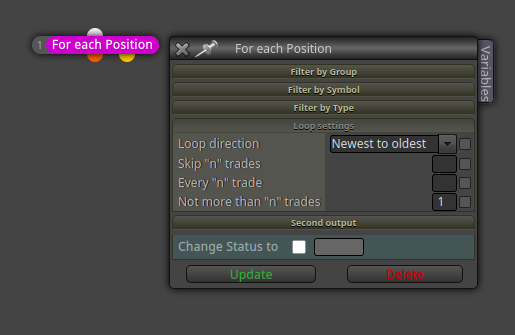
El resto de la estructura que tu mismo compartes en el enlace de tres mensajes más arriba que este se mantiene igual.
@javi0030 Ya veo. Entonces sí que debes usar el bloque 'once per bar', pero para subir el lotaje únicamente cuando la operación anterior toque un SL, entonces debes hacer esto:
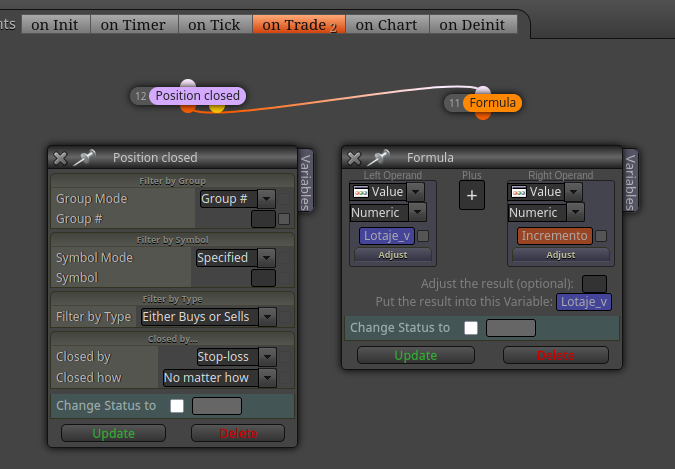
Fijate que los bloques están en la pestaña 'on trade' y no en la 'on tick'.
You need to do the following:
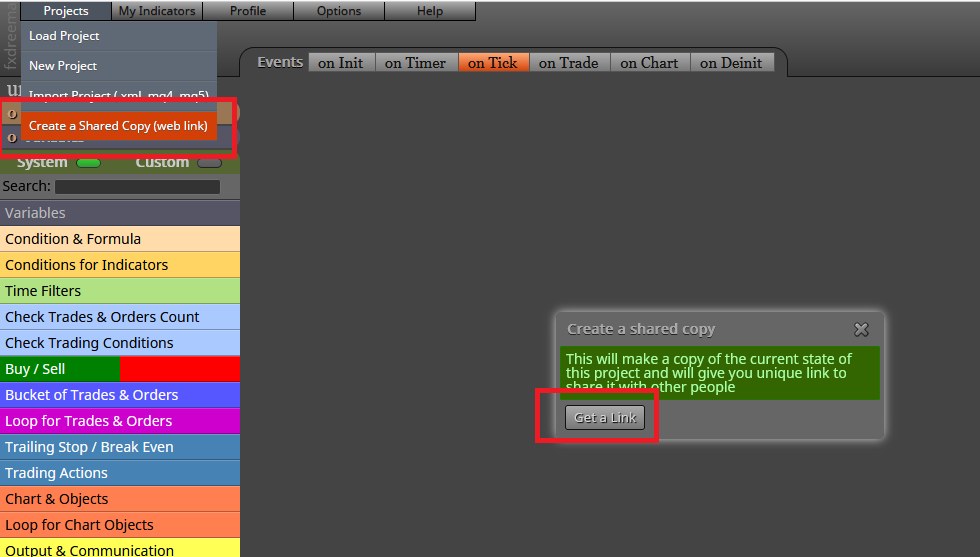
@D-Angelus Teh correct way to share the link to your project is this one:
Es porque la estructura 'For each position' es un bucle, y como tal se ejecuta cada vez que llega un tick a la plataforma. O sea, si llegan 30 ticks DESPUÉS de que se haya llegado a ese límite, pues el bucle abrirá 30 operaciones. Y así hast ael infinito. Para evitar-lo, debes usar el bloque rosa 'once per position/order', que limitará la acción del bucle.
Can you please share the link to your project? That will make the issue easier to understand.
Some more information would be appreciated, please Could you please provide a numeric example of what you exactly mean by 'averaging'? In my experience, there are as many definition as traders.  That would definitely help.
@javi0030 Eso que pides se puede realizar con variables. Almacenas en una variable el último valor del lotaje actual y si se abre una nueva operación en pérdida, lo tomas de allí para, seguidamente, actualizarlo y subirlo.
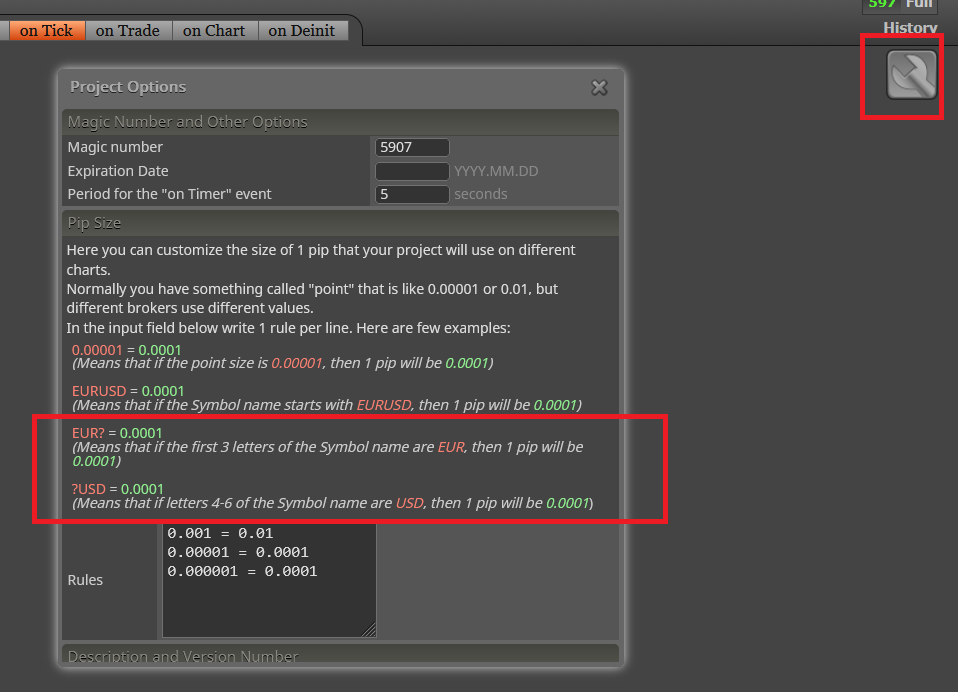
@pipsondeck You can use the rules specified in the 'project options' icon:
Did you pay via crypto, maybe? Cryptopayments are slow to process here. You should contact the admin directly to let him know the issue.
No martingale is profitable in the long run. The account blowing up is a matter of time.
@fxDreema And this is exactly what happens when you think the admin never reads the forums!!!! 

Correct, but you will also have to specify that on the 'No position' block on top. Its current configuration will work on one only chart: the one the bot is running on.
Correct. All blocks connected below it will do all the calculations on all the selected symbols selected in the block.
You selected 'Yes' at the absolute distance box. You need to select No instead and then use the correct order in the distance slots on top.