Sin duda el problema es la configuración de tu computadora. A mi me pasó exactamente lo mismo. Tuve que cambiar la resolución de pantalla de Windows, pero fué en una versión anterior a Windows 11, con lo que no sé dónde solucionarlo en esta versión. Si no encuentras el modo, simpre puedes ir a fxDreema y cambiar el tamaño de letra en el propio bot.
Posts made by l'andorrà
-
RE: Imágenes del panel de control (Control Panel) salen muy pequeñas después de cambiar de computador – ¿Solución?posted in Questions & Answers
-
RE: How can a file be created on back testing?posted in Questions & Answers
@l-andorrà I was wrong. I finally found the file!! However, no valid information is stored there, apparently. This is what I get in the log file:
CS 0 15:57:24.555 Startup MetaTester 5 build 5640, 20 Feb 2026
CS 0 15:57:24.555 Startup Windows 11 build 26200, 12 x AMD Ryzen 5 5500, AVX2, 10 / 15 Gb memory, 252 / 393 Gb disk, UAC, GMT+1
CS 0 15:57:24.557 Server MetaTester 5 started on 127.0.0.1:3000
CS 0 15:57:24.560 Startup cloud network mode is off
CS 0 15:57:24.560 Startup initialization finished
CS 0 15:57:24.665 127.0.0.1 login (build 5640)
CS 0 15:57:24.778 Network 46844 bytes of account info loaded
CS 0 15:57:24.778 Network 1478 bytes of tester parameters loaded
CS 0 15:57:24.778 Network 708 bytes of input parameters loaded
CS 0 15:57:24.782 Network 13009 bytes of symbols list loaded (2517 symbols)
CS 0 15:57:24.782 Tester expert file added: Experts\Advisors\Write.ex5. 65078 bytes loaded
CS 0 15:57:24.797 Tester 10668 Mb available, 132 blocks set for ticks generating
CS 0 15:57:24.797 Tester initial deposit 100000.00 EUR, leverage 1:30
CS 0 15:57:24.798 Tester successfully initialized
CS 0 15:57:24.798 Network 79 Kb of total initialization data received
CS 0 15:57:24.798 Tester AMD Ryzen 5 5500, 16273 MB
CS 0 15:57:24.824 Symbols EURUSD: symbol to be synchronized
CS 0 15:57:24.824 Symbols EURUSD: symbol synchronized, 3720 bytes of symbol info received
CS 0 15:57:24.828 History EURUSD: history synchronization started
CS 0 15:57:24.846 History EURUSD: load 93 Kb of history data to synchronize in 0:00:00.014
CS 0 15:57:24.846 History EURUSD: history synchronized from 2024.01.02 to 2026.02.23
CS 0 15:57:24.846 Ticks EURUSD: ticks synchronization started
CS 0 15:57:24.850 Ticks EURUSD: load 277 Kb of tick data to synchronize in 0:00:00.000
CS 0 15:57:24.850 Ticks EURUSD: history ticks synchronized from 2026.01.26 to 2026.02.23
CS 0 15:57:24.873 History EURUSD,H1: history cache allocated for 7126 bars and contains 7074 bars from 2025.01.02 00:00 to 2026.02.20 23:00
CS 0 15:57:24.873 History EURUSD,H1: history begins from 2025.01.02 00:00
CS 0 15:57:24.877 Tester EURUSD,H1 (AdmiralsGroup-Demo): generating based on real ticks
CS 0 15:57:24.877 Tester testing with execution delay 50 milliseconds
CS 0 15:57:24.877 Tester EURUSD,H1: testing of Experts\Advisors\Write.ex5 from 2026.02.23 00:00 to 2026.02.24 00:00 started with inputs:
CS 0 15:57:24.877 Tester MagicStart=7324
CS 0 15:57:24.901 Ticks EURUSD : real ticks begin from 2026.01.26 00:00:00
CS 0 15:57:33.524 Tester final balance 100000.00 EUR
CS 0 15:57:33.524 Write (EURUSD,H1) 2026.02.23 23:58:58 Backtested in 8.63 seconds
CS 0 15:57:33.524 Write (EURUSD,H1) 2026.02.23 23:58:58 Average ticks per second: 7
CS 0 15:57:33.524 Write (EURUSD,H1) 2026.02.23 23:58:58 Expert Advisor self terminated
CS 0 15:57:33.529 Tester EURUSD,H1: 63834 ticks, 24 bars generated. Environment synchronized in 0:00:00.063. Test passed in 0:00:08.692 (including ticks preprocessing 0:00:00.015).
CS 0 15:57:33.529 Tester EURUSD,H1: total time from login to stop testing 0:00:08.755 (including 0:00:00.063 for history data synchronization)
CS 0 15:57:33.530 Tester 63 Mb memory used including 0.47 Mb of history data, 64 Mb of tick data
CS 0 15:57:33.530 Tester log file "C:\Users\Cleric\AppData\Roaming\MetaQuotes\Tester\24F345EB9F291441AFE537834F9D8A19\Agent-127.0.0.1-3000\logs\20260224.log" written
CS 0 15:57:33.530 Tester test Experts\Advisors\Write.ex5 on EURUSD,H1 thread finished
CS 0 15:57:33.537 127.0.0.1 prepare for shutdown
CS 0 15:57:33.537 127.0.0.1 shutdown finished
CS 3 15:57:36.561 Tester close visual tester window
CS 0 15:57:36.617 Server MetaTester 5 stopped -
RE: How can a file be created on back testing?posted in Questions & Answers
@sktsec There is nothing like that in the tester's Journal tab. This is what I get:
CP 0 15:57:24.099 Tester "Advisors\Write.ex5" X64
RI 0 15:57:24.128 Tester EURUSD: history data begins from 2023.04.07 00:00
HN 0 15:57:24.141 Tester EURUSD: preliminary downloading of history ticks started, it may take quite a long time
CS 0 15:57:24.141 Tester EURUSD: preliminary downloading of history ticks completed
PK 0 15:57:24.141 Tester EURUSD: ticks data begins from 2026.01.26 00:00
PD 0 15:57:24.142 Tester EURUSD: history data begins from 2023.04.07 00:00
KR 0 15:57:24.142 Tester EURUSD: preliminary downloading of history ticks started, it may take quite a long time
HO 0 15:57:24.142 Tester EURUSD: preliminary downloading of history ticks completed
GG 0 15:57:24.142 Tester EURUSD: ticks data begins from 2026.01.26 00:00
PR 0 15:57:24.152 Core 01 agent process started on 127.0.0.1:3000
CE 0 15:57:24.152 Core 01 connecting to 127.0.0.1:3000
RL 0 15:57:24.661 Core 01 connected
FJ 0 15:57:24.666 Core 01 authorized (agent build 5640)
NK 0 15:57:24.676 Tester EURUSD,H1 (AdmiralsGroup-Demo): visual testing of Experts\Advisors\Write.ex5 from 2026.02.23 00:00 to 2026.02.24 00:00
FP 0 15:57:24.798 Core 01 common synchronization completed
LI 0 15:57:24.839 Core 01 EURUSD: history for 2026 year synchronized
FM 0 15:57:24.839 Core 01 EURUSD: history synchronization completed [93 Kb]
MH 0 15:57:24.839 Core 01 EURUSD: 93.63 Kb of history processed in 0:00:00.016
CR 0 15:57:24.847 Core 01 EURUSD: ticks synchronization completed [277 Kb]
QE 0 15:57:33.537 Core 01 connection closedThis is very weird. What am I missing?
-
RE: How can a file be created on back testing?posted in Questions & Answers
I confirm I looked for the file on MQL5/Files folder and no file was created after the back test. I tried on different MT5 platforms and the result is always the same.
-
RE: Indicator Libraryposted in Questions & Answers
Do you mean uploading them to your fxDreema account to be used in your projects maybe?
-
RE: Only one trade at a time on high volatility currency pair (No Trade not working)posted in Questions & Answers
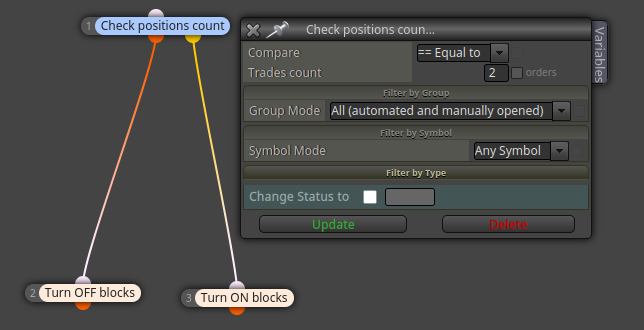
@bunker9508 The you can do this:

The blue blocks will wait until 2 trades are open right now on any charts. If that is true, then both 'buy/sell now' blocks will be blocks via the 'turn off' block. If no trade or just one trade is open, the the 'turn on block' will reactivate them.
-
RE: How can a file be created on back testing?posted in Questions & Answers
Thank you for your help. However, no file was created. In effect I didn't find the 'files' folder either. Is that folder supposed to be created at the same time that the file?
-
RE: actualizarposted in Bug Reports
¿Qué navegador estás usando? ¿Y sobre qué sistema operativo corre?
-
RE: Trailing Stop not working but Trailing Group workposted in Bug Reports
What do you exactly mean? What is the problem exactly?
-
RE: Only one trade at a time on high volatility currency pair (No Trade not working)posted in Questions & Answers
Yes, it's possible, but I guess you are requesting for that to happen o any of those 4 symbols, right? I mean, are those 2 simultaneous trades to be open on 2 specific symbols or on any of them at random?
-
How can a file be created on back testing?posted in Questions & Answers
I need to collect some information about price results when back testing. However, the yellow block 'write to file' creates nothing on back testing. Is that a bug or am I missing something?
-
RE: (buy/sell expiration mode) Not Working...posted in Bug Reports
This is really weird because it should work. Definitely you should contact the admin to let him know.
-
RE: (buy/sell expiration mode) Not Working...posted in Bug Reports
@Hellzer Can you see the object created by the bot on screen with the expiration limit?
-
RE: Close a basket of trade at benefit.posted in Questions & Answers
Is this bot supposed to close trades that were open by other non fxDreema bots?
-
RE: Cent Account Lot Size Problemposted in Questions & Answers
Can you please share the link to your project?
-
RE: Hello, I cannot access the builder. It shows: TypeError: Cannot use 'in' operator to search for 'active' in _391posted in Bug Reports
Never seen something like that. Did you try using a different browser?
-
RE: Profit in system for each trade seperatedposted in Questions & Answers
Yes, you can create a group of trades and the use a 'for each trade' loop for that specific group. That means any trade belonging to any other group will not be considered in the calculation.