I don't know any function doing exactly that, although I may be wrong. The only solution I think of is creating that structure within the bot itself searching for that information and then exporting it into a file.

I don't know any function doing exactly that, although I may be wrong. The only solution I think of is creating that structure within the bot itself searching for that information and then exporting it into a file.
This is how it works if I understood what you said correctly. Your initial SL is 300 pips. Then, as soon as the trade is in profit:
Could you please share the link to your project instead of showing the screenshot?
Do you mean the bot is supposed to open a second trade at the exact same price level as the previous one hit its TP? I don't see the logic behind that.
Did you follow all steps described in this custom indicators tutorial?
https://fxdreema.com/forum/topic/4208/tutorial-06-my-indicators-in-fxdreema
If you followed them correctly and it doesn't work yet, you'll have to find another indicator. Sadly, not all custom indicators work on fxDreema.
@lolomax Well, in that case you will have to dedicate some time to learn how the platform works, and I'm afraid it is not as intuitive as it looks. I'll be glad to help, but you will have to put effort on your end.  Are you ready?
@thatguyisop Did you try this configuration instead?
Are you asking for someone to build it from scratch or someone helping you to complete a current version of it?
@bb-2 You need to use a 'time filter' block in which you specify when trade can be open:
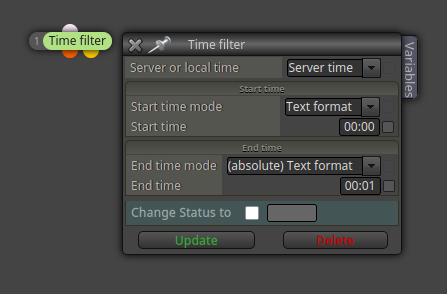
For example, from 08:00 to 23:59.
Never used that lock in particular. I guess (this is just a guess), those time slots are used to establish the time period within no trade is supposed to be open, but honestly I don't see the logic behind that. What do you need exactly?
Your logic is correct. It should work as per your current settings. What is the problem exactly?
@Konstantin85 This is the second thread you created for the exact same question. Please don't duplicate threads.
No, they don't. They work perfectly fine on both types of accounts. This has happened to me before. The problem is the broker. They are using different functionality rules for demo and real accounts. Some restrictions are applied to real accounts in this case that are not applied to demo accounts. Try asking them what's the case here. More than probably they will deny any restriction applied. In that case the only solution is moving to a different broker, I'm afraid.
I see you are using several TF at the same time, on which one will the EA be working?
@Kim98 Can you please open a separate thread for that?
@demobot Here you have the general structure:
https://fxdreema.com/shared/4ayQe2TV
All conditions blocks required to open a trade need to be connected above block ID 1 and then you can do this structure as big as you need.
At the same time, you can use it a new separate structure looking for closing trades at a specific profit by using the same logic.